Invoicing & Payments for Field Service: The Operator's Playbook

Why Invoicing Is the Single Biggest Cash Flow Lever in Field Service
Over 15 years of conversations with shop owners, we’ve seen the same pattern across plumbing, HVAC, electrical, landscaping, and pest control businesses. The companies that grow consistently are not necessarily the ones with the best technicians or the most efficient trucks. They are the ones with a tight invoice-to-payment loop: work completed, invoice sent, and cash collected quickly. The shops that struggle are usually running a slower, less reliable version of the same process, where delays and small leaks compound over time.
For a typical 5–20-tech shop, back-office batch invoicing often creates a 2–3 day gap between job completion and invoice delivery. Shops that switch to mobile, on-site invoicing can deliver the invoice to the customer within 10 minutes of job completion. Data from thousands of invoices across North America supports this pattern: companies that send invoices within 10 days of job completion are typically paid within 51–63 days. Once invoicing slips beyond 30 days, payment cycles can stretch past 85 days, effectively doubling the cash flow delays because of a single process change.
The financial cost adds up quickly. Carrying $100,000 in outstanding receivables for 60 days can cost roughly $1,600 in interest on a standard line of credit, excluding factoring fees and administrative costs. For a business operating at a 35% margin, that drag is significant. This guide covers everything an operator needs to think through: invoice timing, recurring billing, which payment methods to prioritize, late-payment workflows, accounting synchronization, and the industry-specific patterns that make these processes look different across HVAC, pest control, and landscaping.
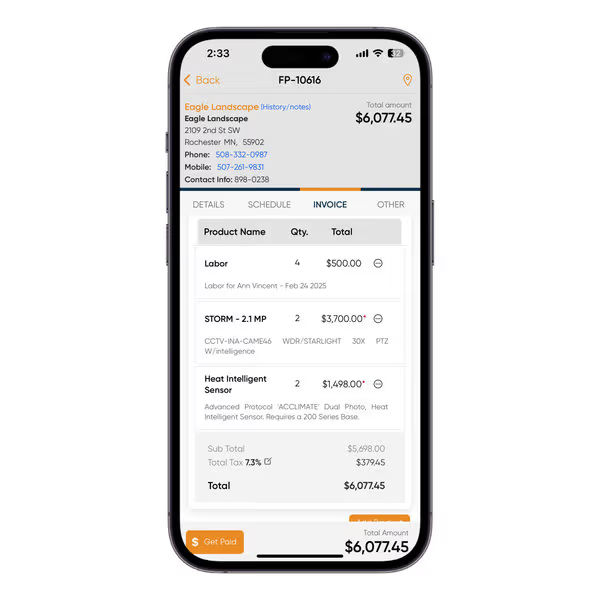
When to Send the Invoice: Before, During, or After the Job
The most common invoicing question new operators ask is: should I invoice before or after the work is completed? There are four common billing timing models, and each works best for a different type of job. Choosing the wrong one is one of the most common causes of cash flow slowdowns.
1. Invoice on-site, immediately after job completion. This is the gold standard for break-fix residential work: HVAC service calls, plumbing repairs, garage door repairs, appliance repairs, and handyman jobs. When the technician finishes the work while the customer can still see the results, payment collection and customer satisfaction are both at their highest. Three days later, you are fighting against fading urgency and memory.
2. Invoice within 24-48 hours. Ideal for larger residential projects such as painting, landscaping installations, and window cleaning, where the customer may need time to review the completed work. Send a satisfaction follow-up first, then the invoice. This builds goodwill without significantly delaying payment collection.
3. Recurring or scheduled billing. For maintenance agreements, recurring lawn care and pest control services, and HVAC plans that operate like AMCs, invoicing should follow a fixed billing cycle. Customers expect recurring billing in these cases, and predictability matters more than speed.
4. Deposit or progress invoicing before the job. For large installs, multi-day construction, or any job requiring significant material outlay, ask for a deposit upfront and progress payments at milestones. A 6-person shop floating $15,000 in copper and equipment for a commercial install cannot wait until completion. We dig deeper into this trade-off in the right time to send invoices and in our breakdown of sending invoices before or after payment.
What happens when shops get the timing wrong? Take an HVAC contractor handling $2,500 capacitor and coil replacement jobs but waiting until the end of the week to send invoices. That delay creates several unnecessary float days on every ticket. Across roughly 40–50 HVAC shops with fewer than 10 technicians, the ones that moved invoicing into the truck reported noticeable cash flow improvements within the first month.
What Goes On the Invoice: The Non-Negotiable Line Items
Around 10% of manually entered invoices in a typical 5–20-tech shop are returned for disputes or corrections due to incorrect part numbers, missing line items, or misentered labor hours. Every disputed invoice creates additional callbacks, revised paperwork, and at least another week added to the payment cycle. In many cases, the root cause is a poorly structured line-item process.
A professional field service invoice must include:
- Header block: Business name, logo, license number (especially important in plumbing, HVAC, and electrical work), phone number, email address, and physical address.
- Invoice number and issue date. Sequential invoice numbering is non-negotiable for audit and tax purposes.
- Customer block: Customer name, service address, billing address (if different), phone number, and email address.
- Job reference: Work order number, job site, and service date. These details connect the invoice to the actual work performed for warranty claims or dispute resolution.
- Itemized parts: Description, part number, quantity, unit price, and line total. “Service charge” is not a useful line item. “Replaced 45 MFD dual-run capacitor on Goodman 3-ton condenser” is.
- Itemized labor: Labor hours and rates, or the referenced flat-rate pricing and job cost.
- Subtotal, taxes, discounts, total due. In Canada, the GST/HST registration number and tax amount must be listed separately on every invoice once annual revenue exceeds $30,000.
- Payment terms: Payment terms such as Due Upon Receipt, Net 7, Net 15, or Net 30. Choose one structure and apply it consistently across invoices.
- Accepted payment methods: Accepted payment methods including checks, ACH, credit cards, financing options, payment links, and QR codes.
- Warranty and notes: Any service warranty information, recommended follow-up work, or technician notes.
- Signature block: Customer signature confirming job completion. Digital signatures are legally valid in the event of a dispute.
For a deeper breakdown of each block, see how to write an invoice and our roundup of free HVAC invoice templates.
.webp?updatedAt=1747622413246)
Table: Invoice elements - residential vs. commercial jobs
Source: CRA invoice requirements; Field service operator best practices
| Invoice Element | Residential | Commercial / Maintenance |
| Business name, logo, license number | Required | Required |
| GST/HST number (Canada, >$30K revenue) | Required | Required |
| Sequential invoice number + date | Required | Required |
| Customer service + billing address | Required | Required - often different |
| Work order / job reference | Required | Required |
| Itemized parts (part no., qty, unit price) | Required | Required |
| Itemized labor (hours x rate or flat-rate name) | Required | Required |
| Payment terms | Required | Required |
| Late fee policy | Recommended | Required |
| Payment link or QR code | Required | Required |
| Purchase order reference | Rarely needed | Often required by client |
| Photos of completed work | Recommended | Highly recommended |
| Signature block | Required | Required |
Flat-Rate vs. Time-and-Materials: Which Pricing Model Belongs On Your Invoice
There’s a long-running debate in field service over the best pricing model: flat-rate or time-and-materials. Most mature businesses use both, depending on the type of work.
Flat-rate pricing works best when scope is predictable and the customer wants certainty upfront - HVAC service calls, plumbing repairs, drain clearing, panel replacements, garage door spring jobs. The customer hears one number, agrees, and there's no need to defend hourly billing afterward. Flat-rate also pushes average ticket up because efficient techs aren't penalized for finishing fast. The downside: you need a real flat-rate book, not back-of-napkin math, or you lose money on hard jobs and overcharge on easy ones. We cover this in our HVAC flat-rate invoicing guide.
Time-and-materials is right for unpredictable scope - commercial maintenance, complex remodel work, multi-day construction, anything where actual hours and materials can't be known upfront. T&M protects you from scope creep but requires meticulous records. Every billable hour, every receipt, every subcontractor markup needs to land on the invoice with backup. See our time and material invoicing in field service for the mechanics.
The same pattern holds true: shops that rely only on time-and-materials pricing for residential repair jobs tend to face more billing disputes. Customers do not want to debate whether a capacitor replacement actually took 90 minutes. They want a clear, predictable price. The pricing model should match the type of work, not the other way around.
Recurring Billing for Service Contracts and Maintenance Plans
Across 40–50 HVAC businesses with fewer than 10 technicians, the operators who set up recurring billing correctly tend to build more predictable revenue streams. The ones that manually recreate invoices every quarter often see customers drop out of the program within a year.
Recurring billing is essential for businesses that perform repeat or scheduled work. Examples include HVAC AMCs and seasonal tune-ups, seasonal landscaping contracts, monthly pest control routes, recurring janitorial services, fire and life safety inspections, and pool maintenance.
The setup that actually holds up over time:
- Customer enrollment with stored payment method. A card-on-file or ACH authorization captured at signup. This is the critical first step. Without it, recurring billing becomes nothing more than a manual invoicing schedule with extra steps.
- Defined billing cadence. Billing cycles can be monthly, quarterly, semi-annual, or annual, and should be tied to the service schedule, not to when someone remembers to send the invoice.
- Auto-generated invoices on schedule. The system should automatically generate the invoice, charge the stored payment method, and send the receipt without requiring manual involvement.
- Failure handling. Cards expire and banks decline transactions. The system must detect failed payments, retry charges on a defined schedule, and notify the team before the next service visit.
- Easy plan changes. Customers may add a property, remove a service, or upgrade to a different tier. The recurring billing setup should update without requiring the entire customer record to be rebuilt.
Owners on r/smallbusiness consistently report that recurring billing underperforms when the setup is incomplete - failed cards, expired payment methods, and silently broken auto-charges erode revenue month over month. The fix is discipline: capture payment method at enrollment, retry failures automatically, review the failed-charge queue weekly. We dig into the operational side in how to automate invoice processing.
What Payment Methods to Accept (and Which to Push)
The cost of a payment method matters less than the speed at which cash becomes available. Businesses that refuse to accept credit cards to avoid a 2.9% processing fee, while simultaneously carrying 4% bad debt in receivables, are making the wrong financial tradeoff.
Credit and debit card (in-person, tap, swipe, or keyed). This is the default for residential service work. Customers sign, tap, and complete payment before the technician leaves the driveway. The cost is the processing fee, typically around 2.6% plus $0.10 for card-present transactions. The benefit is that collection risk is almost eliminated.
ACH and bank transfer. Essential for commercial customers and higher-value invoices, where credit card processing fees can become expensive. ACH payments take longer to settle (typically 2–3 business days) but usually cost only 0.5–1%. This is the right default for recurring B2B billing.
Stored card on file. This is one of the biggest advantages of recurring subscription plans. Once a customer authorizes a card at signup, recurring charges stop functioning like collections and become part of a predictable billing process.
Customer financing. For larger residential jobs such as full HVAC replacements, panel upgrades, or water heater installations, financing options can help close jobs that would otherwise stall because of upfront cost. The customer gets a monthly payment plan, while the business is paid in full upon job completion. For shops with average ticket sizes above $3,500, the integration is usually worth it.
Check. Checks are still common in commercial work and among older residential customers. Accept them, but do not make them the default payment method. Payment float can seriously hurt cash flow.
Cash. Perfect for smaller jobs. Every cash transaction should still be recorded with an invoice in the system. Undocumented cash payments create accounting and audit risks.
Check-only businesses typically write off around 35% of receivables as bad debt. Shops that accept credit cards as well as on-site ACH payments see that number drop to around 1%, since payment is collected before the technician leaves the job site.
Table: Payment method comparison
Source: Contractor magazine; Host Merchant Services
| Payment Method | Processing Cost | Settlement Time | Best For |
| Credit/debit (card-present) | ~2.6% + $0.10 | 1-2 business days | Residential, on-site |
| Credit/debit (keyed/online) | ~2.9% + $0.30 | 1-2 business days | Remote payment link |
| ACH / bank transfer | 0.5%-1% | 2-3 business days | Commercial, large invoices |
| Stored card on file | ~2.6% + $0.10 | 1-2 business days | Recurring contracts |
| Customer financing | Merchant fee varies | Immediate to you | Large installs |
| Check | Near zero | 3-5 business days | Legacy commercial clients |
| Cash | Zero | Immediate | Small service calls |
Late-Pay Flows: How to Get Paid Without Burning the Relationship
Even when everything is set up correctly, late payments will still happen. The real issue is whether your business follows a defined process or treats every overdue invoice as a separate emergency. Owners on r/smallbusiness often discuss customers who go well beyond Net 30 terms, requiring hours of manual follow-up and tracking. This kind of unpredictability can disrupt cash flow planning, even when the work has been properly invoiced.
The late-pay flow that works:
Day 0 (invoice sent): The invoice is sent when the job is marked complete. It includes the payment link, terms and conditions, and the due date.
Day -3 (before due date): A friendly automated reminder: “Just a heads-up, your invoice is due in 3 days. Click here to pay.” This helps catch customers who simply forgot.
Day +1 (one day past due): A simple automated reminder with the same payment link. No threats.
Day +7: A second reminder that is slightly more explicit: “Your invoice is now a week past due. Please let us know if there’s an issue.”
Day +15: A personal email or phone call from a real person in your shop. This is where the inflection point occurs, real cash flow issues can often be resolved here. Slow-paying customers may be flagged for follow-up.
Day +30: Final notification: mention late fees as per your terms and pause future service if applicable.
Day +45-60: The decision point: escalate to a collection agency, write off the invoice, or adjust according to your agreement.
For templates at each step, see our overdue payment reminder email guide. Automate the early reminders so your team isn't burning hours on routine follow-up - reserve human attention for Day +15 and beyond, where judgment matters.
When disputes arise on construction or larger commercial work, clean documentation is what separates a 2-week resolution from a 6-month fight. We covered this in construction invoicing dispute management. Itemized invoices, signed work orders, photos, and clear contract terms resolve 80% of disputes before they become disputes.
Reconciliation: Syncing Invoices and Payments to QuickBooks or Xero
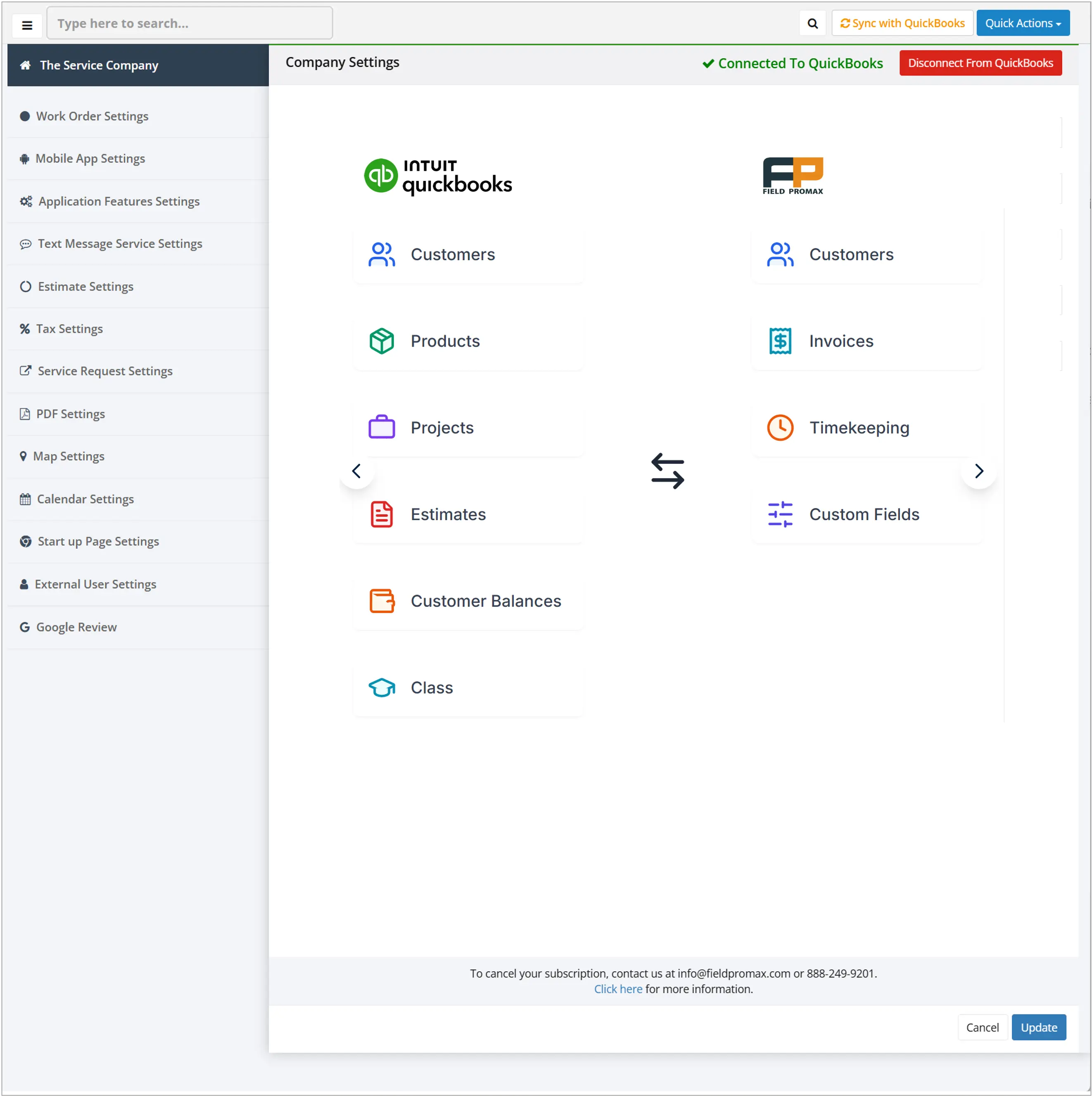
When we developed Field Promax’s accounting integrations, the request from our operators was simple: they wanted to stop their bookkeepers from re-keying numbers on Saturdays. This is still the primary goal of a two-way sync. For a typical 5–20 tech shop still using paper invoices, days sales outstanding (DSO) regularly stretches beyond 60 days. Shop owners who switch to electronic invoicing with integrated payments report that this drops to around 20 days, since customers can pay immediately when the invoice hits their inbox. Another key benefit is clean books: when the field system and accounting system remain in sync, tax filings are more accurate and you avoid spending a weekend each quarter on reconciliation.
What a real two-way sync does:
- Customer Sync. Customer records, contact info, and billing addresses sync bidirectionally - change in either system and it will show up in the other.
- Invoice Sync. Invoices generated in your field systems land into QuickBooks or Xero with line items, tax codes and payment status intact. There is no re-keying.
- Payment sync. If a customer makes a payment through your field system's processor, the transaction is recorded in the accounting system and the invoice is then marked as paid. When the check is received and it is recorded in the accounting system the status of the invoice is updated in your field system.
- Item and service mapping. Parts inventory and service codes are mapped to QuickBooks items, ensuring that income is correctly categorized to report and tax.
- Tax handling. Sales tax rates flow correctly. In Canada GST/HST rates for each province automatically sync when they are set up.
For the Xero side, we've written a fuller breakdown in Xero invoicing software for field service businesses. Either way, the goal is the same: enter the data once, in the field, and let it propagate everywhere it needs to go.
Compliance Edge Cases: VAT Domestic Reverse Charge and Tax Variations
For US-based operators, compliance pressure shows up in sales tax. State and local rates vary, exemptions vary, and what's taxable as labor in one state is exempt in another. The most common mistake that puts shops in trouble is coding the tax rate of one state into the invoice template, and then forgetting that a neighboring county could be taxed in a different manner. A good platform allows you to set tax rates for each service location.
Customer records, contact info, and billing addresses sync bidirectionally - change in either system and it will show up in the other. GST is charged at 5% for non-participating provinces. Harmonized provinces are charged HST at higher rates, namely Ontario at 13%, Nova Scotia, New Brunswick, Newfoundland and Labrador, and Prince Edward Island each at 15%. Invoices more than $500 must contain the buyer's name and the payment conditions. The CRA doesn't allow GST/HST to be applied to late-payment charges - only on the invoiced amount.
If you operate in regions with a Domestic Reverse Charge (DRC) regime - most commonly UK construction subcontracting - your invoice must state that the reverse charge applies, list the net amount, show the VAT that would have applied, and indicate the buyer is responsible for accounting for it. Full compliance walkthrough in what is Domestic Reverse Charge (DRC) and how it impacts service businesses.
The shops that can withstand an audit without anxiety are those that have their records organized before the auditor arrives. Itemsized invoices, signed work orders, tax records properly archived that are kept for a minimum six years (CRA requirements) means that an audit is an issue, not a crisis.
KPI Benchmarks: Invoicing and Payment Health
Use these benchmarks to evaluate where your invoicing process stands.
| KPI | Underperforming | Average | Best-in-Class |
| Days to invoice after job close | 14 days | 3-7 days | Same day (mobile) |
| DSO - residential | 30 days | 15-25 days | <10 days |
| DSO - commercial HVAC | 90 days | 45-60 days | 30-45 days |
| Invoice error rate | 10% | 5-10% | <2% |
| Late payment rate | 40% | 20-30% | <10% |
| Bad debt write-off rate | 5% | 3-4% | <1% |
| Payment collection time (automated flow) | 35-45 days | 20-30 days | 12-18 days |
| Admin time on invoicing per month | 15 hours | 8-12 hours | <3 hours |
Vertical-Specific Invoicing Patterns
Generic invoicing tips only go so far. The operational practices differ significantly in trade.
HVAC. Mix of flat-rate service calls, T&M for complex commercial work and regular AMC programs for tune-ups. Invoice on the truck for service requests, deposits for installation and periodic invoices to maintain contracts. Photos of the equipment serial numbers and refrigerant included on each invoice to show warranty and EPA compliance.
Plumbing. Flat-rate heavy on residential break-fix (drain clearing and fixture replacement, and water heaters). T&M for remodeling and new construction. After-hours emergency charges are included as an individual line item - not included in the labor rates - so that the customer can see exactly what they're paying for.
Electrical. License number on each invoice. Permit fees are an individual line item. For panel upgrades and EV charger installation, financing options included on the invoice can be used as a sale-closer. Commercial electrical typically runs with Net 30 which means the late-pay flow is more important than it does in residential.
Landscaping and lawn care. Recurring billing is a major issue for seasonal contracts. The card on file at the time of enrollment is the most crucial aspect. One-off jobs will be invoiced after the completion. Real-time field-to-office sync lets recurring billing be scheduled to run.
Pest control. Most of the time, it is recurring monthly or quarterly billing. The stored payment method is not negotiable. The initial service is usually invoiced in a separate way from the regular plan. Connect to commercial accounts, and you're running Net 30 with PO numbers to be listed on each invoice.
Garage door, appliance repair, locksmith, handyman. Residential break-fix model. Invoice and pay on-site. Card processing on a mobile device is the biggest operational unlock. A typical ticket is not so big that even a delay of one day in the process of invoicing can seriously impact cash flow.
Across every vertical, the pattern is the same: invoice immediately, accept the payment methods customers prefer, and automate recurring revenue wherever the work allows.
What Modern Field Service Invoicing Actually Looks Like
When we developed Field Promax's invoicing system, it was designed with the idea that a tech standing on the customer's driveway should be able to transform the completed work order into a sent invoice and a paid transaction within two minutes via a phone. Everything else follows from this.
The shape of a modern field service invoicing-and-payments stack:
- Work order to invoice in one tap. Job details, used parts, labor hours, photos, customer signatures all of which are recorded during the job. The invoice offers an alternative view of the same data.
- Customer-facing payment options at the bottom of every invoice. Card link, ACH option, financing when the need arises. The customer can choose.
- Stored payment methods for recurring work. The data was taken at the time of enrollment, charged on schedule, and restarted in the event of a failure.
- Automated reminder cadence for overdue invoices. Pre-due, due, Day +1, Day +7, Day +15. Templates are configured once and sent automatically. Human escalation is reserved for situations where judgment matters.
- Real-time sync to QuickBooks or Xero. Customers, invoices, payments, items, taxes. Bidirectional. No weekend re-entry.
- Operator dashboard showing AR aging and cash position. Incomplete balances. Who is owed ,what is at risk, Continuously updated, not at the month's end.
A technician who has tried a variety of field service platforms has described Field Promax as the best to date - it's easy to input basic invoices, flexible for tracking and sales, and with access to developers for any updates.
Conclusion
The invoicing-and-payments loop is one of the highest-leverage process changes available to a field service operator - and one of the most frequently deprioritized. It's the difference between a shop that grows on its own cash flow and one that is always one bad month away from a payroll crisis.
Each operational decision made in this guide - when to invoice, when you should add to it, what payment method to accept , how to deal with late-pay , how to integrate with accounting - can be applied to thousands of tasks over the course of a business existence. Keep the loop in place and the rest of the operation can be scaled. Make it loose and no amount of marketing spend will improve the bottom line.
From 15 years of discussions with operators across all trades, the shops that succeed don't have the most expensive tools. They set same-day payment as a non-negotiable operational standard and built the systems - mobile invoicing, stored cards, automated reminders, and accounting sync to make it the default on every job.
Book a demo to unlock your 14-day free trial.
Frequently Asked Questions

Founder and CEO
Joy Gomez is an engineer, process automation expert, and the Founder of Field Promax. Known for his technical expertise and commitment to field service innovation, Joy writes about transforming traditional business models into paperless, efficient operations. He is a Lean Six Sigma Black Belt based in Rochester, MN, dedicated to helping field professionals work smarter through better technology.
Reviewed by

Content Creator
Bhargavi Halthore is a content writer at Field Promax, a field service management platform serving trades businesses across the USA and Canada. With over a decade of experience writing for business owners, she brings detailed, ground-level insight to every topic she covers. Her research goes beyond search results - she digs into LinkedIn groups, Facebook communities, and Reddit forums to understand what field service business owners are actually dealing with on the ground. She speaks directly with industry professionals, understands their day-to-day challenges, and translates that into content that is practical and actionable. What you read in her articles reflects real industry patterns, not theory.