Custom Forms for Field Service: A Practical Build Guide for Small Shops

The pattern appears each week in HVAC, plumbing, electrical, and pest control businesses in the 5–20 technician range. A dispatcher is chasing paper work orders. Technicians fill out inspection forms by handwriting them on the tailgate. The administrator then re-keys the writing into the QuickBooks system two days later. Over the course of fifteen years of interactions with customers and paper work orders, we have found that approximately 15% of the tickets in shops like these get lost or duplicated. They also do not return to the office in an invoice-ready format.
Shops that use digital work orders can reduce leakage from around 15% to zero, since the work order is saved in the cloud as soon as the technician starts the job.
A marketing variant of this fix shows a clear before-and-after contrast. The operator version is more cluttered, with checkboxes that are difficult to use on a smartphone, fields that technicians cannot easily view on a five-inch screen, and conditional logic that breaks down in low or no-signal job sites. Owners on Quora frequently report the same issues: paper work orders are delayed or misplaced between dispatchers, office staff, and field technicians. What they want is a digital workflow that replaces manual handoffs and clearly shows who is responsible at each step of the process.
This guide is intended for those who are aware that the paper isn't functioning and would like an honest explanation of the best way to repair it.
What Custom Forms Actually Fix
Forms are the operational carrier for work order data, equipment status, customer signatures, EPA 608 service logs, and OSHA incident records. A generic form bleeds time out of the operation slowly. A tech checks irrelevant fields on a maintenance sheet built for a different trade. An admin spends Monday morning chasing whether Friday's ticket got paid. A new hire skips a compliance step because the form did not enforce it.
1. Dispatcher hours drop from 8-10 per week to under one
Standardized data capture is the first thing owners notice when they switch:
- The same format for customer records every time
- Pre-populated fields retrieved from the previous work order
- Fewer empty fields, since the form shows techs only what is required for the job.
- Faster job close - no end-of-day paperwork sprint
In a typical 5–20 tech shop, dispatchers handling paper work orders spend 8–10 hours each week searching for lost tickets, entering tech notes, and moving paperwork to the billing department. Shops that switch to digital work orders typically report that this time drops to less than an hour, as tickets are automatically transferred from the field to billing when the job is closed.
2. Cleaner data at the field-tech level
Bad data is mostly a UI problem. Illegible handwriting, missing checkboxes, free-text fields that should be dropdowns. Baymard Institute research on form completion shows average checkouts now use 11.3 fields (down from 12.7 in 2019), with optimal completion in the 6-8 field range. Every extra field is a tax on the tech's time and a chance for the office to get a half-filled record. The shops that fix this:
- Replace free-text fields with dropdowns to prevent typos and variations
- Take photos of evidence inline - failed valve, burned panel, before-and-after condition
- Ensure field labels match the trade terms technicians already recognize
- Create required fields to ensure the job cannot be completed without invoice-ready information
This last aspect is what will move the needle during the initial 30 days.
3. First-time fix rate climbs when techs get mobile checklists
Aberdeen research pegs the industry-average first-time fix rate at roughly 75%, with top-quartile field service teams pushing past 88%. High-FTFR organizations equip techs with mobile access to service history, asset records, and standardized checklists at 82% adoption versus 48% for laggards. Shops that move from tribal-knowledge troubleshooting to mobile checklists consistently tell us their callback rate drops within a quarter.
Custom forms compress the form-fill: fewer fields, voice-to-text on long notes, auto-stamped time and GPS, and instant data transfer through the field service mobile app into office workflows without re-keying.
4. Compliance turns from a binder problem into a field problem
HVAC techs servicing equipment under EPA Section 608 must document the date and type of service plus the quantity of refrigerant added on every service record for systems with 50+ pounds of ozone-depleting refrigerant. Employers with 100+ employees in high-hazard industries must electronically submit Form 300 and Form 301 incident data annually under OSHA's 2024 recordkeeping rule, with records retained for five years and fatalities reported within eight hours.
The shops that are checked are not always those with the largest binder. They are the ones with forms that require mandatory fields at the time of capture, meaning technicians cannot complete the task without the information auditors require. 5. A pattern across small residential contractors
Over the 30–40 small residential service businesses we’ve worked with since 2019, the same QuickBooks-only setup pattern has recurred in the sub-10 tech category. Estimates are constructed line-by-line each time, since no one has stored the previous version as a reusable template. The dropdown for selecting the source of referrals in customer records is left blank in two out of three new entries, since it is not mandatory by default.
The representative case: an owner-operator managing six technicians, handling estimates and bookkeeping on his own with a part-time admin. In the second half of spring and into summer, he was working two nights a week rewriting estimates nearly identical to ones he had submitted the month before. When he tried to evaluate whether his Google Ads spend was worth renewing, he could not separate ad-driven customers from word-of-mouth referrals in his own client list.
The solution was not particularly elegant. Over the course of a weekend, he created six estimate templates based on job type. He saved them as estimate templates in QuickBooks. Then, he set referral source tagging as a standard, so no estimate could be released until the customer record included a source selection. The initial dropdown included fifteen options. After two weeks, seven options were removed because they had not been used.
Estimate turnaround dropped roughly 50% by the close of the second month. The tagging rules were not consistently followed during the first eight weeks. Administrators allowed estimates to pass untagged on rush jobs until the owners began receiving incomplete data. Backfilling old customer records was never practical. Certain accounts created before the rule change have blank source fields, and the account owner chose to leave them blank rather than guess.
This composite case reflects the standard pattern observed among small contractors we’ve worked with.
The 6 Form Types Every Field Service Shop Needs
Before building anything, you must be aware of what you are building. The majority of small-scale trade shops rely on various forms that have evolved organically - one form specifically designed for a particular job, another for the client, and a clipboard checklist that someone created three years ago. First, you need to replace this patchwork with a well-organized collection of forms, each with a distinct function.
1. Job intake form. It captures what the customer requires before dispatching anyone to the site: the problem description, site access details, the name and model of the equipment, the preferred appointment time, and customer authorization. A clear intake form can prevent technicians from arriving with insufficient information to perform the job.
2. Pre-job site safety checklist. OSHA requires hazard assessments prior to maintenance work in general industrial environments (29 CFR 1910.132). This form documents that your technician inspected the work area before starting the job - including electrical hazards, confined spaces, and PPE requirements. It takes only five minutes and helps protect you from fines of up to $16,550 for serious violations.
3. Work order / service report. The primary document for each job includes the type of work, technician name, start and finish times, the work performed, and the components used, along with their quantities and part numbers, as well as the customer’s signature upon completion. This feeds directly into invoicing - every field must be precise.
4. Equipment inspection checklist. Job-type and trade-specific. An HVAC preventive maintenance checklist appears very different from a backflow test form or panel inspection report. These checklists ensure that technicians complete every step according to plan and record results in a way that supports warranties, compliance, and service history.
5. Customer satisfaction and sign-off form. At the conclusion of each visit, it records the customer’s acknowledgement that the work was completed. It also includes notes from follow-up visits and a signature or digital acknowledgment. This protects you in the event that a client later claims the work was not completed.
6. Incident and near-miss report. The form is required by OSHA recordkeeping regulations for certain employers. If something goes wrong: such as a technician error, damaged part, or customer issue - it records the date, time, individuals involved, and any corrective actions taken.
The Seven-Step Build That Holds Up in Real Shops
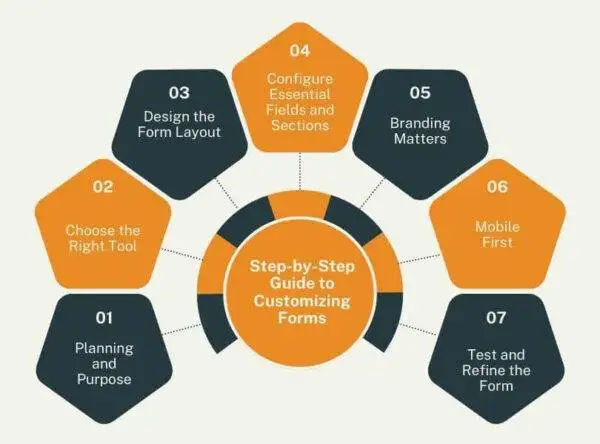
The order that minimizes rework:
1. Plan the form's purpose before opening any builder
A work order, an HVAC preventive maintenance checklist, an EPA 608 refrigerant log, and an NFPA 72 fire alarm test report all include distinct mandatory fields as well as different retention requirements for compliance audits. When designing a system, you must account for every data point required to bill the customer, every piece of information technicians need to complete the job safely, and every regulatory requirement your industry must meet. This should involve dispatch, technicians, and administrators who enter data into accounting before finalizing the system design.
2. Choose the right platform
Generic builders like Google Forms, JotForm, and Smartsheet win on flexibility and lose on field service workflow. They do not know about your customer record, dispatch board, or QuickBooks invoice. An FSM-native form builder inherits customer, work order, and asset context, so the form output lands in the right place automatically and feeds scheduling and dispatch, invoicing, and QuickBooks integration without re-keying.
Many businesses that are switching to custom-designed digital forms are not transitioning from an FSM platform. Instead, they are using spreadsheets, paper, or QuickBooks-only setups, which changes the rollout process: customers and assets must be imported first, followed by the creation of forms based on the data already in place.
3. Design a layout that reads clean and works
Separate similar fields such as customer details, job specifics, signatures, and materials into distinct sections. Provide one-line instructions when a field may be unclear. Use single-column layouts for phones. Do not squeeze a two-column desktop layout onto a mobile screen, as it can cause users to miss fields while scrolling.
4. Configure essential fields with the right input types
- Text boxes for truly freeform note-taking (rare)
- Dropdowns that cover everything with fewer than twelve options
- Checkboxes for pass/fail and yes/no states
- Date/time selectors for service scheduling
- Photo capture to provide proof of work
Mark necessary fields with a clear indication. Make sure you use conditional logic in a precise manner - when an inspection fails, then trigger an additional section. This is a great design. Forms that hide half their fields until a technician hits the right button become an unintentional debugging exercise for new hires
One frequent Field Promax user on the QuickBooks App Store mentioned cycling through several different work order apps before settling on this one, citing ease of use and quick customer support as key aspects.
5. Brand the form lightly
Logo on top. Brand colors used on buttons and headers. A font hierarchy aligned with your brand. A neat, professionally branded design on a tablet in front of a customer appears significantly more trustworthy than a paper clipboard and that impression can affect the likelihood that a client will accept an offer immediately.
6. Design for the phone first
Layout with a single column, touch targets large enough to use with gloved hands, offline capability so a basement HVAC technician without signal can still complete the job - with sync happening automatically when connectivity is restored. Automatic GPS and time stamping removes the need to manually enter the job address.
We hear from HVAC owners almost every week. Their techs use the form on their phones; however, the form was created on a computer. Fields do not fit properly. The dropdown has 40 options, while six cover 90% of the jobs. The signature box is hidden under the keyboard. The tech gives up and returns to the clipboard in the truck. In 14 years of interactions with mobile field service apps, technician adoption has been the single most reliable indicator of a custom form’s success. If a form cannot be completed on a 5-inch screen with one hand in a glove, the rollout will fail, regardless of how tidy the desktop preview looks.
7. Pilot with two or three techs before shop-wide rollout
Do a two-week trial using real working conditions - a dim basement, a roof, or a customer’s driveway. Identify every point where technicians hesitate or are unable to complete the form. Retest and refine. The version that survives the pilot is usually 30% shorter than the original draft. That shorter form is the proof the process worked.
Form Templates Owners Ask For Most
The fields below are intended to be starting points. Change them according to the particulars of your business and the jurisdiction you are in.
1. Work order forms
Purpose: Keep track of project materials, times and confirmation from the customer so that the office can bill the next day.
Key fields:
- Information about the customer: name, address, phone number, and a flag for account history.
- Job description: specific location, priority, and related asset.
- Assigned technician and dispatch time, time on site, as well as completion time and total labor time.
- Materials and components used, including quantity and cost.
- Pictures of the completed work.
- Notes from the technician and customer signatures.
A truck-repair business reviewing Field Promax on the QuickBooks App Store described adopting it specifically to build accurate work orders and invoice quickly, with support along the way. The work order record feeds the field service invoicing software without re-keying.
.webp?updatedAt=1747733768906)
2. Maintenance checklists
Purpose: Document recurring preventive maintenance so equipment history is queryable when something fails.
Key fields:
- Equipment ID, model, location, asset tag (linked to equipment tracking software)
- Standardized task list with checkboxes
- Pass/fail per task with notes for any fail
- Photos where condition matters
- Technician name, date, signature
Owners on Quora repeatedly describe wanting reusable checklist templates so steps can't be skipped and the same job runs the same way every visit.
3. Inspection reports
Purpose: Note site inspections, equipment or other documentation in accordance with a contract or standards with a legally enforceable audit trail.
Key fields:
- Inspection details (date, location, inspector name, credentials)
- Items analyzed with pass/fail as well as quantitative results
- Inadequacies, severity, recommended corrective actions
- Action owner due date, work order reference work order reference
- Signed by inspectors and supervisors
For fire and life safety work, NFPA 25 documentation requires inspection dates, results, deficiencies, corrective actions, inspector credentials, and quantitative test results - with retention periods tied to test frequency: 13 months for monthly tests and six years for five-year tests. Shops that have failed a single audit build these fields into the form by default from that point forward.
4. Incident report forms
Purpose: Document accidents, injuries, or near-misses using the data required by OSHA Form 301.
Key fields:
- Incident date, time, location, type
- Contact information and names of all witnesses and parties
- An in-depth account of what happened
- Actions immediately taken
- Follow-up action requirements as well as accountable parties and deadlines
- Supervisor reporter, supervisor and safety officer Signatures of supervisor, reporter, and safety officer
OSHA requires Form 301 to be completed within seven calendar days of notification. Records must be retained for a minimum of five years. Penalties vary, reaching up to approximately $16,550 to $20,000 per violation as of January 2025.
Best Practices That Actually Move the Needle
Four practices distinguish forms that are used from those that are not.
1. Design for the user, not the database
- Single-column layout with clear, short questions
- Field labels that are descriptive and do not contain internal jargon; they serve as placeholders for information
- Dropdowns, radio buttons, and checkboxes for frequently used selections
- Conditional logic that hides non-essential fields rather than burying essential ones
Each field you remove increases efficiency - to the point where you are ready to start removing required information.
2. Enforce accuracy at entry, not at audit
- Indicate fields that are required with an asterisk or a color indicator
- Validation rules for email, phone and dollar fields
- Inline error messages, so the tech can fix the issue right away and not after the form is synced at 9 pm
3. Build compliance fields into the form, not the binder
- Draw a map of the current regulations (EPA 608, NFPA 25/72, NEC 2023, OSHA 1904) before construction.
- By default, capture required fields. Do not depend on technician memory.
- Keep your data in systems that comply with retention requirements (five years in the case of OSHA, 13 months and up to six years for NFPA 25).
4. Review forms quarterly with the people who use them
- A quarterly review is conducted with administrators and technicians who use the forms daily.
- Update forms whenever regulations change, service types change, or fields are consistently left unfilled.
- Sunset forms that are no longer used. Dead forms create confusion without providing useful information.
Connecting Custom Forms to Your Work Order Workflow
A form created by itself is merely a better clipboard. Its value increases when it is connected to your customers’ records, work orders, and invoicing workflow.
1. Dispatch triggers the right form automatically. If a dispatcher creates a work order for a preventive HVAC maintenance call, the system should automatically attach the appropriate checklist. The technician does not have to look for it. The type of job determines which form set appears in the mobile app. This helps eliminate “which form do I use?” confusion that can lead to incorrect forms, incomplete forms, or even no forms at all.
2. Customer and site data pre-fills from the work order. The technician shouldn’t need to enter the customer’s name, address, or model into a service request. That information is already on the work order. By pre-filling it using linked records, you eliminate transcription errors and can save three to five minutes per task.
3. Form completion gates job closure. Technicians should not be able to mark a job as complete without a customer signature, the refrigerant log (for HVAC jobs), or a completed inspection checklist. This is not about mistrust, but about establishing the right system to protect your technicians while also safeguarding your business.
4. Completed form data flows into the invoice. The parts of the service report become line items. The labor hours are included in the cost. Tech notes are included in the invoice description. When this chain functions, the invoicing process becomes an automated result of field work already done and not a separate manual process.
A reviewer from G2 observed that before proper digital work orders, the office manager would spend two hours everyday copying papers into the billing system. After switching, invoicing takes around 20 minutes in total.
| Workflow Stage | Manual Process | Connected Form Process |
| Job dispatch | Dispatcher prints form and hands to tech | Form auto-attached to work order on dispatch |
| On-site data entry | Tech handwrites customer and equipment info | Customer/equipment data pre-filled from record |
| Job completion | Tech drops paper form at office | Form submitted digitally, synced instantly |
| Invoice creation | Office staff re-enters parts, labor, notes | Form data auto-populates invoice fields |
| Compliance records | Paper filed in binder by date | Searchable by job, customer, equipment serial |
| Service history | Dig through filing cabinet | Pulled up in seconds from customer record |
Common Mistakes Small Shops Make When Building Custom Forms
1. Building one universal form instead of job-type-specific ones. The result is a form so long that techs can read it on every job. One plumbing contractor shared his experience on a trade forum: "We had one form for everything - drain calls, water heater installs, backflow tests. It was twelve pages long. Nobody filled it out completely. Ever." Specific forms for job types are smaller, faster, and more accurate.
2. Making every field required from day one. If every field is required, techs start entering placeholder values ("N/A," "0," "see notes") in order to move beyond the screen. Start by focusing on the fields that are mandatory for compliance or billing. Add requirements as you learn where the gaps really are.
3. Skipping mobile testing before launch. A clean-looking form on a desktop may not be usable on mobile. Long labels can be removed. Dropdown menus become tiny tap targets. Date pickers are broken when using specific Android versions. Always test using the original gadgets your techs have.
4. Ignoring the technician's physical context. Forms are filled out on ladders, in attic spaces, under sinks. If a form requires two-handed typing or precise input of text the form will be not completed or submitted. Ask: could a tech fill this out on a ladder with one free hand? If not, you can redesign the field.
5. Forgetting to capture photo evidence. A picture of the equipment's condition before and after work creates an indisputable record. However, many shops create service forms that do not have a photo field. Make sure to include a photo field on each repair and inspection form, and limit the tapping required to attach it.
6. Never updating forms after launch. A form built in January is outdated by April, if there are changes to the scope of work or a regulation is updated. Set a quarterly calendar reminder. The recurring notes your techs make in the free-text field are fields that need to be officially regulated.
7. Treating forms as separate from training. A new tech who has never seen your HVAC checklist will not complete it correctly, even if it's designed perfectly. Forms must be an integral part of the onboarding process. Guide new employees through each form before their first job.
Future Trends: Where Custom Forms Are Heading
The field service management market is growing rapidly - between $5.64 billion in 2025 to a projected $9.68 billion by 2030, a CAGR of 12.5% (Brocoders, Global Field Service Management Trends 2026). Smarter data capture in the field is a major factor of the growth.
1. AI-powered pre-fill. Forms are starting to be pre-populated with the help of AI analysis of the service historical data. If an appliance was repaired six months ago and the tech found a refrigerant leak, the next maintenance form will highlight the prior issue finding automatically.
2. Smart checklists that adapt in real time. Mobile forms are now used to guide the task rather than just record it. Smart checklists use conditional logic and branching to walk a tech through a job step-by-step, and adjust questions based on what they find at each step.
3. Voice-to-text and photo AI. Some platforms now let techs dictate notes via voice-to-text. AI-powered image analysis is now beginning to detect equipment conditions from photos taken during a visit - identifying issues the tech may not have noticed
4. Automated report generation. Instead of having a tech write the service summary after a job, the platform generates plain-language reports by analyzing the data on forms. Tech reviews and approves it.
5. Regulatory auto-update. Some platforms are building rule engines that detect when a form's required fields do not meet the requirements of current regulatory standards - thus the platform informs you when your forms are out of compliance before an auditor notices.
Sources: Grand View Research, Brocoders FSM Trends 2026, MarketsandMarkets
| Year | FSM Market Size (USD Billion) | Primary Driver |
| 2022 | $4.43B | Shift from paper to digital workflows |
| 2023 | $4.85B (est.) | Mobile app adoption among field techs |
| 2024 | $5.10B | Cloud-based SaaS replacing on-premise tools |
| 2025 | $5.64B | AI scheduling and predictive maintenance |
| 2026 | $6.24B (proj.) | Autonomous agents, smart form workflows |
| 2030 | $9.68B (proj.) | Full integration of IoT, AI, and data analytics |
Financing Options for Upgrading Your Form and Work Order System
1. Monthly SaaS subscription (no upfront cost). Field Promax plans start at $99/month for the Light plan (1 user), $159/month for Standard (5 users), and $239/month for Premium (12 users). A shop that eliminates even two invoice disputes every month - each of which is worth $150 to $300 in billing corrections - the subscription pays for itself in a short time.
2. SBA Microloan Program. The U.S. Small Business Administration's Microloan program offers loans up to $50,000 for working capital including digital infrastructure and software tools managed by nonprofit lenders, with rates generally lower than the traditional bank lines of credit.
3. Section 179 deduction. Business software subscriptions are tax-deductible business expenses. Depending on how costs are structured, they may qualify under Section 179 for immediate expensing within the year of the purchase. Check with your accountant to determine the exact rules.
4. Business line of credit. For shops investing in a wider digital transition - including tablets, upgraded mobile devices, and FSM software - a business line of credit from a community bank or credit union can provide flexible drawdown and repayment options.
5. CDFI financing (Canada). Canadian small businesses can access funding through Community Futures and other CDFIs. The Canada Digital Adoption Program (CDAP) has provided grants to eligible small businesses for digital tool adoption - Consult with your local Small Business BC, Ontario Small Business Enterprise Centre, or provincial equivalent for current availability.
KPI Benchmarks: How High-Performing Shops Measure Form Effectiveness
| KPI | Low Performer | Industry Average | High Performer | Source |
| Form completion rate | Below 60% | 75-80% | 95%+ | GoFormz, Going Paperless in Field Service |
| Time on admin (per tech/week) | 10+ hours | 7 hours | Under 3 hours | Salesforce Research via sitecapture.com, 2026 |
| Invoice dispute rate | 8-10% of invoices | 3-5% | Under 1% | Industry practitioner estimates, G2 review data |
| Days to invoice after job close | 5+ days | 2-3 days | Same day | FieldCamp, Field Service Report 2026 |
| First-time fix rate | Below 70% | 76-80% | 87%+ | Aquant 2024 Field Service Benchmark Report |
| Productivity gain post-digital forms | Under 10% | 24% | 26%+ | fieldservicesoftware.io, FSM Statistics 2025 |
| Paperless adoption (field service SMBs) | N/A | 48% using FSM | 71%+ of high-growth shops | Quixy, Field Service Industry Statistics |
The Form Maintenance Lifecycle: How to Keep Forms Current
Most guides focus on how to create forms. The shops that get the most value from digital forms use another system in place - an approach that keeps the forms up to date, accurate, and aligned with the way work is actually being done.
Forms that were designed well at the time of its launch can change. New job types emerge. Regulations get updated. Techs find ways to work around the issue. Customers start asking for data that is not being recorded. Without a regular maintenance program, the best-built forms slowly transform into outdated forms.
1. Quarterly review cycle. Every three months, review 10–15 completed forms of each type and look for patterns. Consistently blank fields usually mean the field is either irrelevant (remove it) or label is unclear (rewrite it). Recurring entries in the notes field often indicate that a structured field needs to be added.
2. Technician feedback loop. Techs find friction points that never show up in analytics - the dropdown missing the right equipment brand, the checklist that lists steps in the wrong order for how the job actually runs. Create a basic feedback channel such as shared notes , monthly 15-minute meetings, or a direct message thread where techs flag issues whenever they notice them.
3. Regulatory monitoring. Assign one person - usually the owner or office manager - to monitor regulatory changes for your trade and jurisdiction. If the requirements change or new requirements are added to the form, you must update it within 30 days.
4. Version control. When you update a form, make sure to preserve the original version but make the form inactive. If a dispute arises over a job completed under the old format, you must show what the form was when it was created.
Build Forms That Fit Your Shop with Field Promax
Custom forms cut down on form-fill time, reduce the 15% ticket-loss gap between the office and the truck, and create the audit trail that compliance officers seek.
Field Promax is built for the 1-50 tech shop that other software ignores or overcharges. Our form builder inherits customer, work order, and asset context so the data lands where it needs to land. Schedule a demo and bring the form types you already use - we will show you what they look like once they inherit the rest of your operation.
Plans start at $99/month for the Light plan (1 user), $159/month for the Standard plan (5 users), and $239/month for the Premium plan (12 users). Schedule a demo and get your 14-day trial.
Pre-Launch Checklist
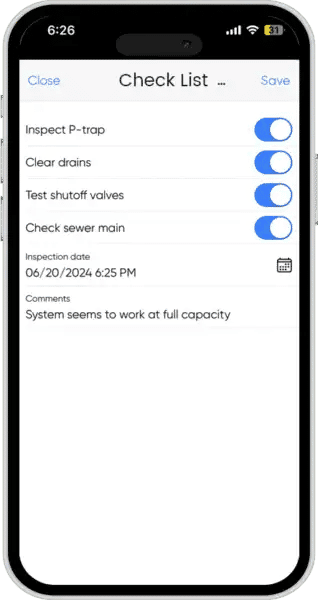
Before shipping a new form into production:
- Form purpose and required data are documented
- Platform selected with FSM, accounting, and asset integrations confirmed
- Single-column, mobile-first layout with similar fields grouped
- Required fields marked and validated
- Branding consistent with your invoice
- Mobile rendering tested on the actual devices techs use
- Pilot run with at least two techs over two weeks, feedback incorporated
- Integration with reports and dashboards confirmed
- Quarterly review scheduled on the calendar
Continue the Mobile Checklist Series
Related reading from our work order cluster:
- HVAC Issues Technicians Miss That Customers Catch First - the pillar on why structured forms close callback gaps.
- Simple QA Checklists That Reduce Callbacks for Field Technicians - the QA-checklist companion to custom forms.
- Preventive Maintenance Checklist for Commercial Buildings - a downloadable PM checklist template.
- How To Create And Manage Work Orders For Efficient Field Service Management - how forms feed into the work order lifecycle.
- Best Online Job Card Systems & Task Management Platforms - job-card platforms that consume the same form data.
More from the work order cluster
Conclusion
Custom forms are what differentiate a business that is aware of what happened yesterday from a shop that guesses on Friday. Get the build sequence right, test it on real phones, and the audit trail will build itself.
Frequently Asked Questions

Content Creator
Bhargavi Halthore is a content writer at Field Promax, a field service management platform serving trades businesses across the USA and Canada. With over a decade of experience writing for business owners, she brings detailed, ground-level insight to every topic she covers. Her research goes beyond search results - she digs into LinkedIn groups, Facebook communities, and Reddit forums to understand what field service business owners are actually dealing with on the ground. She speaks directly with industry professionals, understands their day-to-day challenges, and translates that into content that is practical and actionable. What you read in her articles reflects real industry patterns, not theory.