Job Card Systems and Task Scheduling Software: A 2026 Evaluation Framework

From working with small-to-mid trade shops since 2018, the single biggest first-time-fix driver we see is whether the tech has mobile access to history, asset records, and a structured checklist at the truck. In our customer base, shops moving from tribal-knowledge troubleshooting to mobile checklists report callback rates dropping inside a quarter; the shops that stay flat are the ones where techs still close jobs on paper and re-key later.
This guide is an evaluation framework, not a ranked list. We define what a job card system has to do, score platforms against those criteria, and show where each fits. Treat the vendor sections as a scoring exercise against your own constraints.
What is a job card system
A job card is the digital record of everything that happens on a service call: customer details, assigned techs, parts pulled, time logged, photos, notes, signatures.
- The work order says to do this job (authorization).
- The job card is the record of what we did (evidence).
- The task card tracks the discrete steps inside (workflow).
When the three are connected digitally, office and field stop arguing about what happened. A good system surfaces progress to dispatch in real time and forces every step to get recorded, billed, and filed before the tech leaves.
What service teams gain from digital job cards
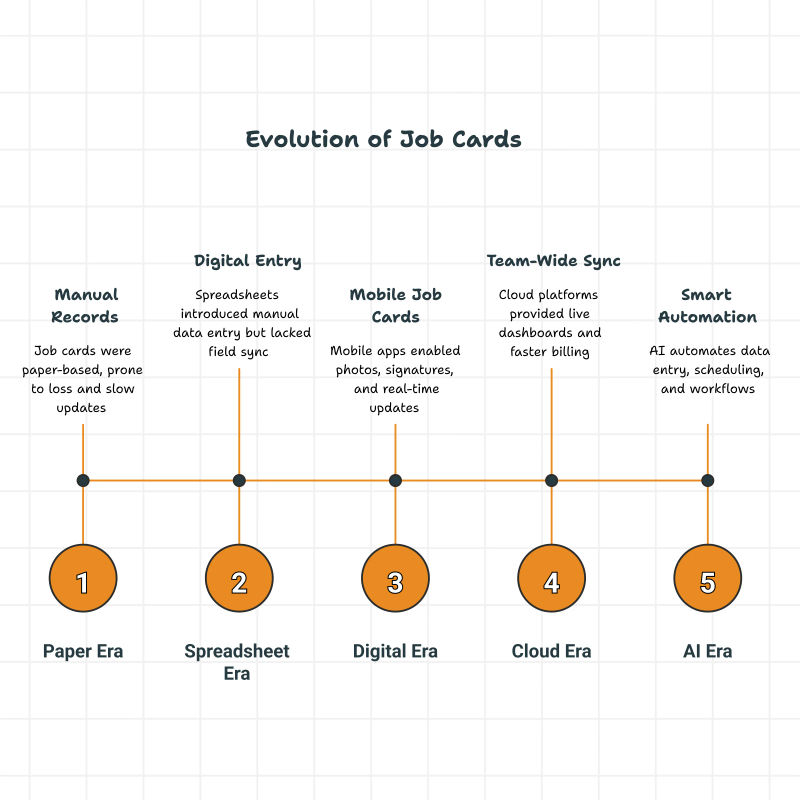
Paper slows everything except friction. Digital job cards collapse the loop: tech updates from the phone, photos upload immediately, customer signs on screen, dispatch sees status without a call. Owners who get the most out of scheduling and dispatch software treat the job card as the live system of record, not a paper artifact transcribed later.
How job cards shape the working day
Digital job card software connects the steps end-to-end:
- Dispatch creates the card and assigns to a qualified tech.
- The tech sees customer history, parts list, and access notes before arrival.
- Photos, notes, and checklist items get attached on site.
- The completed card syncs to accounting for same-day invoicing.
For HVAC and plumbing teams, this is how refrigerant logs, pipe-repair documentation, and electrical safety tests stop falling between the truck and the office.
Why online job cards matter in 2026
Customers expect Uber-style arrival visibility and accurate invoices on completion. The shops that deliver without adding admin headcount run job cards as the spine of operations.
Paper job cards burn the wrong hours
Owners on Quora and trade subreddits describe the same frustration with paper: chaos tracking dozens of concurrent orders, lost visibility into status, parts pending, and customer commitments.
Across our customer base, dispatchers on paper lose a meaningful portion of each week chasing missing tickets, re-keying notes, and matching paperwork to invoices. Shops flipping to digital cards report that collapses to under an hour because the ticket auto-routes from tech to office to invoice the moment work wraps.
Delayed updates become delayed money
Manual updates make billing wait. Digital cards trigger the invoice the moment the tech marks complete. Shops that bill same-day report the biggest single change is removing the manual translation step between truck and office.
Paper leaks tickets predictably
Paper systems leak predictably: missing signatures, parts not recorded, notes lost in a truck console. In our experience, a meaningful share of paper tickets get lost, duplicated, or never make it back invoiceable - owners we work with consistently flag this as their largest source of silent revenue leakage. Digital job cards push that essentially to zero because the ticket lives in the cloud the moment the tech opens the job.
Customers expect real-time updates
Per the Salesforce State of Service report, mobile workers waste roughly 18% of working hours on admin - time automated notifications and digital summaries can recover. In our customer base, shops sending arrival alerts plus a completed-job summary with photos see repeat-call rates climb without changing pricing or marketing. What we hear from operators is that the SMS arrival alert alone shifts the customer conversation from "when is the tech coming" to "thanks for the heads-up," which clears dispatcher minutes for actual scheduling.
.webp?tr=f-auto,q-80,w-800,pr-true)
Key features of a serviceable job card system
Minimum bar: create a job, drop it on a tech, have it appear on the phone with customer context and a route. Drag-and-drop boards with calendar, map, and list views let dispatch see who is available and closest. A weekly board view lets owners pull capacity forward when a customer asks for the soonest opening.
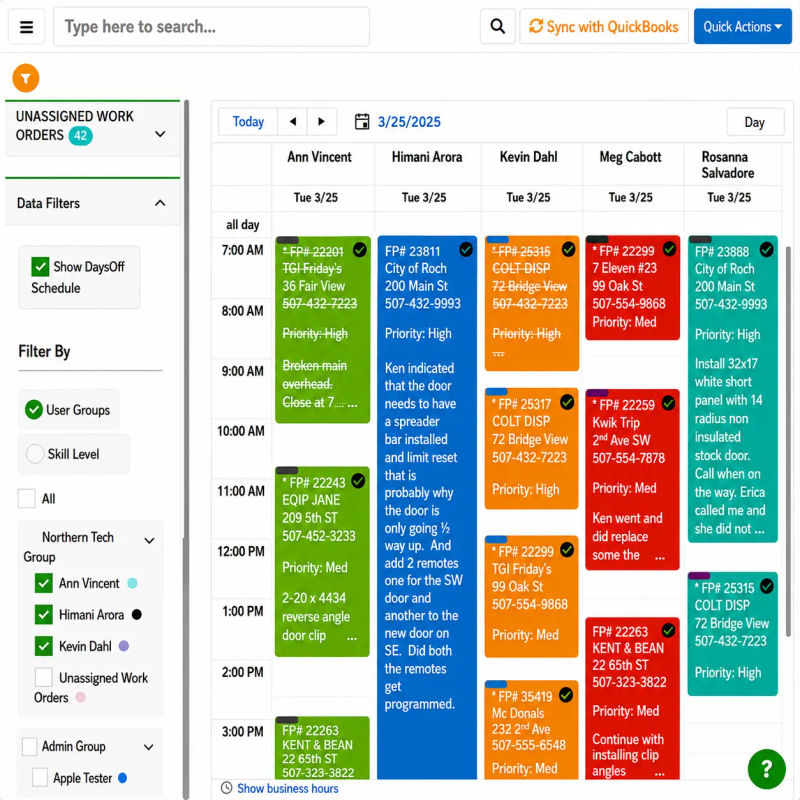
Skill-based assignment
Every tech closes different ticket types cleanly. Routing by skill plus location is one of the largest single drivers of first-time fix improvement in shops that lacked structured dispatch before.
Parts and materials tracking
Materials tracking on the card prevents billing leakage and silent stock-outs. When techs select parts from a connected item list, job costing stays accurate and the parts log feeds reorder logic. This is where equipment tracking software earns its keep on multi-visit projects.
Photos, notes, checklists, attachments
Before-and-after photos, signed checklists, and attached documents pin to the card so warranty and disputes have evidence. A reusable checklist template per job type stops experienced techs from skipping steps the new tech needs.
Time tracking and labor costs
Digital time tracking records start, stop, drive, and on-site hours automatically. Per the BLS Occupational Outlook Handbook, the May 2024 median hourly wage for electricians ran $29.98, with comparable rates for HVAC and plumbing. Across our shops, a half-hour of mis-tracked time per job is real margin walking out at those rates. Our data shows accurate clock-in capture is the second-highest correlate of margin improvement after dispatch automation.
How we evaluated job card and task scheduling platforms
Field Promax makes one of the platforms compared below, so methodology is mandatory. We scored the four major platforms below against six criteria. The niche and adjacent tools later in this guide are included for awareness, not run through the same scoring:
-
Mobile job card depth. Can a tech open a card on the phone, attach photos and a signature, mark complete, and trigger the invoice without returning to the office? Tested on current iOS and Android builds.
-
QuickBooks integration depth. One-way push, two-way sync, or none.
-
Dispatch and scheduling UX. Drag-and-drop calendar plus map view plus skill-based routing, scored on whether a non-technical dispatcher can run the board solo.
-
Pricing transparency at the SMB tier. Whether the vendor publishes its pricing model and offers an honest free trial, versus gating cost behind a sales call.
-
Trade-specific functionality. Refrigerant logging for HVAC, fitting and leak documentation for plumbing, voltage/circuit fields for electrical.
-
Review platform signal. G2, Capterra, and QuickBooks App Store ratings, weighted toward volume rather than headline score.
No single platform wins on all six. The right pick depends on which two or three matter most.
Most job card discussions get stuck on the wrong axis. People argue feature lists when the real predictor of whether a system survives the first six months is mobile-app adoption by field techs. The shops that flip cleanly share one thing: techs use the phone app on day one and keep using it on day ninety. Shops that fail did not fail because the software was wrong. The field never bought in, and the office spent the next quarter re-keying paper anyway.
I also disagree with the pitch that enterprise FSM platforms are best-in-class and small shops should aspire to them. Most small-to-mid trade shops do not have the dispatcher headcount, the IT bandwidth, or the appetite for a year-long rollout. What they need is a job card that gets filled out at the truck, syncs to accounting the same day, and surfaces the parts and time data the office uses to bill cleanly. Anything past that is overhead the shop pays for and never gets back.
- Joy Gomez, Founder of Field Promax
Benefits of online job card software
Each benefit below shows up as a measurable change in the first quarter of a clean rollout.
Faster job completion
Connected job card software removes paperwork delay between jobs. Techs squeeze an extra call into the day inside the first month, simply because no one is driving to the office for paperwork.
Higher accuracy
Required fields, mandatory photos, timestamps, and digital signatures eliminate manual error. When data syncs to QuickBooks automatically, duplicate entries stop and reconciliation gets quiet.
Fewer customer disputes
Incomplete paperwork is the most common cause of billing disputes. Time-stamped, photo-verified, signature-collected cards stored under the customer profile let you pull a record in seconds, collapsing most disputes before they escalate.
Same-day invoicing
Two-way QuickBooks integration is the integration line that matters, not the existence of any sync. A truck repair business reviewing Field Promax on the QuickBooks App Store described being able to create accurate work orders and invoice quickly, with responsive support, which matches what we see when QuickBooks sync is set up cleanly on week one.
Better job-level profitability
Track time, parts, and labor on the card and you can sort jobs by margin within a week. Job costing reports let owners catch money-losing jobs before end-of-month, instead of after.

Task automation that runs itself
Automated workflows schedule follow-up tasks, warranty checks, and recurring maintenance without dispatcher attention. Owners watch the dashboard for exceptions instead of building the schedule from scratch each morning.
Scales where paper breaks
In our experience, the break-point on paper hits somewhere in the mid-single-digit tech count. After that threshold, the office labor required to keep paper sane outruns the cost of any platform on this list.
A pattern across multi-trade operators we have worked with
Across multi-trade operators since 2018, what breaks dispatch is not the software, it is a dispatcher running an HVAC board in one tool and a plumbing board in another, then eyeballing overlap. We saw it at an owner-operator multi-trade shop running HVAC and plumbing crews with a dispatcher and roughly two dozen techs in a mid-size Midwest metro.
Heading into a busy spring, the shop kept double-booking techs whose licenses covered both trades, because two separate calendars were reconciled by memory. Estimate disclaimers compounded it: HVAC estimates carried weather and equipment-availability language, plumbing carried material-assumption language, and when a scope touched both (a re-pipe near an air handler) customers pointed to whichever disclaimer favored them.
The owner collapsed both boards into one shared calendar the dispatcher worked from exclusively, forcing every booking through that surface even when techs pushed back. In parallel, the disclaimer was rewritten into a single template covering both trades' typical exclusions in plain language. The first version went out before legal review. The second came after a customer dispute.
Double-bookings essentially stopped after a rough first month where the unified calendar surfaced conflicts that had been hidden. The disclaimer needed two revisions: a customer challenged a water-damage exclusion the plumbing lead said was standard but read as overreach, and the language got tightened twice before it held. The plumbing foreman was the holdout on calendar adoption. This is a composite case, anchored to the most common version of this pattern across multi-trade operators we have worked with.
Vendors scored against the framework
Each vendor gets parity treatment: overview, where it scores high, where it scores low, and shop profile. Field Promax is included on the same basis. Pricing references reflect publicly listed plans as of late 2025.
Enterprise tier: ServiceTitan
As per the published benchmark documentation, the platform gates full benchmark reports behind a 100-jobs-per-period threshold, signaling its target customer. From years of watching customers evaluate platforms in this tier, the shops that succeed here have dedicated office staff and the implementation patience to match a multi-month rollout.
- Strengths: dispatching depth, marketing and call-tracking integration, reporting analytics, payroll modules, mature mobile app.
- Weaknesses: quote-based pricing with no published per-user rate, long implementation, total cost of ownership that prices out small shops, steep learning curve.
- Best fit: large contractors with dedicated office staff and the budget for a multi-month rollout.
- Worst fit: owner-operator shops that need value on day 30.
Mid-market home services: Jobber
Public comparisons against enterprise FSM platforms flag it as the lighter, friendlier setup. What we hear from operators evaluating this tier is that the scheduling UI lands cleanly with non-technical office staff on day one, which matters more for a residential shop than feature checklist depth.
- Strengths: clean scheduling UI, integrated quoting and invoicing, strong customer communication, publicly listed per-seat pricing tiers.
- Weaknesses: public comparison write-ups flag pricing that climbs sharply with seat count and trade-specific fields that require workarounds. In our customer base, shops on the higher tiers end up paying enterprise-adjacent prices without the enterprise dispatch depth.
- Best fit: residential lawn care, cleaning, and lighter HVAC/plumbing shops leading with customer experience.
- Worst fit: commercial contractors with regulatory documentation needs.
Mid-market home services: Housecall Pro
Side-by-side comparisons place it close to similar mid-market home-service platforms on most criteria. Across our shops looking at this tier, the deciding factor is usually the consumer-facing booking experience rather than backend dispatch depth.
- Strengths: consumer-facing online booking, integrated payments, sleek mobile app, strong marketing automation.
- Weaknesses: less depth on commercial workflows, thin advanced project management, limited reporting customization at lower tiers.
- Best fit: small-to-mid residential service businesses valuing customer-facing polish.
- Worst fit: multi-trade or commercial shops with complex job structures.
Small-to-mid trade shops: Field Promax
Field Promax is priced and structured for the small-to-mid trade shop the field-service software incumbents ignore or overcharge.
- Strengths: two-way QuickBooks sync (Online and Desktop), drag-and-drop scheduling with calendar/map/list views, mobile job cards with photo/note/signature capture, recurring jobs, transparent pricing. A long-time customer reviewing on the QuickBooks App Store described it as the best work-order app they had used after cycling through many.
- Weaknesses: enterprise reporting is basic compared to platforms built for 50+ tech operations; brand visibility is smaller than the larger consumer-brand platforms; advanced marketing automation is not the core focus; AI features are early. We do not pretend to be the prettiest UI.
- Best fit: 1 to 20 tech HVAC, plumbing, electrical, multi-trade, pest control, landscaping shops coming off paper, spreadsheets, or QuickBooks-only setups.
- Worst fit: shops looking for a full ERP or aggressive marketing-automation suite.

Niche and adjacent tools: WorkStudio, Okappy, Hubtiger, Fleetable, Deskera, UpKeep, MaintainX
- WorkStudio. Affordable for auto shops and small manufacturers. Weak on field mobility and accounting depth. Best fit: bay-based repair.
- Okappy. UK-rooted platform connecting contractors, customers, and subcontractors. Best fit: facility managers coordinating vendors. Weakness: lighter on internal dispatch.
- Hubtiger. Rental plus repair management. Best fit: businesses that rent and service equipment. Weakness: limited customer management at scale.
- Fleetable. Fleet maintenance with task management. Best fit: vehicle fleets. Weakness: transport-first, not field-service-first.
- Deskera. All-in-one ERP. Best fit: manufacturers wanting unified back-office. Weakness: too heavy for small contractors.
- UpKeep and MaintainX. Strong for internal maintenance, preventive maintenance, and compliance per their product documentation. Weakness: minimal customer management or invoicing for customer-facing field service.
Job card templates
Templates standardize the work so every tech captures the same evidence the same way. These are starting points. Adapt to your trade and regulatory exposure.
Basic job card template
For one-time service calls and small repairs. Required fields:
-
Customer details
-
Job description and scope
-
Materials used
-
Time spent (start/stop)
-
Tech signature
-
Customer approval
Multi-day template
For HVAC and plumbing projects spanning multiple visits. Daily entries, cumulative photos, and a running parts log keep long projects auditable from day one to closeout.
Tech checklist
Techs check off required safety steps (leak testing, pressure verification, LOTO) before closing. Per OSHA 29 CFR 1904, recordable injury and illness records must be retained for five years and produced for inspectors on request. Shops that pass audits keep the checklist inside the job card where techs already work, not in a binder.
Before-and-after photo log
Timestamped photo log per job: before, in-progress, after. Customers get visible proof, the shop gets warranty defense and dispute-resolution evidence. It's the lowest-effort feature and the one that pays back fastest.
How job card systems support task management
In field service, the job card is the system of record. Strong task management ties scheduling, invoicing, and customer communication back to the card so nothing branches into a side spreadsheet.
Daily scheduling
Drag-and-drop calendars and GPS routing let dispatch see who is closest to the next emergency. Drag the task onto the closest qualified tech, the app pushes the alert, the schedule updates.
Workflows and follow-up tasks
A completed job triggers the next. An AC install completes, a maintenance reminder fires automatically near the one-year mark. Recurring revenue stops depending on someone remembering - which from years of watching customers, this is the single largest source of revenue leakage in shops we work with.
Cutting backlog
Paper backlog has a known shape across the shops we work with: time-to-close lags the actual work, billing lags closing, and cash collection lags billing - each stage adds days the shop never recovers. Digital cards collapse the first two stages. Shops that close jobs from the truck same day report visible backlog reductions within the first month.
Tying jobs back to estimates
Estimate-to-job linkage makes planned vs actual cost comparison automatic. Over a few months, the data tells you which job types you systematically under-quote, and the estimates module gets recalibrated.
Trade-specific job card needs
As per EPA Section 608 recordkeeping rules, commercial systems with 50 lb or more of an ozone-depleting refrigerant require the tech to give the owner an invoice showing refrigerant added, with records retained 3 years. HVAC software buyers who survive the first EPA spot-check built refrigerant logging into the job card workflow, not a separate compliance binder.
Plumbing
Plumbers cycle through fittings, pipe sizes, leak reports, and fixture installs daily. A structured plumbing job card tracks parts, time, and customer approval per visit, preventing small repairs from going undocumented and unbilled.
Electrical
Electricians need voltage, circuit type, and compliance test result fields. NEC 2023 panel schedules and labeling get verified at inspection. Electrical contractor software that lets techs upload wiring photos and test results inline turns the inspection submittal into a one-click export.
Cleaning and recurring maintenance
For cleaning and property maintenance, timestamped completion photos plus a fixed checklist per route keep service quality consistent across a rotating crew.
Fire safety and facility management
Inspection results, tagged-equipment photos, and digital signatures on the card make annual audits a query instead of a project. Per OSHA retention rules, the audit trail survives 5 years anyway, so it might as well live where the tech already works.
How a typical Field Promax setup runs
Under a minute from desktop or phone: add job details, link the customer record, select a template. Templates per service type keep fields consistent across techs.
Assigning techs
Dispatch assigns or reassigns with drag-and-drop. Skill-based routing plus current tech location matter most on emergencies where the right decision saves an hour of drive time.
Mobile app updates
Techs update progress, attach photos, capture signatures, and add notes from the mobile app. Updates sync as they happen - and as noted above, this is the habit that makes or breaks a rollout.
Photos and notes
Each card carries unlimited attachments: before-and-after photos, damage documentation, signed approvals all under the same record.
QuickBooks sync
Two-way QuickBooks integration means card data, invoices, customer records, and payment status round-trip without manual re-entry. The single feature most QuickBooks-only shops cite when they switch off spreadsheets.
Calendar, map, and list views
Calendar for the week ahead, map for routing, list for filter-heavy reschedules. Different roles default to different views; the data is the same underneath.
Reports and margins
Reporting dashboards surface revenue per tech, average job time, and margin per service line. From years of watching customers do this, the shops that act on margin reports weekly are the ones that catch underpriced job types before the quarter closes; the shops that only check end-of-month learn the same lesson three months late.
What to weigh when choosing job card software
If techs cannot figure out the app in 10 minutes, they will not use it. Test the mobile experience first, the desktop dispatcher view second.
Mobile app quality
Test on the actual device fleet your techs carry. The variable that correlates with productivity gains in mobile-driven companies is daily mobile-app usage, not feature-list breadth.
Price versus features
Look for transparent per-user pricing with no setup fees, and discount any platform that quotes you privately.
QuickBooks integration depth
Two-way sync saves hours of weekly reconciliation. Confirm both Online and Desktop if you use both. One-way push shows up in extra bookkeeping time within the first month.
Multi-tech and multi-location support
Multiple service areas, departments, role-based permissions, and clean team management all matter when you cross 10 techs.
Custom templates
Industry-specific templates cut setup time. Flexibility to add custom fields per service type lets the same platform serve HVAC, plumbing, and electrical without rebuilding job structure.
Multi-day project support
Multi-day logging keeps one record open across all visits with daily notes, photos, and parts on the same card. The difference between auditable project records and a folder of fragmented one-offs.
Scheduling engine strength
Visual drag-and-drop, route planning, color-coded status, skill-based routing, and a map view that updates in real time are table stakes.
Common mistakes shops make
Separate apps for scheduling, invoicing, and customer comms create reconciliation work that defeats the point. Pick one unified system.
Letting techs skip required fields
If photos, notes, and signatures are optional, techs rushing on Friday will skip them. Make capture mandatory at the template level.
End-of-day batched updates
Techs reporting at 6 PM produce stale data and inaccurate notes. Train the habit of closing the card before leaving site.
No standardized templates
Without templates, every tech captures different fields and reporting becomes archaeology. Pre-build per service type and lock the structure.
Late invoicing
The most preventable cash-flow leak in field service. The most common feature request across our customer base is tighter dispatch-to-invoice automation, which tells you where the bottleneck sits for small trade shops.
Where job cards and task scheduling go next
The shift in field service is toward connection, not just automation. Modern job card software is what lets a small-to-mid trade shop compete operationally with companies five times its size. The substantive change is not paperless. It is accountability: every tech captures the same evidence on every job, the office sees state in real time, and data feeds back into pricing decisions instead of sitting in a folder.
.webp?tr=f-auto,q-80,w-800,pr-true)
Conclusion
Pick the system the techs will actually use on the truck, not the one with the longest feature list. Once the job card lives in the cloud the moment a tech opens it, almost every downstream metric improves on its own.
Frequently Asked Questions

Content Creator
Bhargavi Halthore is a content writer at Field Promax, a field service management platform serving trades businesses across the USA and Canada. With over a decade of experience writing for business owners, she brings detailed, ground-level insight to every topic she covers. Her research goes beyond search results - she digs into LinkedIn groups, Facebook communities, and Reddit forums to understand what field service business owners are actually dealing with on the ground. She speaks directly with industry professionals, understands their day-to-day challenges, and translates that into content that is practical and actionable. What you read in her articles reflects real industry patterns, not theory.