Xero Tracking Categories for Job Costing: Setup and Limits

Can Xero do job costing? The honest answer
Yes, to a point. Xero's tracking categories allow you to label expense lines and income lines using a branch, a job, or a cost code and then report on the tags. This is real segmentation, and for many trade firms, it's sufficient.
Job costing is easy to understand but hard to maintain: each direct material, labor hour, subcontractor invoice, and overhead cost is assigned to the project that used it, so you can check the quote against the actual cost before the next one is sent out. Xero's construction guideline states exactly the same thing. You should assign a job number and track every expense against it when it occurs.
Xero is an excellent ledger. It's not a job-costing engine, and it doesn't claim to be one. In the 14 years I have spent talking to shop owners, my biggest concern is not choosing Xero, but trying to get the ledger to answer questions it wasn't designed to address, only to blame the software when month-end turns into a reclassification job. Xero announced that it had 2.8 million customers across Australia and New Zealand as of 31 March 2026 in its FY26 financial results. So, for the AU market, this is the ledger most trade companies currently use. It's up to you what you do with it.
How to set up tracking categories in Xero
The process takes about 10 minutes. The decisions are more time-consuming.
- Go to Accounting > Advanced > Tracking Categories and create your very first category. Give it a name for the dimension, not for the job, like Job Type or Branch.
- Add the options in the box. The options are the values that you'll tag against, for example, Service, Install, Warranty, and Maintenance Contract.
- Tag at the line level. Every statement line, bill line, and spend-money line is accompanied by one option in every active category. Purchases, sales, and manual journals all work with it.
- Tag during bank reconciliation as well; otherwise, cash codes derived directly from the feed disappear from the tracker view completely.
- Report on Profit and Loss using a tracking-option filter or from the Tracking Summary report to get an instant per-option overview.
- Archive options for completed work instead of deleting them. Archiving keeps your report history; deleting removes it.
The fourth step is the one where the majority of configurations fail quietly. Untagged transactions don't throw errors; instead, they exist outside the report and cause your margin to appear more attractive than it really is.
The three limits that actually decide this
Competitor posts say that Xero "only allows two tracking categories" and then leave it at that. Here are the limitations set out in detail, all of which are documented in Xero's Accounting API Reference and Help Centre.
The category ceiling. Xero limits every company to two active tracking categories, or four in total counting archived ones, with up to 100 options per category. Two active categories are the official numbers.
The option ceiling. 100 options for each category is Xero's suggested limit, and if you go over it, report loading may slow down. If a service company runs 150 jobs per month, a per-job option list will pass the 100-option limit in under three weeks.
One option per line, and no cross-break. A transaction line can have one option from each category, but never two options from the same category. This is the hardest limit for owners to work around. Owners on r/xero frequently report hitting the ceiling whenever they require a branch, job, and phase simultaneously. The reports will not split a single category* *into two dimensions, leaving manual reclassification as their only method to achieve a job-level margin.
Three dimensions are the standard for a business. Xero gives you two.
A two-category structure that survives contact with a service business
Use two active categories for your budget and allocate the budget across the two dimensions that make up the variance in your margin.
For the majority of field service shops, this is:
- Category 1: Job Type. Install, Service Call, Warranty, Maintenance Contract, Quoted Work. Five to eight choices that will never change.
- Category 2: Crew or Branch. The dispatch team, your vans, or depots. A range of ten to twenty options that will remain stable for years.
What this does not make clear is the possibility of a code for each job. The construction-flavoured advice you will find elsewhere uses a per-job code like Warehouse Renovation, and that works fine when you run five concurrent projects a year. It will collapse when you're running hundreds of small jobs per month, as the option count, not the category count, is the binding restriction.
Job-level detail belongs where the job lives, on the work order. If you want per-job material, labour and margin, build it into a job cost sheet driven by your field data and let Xero hold the roll-up. That split keeps the ledger fast and the job data honest.
Reading the numbers once it is set up
Run Profit and Loss and select a tracking option to view the gross margins for installation versus service calls or for your north team versus your south team. Compare the two periods instead of focusing on one month, since one poor warranty claim can cause a month to be distorted and then disappear over one quarter.
The Tracking Summary report gives you the ability to quickly review the options available in a single category. It is a good way to conduct a health test: any option that has an unusually large or small amount usually indicates that bills are not being coded correctly by the person entering them.
A cautionary note: payroll allocations are not uniform. Allowances, leave, and rate overrides don't always reflect a specific category in a clear manner, and therefore, labour cost by category is usually the weakest part of the analysis. If labour is your biggest expense, and in service work it usually is, the gap is more important than the limit for categories.
When to stop: the breakpoint signals
Stop expanding your tracking categories if any of the following are true:
- You require a third dimension. Job plus branch plus phase means you've already exceeded the capacity of your model.
- Your options list is drifting towards 100, and no one is archiving work that has been closed.
- Someone spends over an hour each month changing the classification of coded transactions in order to answer a margin-per-job question.
- The bill is for a portion of a purchase order. Threads on r/xero from trade owners ask whether a Xero purchase order can be partially invoiced, only to find that it can't, leading them to use a manual tracker within the ledger.
- Two people can enter the same bill but make different choices.
That last one is the real tell. A tracking structure only works while it is applied identically by everyone touching a bill, and the fix is upstream of Xero. When the cost data starts at the technician's job card instead of at a bookkeeper's keyboard, coding consistency stops being a discipline problem.
Your options past the breakpoint
Xero Projects. Xero's own solution tracks time and cost per job, compares budget against actuals, and creates invoices using the information it has tracked. Xero Gold Partner Liston Newton lists it at about $10 per month per user (check current Xero pricing, as it may change) for the initial user and $7 per subsequent user. It is also clear that it will add bookwork, as all data must be entered correctly. Owners on r/xero who have used the software for trade-related work have described it as extremely basic and difficult to use for construction workflows, especially in relation to stage payments, progress claims, and the materials used on the job.
WorkflowMax / WFM by BlueRock. It's important to note that this market isn't settled. Since BlueRock rebranded WorkflowMax, some users describe the transition as troubled, with teams actively shopping and displaced users naming NextMinute as well as Abtrac as their new home. It was built on the concept of time-based billing, which is better suited to professional services than to a shop that bills a flat price plus materials.
A field service system feeding Xero. Australian trade threads reveal the same pattern time and again: Xero is the assumed ledger, and business owners add an application for managing jobs on top of Xero. The job app is responsible for scheduling, materials, labour, and job margin. Xero manages the ledger, as well as GST and BAS. It is important to note that the companies that advise you to exit Xero typically sell the alternative, and that does not necessarily mean they are wrong—just be aware of it.
What actually crosses the sync into Xero
If the task is costed using a field work app, will any useful information remain in the ledger?
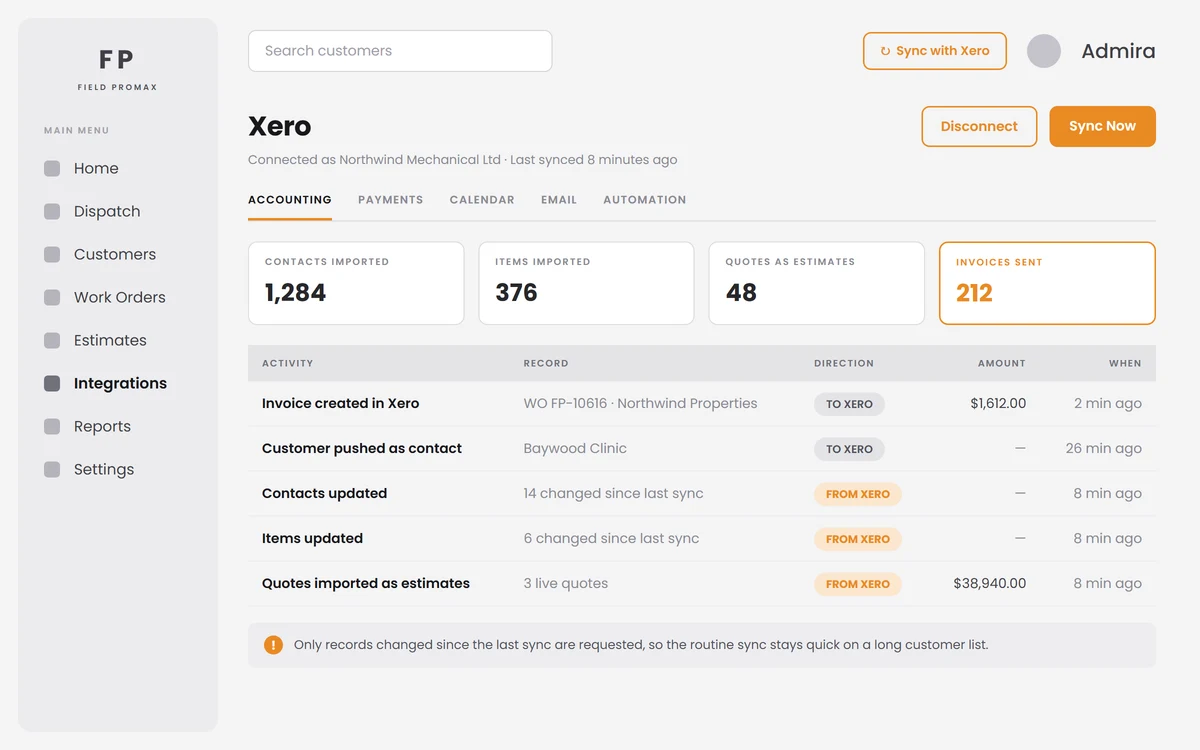
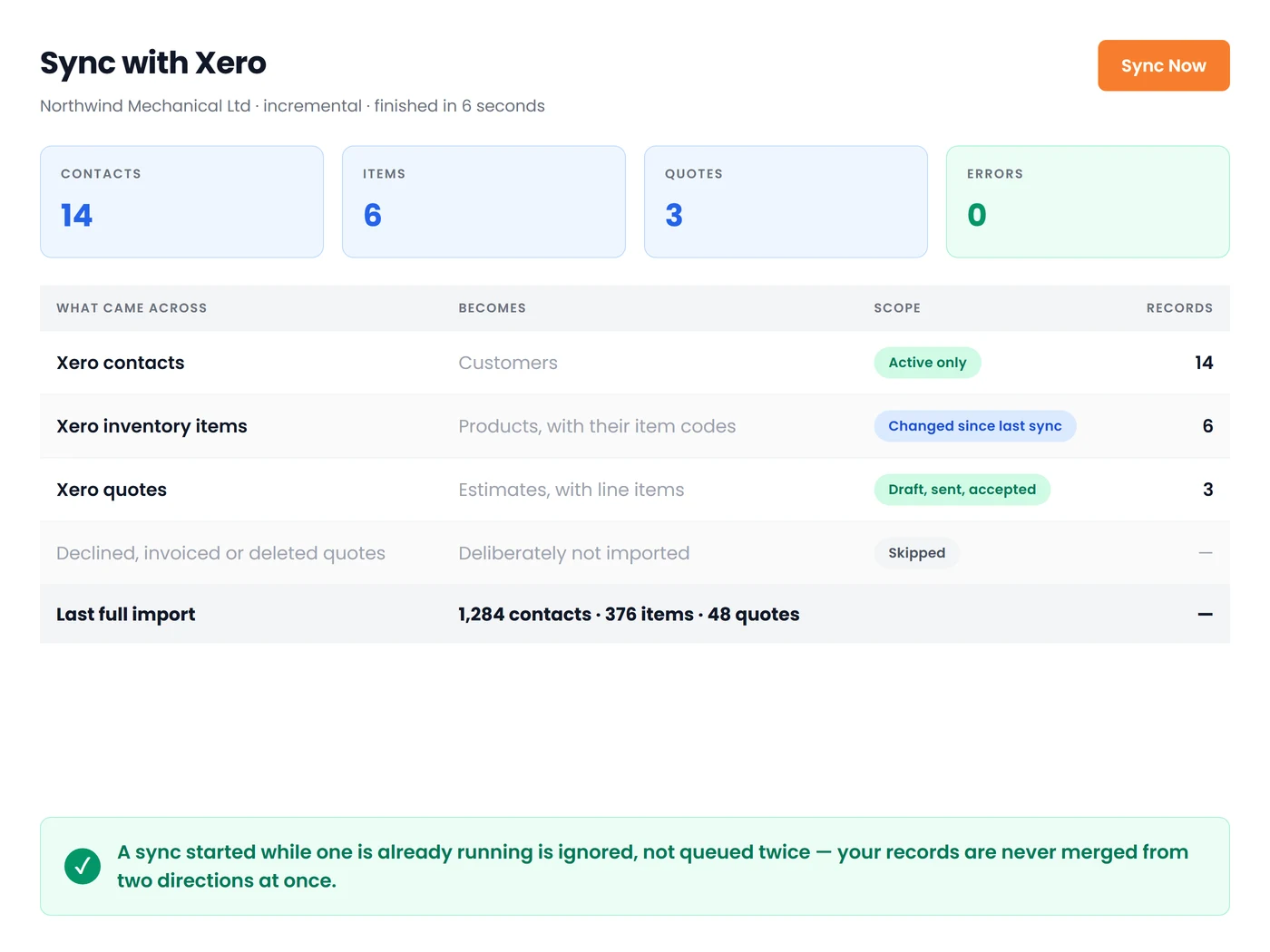
In our Xero integration, the sync imports active Xero inventory items and contacts into Field Promax and imports Xero quotes as estimates. It then runs incrementally, meaning only the information that has changed since the last sync is processed. The details are more important than they may appear. It is important to note that the Xero API allows 60 calls per minute for tenants, plus a daily cap per tenant. The cap becomes particularly important at the end of the month, when invoices, contacts, and payments can all change at the same time. A system that sends everything over again behaves very differently at 4 p.m. on the 30th of each month from one that only sends deltas.
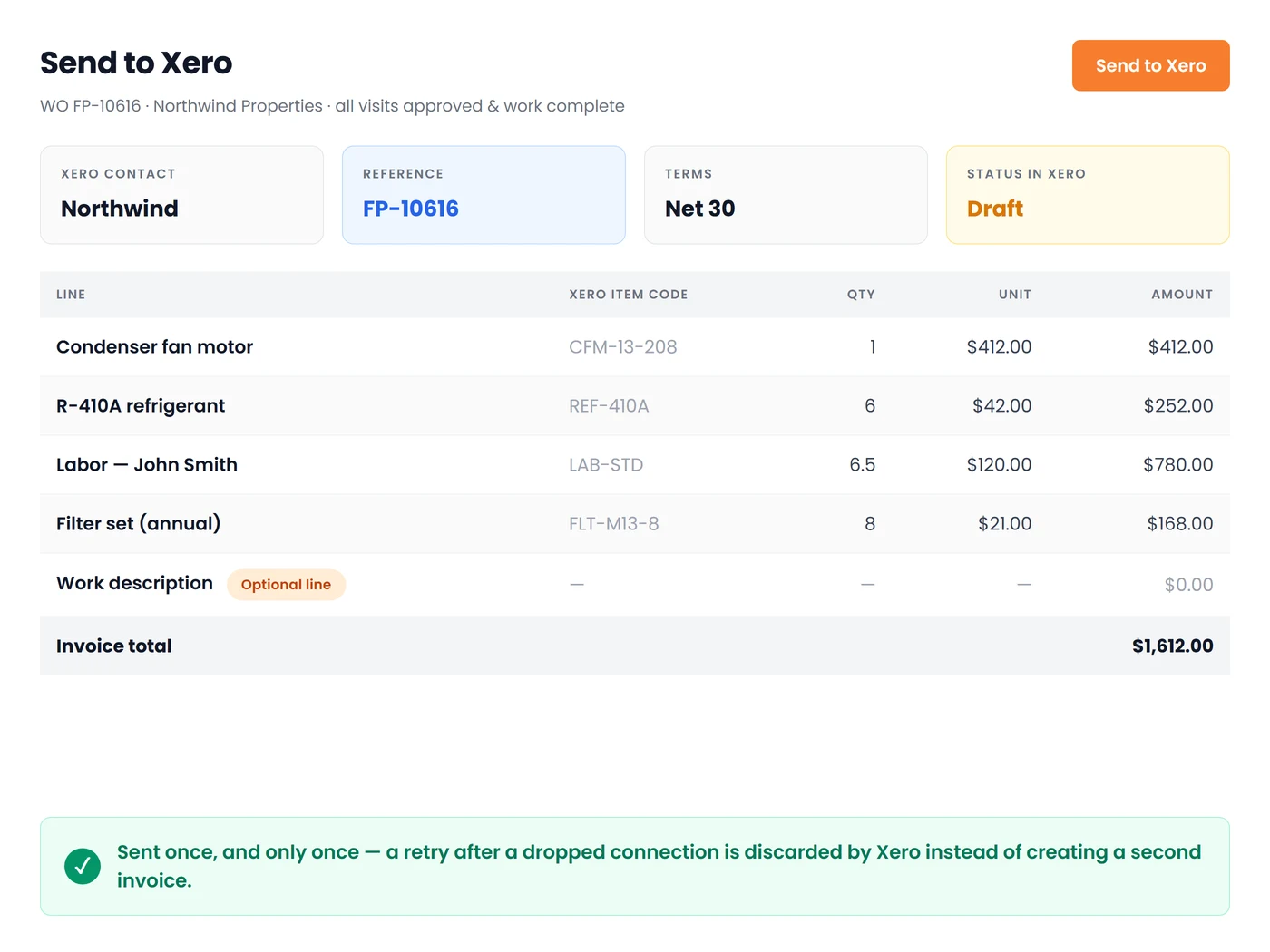
In the reverse direction, the completed work order is transformed into a draft accounts receivable invoice within Xero, with each product line linked to its corresponding Xero item. This also allows for partial billing through a work-complete visit. That last part is what makes progressive billing workable, and it is worth reading alongside our take on when to invoice, before or after the job.
More on Xero for trade businesses
Continue with:
- Xero for Tradies: What It Does Well and Where It Stops — the full picture of where the ledger ends and the job layer starts.
- Xero Projects for Trade Businesses: What It Does, Costs, and Stops — the native step up from tracking categories, and its four hard stops.
- WorkflowMAX Is Gone: Where Xero Trade Businesses Went Next — what replaced the old default job-management answer.
Conclusion
My view after 14 years of these conversations is simple. If two dimensions answer your margin questions and your option lists are stable, keep using tracking categories and stop shopping. Nobody selling you an alternative is going to say that, but it is true for a lot of trade businesses. The moment you need a third dimension, or you are reclassifying transactions at month-end to work out what a job actually made, the ledger has been pushed past its design, and the cost is being paid in admin hours. Move the job costing to where the job data is created, let Xero do what it is genuinely excellent at, and connect the two so the numbers get entered only once. If you want the operational side sorted first, our guide to [L4: job scheduling software] is the right place to start.
Frequently Asked Questions

Founder and CEO
Joy Gomez is an engineer, process automation expert, and the Founder of Field Promax. Known for his technical expertise and commitment to field service innovation, Joy writes about transforming traditional business models into paperless, efficient operations. He is a Lean Six Sigma Black Belt based in Rochester, MN, dedicated to helping field professionals work smarter through better technology.
Reviewed by

Content Creator
Bhargavi Halthore is a content writer at Field Promax, a field service management platform serving trades businesses across the USA and Canada. With over a decade of experience writing for business owners, she brings detailed, ground-level insight to every topic she covers. Her research goes beyond search results - she digs into LinkedIn groups, Facebook communities, and Reddit forums to understand what field service business owners are actually dealing with on the ground. She speaks directly with industry professionals, understands their day-to-day challenges, and translates that into content that is practical and actionable. What you read in her articles reflects real industry patterns, not theory.