Project Management for Small Commercial Construction: G702/G703, Progress Billing, and POs Without the Overhead

Why Project Management Breaks for Contractors Under 25 People
I created Field Promax because I kept seeing the same failing pattern in small commercial construction. A trade contractor that employs between 8 and 25 people gets a build-out or retrofit that's larger than their usual service work. The shop has to equip itself with a project management infrastructure that is more expensive than the margin of the job. They have to come up with a solution: QuickBooks to manage accounting data, a spreadsheet to manage an inventory of values, a Word template to create the G702 summaries, a shared drive for POs, and a group text to be used in the field. The job is finished, the check is cleared, and no one knows within five minutes what the margin was.
In 14 years of having conversations with the owners of mechanical, electrical, plumbing, roofing, and other specialty trade businesses, I've seen the same math unfold repeatedly. The tools designed for $50 million civil GCs are structurally heavy for shops that are running up to 12 live projects with a single PM who also serves as the estimator. The tools designed for service work alone aren't aware of what a schedule of values is. The middle gap is where the margin slowly disappears.
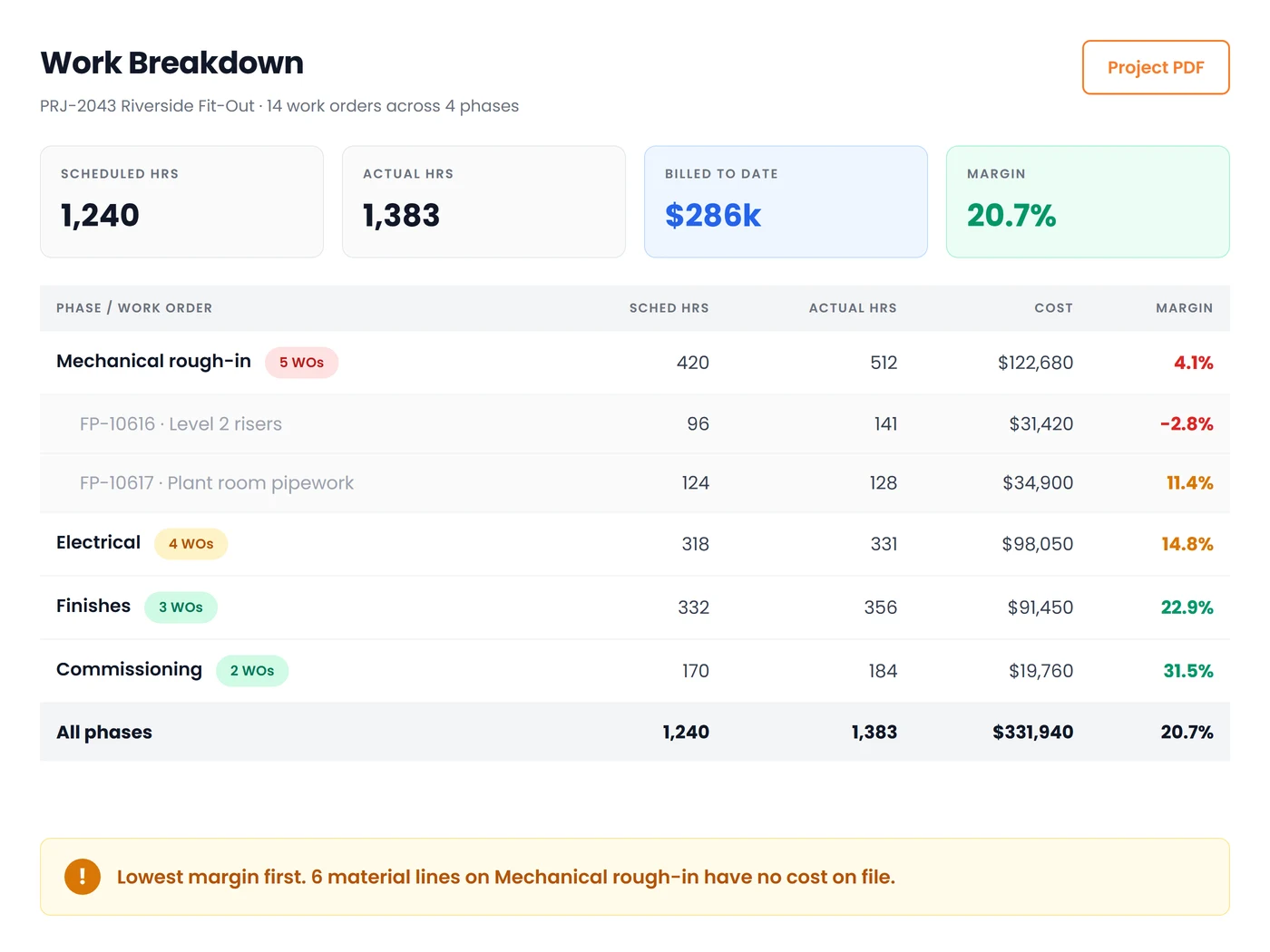
This pillar covers what a small commercial contractor actually needs to run projects: a schedule of values that maps to how you cost the work, purchase orders that reduce budget the day they are raised, job cost sheets that track committed cost rather than only invoiced actuals, AIA G702/G703 pay applications raised from that same structure, retainage and lien waivers handled without a Sunday-night spreadsheet, and change orders that do not get eaten. All of it sized for a shop that cannot afford a controller.
The Schedule of Values Is the Spine of the Whole Project
The sole factor in determining the degree to which a small commercial venture is running smoothly is the way you design the schedule of values on day one. The SOV isn't an invoice document. It's the foundation that all other systems on the project must hang from: cost tracking, POs, subcontractor commitments, retainage release, progress billing, and closing.
The main thing I believe most when working with the contractors we deal with is the following: your structure for your phases and SOV line items must be identical. If your rough-in phase is only one item in your cost report, and three things are on the G703, it will take an evening for each pay app to reconcile them manually. If they're identical, the dispute can be fought only once per job, right at the start, and only if the GC and the owner are willing to discuss line-item granularity.
A starter structure that works for an electrical, mechanical, or plumbing subcontractor in commercial construction is 100 General Conditions, 200 Demo, 300 Material Procurement, 400 Rough-In, 500 Equipment Set, 600 Wiring and Controls, 700 Trim and Devices, 800 Start and Test, and 900 Punch and Closeout. In each of the four cost classes are materials, labor, subcontract, and equipment. Nine SOV lines with four cost buckets, one structure that is identical in the field and in the office, as well as in the application for payment.
Owners on r/ConstructionManagers constantly ask each other how granular an SOV should be and how to cost-load it, because there is no shared convention, and every GC wants it split differently. The best granularity is what is sufficient to ensure that your foreman is able to accurately report the percent complete every pay period and also fine enough so that an overrun of 15% on one phase doesn't get hidden in a phase that is four times the size.
Purchase Orders and Committed Cost: Money You Have Already Spent That Is Not in Your Books
This is the idea that differentiates a true perspective from a lagged one, and is the reason that most small-scale businesses don't have one. Committed cost refers to money that you've promised to spend but that hasn't yet been entered into your accounting system in the form of an invoice. Open POs to suppliers of materials. Subcontractor agreements signed with work still to be done. Field hours are reported, but they have not yet been reported to payroll. Material purchases on site made using the truck account.
The most common arithmetic used to report on the cost of jobs never uses:
Phase budget minus actual costs minus open commitments equals the amount that is remaining.
Make sure it is running on a live phase. The budget for material procurement for a $310,000 electrical construction project is $86,000. Supplier invoices posted to date total $41,000. This leaves $45,000 of runway. Add the remaining open PO for the gear supplier, which is $28,500, and the remaining control subcontract agreement, which is $12,000. Actual remaining: $4,500. The version with no commitments told you that you had 10 times the space you actually had. It then took three weeks for the supplier's invoice to arrive.
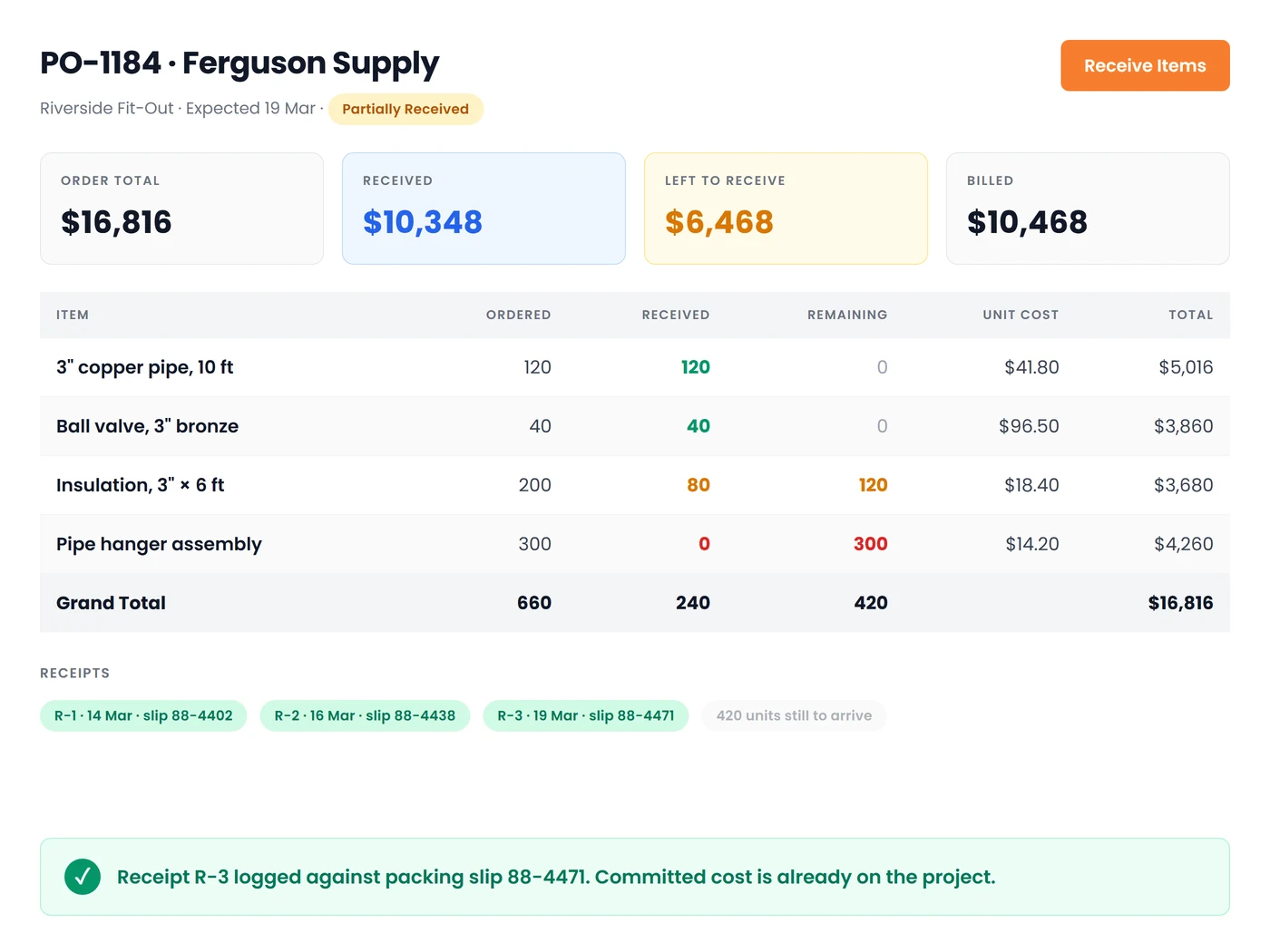
A good PO is one that carries a state beyond just an identifier: draft, sent, partially received, accepted and billed, then paid. Subcontractor assignments work similarly. Once the PO is approved, the budget is fixed. Any view for a project that only accounts for invoices is, in a way, behind due to the length of your supplier billing cycle. For commercial work, this can be between 30 and 45 days.
Procurement research identifies maverick expenditure and PO leakage as accounting for 10% to 20% of savings loss across different sectors. After 14 years of conversations with small shops, a similar amount of spending on materials on an average project is lost through incorrectly coded receipts, purchases made by techs that are never tied to a specific project, or supplier invoices that are posted to the general ledger without a job code. Shops that require each PO to be reissued against the project in the field before the order is made always push the leakage into the single digits because the product is essentially not able to be purchased without a job code attached.
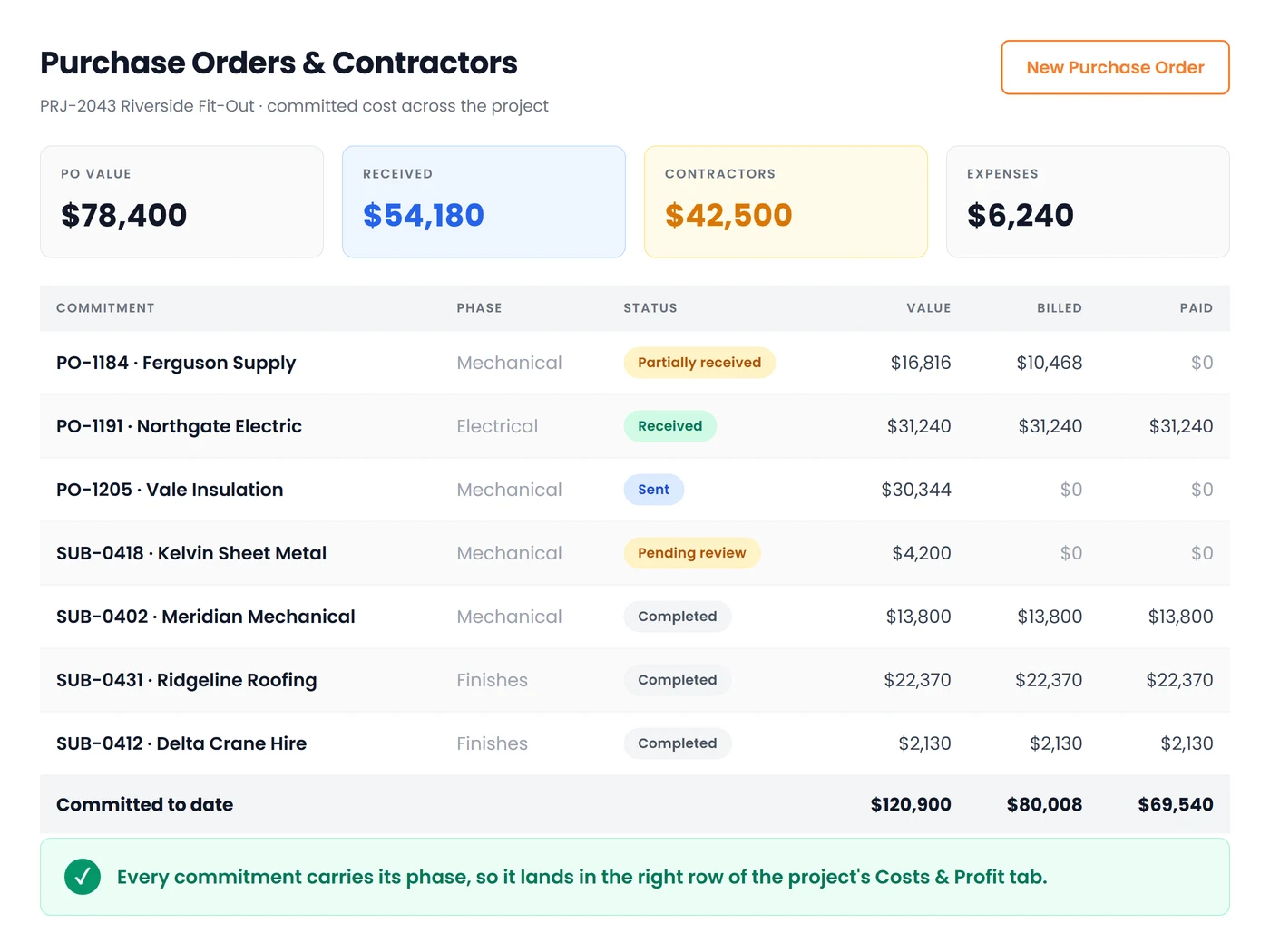
A garage door contractor who is on the QuickBooks App Store described the operational aspect of this and said that last-minute changes, change orders, and customer updates would pass through the cracks of commercial installations and be absorbed as work that was not billed. Making sure everything was traceable back to the original project prevented that particular bleed. The same method that detects changes in a change order will also catch any off-book orders. It's a single habit used to deal with two distinct types of transactions.
Labor at Its Real Cost, Not Its Wage Rate
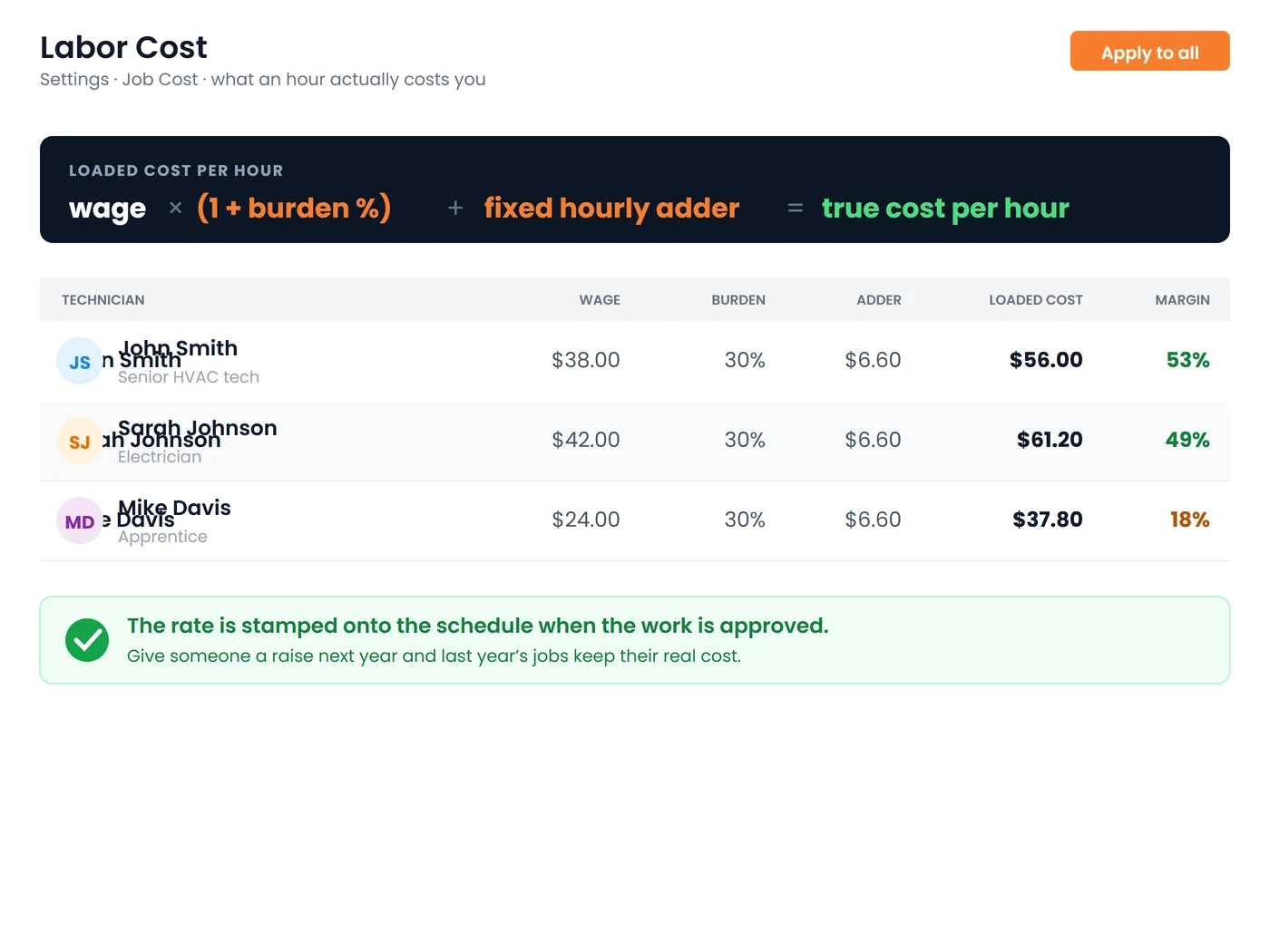
A technician's salary of $32 per hour, because this is the amount on the check, is the most frequent margin error I've seen, and it's never small. The amount that is charged to the project is the wage plus burden, plus an hourly rate fixed for the truck, tools, fuel, phone, and truck.
Burden is the term used to describe employer-paid taxes, as well as workers' compensation, general liability, and fringes. In most commercial states, the burden is between 25% and 40% in addition to the wage rate. The truck and tool adder accounts for the vehicle and tools that do not create an invoice. This is similar to the way that construction cost systems work for owned equipment. Charge an hourly fee that is similar to the amount that the market would charge to lease it to you, since no vendor will ever send you the bill for your personal vehicle.
When we developed Field Promax's view of project costs, I demanded that the cost of loaded labor be the default value and that the unburdened wage be the only exception. If a $32/hour technician costs you $47.80 loaded and you price the project with $32, you didn't exceed the cost of labor. The math was not in your favor.
One watch-out from the field: unbillable travel and paperwork time. If a two-hour project visit carries 70 minutes of drive and 20 minutes of write-up, and only the two hours hit the job, the phase looks efficient and the week does not. Digital job cards and task tracking that capture everything between clock-in and clock-out are how this stops being a leak.
The full burden calculation, the adder math, and how to turn all of it into a defensible sell rate deserve more room than a pillar page can give them. Our guide to pricing HVAC jobs the profitable way walks through the mechanics, and the logic applies to any trade running burdened labor into a commercial phase budget.
AIA G702/G703 Progress Billing Without the Sunday Night Spreadsheet
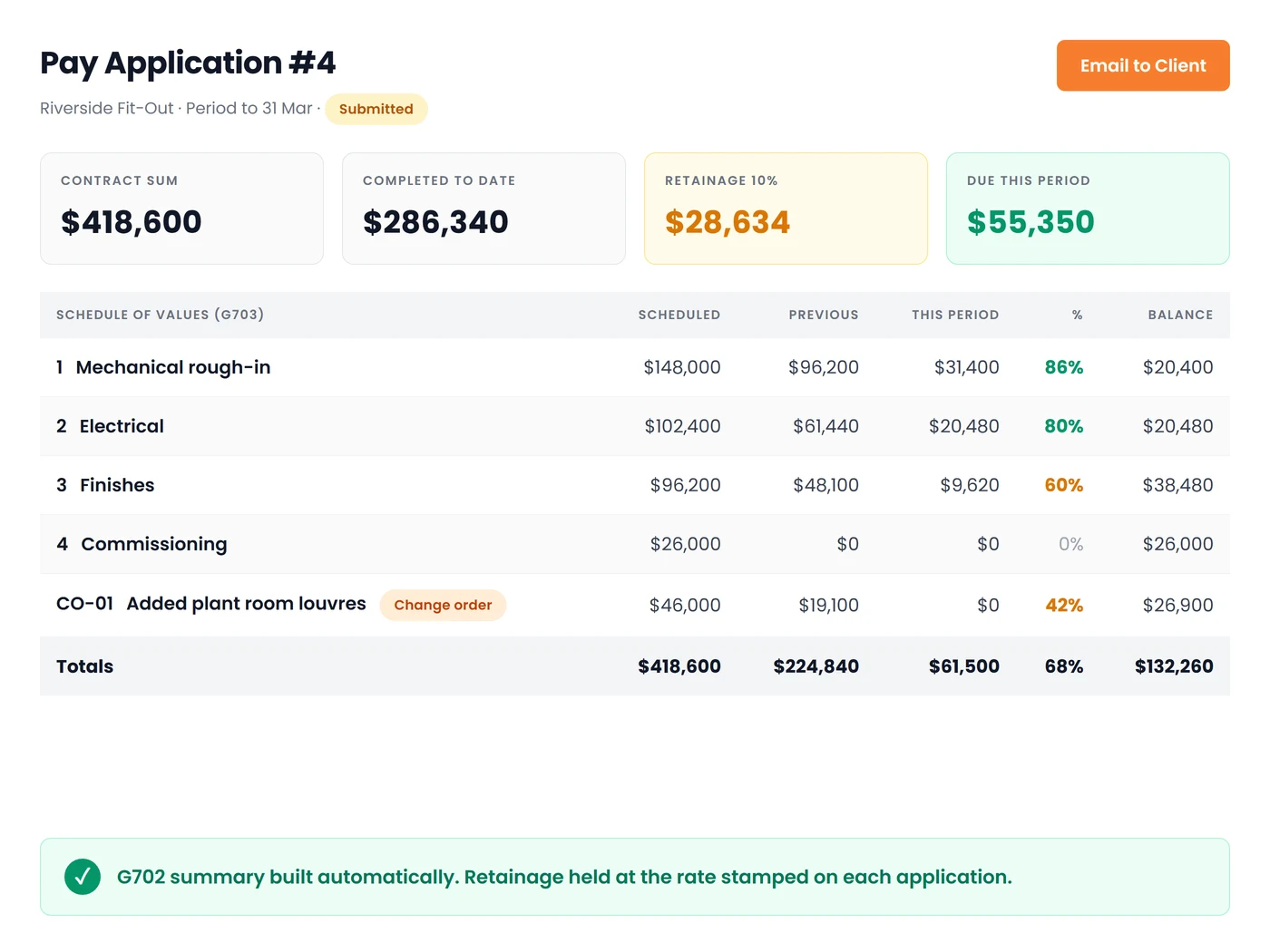
AIA G702 summarizes the certificate. The G703 sheet is the follow-up, which includes every SOV line, the work that was completed prior to this one, work done during the period, as well as the materials that are currently stored, their percent completion, retainage, and remaining balance. Every GC working on commercial projects will require pay applications in this format. Should you fail to comply, they will ask for a correction and add thirty days or more to the payment cycle, which is already lengthy.
Contractors on r/Construction ask openly how others prepare G702 and G703 applications without paid software. The answer is always spreadsheets and Word templates rebuilt every period, with the continuation sheet math and the summary reconciled by hand. It works right up until it does not. From 14 years of customer conversations, roughly 14% of manually-prepared G702/G703 pay applications in a typical small commercial shop come back for arithmetic or formatting errors: totals that do not tie, retainage miscalculations, missed change orders, or the continuation sheet subtotals disagreeing with the summary. Every rejection tacks another 30-plus days onto a cycle that already averages 83 days DSO for commercial subcontractors per CFMA and specialty-contractor filings, well above the 60-day all-industry benchmark.
The solution is not "try harder on the spreadsheet." The solution is to structure your G703 using the identical set of values that you used to estimate the cost of the task. If you report the percent complete for each phase of the field work and every stage includes an SOV line, it is possible for the G703 continuation sheet to be generated by itself, and the G702 summary will be reconciled throughout construction rather than by luck.
A customer from the electrical division described this in a post on our listings, describing the G702/G703 advance billing feature as an invaluable tool for larger commercial jobs, since they can use AIA-formatted payment applications without having to rebuild them each month from scratch. A plumbing professional also stated that the percent-complete invoicing feature was something that had altered the way they handle cash flow in lengthy rough-in projects, as billing on the fly replaced waiting until the end of the month and then having to chase a GC throughout the month.
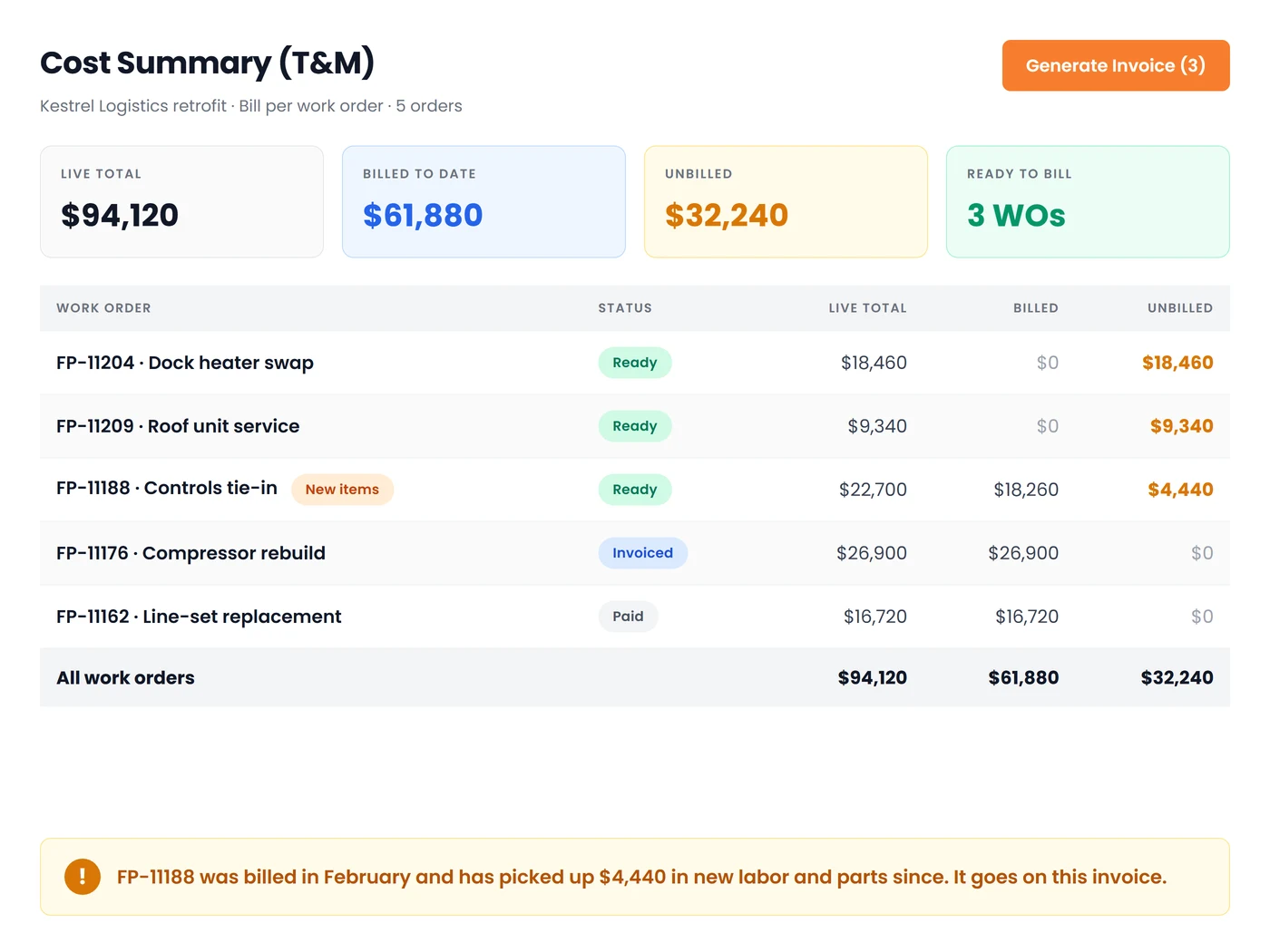
For T&M work on the same commercial project, per-work-order billing is a different mechanic that also needs to be automatic. Every work order carries its own unbilled balance, and when new labor or parts are added after a first invoice, that work order flags itself for a supplemental bill rather than getting quietly missed. The timing side of T&M versus fixed-price billing gets its own deeper treatment in our post on when to send invoices to customers, before or after the job.
Retainage, Lien Waivers, and the Cash Flow Nobody Warned You About
Retainage generates more heat on Reddit threads than any other billing topic, and the recurring detail is telling. Owners describe GCs holding retainage incorrectly, clients continuing to hold past practical completion, and subcontractors chasing amounts months overdue. What comes up consistently is that nobody has a single place showing what is currently held on each project and when it should release.
A typical commercial contract with 10% retainage based on a subcontract worth $500,000 can represent $50,000 in working capital tied up for six months following substantial completion. If you're operating three of them concurrently, that's the equivalent of $150,000 of your own money helping fund other people's work. If the margins for commercial work typically run between 10% and 20%, retainage is often enough to equal an entire quarter's earnings.
The fix for operational issues has three parts. All three require the same place in your billing.
- Track retainage per project and per SOV line, not just as a lump on the invoice. If a phase is nearing completion, you must be able to bill the retainage release for that particular phase without needing to recreate the payment application it was originally part of.
- Track lien waivers as an artifact of each pay app. Conditional upon progress payment, unconditional upon progress payment, final conditional, unconditional upon final. Every waiver that is signed should be linked to the application that it is a part of, and the pay application is not supposed to close until the right waiver has been filed. This is what makes a retainage release application valid six months later.
- Set a calendar reminder per project for retainage release. Do not think, "we should chase that," as a general idea. Create a date-based task that is linked to substantial completion plus the contract's release time.
A locksmith business that we work with talked about the first time they signed a multi-site property management contract. According to them, the AIA document handling allowed them to appear like a larger business and helped keep the billing aspect separated across different locations. This is the result of presenting waivers and retainage as structured data instead of as PDFs inside emails. The shop remains trustworthy in the eyes of its property management company, and the subcontractor is paid according to the date that the contract specifically specifies.
Change Orders That Don't Get Eaten
Reddit and Quora threads about change orders cover the whole failure surface, including the time to file, what to do when a change request is received months after the work is completed, clients refusing to pay for unexpected circumstances, and subs losing change orders before work begins. The most common thread is that changes in scope are faster than the documents.
A principle I advocate for with each commercial contractor we deal with is that no work beyond the scope of work is allowed to begin until an approved change order has been signed. The sentence is easy to write but difficult to execute. It requires a field-based app that allows the foreman to change the scope of his task immediately, as well as a PM who is able to estimate it on the same day, and a document that is visible to the client and can be signed and dated by either the GC or owner electronically without a meeting. If any of these three take a week, then the change order expires in the void and the crew is able to build the work in any case.
Once the order is signed, the change order has to be integrated into the schedule of values as a separate line, not just by enacting an increase on the existing line. The reason for this is the possibility of comparability. If you hide the cost of a change in the initial rough-in phase, the rough-in will look over budget for a long time, and then the next year's estimates are compared against a distorted number. Keep them apart, and both are accessible at closing.
The upstream fix is scope language. Our post on estimate disclaimers covers the specific clauses that keep unforeseen conditions from becoming your problem. On small commercial work where the site conditions are half-known at bid time, disclaimer language is the difference between a change order the GC will sign and a change order the GC will argue about.
Cost to Complete, WIP, and Catching Overbilling Before It Hurts You
Reporting on the progress of work for a small commercial venture requires five inputs. You already have four if your phases are clear:
- Contract price, including approved change orders
- Total cost estimate
- Costs to date, not including committed costs
- Billings to date, after excluding retainage
- Estimated cost to completion
If a project is 50% complete based on cost but only 30% billed, that means you're financing 20% through your own bank account. On an estimate of $400K, that's $80K of your working capital sitting in someone else's building. Turn the ratio around and you've overbilled, meaning you've billed before you've completed the work. This feels like cash today but creates an unplanned hole in the future, since you'll be out of billable work before you're out of costs.
The fifth input is the one that no one gives a contractor who isn't a controller: what to do. There are three reliable sources for the phase percentage: the percentage reported by the field supervisor, open commitments that have not yet been compared with the other phases, and the labor burn rate over the last two weeks compared with the remaining scheduled hours. Choose the most expensive of the three. Optimism in a cost-to-complete number is costly.
This is the math that causes owners to consider this a serious matter. For a small commercial job, a 10% labor overrun on a labor budget of $120K silently wipes out around 25% of the project's gross margin, transforming an initial margin of $45K into $33K before anyone is aware. Based on 14 years of customer conversations, there are shops that move from spreadsheets for end-of-month reconciliation to live labor and PO monitoring in relation to project progress. They are able to identify the fade within the first week instead of at closeout. This is the main difference between changing the scope of your project or the mix of crew members while you still can and simply absorbing the losses.
Cash Flow, DSO, and Why Front-End Discipline Is the Real Lever
Industry data from CFMA, as well as specialty-contractor 10-K filings, puts commercial construction subcontractors' DSO at 83 days per year, far above the 60-day benchmark for all industries. Based on 14 years of customer discussions with small commercial shop owners, they always tell me that 83 days isn't an unreasonable number to aim for. It's the reality of retainage, multi-tier app approvals, and the GC's payment cycle with the shop owner.
What does that mean in practice? If you can improve your billing discipline by seven consecutive days, you've increased your working capital by the amount of your average daily receivables. For a $2 million annual small-sized commercial business, seven days of DSO equals roughly $38K sitting in your bank instead of sitting on a desk waiting to be signed.
The front-end levers are a part of this pillar that already covers:
- A clean G702/G703 that is reconciled automatically and doesn't report math errors
- Retainage is tracked per phase, so release requests can be justified on the first day within the release timeframe
- Lien waivers are filed through the pay app, rather than being constructed at the time of closing
- Change orders must be signed before work begins and then transferred to the SOV with the new lines
- POs are issued before the item is purchased and then closed upon receipt, ensuring that supplier invoices are reconciled in a matter of hours rather than weeks
Each is a tedious operational routine. Together, they reduce DSO more than factoring services, retention loans, and lines of credit. These financing choices are costly. The operating habits are free apart from discipline.
An HVAC contractor in our review listings laid out the coordination aspect clearly, stating that subs working on commercial retrofits were difficult to coordinate, and that each technician and sub is aware of the work order in real time, with dispatchers having insight into who is working on what. The billing benefit of that visibility is that the percentage of completion for each phase is real and not estimated on a Friday afternoon by someone who was not on site.
The Operating Rhythm That Makes All of This Hold
Over the course of about 15 to 20 small, multi-trade commercial shops where we have observed attempts to establish project management discipline for the first time, the failure pattern is constant. The owner reads an excellent article, purchases software that is set up to create an afternoon standing review block, and within one month, the block has fallen apart because Friday afternoons keep getting consumed by end-of-week emergency dispatches and parts pickups. The tool becomes another version of the spreadsheet, and nobody updates it.
The companies that make it stick have three common practices. First, they shift the review block from 7 a.m. to Monday morning, before the day's huddle, because dispatch isn't awake yet and the meeting can't compete with an emergency situation. Second, they view recording as a daily task in the field, not a weekly reconfiguration from the office. Hours for a work order, including phase items consumed, are recorded before leaving the premises, and purchases made in the field are documented and then attached to the PO immediately. Third, if the senior tech pushes back when reviewing the work order with the group, and there's always a reason for that, the review is conducted one-on-one instead of being put on hold. It's slower, but the process is able to endure.
The cadence that works when the block is protected:
- Daily: Hours are recorded against a work order with a specific phase, Consumable materials are recorded, purchase orders are created from field photos and attached, and POs are reissued before materials are ordered.
- Weekly: Spend 20 minutes for each live project reviewing committed versus remaining costs by PM, phase, and owner within the same timeframe.
- Each pay app: Complete a phase-percent reconciliation against the G703 line, confirm and verify retainage, incorporate approved change orders into the SOV before submission, and include the lien waiver.
- Monthly: Review the WIP report, flag the project's overbilling and underbilling, and update cost to complete using the least optimistic of the three sources.
Our cluster post on job costing for small commercial contractors covers the weekly and pay-app cadences in more mechanical detail, including the specific reports to pull. For the daily field-capture side, the guide to job cards and task management is the practical layer. And for the broader cost-management lens, the piece on managing field service costs covers the operational habits that carry from service work into project work.
What to Require From Any Project Management Tool Before You Buy
Do not use feature grids. These are disqualifiers, and each one by itself is enough to make you walk out of a demo.
- Does it capture committed costs, not just invoiced costs? If open POs or subcontractor agreements don't decrease the budget when they are raised, the figures are always behind.
- Does it cost labor at burdened rates automatically, with the truck and tool adder without requiring you to enter an amount per ticket?
- Does the phase structure carry through to the pay application, so that the G703 lines and cost reports are one and the same thing, instead of two lists that have to be reconciled?
- Does the field app work offline, and does the ticket retain its phase when it syncs?
- Does it raise G702/G703 pay apps from the schedule of values, or is it simply exporting CSV files that you can paste into Word? Does it provide a Word template?
- Does it track retainage per phase and per pay app? Does it keep lien waivers as an artifact of every application?
- Does it push cleanly to QuickBooks or your accounting system without re-keying, ensuring that the ledger remains in the accounting system while the project system remains in charge of job costs?
- Does it withhold margin when cost data is incomplete, or does it simply print a percentage?
In terms of pricing and plans, most vendors include project-level costing as well as AIA billing above their basic price. Consider the features included in the tier you can afford, not the highest tier on the list.
A construction client described the practical before-and-after in our review listing and said that commercial, multi-phase construction projects once required managing spreadsheets and paper logs, while PMs now can monitor every project and assign crews from one dashboard, taking the daily administrative work off their plate. This is what "good enough" looks like in a business with fewer than 25 employees. The infrastructure disappears into the operator's day, and the operator stops doing arithmetic on Sunday nights.
Deep dives in this guide
- AIA Pay Applications and the Schedule of Values Explained - the G702/G703/SOV triangle, every G703 column and G702 line, the frontloading trap, and why 14% of manual pay apps come back
- Retainage in Construction: How Much Is Held and How to Get It Back - how much is actually withheld, where retainage sits on the pay application, state-by-state rules, and a seven-step release playbook
Conclusion
Project management in small commercial jobs is not something you can install once and mark off. It's a system that you create before your first ticket is completed and a set of practices you follow each Monday morning, when dispatch tries to eat into your review blocks. Phases that align with your schedule of values. Each work order has its phase. Purchase orders are raised before the material is purchased, committing the budget when they're raised. Labor costs are based on the cost you'll actually have to pay to have someone on the job site. G702 and G703 pay apps can automatically reconcile because they are reading from the same set of data used as part of the expense report. Retention is tracked for each phase, which means release requests can be supported from the first day of the release window. Change orders must be signed before the work gets underway. Complete all that, and when an overrun appears in week one, you have a job to do, and your DSO shrinks by at least a week without a source of external financing. You don't do it, and you're notified at closeout, which is another way of saying you don't find out until it's too late. If your team is reconciling costs for each phase or building the G703 spreadsheet late on Sunday night, this is the one thing to do first. The rest of the pillar is tied to that routine.
Frequently Asked Questions

Founder and CEO
Joy Gomez is an engineer, process automation expert, and the Founder of Field Promax. Known for his technical expertise and commitment to field service innovation, Joy writes about transforming traditional business models into paperless, efficient operations. He is a Lean Six Sigma Black Belt based in Rochester, MN, dedicated to helping field professionals work smarter through better technology.
Reviewed by

Content Creator
Bhargavi Halthore is a content writer at Field Promax, a field service management platform serving trades businesses across the USA and Canada. With over a decade of experience writing for business owners, she brings detailed, ground-level insight to every topic she covers. Her research goes beyond search results - she digs into LinkedIn groups, Facebook communities, and Reddit forums to understand what field service business owners are actually dealing with on the ground. She speaks directly with industry professionals, understands their day-to-day challenges, and translates that into content that is practical and actionable. What you read in her articles reflects real industry patterns, not theory.