Psychrometric Calculator Overview
Psychrometric Calculator for HVAC Experts
What Is a Psychrometric Calculator?
If HVAC work had a magic trick, the psychrometric calculator would be it. No wands, no smoke, just pure science that instantly turns a couple of air readings into every moisture-related fact you could need.
At its core, this tool takes two numbers you already have, such as dry-bulb temperature and relative humidity, and works out the rest. Dew point, wet-bulb temperature, enthalpy, humidity ratio, vapor pressure… the whole weather report for your ductwork. Traditionally, you would find these by wrestling with a psychrometric chart (that spaghetti diagram of curves and lines) or flipping through a psychrometric table. With a calculator, you just enter your data and in seconds you have results that match ASHRAE’s gold-standard formulas.
The beauty here is speed and accuracy. The online psychrometric calculator does not make guesses. It's doing the same math that older charts showed us, but more efficiently and without human error. It's like moving from paper maps to GPS. Yes, you can look at the map, but letting the software do the heavy lifting allows you to concentrate on solving the humidity issue.
The psychrometric calculator is the fastest way to go from "I have a few measurements" to "I know exactly what's going on in the air," and that is how you make better, more efficient HVAC decisions.
Psychrometric Calculator
Tip: Wet‑bulb must be ≤ dry‑bulb. Dew point must be ≤ dry‑bulb. RH must be 1–100%. If you know station pressure, set “Manual”.
Why Psychrometric Calculators Matter
The ability to read a psychrometric chart is a skill; however, it's like solving a puzzle in which all the pieces are straight lines and curves that don't want to remain still. It works well, but it requires patience, time, and a keen eye. A psychrometric calculator comes in to help by transforming what was once a lengthy procedure into minutes.
Here's why it is winning in real life:
- Speed and convenience
It eliminates the drawing, dragging rulers, and cross-referencing. The calculator provides answers in a flash regardless of whether you're on your laptop at work or on the phone in the field. - Accuracy and precision
Human eyes make mistakes. Curves can be misread, lines can be confused, and small errors can turn into big HVAC headaches. A psychrometric calculator uses exact equations based on ASHRAE-approved formulas to give you reliable numbers every time. - Multiple unit systems
Change between imperial and metric without taking out a separate conversion chart. In one moment, you're with °F and pounds of water per pound of dry air. The next moment, you're with °C and grams per kilogram. - Every key property at once
Enter dry-bulb temperature and one second input (relative humidity, wet-bulb, or dew point) and the tool returns humidity ratio, dew point, wet-bulb, enthalpy, and specific volume together, the full state point in one step. - ASHRAE-based accuracy
Results use standard ASHRAE/Magnus formulas, so the numbers match the psychrometric references techs rely on, accurate enough to size dehumidifiers, check condensation risk, and document field readings. - Better field decisions
Whether you need the dew point to prevent condensation or the humidity ratio to size a dehumidifier, the calculator will give you accurate solutions immediately.
A psychrometric calculator is like having your most precise and efficient coworker in your pocket. It does the heavy math, so you can focus on fixing problems and delivering results your clients will notice.
Psychrometric Calculator vs. Manual Chart
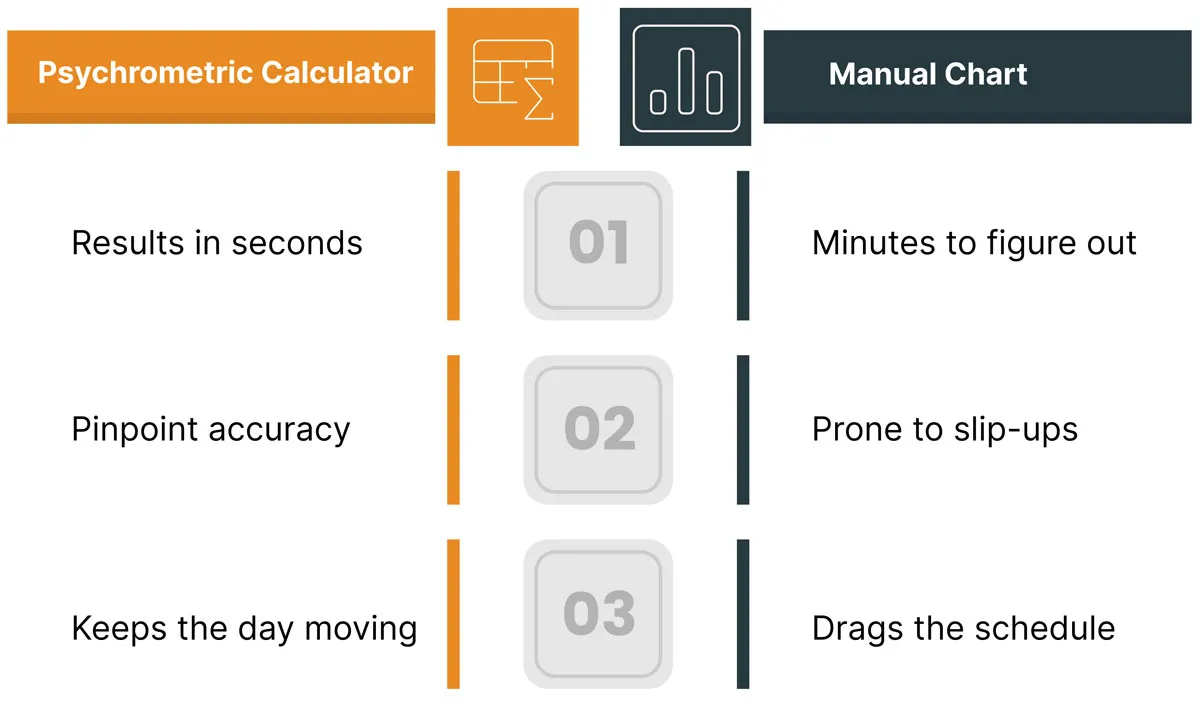
The calculator turns readings into decisions instantly.
From Psychrometric Tables to Psychrometric Calculator Apps
Not long ago, getting air property data meant a lot more effort.
- Psychrometric tables: Static lists that made you flip pages and do math to fill in missing values.
- Psychrometric charts: Great visuals once you mastered them, but plotting lines in the field slowed you down.
- Slide rule calculators: Clever for their time, now more of a museum piece.
Fast forward to today, and you can pull out your phone, enter two numbers, and have every detail in seconds. Web and mobile online psychrometric calculators use ASHRAE-based formulas to deliver instant, accurate results without the steep learning curve.
Since saving you time is the goal, we have built a fully functional calculator right here on this page. No downloads, no logins, just enter your numbers and get to work.
The old tools taught us science. The new tool puts it in your hands instantly.
Best Practices for Using a Psychrometric Calculator
Get the most from your psychrometric calculator with these quick tips:
- Check your inputs - Use the right units and accurate readings.
- Set altitude or pressure - Adjust for your location when the tool allows it.
- Stay realistic - Avoid extreme or impossible values.
- Know the basics - Keep a chart handy as a backup.
- Use real measurements - Calibrated instruments beat guesses.
- Try the advanced modes - Switch between relative humidity, wet-bulb, and dew point as your second input.
- Confirm your units - Toggle SI or IP before you read the results.
The calculator gives you the numbers, but your expertise turns them into smart HVAC decisions.
When and Where to Use a Psychrometric Calculator
A psychrometric calculator is useful any time air temperature and moisture matter. Keep it handy for:
- Designing systems - Get exact supply air conditions, coil loads, or humidifier sizing.
- Troubleshooting - Check if the equipment is removing or adding the right amount of moisture.
- Saving energy - Compare indoor and outdoor enthalpy before switching to economizer mode.
- Drying jobs - Plan dehumidifier use based on grains per pound.
- Training and explaining - Show techs or clients how air changes in real time.
- Compliance - Turn sensor readings into data for reports and certifications.
If moisture or heat transfer is part of the job, this tool helps you nail the numbers fast.
Worked Example
Say you take a reading indoors: dry-bulb temperature of 25°C and 50% relative humidity, at sea level (auto pressure). Set the units to SI, enter 25 in Dry-bulb Temperature, choose Relative Humidity as the second input, and enter 50. Press Calculate and the psychrometric calculator returns:
- Dew point: 13.9°C
- Wet-bulb temperature: 18.0°C
- Humidity ratio: 0.00986 kg/kg dry air (about 69.0 grains/lb)
- Enthalpy: 50.3 kJ/kg dry air
- Specific volume: 0.8581 m³/kg dry air
That dew point of 13.9°C tells you condensation will form on any surface at or below that temperature, which is exactly the kind of number you need before you commit to a coil temperature or dehumidifier setting.
Final Takeaway
A psychrometric chart calculator is more than just a handy gadget. Used right, it’s your shortcut to faster HVAC diagnostics, precise system design, and happier clients. Pair it with accurate measurements, keep it updated, and it will pay you back in saved time and fewer callbacks. The math is done; you just have to turn the numbers into action.
From load calc to a scheduled, invoiced job.
Field Promax helps HVAC contractors turn field readings into scheduled, dispatched, and invoiced jobs, all from one platform. Trusted by 100,000+ contractors across the USA and Canada.
Book my free demoFree 30-minute demo.