Can You Recommend Some Effective Field Service Software? (Guide + Complete Comparison)
.webp)
Running a field service business takes energy, time, and constant attention. You manage calls, jobs, technicians, customers, and invoices, often with minimal margin for error. When everything happens on paper or across many disconnected apps, days feel messy and stressful.
This is why more field service businesses now use field service scheduling software as part of modern field service management software for small businesses. The global FSM market is projected to grow from USD 5.12 billion in 2025 to USD 8.87 billion by 2029, showing a strong CAGR, a clear sign that more companies are rapidly shifting to digital field service tools.
This guide gives you a clear, easy-to-read walkthrough of:
-
What a field service scheduler is
-
How it works and what problems it solves
-
The best field service management software options by team size
-
Comparison tables for features, pricing, and use cases
-
A deep look at Field Promax as an all-in-one field management app
-
A simple checklist to choose, implement, and get ROI quickly
You will see tools used by small teams and top field service companies, including Field Promax, Jobber, Workiz, ServiceTitan, ServiceMax, and NetSuite field service management modules.
What Is a Field Service Scheduler?
A field service scheduler is the core part of your field service business software that plans and tracks all jobs across your team.
Instead of scattered notes, whiteboards, and spreadsheets, it gives you one live view of who is doing what, where, and when.
In most modern solutions, the scheduler lives within a broader small-business field service software platform that also handles quotes, invoices, customer history, and reporting. Field service management tools automate scheduling, dispatching, and technician updates to improve efficiency and customer service. When owners look for the best field service management software for small businesses, they are really choosing how they want scheduling and dispatch to run every single day.
1. How Scheduling Software Works?
Most field service scheduling software follows a simple, repeatable workflow:
-
A customer calls, messages, or fills out a booking form.
-
The system creates a work order with customer data, location, and service details.
-
You see available technicians on a calendar or map for field service scheduling.
-
You assign the job using drag-and-drop or an Automatic scheduler.
-
The job appears on the technician’s mobile field management app with clear instructions.
-
The technician follows the route, completes the work, adds photos and notes, and updates the status.
-
The office issues an invoice for the completed job and collects payment.
Because everything is in one field service software for small businesses, updates are in real time.
The office, field team, and sometimes the customer see the same status without extra calls or manual spreadsheets.
This is one of the key benefits of field service management software: less manual work, fewer mistakes, and a more predictable day.
2. Key Problems It Solves (Overbookings, Routing, Delays, Miscommunication)
A good scheduler inside your field service management software for small businesses helps fix everyday pain points:
- Overbookings and double-booking
Live calendars show which time slots and technicians are free, so you avoid clashes.
- Poor routing and wasted travel time
Smart routing reduces long drives and fuel waste and lets technicians do more jobs per day.
- Delays and late arrivals
If a job runs long, you can move other visits with a few clicks and send updates to customers.
- Miscommunication between the office and the field
Job notes, photos, and checklists stay inside the field management app, so the office does not need to repeat instructions.
- Lost job details and missing paperwork
Work orders, signatures, and invoices remain safely in your field service business software instead of being scattered across paper or WhatsApp chats.
These are some of the most practical benefits of field service management software.
They help smaller field service businesses achieve the level of structure typically found in top field service companies.
Can You Recommend Some Effective Field Service Scheduling Software?
Several proven tools make field service scheduling easier for small, mid-size, and large teams.
The right field service management software for a small business depends on:
-
How many jobs do you handle per day
-
How many technicians do you have
-
How complex your jobs and assets are
-
What level of reporting and automation do you need?
For most owners, the goal is not just to buy the biggest brand.
The real goal is to choose small business field service software that:
-
Matches your existing workflow
-
It is simple enough for the team to adopt
-
Still gives room to grow features later.
Popular choices include Field Promax, Jobber, Workiz, ServiceTitan, FieldEdge, ServiceFusion, ServiceMax, BuildOps, Zoho FSM, and NetSuite field service management modules.
Most of these offer a free trial of field service management software, and some even provide field service management software free starter options, so you can test them with real jobs before paying.
What Are the Best Tools for Field Service Schedule Management?
Some tools focus on small teams. Others are built for complex assets and global operations. Here is a quick guide.
Quick Recommendations by Business Type
For small businesses (1 to 10 technicians)
-
Field Promax - all-in-one field service software for small businesses with scheduling, dispatch, invoicing, and QuickBooks sync.
-
Jobber - simple home-service tool for fast setup and basic automation.
-
mHelpDesk - entry-level small business field service software for simple work orders and basic scheduling.
These tools work well if you are just leaving spreadsheets and want the best field service management software for small businesses without a steep learning curve.
For mid-size teams (10 to 50 technicians)
-
Field Promax - strong choice for growing field service businesses that want Automatic scheduling, clear mobile workflows, and robust reporting.
-
ServiceFusion - balanced feature set at a fair price for growing teams.
-
Workiz - ideal for tech-friendly teams that want call tracking, integrations, and a powerful field management app.
These are good when you need more control than basic field service business software offers, but do not want the full enterprise complexity.
For large and enterprise operations (50+ technicians)
-
ServiceTitan - powerful automation, call centre tools, and deep reporting, often used by top field service companies.
-
ServiceMax - cloud-based, asset-centric platform built for large equipment and multi-site operations.
-
NetSuite field service management - best when you already run your finances and ERP on NetSuite.
These systems can be the best field service software for complex organizations, but small teams often find them too heavy.
.svg)
Field Service Scheduler Comparison Table
Feature Comparison
| Tool | Best For | Key Scheduling Features | Mobile Field Management |
|---|---|---|---|
| Field Promax | Small and mid-size service teams | AI scheduling, drag and drop, route planning | Full field management app |
| Jobber | Very small home-service businesses | Simple calendar, basic job assignment | Mobile app for jobs and invoices |
| Workiz | Tech-savvy, fast-response teams | Schedule board, call tracking, job prioritisation | Strong mobile app with payments |
| ServiceTitan | Large residential and commercial teams | Capacity planning, advanced dispatch rules | Advanced mobile workflows |
| ServiceMax | Asset-heavy enterprises | Complex field service scheduling, asset-based planning | Robust enterprise mobile tools |
| NetSuite FSM | NetSuite ERP users | Drag-and-drop scheduler, integrated resource planning | Mobile access linked to ERP |
| ServiceFusion | Growing mid-size operations | Live calendar, status-based scheduling | Technician app with job checklists |
These tools all help automate scheduling, dispatch, and communication, which are core benefits of field service management software.
Pricing Comparison
Exact prices change often, but most field service management software for small businesses follows similar patterns.
Many of these tools also provide a free field service management software trial so you can test before committing.
| Tool | Pricing Style | Typical Fit |
|---|---|---|
| Field Promax | Per technician per month | Small and mid-size teams |
| Jobber | Tiered per-user plans | Very small and growing businesses |
| Workiz | Per user with add-on options | Service teams that need call tools |
| ServiceTitan | Quote-based enterprise pricing | Larger field service businesses |
| ServiceMax | Enterprise quote only | Large, asset-heavy organisations |
| NetSuite FSM | Add-on module to ERP | Companies already on NetSuite |
| ServiceFusion | Per technician, tiered features | Mid-size teams that want balanced features |
Best Use-Case Comparison
| Tool | Best Use Case | Why It Fits Well |
|---|---|---|
| Field Promax | All-in-one field service software for small businesses | Combines scheduling, dispatch, invoicing, and QuickBooks sync in one platform |
| Jobber | Simple home service jobs | Easy for new users, clean schedule view |
| Workiz | Fast-response trades like locksmiths and junk removal | Strong call handling and integrations |
| ServiceFusion | Growing teams that need structure | Balanced field service business software with good value |
| ServiceTitan | High-volume service brands | Designed for top field service companies with call centres |
| ServiceMax | Enterprise asset service | Built for large asset-centric field service scheduling |
| NetSuite FSM | NetSuite-driven organizations | Ties field jobs directly into ERP and billing |
Essential Features to Look for in a Field Service Scheduling Tool
When choosing the best field service management software, look for features that make daily work easier and not just nicer in a brochure.
1. Intelligent Dispatching and Technician Assignment
The system should match jobs to the right technician based on skills, availability, and location. This is where modern field service scheduling software starts to save real time.
2. Real-Time Calendar and Drag-and-Drop Scheduling
You need a live calendar that updates as jobs change. Drag-and-drop makes field service scheduling faster and more visual.
3. Route Optimisation and Travel Reduction
Built-in routing cuts wasted travel time and fuel costs. For many field service businesses, this alone can cover the cost of the tool.
4. Mobile App for Technicians
Technicians should see schedules, job notes, and checklists in a clear field management app.
5. Job Status Tracking and Two-Way Updates
The office should see job status changes as they happen. Two-way updates reduce back-and-forth phone calls.
6. Equipment Tracking and Work Order Management
If you handle assets or equipment, choose field service business software that records serial numbers, history, and warranties.
7. Automated Notifications and Reminders
Automatic job reminders, arrival texts, and follow-ups keep customers informed. This is one of the most visible benefits of field service management software.
8. Integrations (CRM, Maps, Accounting, Payments)
Look for easy links to CRM, maps, payment gateways, and accounting, especially if you use NetSuite field service management or QuickBooks in your stack.
9. Reporting and Analytics
You should see job counts, revenue, and technician performance without having to export 10 spreadsheets. Good reporting helps small teams act more like top field service companies.
Pricing Guide: How Much Does a Field Service Scheduler Cost?
Pricing for field service management software for small businesses usually fits into a few simple models.
1. Per-Tech Monthly Pricing
You pay a fixed price per active technician. This is common in field service software for small businesses like Field Promax, Jobber, or ServiceFusion.
2. Per-Job Pricing
You pay based on completed jobs or visits each month. This works well for seasonal field service businesses or teams with significant volume swings.
3. Tiered Enterprise Pricing
Enterprise tools like ServiceMax or large NetSuite field service management setups often use quote-based or tiered pricing. Costs depend on modules, users, and custom integrations.
4. Hidden Costs to Look Out For (Setup Fees, Add-Ons, Integrations)
-
One-time setup or onboarding fees
-
Extra charges for integrations
-
Add-ons for advanced reporting or automation
Sometimes, a slightly higher monthly plan from the best field service software with fewer hidden fees is cheaper overall.
5. Cost Comparison
| Pricing Type | Typical Tools | Best For |
|---|---|---|
| Per-tech monthly | Field Promax, Jobber, ServiceFusion | Most small and mid-size teams |
| Per-job | Some Workiz and job-based plans | Seasonal or high-variance businesses |
| Tiered enterprise | ServiceTitan, ServiceMax, NetSuite FSM | Large and complex organisations |
Many vendors offer a free trial of field service management software, and some advertise field service management software free plans with limited features, so always test before deciding.
How to Choose the Right Field Service Schedule Management Software
You can choose the right field service management software for a small business by following a simple, step-by-step approach.
Step 1 - Identify Scheduling Volume and Complexity
List how many jobs you handle per day and week. Note peak seasons and the frequency of emergency calls.
Step 2 - Mapping Your Workflow (Dispatch, Booking, Billing)
Draw a simple map from the incoming request to the final payment. This shows where field service business software should help most.
Step 3 - Must-Have vs Nice-to-Have Features
Mark essentials like field service scheduling, mobile app, and invoicing. Put advanced items, such as complex analytics or custom portals, on the “later” list.
Step 4 - Integration Requirements
Check which systems you must connect: accounting, CRM, ERP, or payment tools. If you use NetSuite, NetSuite field service management may be a natural choice.
Step 5 - Pilot Checklist (30-Day Evaluation Template)
Use a 30-day test for each shortlisted tool:
-
Add real customers and jobs
-
Let technicians use the field management app in the field.
-
Send at least a few real invoices.
-
Ask the team how it feels after a full week of live work.
Step 6 -Common Mistakes to Avoid
Avoid:
-
Buying heavy enterprise tools like ServiceMax when you have three technicians
-
Choosing only based on price and ignoring the mobile experience
-
Skipping a test and trusting a “demo only” call
A short, focused trial makes it easier to pick the best field service management software for your current stage.
How Field Promax Helps You Automate Scheduling and Dispatching?
Field Promax is designed to be a powerful yet simple field service management software for small businesses and mid-size teams.
1. Automatic Job Scheduling and Technician Matching
Field Promax’s automatic job scheduling and technician matching assigns the right technician to each job based on availability, skills, and location. This reduces manual planning, avoids scheduling conflicts, improves response times, and ensures jobs are completed efficiently with better customer satisfaction.
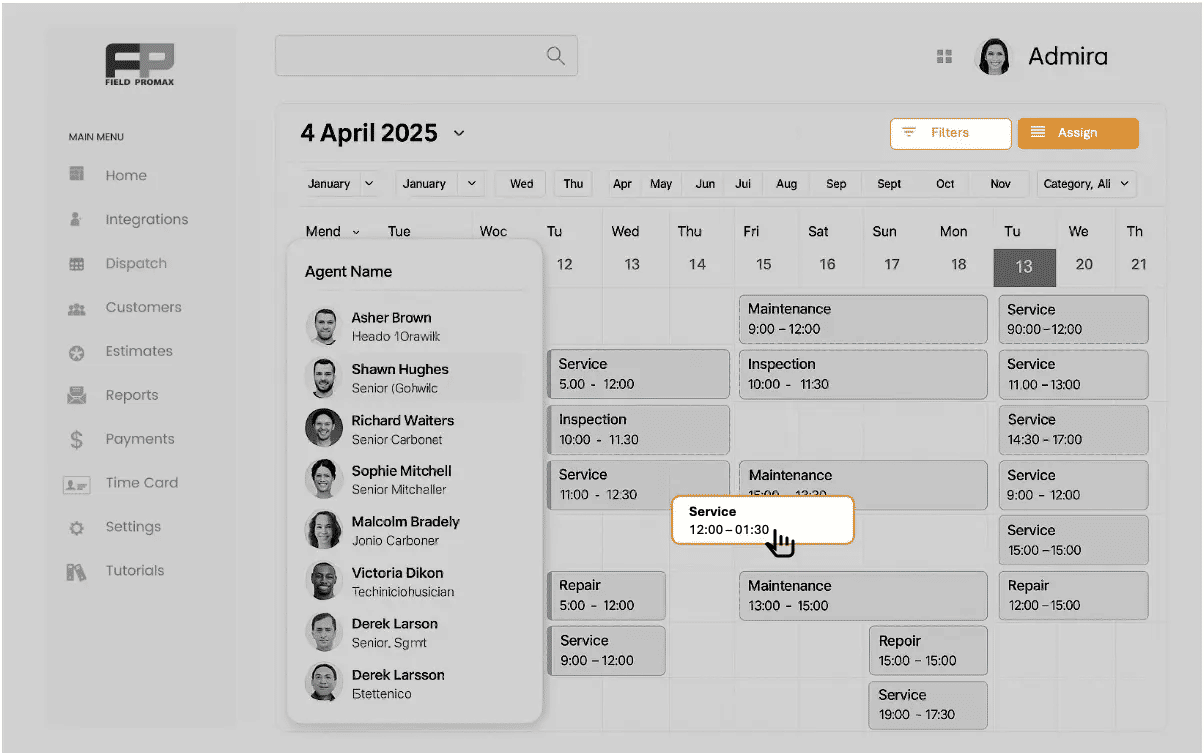
2. Real-Time Dispatching and Live Map-View
Dispatchers see technicians on a live map and a calendar at the same time. They can reshuffle jobs quickly when plans change.

3. One-Tap Mobile App Workflows
Technicians use a mobile field management app to see jobs, add photos, update status, and capture signatures. This keeps office and field teams in sync without extra phone calls.
4. Calendar Sync + Automated Notifications
Field Promax syncs with calendars and sends reminders to customers. This reduces missed appointments and maintains professional communication.

5. Faster Estimating → Faster Invoicing Pipeline
Estimates turn into jobs and then invoices with very few steps. As a result, many owners find that this type of field service business software helps cash flow as much as it helps scheduling.

6. Examples of Time Saved (ROI Table)
For a team of six technicians:
These gains show why many owners see tools like Field Promax as among the best field service management software options for small and growing teams.
| Area | Before Field Promax | After Field Promax |
|---|---|---|
| Daily scheduling effort | 2 hours of manual updates | 30-45 minutes with AI and drag-and-drop |
| Technician confusion | Frequent calls for job details | Clear tasks in the field management app |
| Missed or late invoices | Several per month | Rare, because invoices follow completion |
Why Is Field Promax Better Than Traditional Scheduling Tools?
Compared with paper, spreadsheets, or basic apps, Field Promax:
-
Combines field service scheduling software and job management in one place
-
Gives a single view of customers, jobs, and payments
-
Helps small teams act like top field service companies without enterprise costs
Real-World Use Cases and Industry Examples
The same field service scheduling logic works across many trades.
1. HVAC
HVAC teams manage seasonal peaks and emergency breakdowns. Field service management software for small businesses helps them fit urgent jobs into a busy schedule without losing planned maintenance work.
2. Plumbing
Plumbing businesses handle leaks, blockages, and planned installs. A scheduler helps route plumbers efficiently and keep records for future visits.
3. Electrical
Electrical teams use field service business software to manage safety checks, permits, and follow-up work. Job history is crucial for compliance and future upgrades.
4. Pest Control
Pest control companies use recurring schedules and treatment cycles. Field service scheduling software ensures no step or follow-up is missed.
5. Cleaning
Cleaning businesses use recurring jobs, time blocks, and routes. A simple field management app shows cleaners where to go and what to do each day.
6. Construction Services
Smaller construction and maintenance teams use field service software for small businesses to track punch-list items, warranty work, and ongoing site visits.
Implementation and Migration Checklist
You can move to modern field service software for small businesses without disrupting your operations if you follow a clear plan.
1. Data Import (Customers, Techs, Jobs, Pricing)
Import customer lists, service items, technician names, and basic job history into your new field service business software.
2. Calendar Sync
Connect your main business calendars so that jobs appear instantly and double-bookings are avoided.
3. Technician App Setup
Install the field management app on technician devices. Run a short practice day with internal or test jobs.
4. Automation Rules
Set up basic automation, such as reminders, job confirmations, and follow-up messages. This shows the early benefits of field service management software to your team.
5. Training Plan and Launch Timeline
Plan a short training session for office staff and technicians. Run your old system and the new field service scheduling software side by side for a week, then switch fully.
%20(1).webp)
Methodology - How We Evaluated and Ranked These Tools
To suggest the best field service management software, we followed a simple, transparent method.
1. Data Sources Used
We looked at:
-
Vendor product pages and documentation
-
Public comparison guides
-
Everyday use cases across HVAC, plumbing, electrical, and other field service businesses
2. Evaluation Criteria (Pricing, Features, Support, Ease of Use, Integrations)
Each tool was viewed through:
-
Scheduling and dispatch features
-
Mobile field management app quality
-
Integrations with accounting, CRM, and ERP
-
Pricing and plan structure
-
Onboarding and support options
3. Ranking Weightage Table
| Factor | Weight |
|---|---|
| Scheduling and dispatch strength | 30% |
| Mobile app and usability | 25% |
| Integrations and ecosystem | 20% |
| Pricing fairness | 15% |
| Support and onboarding | 10% |
This helps identify the best field service software for teams of different sizes and needs.
Final Recommendation: Which Scheduler Should You Choose?
Choosing the right scheduling tool helps your business stay organised, complete more jobs, and improve customer satisfaction. Many field service businesses choose Field Promax because it offers smart scheduling, clean workflows, robust automation, and a fast mobile app all in one platform.
If your team wants fewer mistakes, better communication, and a simpler daily workflow, start by testing a free field service management software trial. Compare tools like Field Promax, Workiz, and ServiceMax.
Then choose the best field service management software for a small business that fits your budget and goals.
With the right field service scheduling software in place, you move closer to the level of top field service companies while still running a lean and focused operation.
.webp)