Lead Management and Referral Tracking for Contractors
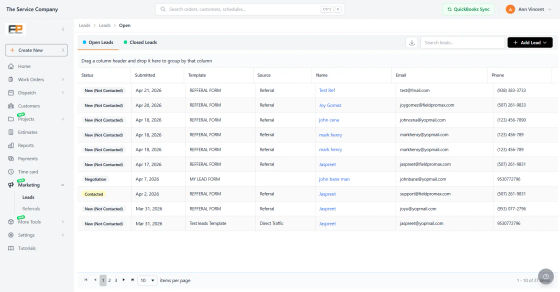
Every inquiry in one pipeline, with the source attached.
Field Promax gives you lead forms you can put on your website, in your ads and on a QR code on your truck, and it records where each lead came from. Your team moves leads through your own stages, answers them from a shared inbox and turns the winners into customers in one click. Happy customers and your techs can send you referrals too, and you track every reward until it's paid.
Trusted by 100,000+ contractors. Rated 4.7 on Google and 4.2 on Capterra.
Leads
Capture every new inquiry in one place.
Create simple lead forms, collect customer details, and push every submission directly into your lead pipeline so your team can respond quickly.
Request Demo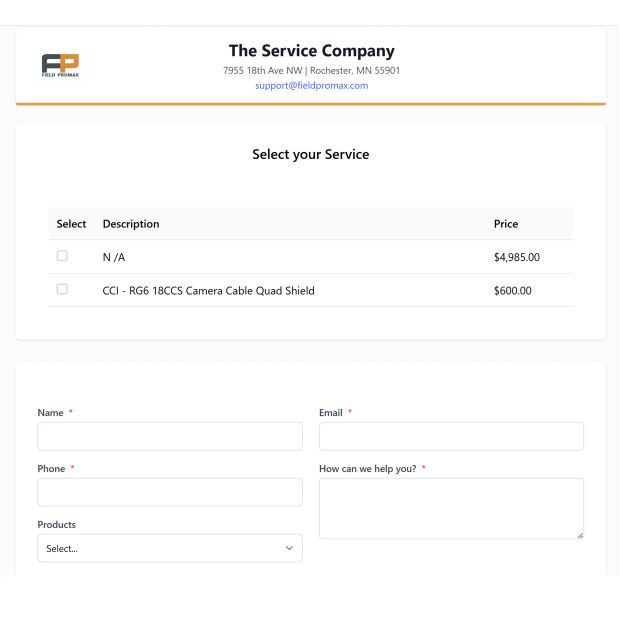
Referrals
Turn happy customers into repeat growth.
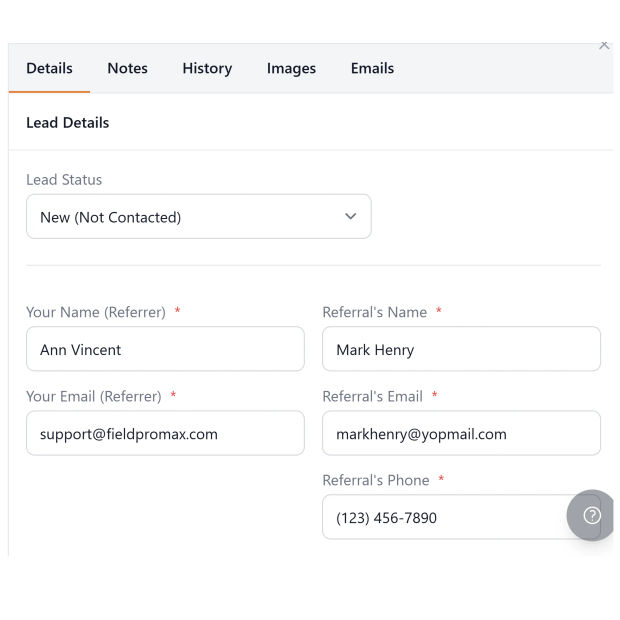
Share referral links, reward customers for successful referrals, and track each referral from invite to converted job with clear status visibility.
Request DemoBuilt-In Lead and Referral Tools
Track every lead and referral from first contact to booked job, right inside Field Promax:
Lead Forms Anywhere
Put the same lead form on your website, behind a link in your ads, or on a QR code on trucks, flyers and yard signs. Every submission lands in your Leads list right away.
Lead Source Tracking
Every lead shows where it came from, from a source tag on the form link or the site the visitor came from, and the Lead Source report shows which ads and channels bring in work.
Your Own Sales Stages
Set your own lead statuses. Every status change is logged with who moved it and how long the lead sat in each stage, so you can see where deals stall.
Referral Programs
Reward customers for sending business your way. Track every referral from invitation through to converted job, and mark each reward paid when you pay it.
Shared Inbox on Every Lead
Connect Gmail or Google Workspace, or Outlook or Microsoft 365, and the email threads with each lead show on the lead's record, from a shared company inbox or your own work email.
One-Click Convert
Turn a won lead into a customer in one click, with the details already filled in, ready for estimates and work orders.
Frequently Asked Questions
Lead management software is a place to collect every new inquiry, see where it came from, follow up and track it until it becomes a job or is lost. In Field Promax, leads come in through your own online forms, sit in one pipeline with stages you set, and convert into customers you can quote and schedule, so nothing gets lost in a notebook or an inbox.
You design lead forms under Settings, then share them three ways: embed the form on your website's quote page, use the form's direct link in ads, emails or social posts, or print its QR code on trucks, flyers and yard signs. Each submission lands in your Leads list right away with the form's fields and any services the customer picked. Need a website to put it on? See our website design services.
Yes. Every lead shows a Source. If you add a source tag to the form link, such as ?source=google-ads or a utm_source tag, Field Promax records it automatically. With no tag, it detects the source from the site the visitor came from, such as organic search. The Lead Source report then shows your leads by source, so you can see which ads, mailers and channels actually bring in work.
Yes. You define your lead statuses in Settings. The default list runs New (Not Contacted), Contacted, Qualified, Proposal Sent, Negotiation, then Won or Lost. Every status change is logged with who moved it and how long the lead sat in each stage, so you can see where deals stall. Notes and photos stay on the lead.
Open the lead and use the Emails tab. It shows the real email threads with that lead from your connected email: a company shared inbox that everyone on the team can see and answer, plus your own work email. You can connect Gmail or Google Workspace, and Outlook or Microsoft 365. You can compose and send from the lead page, so the whole conversation stays on the lead's record.
Yes. Choose Convert to Customer and Field Promax opens a customer form filled in from the lead. Save it and the lead is marked Won (Closed - Converted) with a link to the new customer, who is ready for estimates and work orders. You don't need to export anything or retype details.
Yes. You set the reward amount and get a public referral form. Share it with a link, email it to customers from your work email, or print it as a QR code on invoices and truck decals. When a customer sends a friend, the referrer gets an automatic thank-you email, your team is notified, and the friend shows up as a lead with a Referral badge.
Each referral sits in a ledger with the referrer, the friend, the reward and a status: Open, Paid or Closed. The reward amount comes from your program settings, and you can change it for a single referral. When the referred job is done, set the status to Paid and the ledger totals update. You pay the reward yourself, for example with cash, a gift card or a credit.
Yes. When a technician closes a work order, Field Promax can text the customer a link to leave a Google review, so you collect reviews without chasing anyone. More reviews help you show up and win trust in local search. See how it works in Google review management.
There is no free plan, but you can try Field Promax free for 14 days after a short demo. Plans start at $99/month in the US and A$149/month in Australia. See plans and pricing.