Business Phone System for Field Service
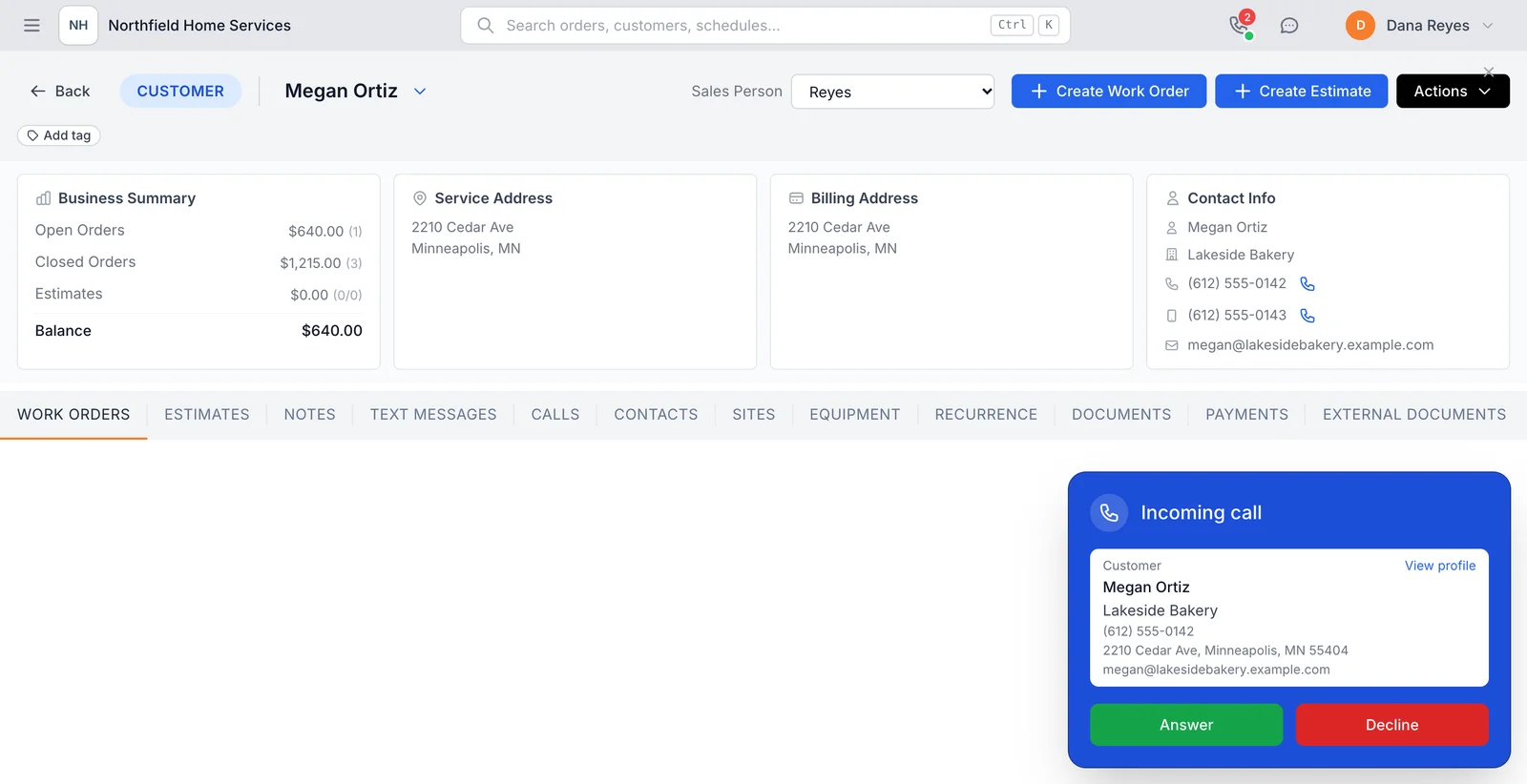
Answer your business line inside Field Promax.
Calls to your business number ring your team in the browser, in the Field Promax mobile app and on the cell phones you choose. Field Promax matches the caller to a customer, so you see who it is before you pick up, and you can start a work order while you talk. Missed callers can leave a voicemail that is written out for you, get a text back, and every call lands in one call log.
Trusted by 100,000+ contractors. Rated 4.7 on Google and 4.2 on Capterra.
Start the Work Order While the Customer Is Still Talking
Caller matched, details on screen, job started.
When the caller's number matches a customer, the call card shows their name, company, phone, address and email. Once you answer, click Create Work Order or Create Estimate without hanging up, and use Mute and Keypad as you need them. Your team can also call customers from your business number: dial from the phone button, or click the phone icon next to a number on a customer page, a work order or a text conversation.
Request Demo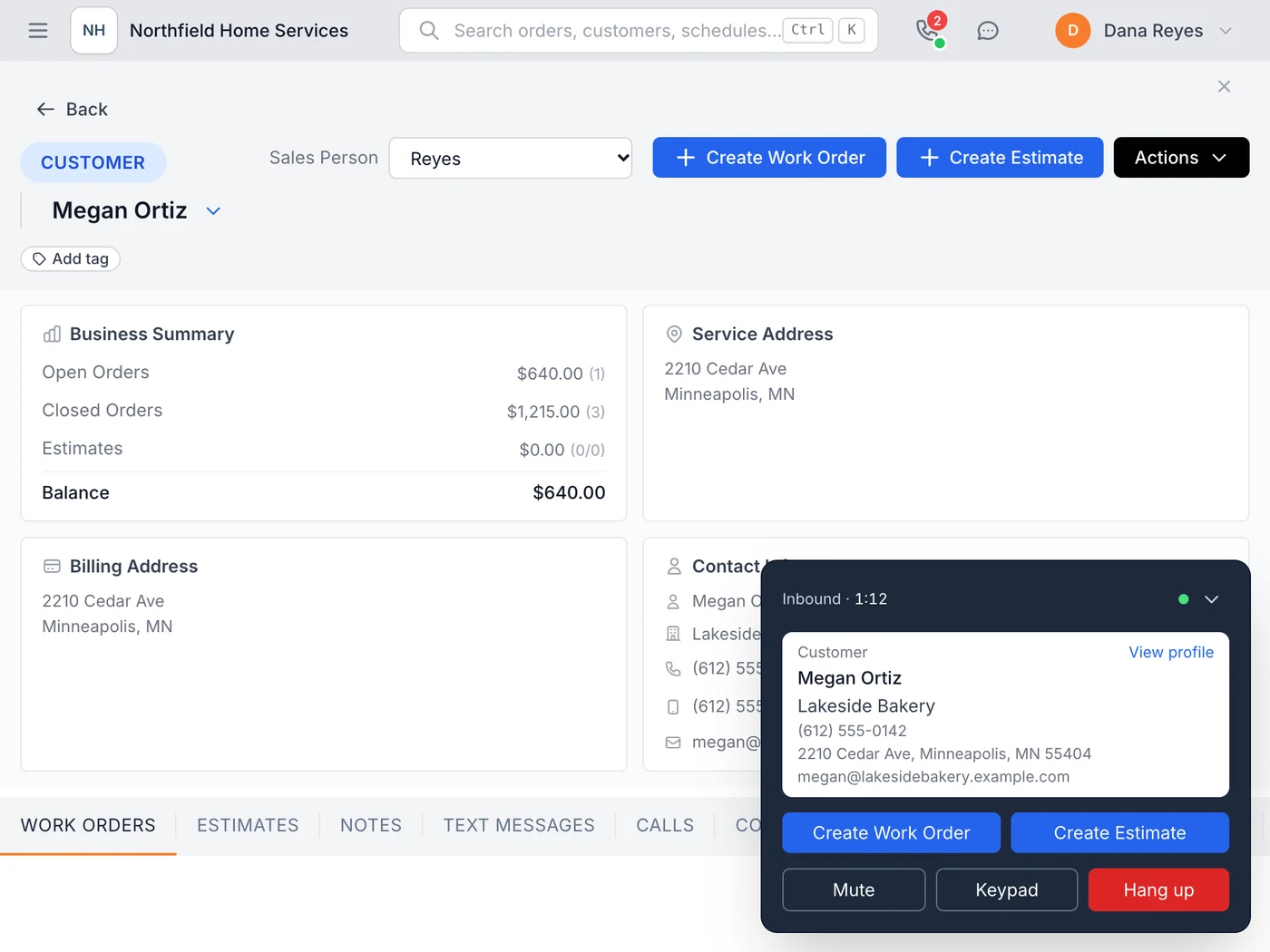
Every Call, Voicemail and Recording in One Log
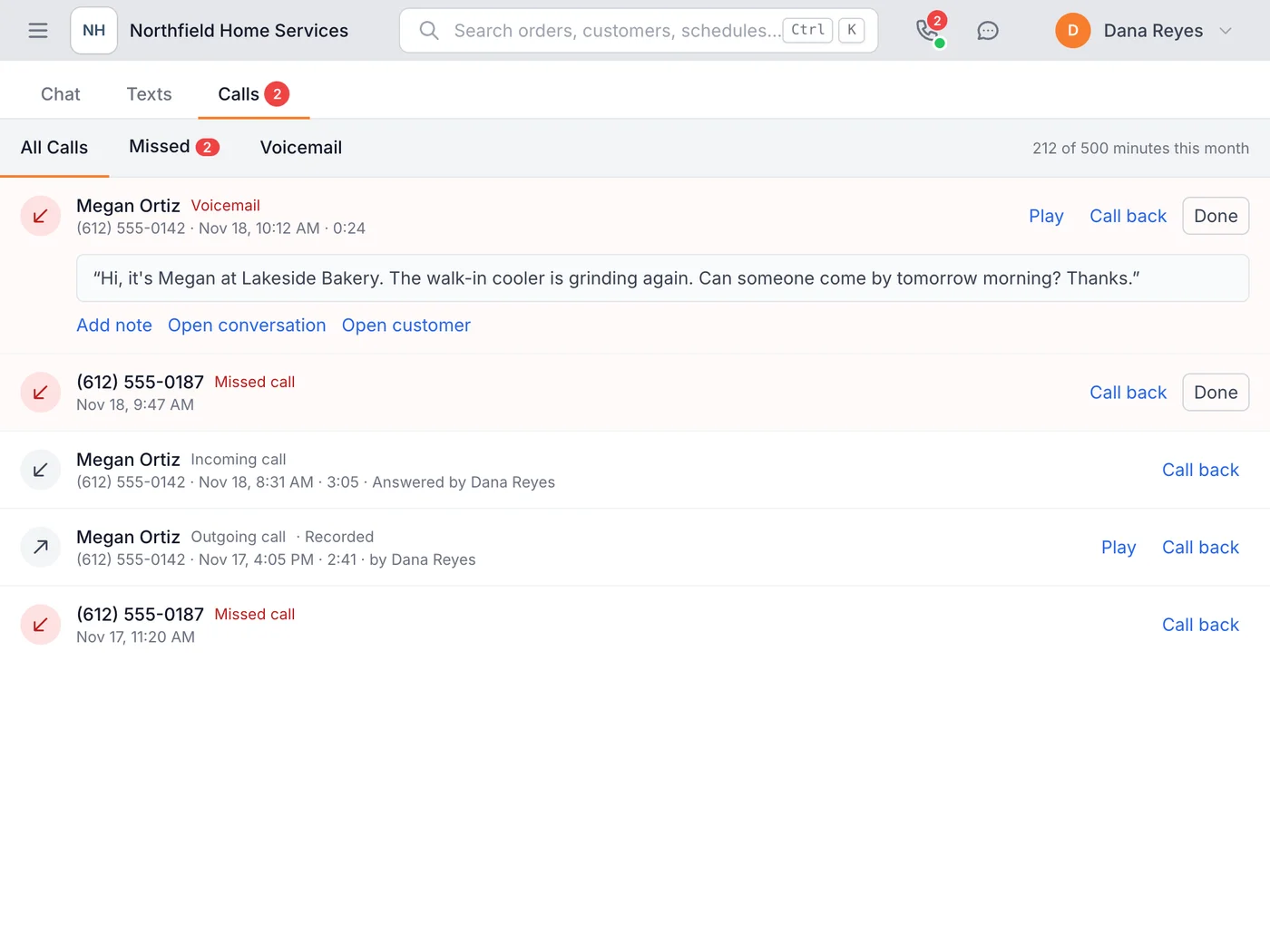
Play it, read it, call back, mark it done.
Each call is saved with the customer when Field Promax can match the caller. Filter by All Calls, Missed or Voicemail, play recordings and voicemails, and read the voicemail as text under the player. Add a note, click Call back, and mark a missed call Done once you have followed up so the red count goes down. Customer pages and work orders have their own Calls tab, and the log shows how many minutes you have used this month.
Request DemoA Phone System Built for the Office and the Field
Set it up once, then every call runs through Field Promax:
Business Numbers in Minutes
Search by area code and buy a number from Settings. It is ready straight away. Add more numbers, choose a primary, and set each one for calls and texts, calls only or texts only.
Ring the Right People
Add up to 10 people and phone numbers to your ring group. Everyone rings at the same time, for 10 to 60 seconds, and the first to answer takes the call. Cell phones press 1 to accept.
Greetings and Voicemail
Write a greeting callers hear before the phones ring and your own voicemail greeting. Voicemails of up to 2 minutes are written out as text, so you can read them in the call log.
Business Hours and After Hours
Set your open days and hours. Calls outside them go to voicemail or forward to one on-call number, which hears "Press 1 to accept" so a personal voicemail never picks up your customer.
Call Recording
Turn on recording and callers hear your announcement first. Both sides of the call are recorded from the moment it is answered, including calls forwarded to your on-call number. Calls to 911 are never recorded.
Missed Call Text Back
When a call is missed, Field Promax can text the caller from your primary number after the call ends, with your own message. One text per number per hour, and never to someone who opted out.
Frequently Asked Questions
It lets your team take and make customer calls on your business number, right inside Field Promax. Calls ring in the browser, in the Field Promax mobile app and on the cell phones you choose, callers who are not answered can leave a voicemail that is written out as text, and every call is saved in the call log with the customer when Field Promax can match the caller.
An administrator opens Settings, then Company, then Phone, clicks Buy a number, types a 3-digit area code or leaves it blank, and clicks Buy next to the number they want. The number is ready straight away, and the first number you buy becomes your primary number. You then register your emergency (911) address and click Turn on phone.
You choose. Add up to 10 people and phone numbers to the Who answers list. People ring in their browser while they are signed in to Field Promax, and outside numbers such as a cell phone or desk line ring too. Everyone rings at the same time for the time you pick, from 10 to 60 seconds, and the first person to answer takes the call. If nobody answers, the caller hears your voicemail greeting and can leave a message.
Yes. Technicians can answer calls in the Field Promax mobile app. You can also add any cell number to the Who answers list. When it rings they hear "Press 1 to accept", and the call connects only if they press 1, so a missed call goes to your business voicemail instead of their personal one. Outside numbers must be US or Canadian numbers.
Set your business days and opening hours, then choose what happens outside them: send callers to voicemail, or forward them to one on-call number. The on-call number rings for the same time as your ring group, the person who answers presses 1 to accept, and if nobody accepts the caller goes to voicemail.
Yes. Turn on Record calls and write the announcement callers hear, or use the standard wording, "This call may be recorded for quality and training purposes." Recording starts when the call is answered and covers both sides, including calls forwarded to your on-call number. Recordings show in the call log with a Play link. Calls to 911 are never recorded. Rules about recording calls vary by location, so check what applies to you.
It can. Turn on Text back missed callers and edit the message, or keep the one filled in for you. After a missed call or voicemail ends, Field Promax texts the caller from your primary number. It sends at most one text to the same number in an hour, skips hidden numbers and anyone who opted out of texts, and starts once your texting registration is approved.
Yes. Click the phone button in the top bar and dial, or click the small phone icon next to a phone number on a customer page, a work order or a text conversation. You can also click Call back in the call log. The customer sees your business number, not a personal one.
In the office, a desktop or laptop computer running Windows with Chrome, Firefox or Edge, or macOS with Chrome, Firefox or Safari, with the microphone allowed. Keep the Field Promax tab open while you work. In the field, the Field Promax mobile app. You also need a business number bought in Field Promax and a registered 911 address.
Yes. Keep your current number and forward its calls to your Field Promax business number. Your customers keep calling the number they already know, and the calls ring your team in Field Promax.
Phone System is available for businesses in the US and Canada.
Phone System comes with the Premium plan. Book a free demo to see it.