Xero Projects for Trade Businesses: What It Does, Costs, and Stops
What are projects in Xero?
The project you create in Xero is a container that you connect revenue and costs to, so that you can determine whether a particular part of the work was profitable. Create the project with the customer, record the time with the start/stop timer, then attach bills and expenses, and create an invoice based on the costs and time you track. Xero describes itself as job tracking software and job costing software. That puts it in direct competition for trade and construction business work (xero.com).
The most important part of the framing, and the one reviewers tend to skim over: Xero Projects is an accounting-related tracker. It provides "what did this job cost and what did we bill for it." It doesn't address "who is going where on Thursday and did they collect a signature." This whole post comes back to that one difference.
Is Xero Projects free, and how much is it per month?
No, Xero Projects is not free, and there's no monthly figure I can give you as a straightforward answer.
The project is offered as part of the Xero plan structure rather than as a standalone add-on. The higher plan tiers offer Projects with a specific number of Projects users. When you surpass that number, you are charged for each additional Projects user. Therefore, the actual price depends on the plan tier you are on and the number of people you want to log time. Two bookkeepers and two techs will cost you more than eight techs.
This is the reason you shouldn't rely on the figures you see in blog articles, including figures that are more than one year old. On the pages for partner accountants that are currently ranked for this term, one page lists prices that are tied to $15/$25/$35 a month, another shows an initial fee of $10 plus $7 for each additional user, and a third states that Projects is offered at no additional cost when you sign up for more expensive plans. It is impossible for all of these to be right at the same time. These are snapshots from various packaging periods.
Prices also move. Xero lifted Australian plan prices on 1 July 2026, with Ignite going from $35 to $37, Grow from $75 to $78 and Comprehensive from $100 to $107, and the multi-organisation discount was removed on the same date (reported plan changes). Go to Xero's current AU pricing page, pick your plan, count your Projects users, and do the sum yourself. That is the only figure that will be true on the day you sign up.
What Xero Projects does well
Credit where it's due. For a particular type of work, Projects is neat and can be found in the ledger you have already reconciled.
- Time tracking with a start/stop timer, plus location-based tracking, from the mobile app (Xero app listing)
- The capture of expenses for a particular project, including the cost of staff and bills
- Cost estimation and quotes before a project begins
- Invoicing based on costs, time, or a set amount with a markup
- A profitability view showing actual versus estimated on every job
- No sync gap because it's all stored in Xero
If you do time-and-materials-based work that is set up at once, completed in a couple of visits, and then invoiced in full at the end of the project, that is a good arrangement, and you might not require anything else. I have advised owners on exactly this.
Where Xero Projects stops for a trade business
Four workflows repeatedly come up, and Projects manages none of them efficiently. Owners on r/xero have been explicit about this in threads, calling the program "very basic" and "genuinely tough for construction workflows," with threads soliciting replacements for Projects rather than making tweaks to it.
1. Staged billing and progress claims
Fitouts, new construction rough-ins, or a commercial job: you invoice in stages for work done rather than with one payment at the conclusion. Projects invoices based on recorded time and expenses. It doesn't have the native notion of a claim schedule, the proportion of the job complete, the amount held, or a modification that has been approved during the job and then rolled into the following claim. The owners who describe this in r/xero often end up creating the claim on a spreadsheet and then entering the bill manually. This places the actual position of the job outside the ledger.
2. Materials, from purchase order to supplier bill to job cost
This is the method that quietly ruins margin reporting. When you send a purchase order to a wholesaler and it is divided, the wholesaler invoices you for only part of the order. Owners on r/xero inquire directly whether a Xero purchase order can be placed in a bill-to-pay state and discover that it can't, so the reconciliation is reverted to manual tracking in the ledger. Users of the Xero App Store also report that purchase orders don't connect to projects, which means that the cost of materials is credited to the job late, held back, or not there at all.
3. Subcontractors
Projects was designed around your own staff logging their own hours. A subbie is a cost you commit to, receive against, retain from, and sometimes back-charge. There is no commitment tracking, so the job looks profitable right up until the subbie's invoice arrives. If you also operate in the UK, the Domestic Reverse Charge rules on subcontractor VAT add a treatment layer on top that a simple time-tracker was never built to carry.
4. Phases
Owners prefer cost per project, as well as by the phase of the job and by branch or team. Projects gives you tasks inside the project; however, the tasks are labour buckets, not cost centres against which you can calculate a margin from another perspective. The result is that people are forced to track categories, and that's where the next limit appears.
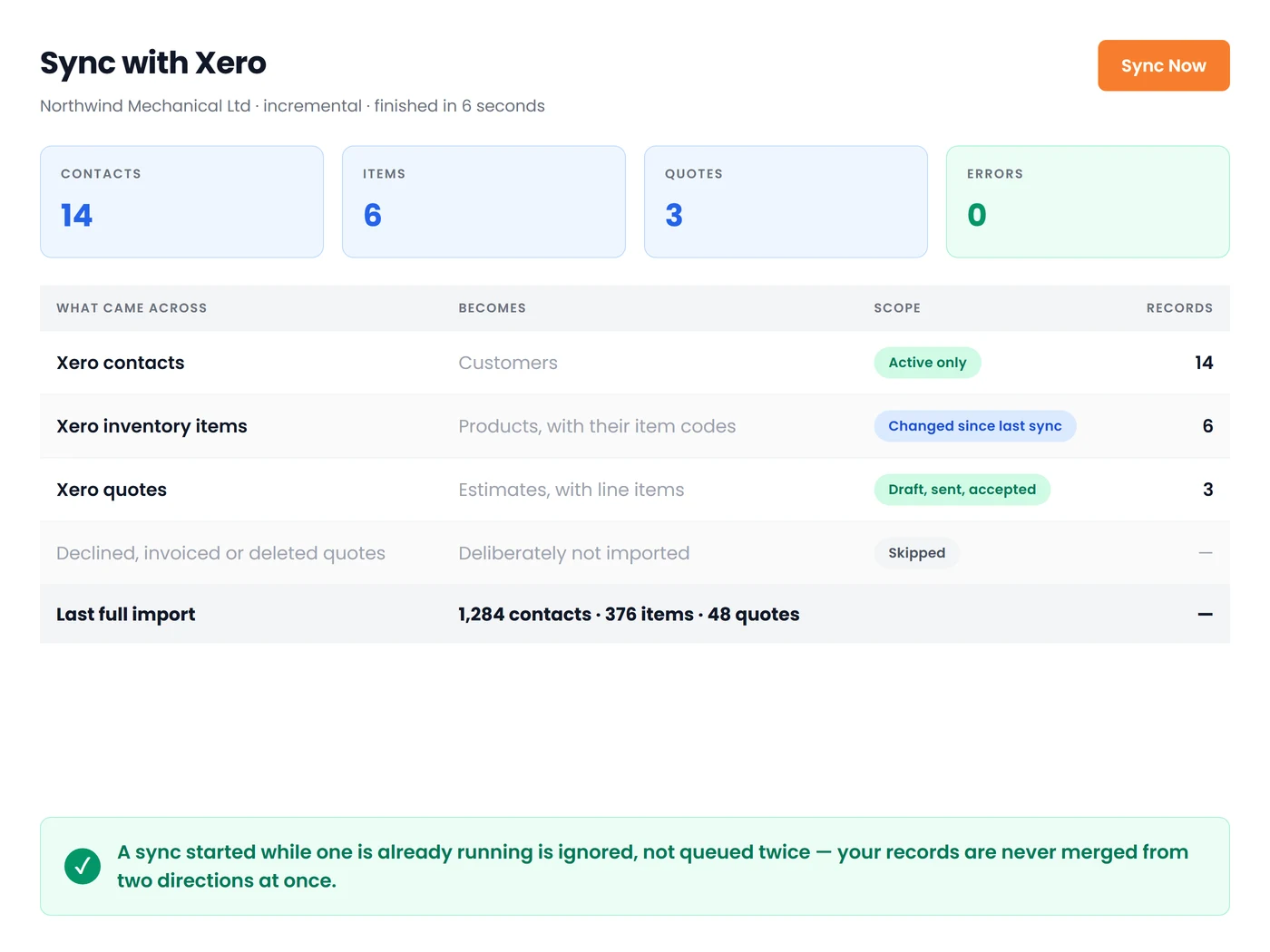
On our side, the piece that answers the staged-billing gap directly is partial billing by approved work-complete visit: a completed work order becomes a draft accounts-receivable invoice in Xero with each product line matched to its Xero item, and you can bill the portion that is signed off rather than waiting for the whole job. If you want the invoicing mechanics in detail, we covered them in Xero invoicing software for field service businesses, and the scheduling side sits in our guide to appointment scheduling and invoicing software.
Customer reviews of Field Promax tend to land on the same two points rather than on feature counts: one enterprise rolled us out across four of its businesses with plans for more, citing customer service beyond expectations and customisations that out-of-box and niche products could not match, and another reviewer noted the app met their needs and that I personally accommodated business-specific changes they asked for. That second one is deliberate on my part. Trade workflows differ enough that the last ten percent of fit usually has to be built, not configured.
The tracking categories workaround, and its two-active-category ceiling
The simplest method to calculate job costs in Xero is to track categories. You can create a category titled Job, then add every job to it as an option and add each invoicing and billing line to it. Your P&L is then broken out by job.
The ceiling is a stumbling block, and it is coming quickly. Xero provides two active tracking categories per company (four in all, including the ones that are archived), each of which can have up to 100 options. This means you can have branches and jobs, or Job and Phase, but you can't have all three. Owners who are hitting this issue on r/xero have also reported that their reports are not able to clearly break down using both categories at the same time, and manual reclassification is the only way to get an overall margin at the job level.
A practical guideline from the conversations I've had: a three-tech business that runs single-site jobs could rely on tracking categories on their own and not bother with Projects at all. A fifteen-tech company that runs multiple teams across phases of work will be able to hit the two-category barrier within a quarter, and no number of clever category names can get around it.
Conclusion
Xero Projects is a good accounting-related tracker sold as exactly that. It becomes a problem when a trade business treats it as a job management software because billing stages, from purchase orders to job costs, commitments to subcontractors, and phase-level reporting are all beyond what a tracking-category setup can do. It also reaches its limits quickly. My advice after 14 years of these discussions isn't glamorous: determine which of the four workflows you are running now, rather than those you may be running three years from now. If none of them apply, turn off Projects and keep working. If more than one applies, use Xero as your ledger, place a job management system in the middle, and make the length of the sync one of the things you interrogate most carefully before signing any agreement.
Frequently Asked Questions

Founder and CEO
Joy Gomez is an engineer, process automation expert, and the Founder of Field Promax. Known for his technical expertise and commitment to field service innovation, Joy writes about transforming traditional business models into paperless, efficient operations. He is a Lean Six Sigma Black Belt based in Rochester, MN, dedicated to helping field professionals work smarter through better technology.
Reviewed by

Content Creator
Bhargavi Halthore is a content writer at Field Promax, a field service management platform serving trades businesses across the USA and Canada. With over a decade of experience writing for business owners, she brings detailed, ground-level insight to every topic she covers. Her research goes beyond search results - she digs into LinkedIn groups, Facebook communities, and Reddit forums to understand what field service business owners are actually dealing with on the ground. She speaks directly with industry professionals, understands their day-to-day challenges, and translates that into content that is practical and actionable. What you read in her articles reflects real industry patterns, not theory.