WorkflowMAX Is Gone: Where Xero Trade Businesses Went Next

What actually happened to WorkflowMax
Xero announced it was winding down WorkflowMax and switched the original product off on 26 June 2024 (blog.xero.com). New trials stopped at announcement, and Xero framed the decision as a shift in product focus rather than a technical failure. Xero Practice Manager was explicitly excluded from the change, which is why some accountants you speak to will tell you nothing happened to them. Nothing did.
The brand did not disappear. Melbourne consultancy firm BlueRock acquired it and relaunched it under the name WorkflowMax by BlueRock as a distinct product with a distinct codebase. That difference matters more than it appears. The customers who "migrated" were moving to another application with the same name as the one they had before, and their data had to be transferred to the new application.
A simple note before anything else: there's no primary source of information on how many WorkflowMax organizations used it or where. Account counts that appear in blog posts by vendors are merely secondary claims. I won't repeat them as facts, which is why you ought to be skeptical of any substitute site that does.
Why the successor has had a rough reception
Review the public review pages for WorkflowMax by BlueRock and BlueRock on Software Advice, Capterra, Trustpilot, and the Xero App Store. The complaints cluster together rather than dispersing. The most frequent complaints are about clunky time entry and limited options when recording time, invoicing that does not work or exports improperly, reports that need manual revisions to be reliable documents, issues with document management, and slow responses to support issues that frustrated people who could not afford the delay. A number of reviewers have also highlighted features that they used to rely on in the previous version, including multi-currency billing and a Xero sync that they did not need to supervise.
In Reddit's r/xero forums, the language is more blunt. Owners discuss the successor using terms I do not want to repeat, and the result they describe is teams scrambling mid-year to find something that will handle billing and project management all in one place.
Fair enough: BlueRock inherited a large, popular, opinionated user base after an extensive rebuild. They issue release notes, and a few companies still run with it to this day. The issue for you to consider is narrower. Does it fit the ideal requirements of a trade company, and has it ever?
Why trade businesses got the worst of this
WorkflowMax was advertised as a large catch-all for everyone from plumbers to accountants. After it was discontinued, nearly every "best WorkflowMax alternative" article that was published was written for the accountant side of the spectrum: architects, engineers, consultancies, and agencies. Utilisation rates, WIP, and billable hours.
A trade business does not operate by hourly billing. It starts with a quote, which becomes an actual job, with materials scheduled against the task, a team dispatched to a location, and any modification approved by the customer, followed by an invoice for the work that was actually completed. These are two different workflows, and project-management software designed for time billing doesn't include them.
That's the problem I'm hearing about in Australian trade forums. Xero is the default ledger, and what the owners have described is Xero along with a separate job application on top of it, rather than Xero all by itself. Electricians and sole-trader subbies state that they hear the same thing over and over again: Xero is the only accounting software that anyone in their field mentions, and they need to look for a different solution to manage the work. Users who have tried Xero's Projects module say it has limitations with stage payments, progress claims, and materials for a job, with some saying that it is fundamentally unsuited to construction workflows.
Where displaced users actually went
Three lanes, and they are really different places.
Lane one: stay on WorkflowMax by BlueRock. The lowest friction and most reasonable costs apply if your project involves time-and-materials professional services with a light schedule.
Lane two: move to a professional services tool. In the threads on r/xero, the two names displaced users mention are NextMinute and Abtrac. Both are reputable. Abtrac is designed for consultancies in the built environment. NextMinute is closer to trades, and Xero's Australian Construction and Trades Collection offers it as a possible alternative to WorkflowMax. NextMinute is rated 4.92 out of five based on 52 reviews at the time of writing, while Abtrac is rated 4.9 based on 24 reviews.
Lane three: move to field service or job management software. The marketplace for trade and construction includes Tradify, ServiceM8, simPRO, and more. Xero states its ecosystem includes more than 1,000 connected apps. It's where most businesses with vans, crews, and inventory are located, and it's the only lane that nobody writing about WorkflowMax alternatives has bothered to discuss.
What "Xero integration" has to mean for a trade business
Every job application that you can find works with Xero. Few will explain what breaks when you scale, so here are the two ceilings I'd test against before signing any contract.
Tracking categories run out. Xero provides two active tracking categories within a company, with four total that can be archived. Each category can have up to 100 options. Tracking categories are the most common method of calculating job costs in Xero and, therefore, the moment you need cost per branch, per job, and per phase, you run out of room. This is the reason why many owners are forced to reclassify journals manually in order to achieve an overall margin for jobs, and the reason why job costing should be a part of the job app instead of the ledger.
API limits bite at month-end. Xero permits 60 API calls per minute for tenants, plus the daily cap per tenant. The minute limit is rarely a concern for businesses operating in the field. The daily limit is what causes problems when invoices, contacts, and payments all happen at once on the final day of the month. Integrations that sync incrementally and only push what has changed differ from those that send the entire data set every time.
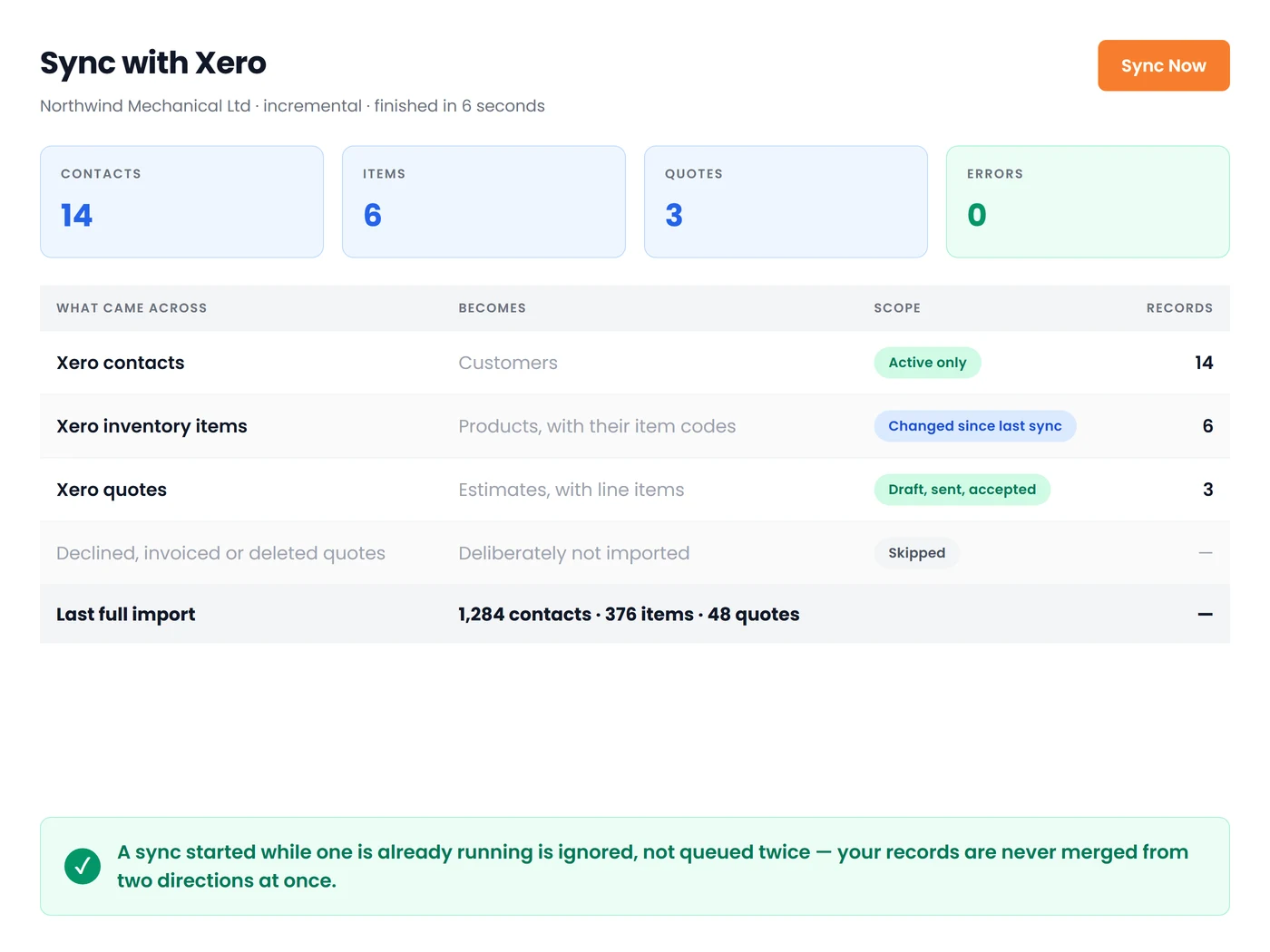
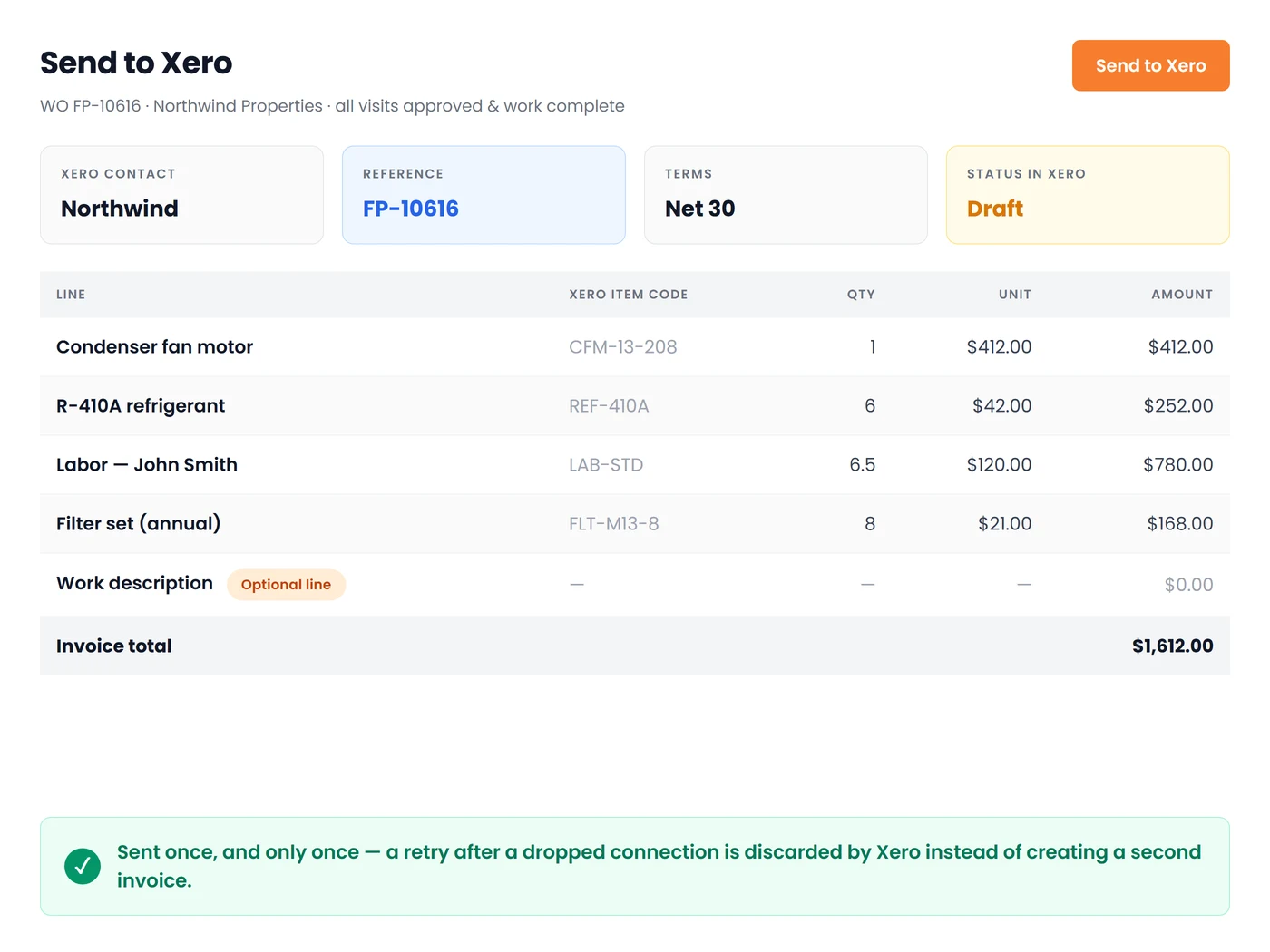
That is the reason our own sync is built the way it is: pull active Xero contacts, inventory items and quotes across incrementally, then push completed work orders back as draft AR invoices with each line matched to its Xero item. If you want the invoicing side in more depth, we wrote it up separately in Xero invoicing software for field service businesses.
The four criteria that separate trade tools from the rest
Don't bother with feature lists for a minute and try these four features on a real-world job during your trial.
-
Staged and progress billing. Are you able to make a claim for 40 percent of the job without creating a fake invoice? Does it recognize a bank deposit? This is the point at which Xero Projects and most agency tools fail.
-
Materials against a job. Can a purchase order be partially received and still charge the right amount? Owners often discover that the Xero purchase order can't be placed in a partially billed state, which is why reconciliation becomes a separate spreadsheet that is not linked to the ledger. The job application must be able to absorb this.
-
Subcontractor cost. Sub invoices need to land against the job, not just the P&L, and the compliance treatment has to survive the sync. If you also run work in the UK, the reverse charge rules change what your job records need to carry, which we covered in what Domestic Reverse Charge means for service businesses.
-
Job phases.** **Rough-in, fit-off, defects. If the phases are only a text field, the margin reporting will be an exercise in guesswork.
For smaller operations, add a fifth: does scheduling and invoicing sit in the same place, so nobody re-types a job into a second system? Our guide to appointment scheduling and invoicing software walks through what that combination should look like for a two to five van shop.
Migration: what travels and what does not
In 14 years of these discussions, the mistake I have seen most often is treating migration as an IT-related task instead of a record-keeping decision. Contacts, item lists, and open quotes can be moved easily. Custom fields, historical time entries for closed jobs, site photos attached to the job, and WIP that is part-billed are where the losses occur, and you usually discover them nine months later, when clients dispute an amendment.
My advice is the same. Export everything before your access window ends, even the unattractive CSVs that you believe you'll never open. Make a conscious decision about which history you want to include in the new system and which can be stored in cold storage. Importing five years of closed jobs can slow down your new tool without providing any operational benefit. Move one branch or crew initially and continue to run both systems simultaneously for a two-week period.
I'll also state clearly that those who claim to offer a one-click WorkflowMax importer are talking about the simple part of the task. The difficult part is deciding what a "job" is now, and no one can import that decision for you.
Where Field Promax fits, and where it does not
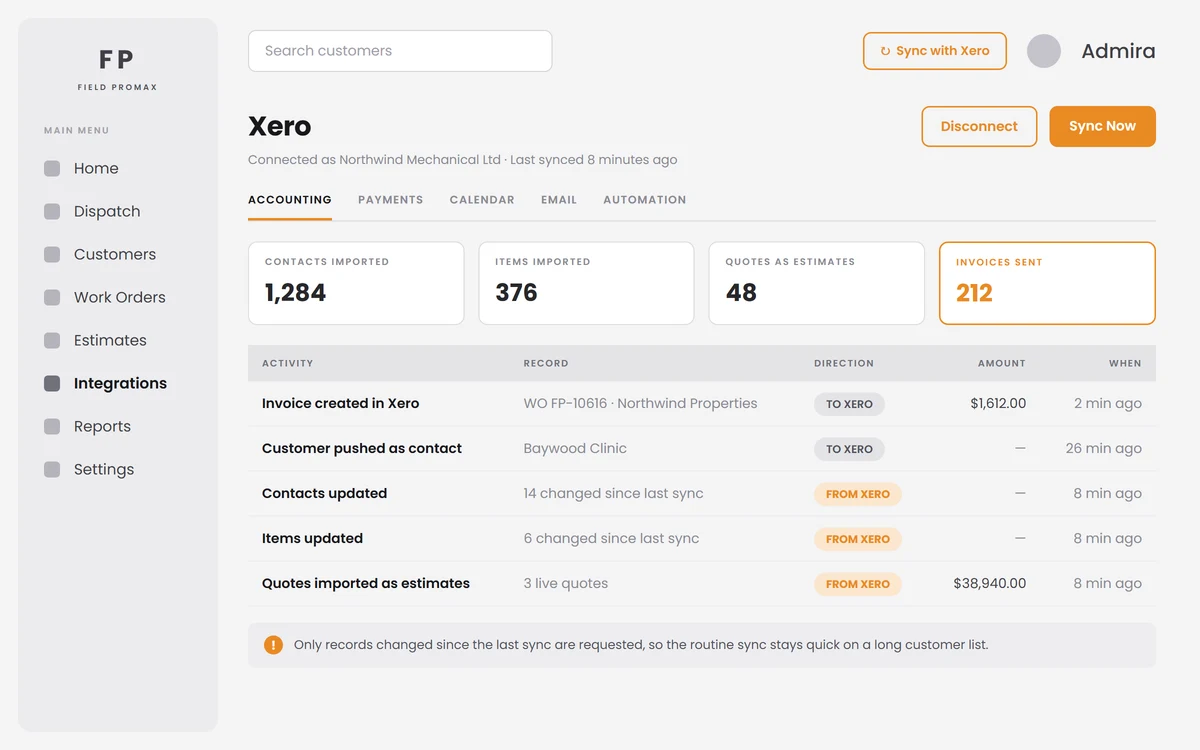
We're a job management and field services platform designed for companies that assign employees to job sites. We provide work orders, scheduling, mobile job completion, job forms and photos captured on the job, time capture that flows into timesheets, quoting and invoicing, and a Xero connection that is accessed via a Xero login without exports or copy-and-paste. Reviews point to our strengths: one company has rolled us out across its four businesses and cited customisation and service that other products on the market could not match, while another user noted that we provided the business-specific modifications they had wanted. This is the real source of our strength. Here's where we have not been getting the right answer. If you're an architecture practice, an engineering firm, or an agency whose entire commercial model revolves around selling time on a fee-proposal basis, then you need a professional services tool. Abtrac, Projectworks, NextMinute, or WorkflowMax from BlueRock will be more useful than we are. We can tell you this now, rather than having you discover it less than six weeks into implementation. Resource forecasting and utilisation reporting for staff with chargeable status aren't what we're designed to do.
A context worth keeping in mind: Xero reported roughly 2.8 million customers across Australia and New Zealand as of 31 March 2026 in its FY26 financial results, and Australian plan prices increased starting 1 July 2026, with the discount offered to multi-organisation customers eliminated. Your ledger isn't moving. The layer on top of it is the one you need to consider.
How to decide in the next 30 days
Week one: Download the WorkflowMax export and write down the five reports you use. They aren't the ones you planned to use.
Week two: Narrow down the three options, one for each of the above lanes, and schedule demos you can attend. You should insist on running your own project through the trial, which includes a part claim and a supplier invoice.
Week three: Make sure you check your Xero side. Draft invoices are arriving with the correct items, tax rates, and trackers; timesheets are arriving in the places that payroll anticipates them; and the sync doesn't require manual intervention.
Week four: Run one crew in parallel. What breaks during that fortnight is what would break across the entire company in month three.
This is a five-year choice. A month of running two systems costs little compared to a five-year mistake.
More on Xero for trade businesses
Continue with:
- Xero for Tradies: What It Does Well and Where It Stops — the pillar guide to what Xero handles and where a job layer takes over.
- Xero Projects for Trade Businesses: What It Does, Costs, and Stops — whether the native module is a credible replacement for your shop.
- Xero Tracking Categories for Job Costing: Setup and Limits — the two-active ceiling in detail, with a structure that survives a service business.
Conclusion
The removal of WorkflowMax was disruptive, and the new conversation that followed was written almost entirely for consultants. If you manage vans and crews, the conversation wasn't about the company you run. I've seen trade business owners lose a whole quarter because of a move they interpreted as a software change but later discovered was actually a record-keeping decision. Those that came out ahead followed the same process: they exported everything while running one team in parallel, then tested the partial claim as well as the supplier's bill before completing the transition. Choose the lane that is compatible with the way you invoice, then protect your records and keep Xero focused on the accounting work it's good at.
Frequently Asked Questions

Founder and CEO
Joy Gomez is an engineer, process automation expert, and the Founder of Field Promax. Known for his technical expertise and commitment to field service innovation, Joy writes about transforming traditional business models into paperless, efficient operations. He is a Lean Six Sigma Black Belt based in Rochester, MN, dedicated to helping field professionals work smarter through better technology.
Reviewed by

Content Creator
Bhargavi Halthore is a content writer at Field Promax, a field service management platform serving trades businesses across the USA and Canada. With over a decade of experience writing for business owners, she brings detailed, ground-level insight to every topic she covers. Her research goes beyond search results - she digs into LinkedIn groups, Facebook communities, and Reddit forums to understand what field service business owners are actually dealing with on the ground. She speaks directly with industry professionals, understands their day-to-day challenges, and translates that into content that is practical and actionable. What you read in her articles reflects real industry patterns, not theory.