7 Best Kickserv Alternatives: An In-Depth Guide

Your field service business is growing, but is your software keeping up? If you're starting to feel the limitations of the kickserv app, you're not alone. Many field service companies outgrow their initial software choice after reading kickserv reviews and recognizing similar growth limitations, add more technicians, expand to new locations, or simply need more advanced features to stay competitive.
Field Service Management (FSM) software is the backbone of modern service businesses. It handles everything from scheduling and dispatching to invoicing and customer communication. But not all FSM platforms are created equal. Some excel at automation, others shine with integrations, and some are built specifically for certain industries like HVAC, plumbing, or electrical work. The FSM market is forecasted to grow from $5.10B (2025) to $9.17B (2030) at ~12.5% CAGR.
This guide will walk you through the best Kickserv alternatives available today. Whether you're looking for a more affordable option, a platform with better customer support, or software that scales with your growing business, you'll find detailed comparisons, pricing breakdowns, and honest pros and cons for each alternative. By the end, you'll have everything you need to make an informed decision that's right for your business.
5 Signs You've Outgrown Kickserv
Before we dive into alternatives, let's talk about why you might be considering a switch in the first place. Here are the most common reasons field service companies decide to move on from Kickserv.
Limited Scalability Issues
Your team is expanding, and Kickserv is struggling to keep up. Maybe you've added a second location, hired more technicians, or launched a new service division.
Here's what you might be experiencing:
-
Kickserv works fine for small, single-location shops with a handful of trucks
-
But as your business grows with more technicians and trucks in the field, the platform struggles
-
Operating from multiple locations becomes complicated
-
Launching new business units feels clunky and inefficient
-
You find yourself managing workarounds instead of using built-in features
Lack of Advanced Features and Automation
You need more powerful automation, reporting, and customization than Kickserv provides.
You're probably frustrated because:
-
You want to automate invoice delivery, but Kickserv doesn't offer it
-
Setting up capacity planning rules would save hours, but the feature doesn't exist
-
Creating custom reports that drill down into your data is nearly impossible
-
Kickserv's feature set is solid for basics, but sophisticated automation is lacking
-
Your team spends hours on manual tasks that should be automated
Integration Headaches
Kickserv doesn't seamlessly connect with your other business-critical software.
The pain points include:
-
You're using QuickBooks, but data syncing is manual and error-prone
-
Zapier integrations exist, but they're clunky and unreliable
-
Your custom CRM system doesn't talk to Kickserv at all
-
You're tired of manually syncing data between platforms
-
The right FSM software should integrate smoothly with your entire tech stack
Poor Mobile Experience
Your technicians in the field are frustrated with the kickserv app.
This translates to real problems:
-
A clunky mobile experience means slower job completion
-
More errors happen because the app is hard to use
-
Your field teams are frustrated and less productive
-
Technicians struggle to access job details on the go
-
Updating work orders and capturing signatures is a pain point
You Need Better Customer Support and Community
You're not getting the level of support highlighted in positive kickserv reviews.
When issues arise, you need:
-
Responsive support teams that actually help solve problems
-
Access to a community of other users who understand your challenges
-
Training resources to help your team use the software effectively
-
Dedicated support contacts, not just generic help tickets
-
A user community sharing best practices and strategies
If any of these sound familiar, it's time to explore your options. The good news? There are excellent alternatives available.

The Top 7 Kickserv Alternatives
1. Field Promax: Your Field Service Command Center
Best for: Growing field service companies that want an all-in-one platform built specifically for the trades (HVAC, plumbing, electrical, and more).
Field Promax is purpose-built for field service businesses that are serious about growth. Unlike generic software adapted for field services, Field Promax was designed from the ground up with the unique needs of service contractors in mind.
Key Features
Field Promax delivers the complete toolkit your business needs:
-
Intelligent Scheduling & Dispatching: Route optimization that gets more jobs done per day with less wasted travel time
-
Advanced Automation: Automate quotes, invoices, follow-ups, and routine communications so your team focuses on service delivery
-
Powerful Reporting: Drill down into your data with custom reports that show you exactly what's working and what's not
-
Mobile-First Design: Your technicians get a mobile app that's actually enjoyable to use, not a chore
-
Deep QuickBooks Integration: Seamless two-way sync with QuickBooks Online and Desktop no manual data entry
-
Industry-Specific Workflows: Built for HVAC, plumbing, electrical, and other trades with features that match how you actually work
-
Customer Portal: Let customers book appointments, pay invoices, and track technicians in real-time
-
AI-Powered Insights: Get actionable recommendations to improve efficiency and profitability
Pricing
Field Promax pricing is designed to scale with your business, starting at competitive rates that make sense for growing companies. You only pay for what you use, with flexible plans that grow as you do.
Pros
-
Built specifically for field service contractors, not adapted from generic software
-
Exceptional customer support with dedicated success managers
-
Active community of field service business owners sharing strategies
-
Continuous innovation with regular feature releases
-
Transparent pricing with no hidden fees
-
Proven track record helping contractors grow revenue
-
Industry expertise built into every feature
Cons
-
Smaller than some enterprise competitors (which also means more personalized support)
-
May require some setup to match your specific workflows
-
Focused on field services, so not ideal if you need broader business functions
2. ServiceTitan: The Enterprise Powerhouse
Best for: Large residential and commercial shops with 10+ technicians looking for an all-in-one solution that can scale to enterprise levels.
ServiceTitan has become the dominant player in the field service software space, and for good reason. This platform is built for businesses that want to grow big. Over the past decade, ServiceTitan has revolutionized how contractors operate, and it continues to lead the market with over 200 new features and improvements released yearly.
Key Features
ServiceTitan goes far beyond basic scheduling and dispatching:
-
Robust Automation Throughout: Automated report delivery, capacity planning rules, and touchless accounting integration
-
Invoice Capture: Upload PDFs or images of vendor invoices and automatically extract the data
-
Multiple Business Divisions: Support for residential, commercial, and construction divisions simultaneously
-
Enterprise Hub: Roll-up reporting, dashboards, centralized contact center, and Marketing Pro Enterprise
-
30+ Direct Integrations: Seamless connection to third-party platforms with real-time data syncing
-
Open APIs: Build custom integrations for your unique needs
-
Quarterly Releases: Continuous innovation with new features added regularly
-
Enterprise-Grade Security: 99.9% uptime, PCI-DSS Level 1, SOC 2 Type II compliance
Pricing
ServiceTitan is premium pricing, typically starting in the high hundreds of dollars per month depending on your team size and feature set. While it's not the cheapest option, the value proposition for growing businesses is strong.
Pros
-
Unmatched feature set and automation capabilities
-
Scales from small shops to enterprise operations
-
Extensive customer support, training, and community resources
-
Deep QuickBooks and accounting integrations
-
Industry-leading AI technology (Titan Intelligence)
-
99.9% uptime and enterprise-grade security
-
Best for companies with 50+ technicians
Cons
-
Expensive for small businesses with just a few technicians
-
Can be complex and require significant setup and training
-
Steeper learning curve than simpler alternatives
-
May include features you don't need
3. Jobber: The User-Friendly Choice for SMBs
Best for: Small to medium-sized businesses that need a simple, intuitive, and affordable solution that doesn't sacrifice features.
Jobber has earned its place as one of the most popular FSM platforms for small and medium-sized field service companies. It's the choice for owner-operators who want powerful functionality without the complexity and cost of enterprise platforms.
Key Features
Jobber excels at simplicity without sacrificing power:
-
Easy Job Scheduling & Dispatching: Intuitive interface that your team will understand immediately
-
Professional Quoting: Create quotes with online approval and automated reminders
-
Instant Invoice Generation: Invoices sent directly to clients automatically
-
Two-Way Text Messaging: Communicate with customers directly through the platform
-
Customizable Templates: Save time on repetitive communications
-
Location-Based Timers: Automatically track visit times when technicians enter and leave properties
-
Job Profitability Tracking: See exactly which jobs are profitable
-
Mobile App: Technicians actually enjoy using it (rare for FSM software)
Pricing
Jobber's pricing is refreshingly straightforward. Plans start around $49 per month with multiple tiers as you grow. This makes it accessible for small shops while remaining affordable even as you scale.
Pros
-
Very easy to use and intuitive interface
-
Affordable pricing with transparent tiers
-
Excellent mobile app that technicians love
-
Great for small- to medium-sized businesses
-
Good integration options with QuickBooks Online and Zapier
-
Strong community and user support
-
Fast implementation and onboarding
Cons
-
Lacks some advanced features of enterprise platforms like ServiceTitan
-
Limited customization compared to more flexible solutions
-
May not scale as smoothly for very large operations
-
Fewer automation options than premium platforms
4. Housecall Pro: The Community-Driven Platform
Best for: Owner-operators and small businesses that value a strong user community, support resources, and an all-in-one platform.
Housecall Pro has built a loyal following by focusing on what small business owners actually need. The platform combines solid FSM functionality with an emphasis on community and support that many competitors overlook.
Key Features
Housecall Pro includes the essential FSM tools with a community twist:
-
Job Scheduling & Dispatching: Core functionality done right
-
Quoting & Invoicing: Professional templates and easy workflow
-
Marketing Tools: Built-in features to help you grow your customer base
-
Mobile App: Reliable technician app with offline capabilities
-
Community Forum: Thousands of field service business owners sharing ideas and strategies
-
Integration Support: Popular accounting software connections
-
All-in-One Interface: Doesn't overwhelm new users with unnecessary complexity
-
Peer-to-Peer Support: Learn from other business owners in the community
Pricing
Housecall Pro starts around $65 per month, positioning it as a middle-ground option between budget-friendly Jobber and premium ServiceTitan.
Pros
-
Excellent community forum and peer support
-
Good balance of features and simplicity
-
Strong marketing tools included
-
Affordable pricing
-
Dedicated support team available
-
Great for owner-operators
-
Active user community sharing best practices
Cons
-
Not as feature-rich as ServiceTitan
-
Less advanced automation compared to competitors
-
The interface could feel dated to some users
-
Smaller feature set overall
5. Workiz: The Rising Star for Specialized Trades
Best for: Businesses in specific trades like locksmithing, garage door repair, junk removal, and other specialized services that need industry-specific workflows and features.
Among workiz competitors, Workiz is an emerging platform that's gaining traction fast, especially among companies in niche trades.If you're researching a workiz alternative, you may find other platforms offer broader features designed for your industry.
Key Features
-
What makes Workiz unique is its focus on industry-specific solutions:
-
Workiz Voice Platform: Automates customer communication and job dispatch through voice technology (unique feature)
-
Advanced Inventory Management: Track parts and materials specific to your trade
-
Industry-Specific Workflows: Built for locksmithing, garage door repair, junk removal, and similar services
-
Specialized Job Types: Features tailored to the unique challenges of niche trades
-
Automated Dispatch: Voice-based system that's faster than traditional methods
-
Customer Communication: Automated calls and texts for appointment reminders and updates
-
Trade-Specific Reporting: Metrics that matter for your specific business
Pricing
Workiz starts around $225 per month, making it more expensive than Jobber but potentially offering better value if you're in one of their target industries.
Pros
-
Industry-specific features and workflows
-
Innovative Workiz Voice Platform compared to other workiz competitors in the market
-
Advanced inventory management for specialized trades
-
Growing feature set tailored to niche businesses
-
Strong support for specialized service companies
-
Automation designed for your specific trade
Cons
-
More expensive than general-purpose FSM platforms
-
Smaller user base and community compared to ServiceTitan or Jobber
-
It may be overkill if you don't need industry-specific features
-
Less established than larger competitors
6. Service Fusion: The Flexible and Affordable Option
Best for: Businesses that need a flexible, customizable solution without a high price tag, especially teams with many technicians.
Service Fusion takes a different approach to pricing and flexibility. Instead of charging per user, they offer flat-rate pricing, which can be a huge advantage if you have a large team.
Key Features
Service Fusion includes all the core FSM functionality with flexibility in mind:
-
Flat-Rate Pricing: Add unlimited technicians without increasing costs
-
Scheduling & Dispatching: Core functionality with customization options
-
Quoting & Invoicing: Professional templates and workflow automation
-
Mobile App: Reliable technician app for field operations
-
Strong Integration Capabilities: Works with popular business software
-
Customizable Interface: Match the platform to your workflow, not the other way around
-
Comprehensive Reporting: Drill down into your data with custom reports
-
API Access: Build custom integrations for unique needs
Pricing
Service Fusion starts at $149 per month for unlimited users. This flat-rate model is particularly attractive for larger teams, where per-user pricing could become prohibitively expensive.
Pros
-
Flat-rate pricing for unlimited users (huge savings for large teams)
-
Flexible and customizable interface
-
Strong integration capabilities
-
Affordable for growing companies
-
Good reporting features
-
No per-user fees means predictable costs
-
Scales well with team growth
Cons
-
The interface can feel dated compared to newer platforms
-
Less advanced automation than ServiceTitan
-
Smaller community and fewer support resources
-
May require more setup and configuration
7. FieldEdge: The QuickBooks Desktop Specialist
Best for: Businesses that are heavily reliant on QuickBooks Desktop and need the deepest possible integration between their FSM and accounting software.
If you're a QuickBooks Desktop user, FieldEdge might be your perfect match. This platform is specifically designed to work seamlessly with QuickBooks Desktop, offering integration depth that other platforms can't match.
Key Features
FieldEdge's main strength is its deep QuickBooks Desktop integration:
-
Two-Way QuickBooks Desktop Integration: Seamless data flow between field operations and accounting
-
Automatic Data Sync: No manual data entry between systems
-
Service Agreement Management: Robust tools for recurring service contracts
-
Job Costing: Detailed cost tracking for accurate profitability analysis
-
Technician Tracking: Real-time location and time tracking
-
Mobile App: Technician app with offline capabilities
-
Reporting: Financial and operational reports integrated with QB data
-
Accounting Automation: Streamlined accounting workflows
*Pricing
FieldEdge uses custom pricing, typically a few hundred dollars per month depending on your team size and feature needs.
Pros
-
Best-in-class QuickBooks Desktop integration
-
Robust service agreement management
-
Reliable and stable platform
-
Good for businesses with complex accounting needs
-
Deep accounting integration
-
Proven for QuickBooks Desktop users
Cons
-
Less flexible if you're not a QuickBooks Desktop user
-
Smaller feature set compared to ServiceTitan
-
Custom pricing can be harder to budget for
-
Not ideal if you're moving away from QB Desktop
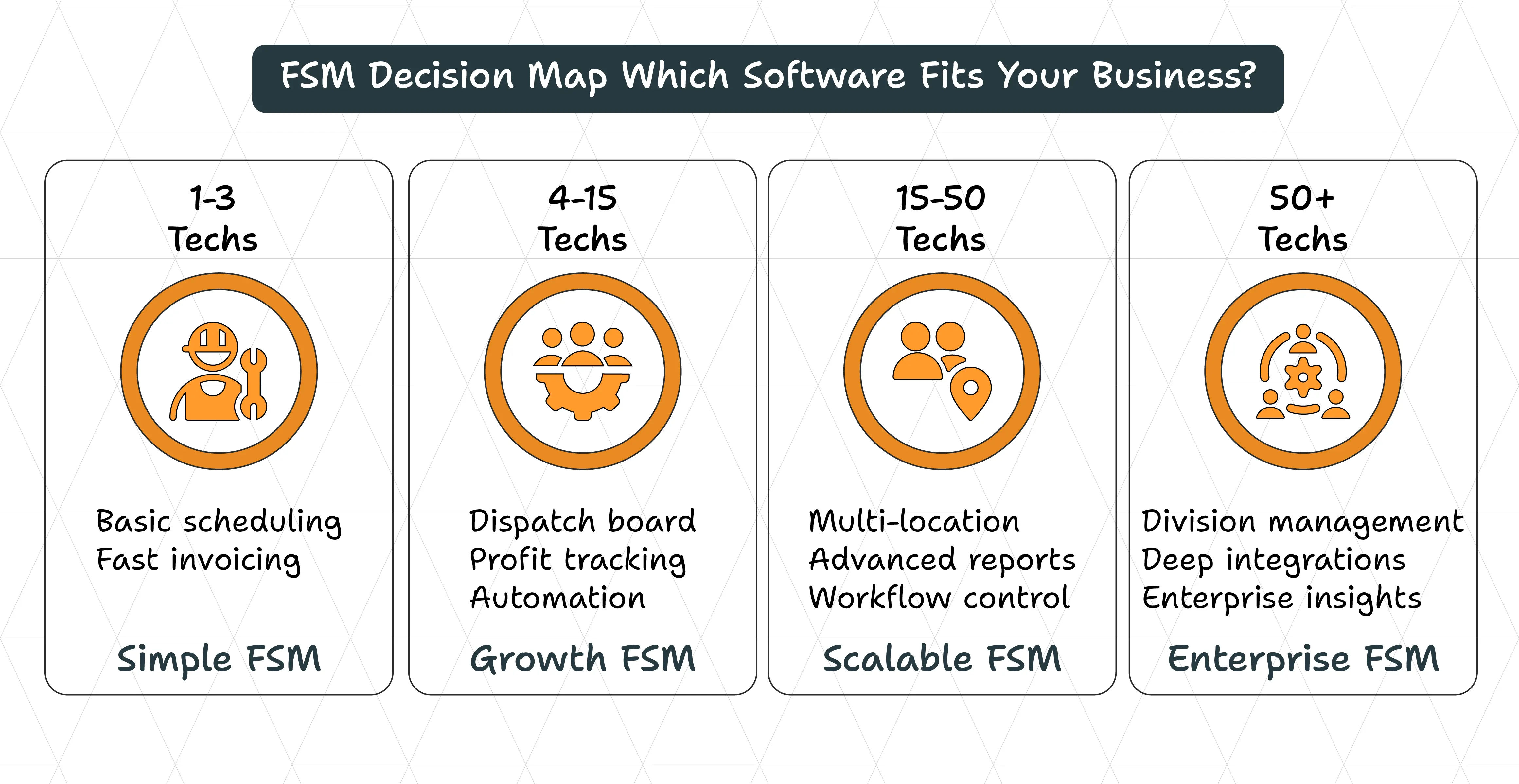
The Ultimate Comparison: Feature Matrix
Here's how these seven alternatives stack up across the most important features:
| Feature | Field Promax | ServiceTitan | Jobber | Housecall Pro | Workiz | Service Fusion | FieldEdge |
|---|---|---|---|---|---|---|---|
| Starting Price | Competitive | $500+/mo | $49/mo | $65/mo | $225/mo | $149/mo | Custom |
| Pricing Model | Flexible | Per User | Per User | Per User | Per User | Flat Rate | Custom |
| Free Trial | Yes | Yes | Yes | Yes | Yes | Yes | Yes |
| Best For | Growing Services | Enterprise | SMBs | Owner-Ops | Niche Trades | Large Teams | QB Desktop |
| QB Online Integration | Excellent | Excellent | Good | Good | Good | Good | Limited |
| QB Desktop Integration | Good | Limited | No | No | No | No | Excellent |
| Mobile App Quality | Excellent | Excellent | Excellent | Good | Good | Good | Good |
| Automation Features | Excellent | Excellent | Good | Good | Good | Fair | Fair |
| Customization | Good | Limited | Limited | Limited | Limited | Moderate | Moderate |
| Customer Support | Excellent | Excellent | Good | Excellentcellent | Good | Fair | Good |
| Community | Growing | Excellent | Good | Excellentcellent | Growing | Fair | Fair |
| Scalability | SMB-Enterprise | Enterprise | SMB-Mid | SMB | SMB-Mid | Mid-Large | Mid |
| Industry Focus | Field Services | Field Services | Field Services | Field Services | Niche Trades | General | Field Services |
The Main Event: ServiceTitan vs Jobber vs Workiz
When evaluating servicetitan vs jobber, these represent two of the most popular choices in the market right now, and they serve very different needs. In the servicetitan vs jobber debate, let’s break down when to choose each one.
When to Choose Field Promax
Choose Field Promax if:
-
You're a growing field service company with 5-50 technicians
-
You want industry-specific features built for trades like HVAC, plumbing, and electrical
-
You value personalized customer support and community
-
You want continuous innovation and regular feature updates
-
You're looking for excellent value without enterprise pricing
-
You want a platform that understands field service businesses deeply
When to Choose ServiceTitan
Choose ServiceTitan if:
-
You're running a large business with 50+ technicians
-
You need advanced automation and reporting capabilities
-
You want to scale to enterprise levels
-
You operate in multiple locations or business divisions
-
You're willing to invest in premium software for maximum features
-
You want the most comprehensive feature set available
When to Choose Jobber
Choose Jobber if:
-
You're a small- to medium-sized business with 1-10 technicians
-
You want simplicity and ease of use over advanced features
-
You're budget-conscious and need affordable pricing
-
You're just starting out with FSM software
-
You want a platform that your team will actually enjoy using
-
You need quick implementation without extensive setup
When to Choose Workiz
Choose Workiz if:
-
You're in a specialized trade like locksmithing, garage door repair, or junk removal
-
You need industry-specific workflows and features
-
You want innovative features like voice-based dispatch
-
You're willing to pay a premium for a platform built specifically for your business
-
You want automation tailored to your specific trade
Understanding Pricing and ROI
How Much Does Kickserv Cost?
kickserv pricing varies depending on your team size and feature needs:
-
Small teams (1-3 technicians): $99-$149/month
-
Medium teams (4-10 technicians): $200-$400/month
-
Large teams (10+ technicians): Custom pricing
-
Per-user fees apply as kickserv pricing scales with your growth
Are There Any Free Kickserv Alternatives?
Yes, there are free FSM options available, but they come with significant trade-offs:
-
Free Options: Bitrix24, Zoho Creator, and others
-
The Reality: Free software typically lacks advanced features, customer support, and scalability
-
The Math: For most growing field service businesses, the investment in paid software pays for itself through increased efficiency and reduced manual work
-
The Bottom Line: You get what you pay for; free software can work for very small operations, but growing businesses need paid solutions
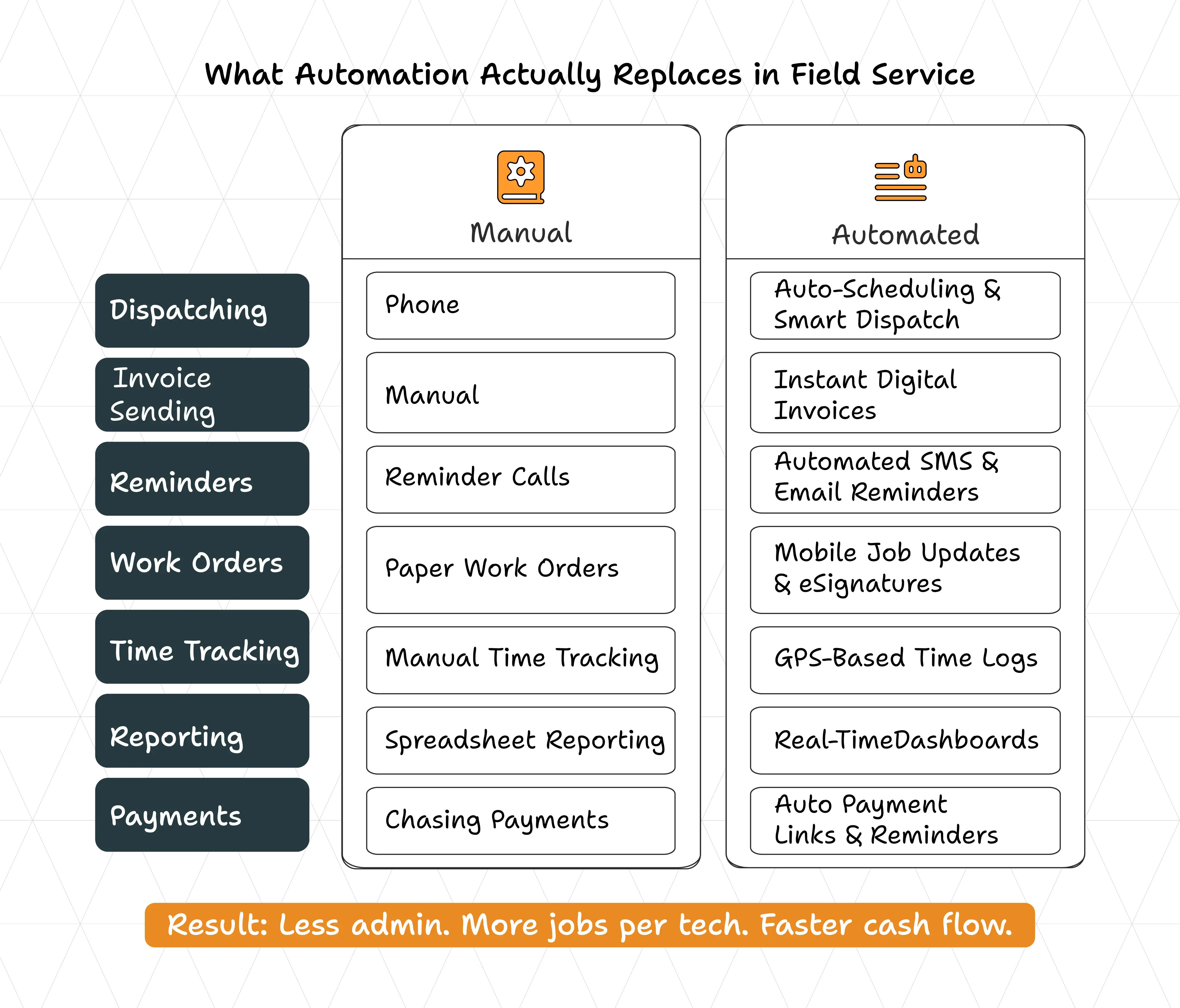
How to Calculate the ROI of Your FSM Software
The real question isn't "How much does the software cost?" but "How much will it save me?"
Here's a simple framework:
Identify Your Current Costs:
-
Calculate how much time your team spends on administrative tasks
-
Include scheduling, dispatching, invoicing, and data entry
-
If your team spends 10 hours per week on these tasks at $25/hour, that's $250/week or $13,000/year
Estimate Efficiency Gains:
-
A good FSM platform typically reduces administrative time by 20-40%
-
If you save just 20% of that time, you're looking at $2,600/year in labor savings
-
Better scheduling means more jobs completed per technician
-
Faster invoicing means faster payment
Add Revenue Improvements:
-
Better scheduling and dispatching increases jobs completed per day
-
Faster invoicing means faster cash flow
-
Improved customer communication means higher retention
-
These improvements often add 5-15% to your revenue
Calculate Your ROI:
-
If you're paying $500/month ($6,000/year) for premium software
-
But you're saving $2,600 in labor costs and gaining $10,000 in additional revenue
-
Your ROI is positive in the first year, and grows from there
Making the Switch: Your 5-Step Kickserv Migration Plan
Ready to move to a new platform? Here's how to do it smoothly without disrupting your business.
Step 1: Data Backup and Cleanup
Before you do anything else, protect your data:
-
Back up all your data from Kickserv
-
Export your customer list, job history, invoices, and critical information
-
This is your safety net if anything goes wrong
-
While you're at it, clean up your data: ◦ Remove duplicate customers ◦ Archive old jobs ◦ Ensure customer information is accurate and complete ◦ Fix any data quality issues
Step 2: Choose Your New Platform and Sign Up for a Trial
Don't rush this decision:
-
Sign up for free trials with your top 2-3 choices
-
Spend at least a week using each platform with your team
-
Have your technicians test the mobile app in the field
-
Try creating a quote, dispatching a job, and generating an invoice
-
This hands-on experience will tell you more than any feature list
-
Ask questions and test customer support responsiveness
Step 3: Data Import and Configuration
Once you've chosen your new platform:
-
Work with their onboarding team to import your data
-
Most modern FSM platforms have tools to import from Kickserv
-
Import customer data, job history, and other critical information
-
Configure your settings and preferences
-
Set up your technician profiles
-
Customize workflows specific to your business
-
Test everything before going live
Step 4: Train Your Team
Don't underestimate the importance of training:
-
Your team will use this software every day
-
Make sure they understand how it works
-
Most platforms offer training resources, webinars, and onboarding support
-
Take advantage of these resources
-
Have your team practice with the new system
-
The better trained your team is, the faster you'll see ROI
-
Schedule follow-up training for advanced features
Step 5: Go Live and Decommission Kickserv
Pick a date to go live:
-
You might want to run both systems in parallel for a week or two
-
This ensures everything is working smoothly
-
Monitor the transition closely
-
Once you're confident, shut down the kickserv app
-
Fully commit to your new system
-
Don't look back!
For more information, contact Field Promax
We're here to help you get started
Conclusion: Which Kickserv Alternative is Right for You?
The field service software market has never been more competitive, which means you have excellent options. The right choice depends on your specific needs, budget, and growth plans.
Here's a quick decision guide:
-
Growing field service company with 5-50 technicians? Field Promax is built for you
-
Large enterprise with 50+ technicians? ServiceTitan is the clear choice
-
Small business that values simplicity and affordability? Jobber is hard to beat
-
In a specialized trade? A workiz alternative may be worth a serious look
-
Need maximum flexibility and customization? Service Fusion is your answer
-Heavily invested in QuickBooks Desktop? FieldEdge is the specialist you need
The key is to try before you buy. Sign up for free trials, involve your team in the decision, and choose the platform that feels right for your business. The investment in the right FSM software will pay dividends through increased efficiency, better customer service, and faster growth.
Ready to make the switch? Download our free guide to choosing the right field service software for your business. We'll walk you through the decision-making process, help you evaluate your options, and provide a checklist to ensure you choose the platform that's right for you.
Download Your Free Guide: The Complete Field Service Software Buyer's Checklist
Stop guessing and start choosing with confidence. Our free guide includes:
-
A detailed feature comparison checklist
-
Questions to ask each software vendor
-
A ROI calculation worksheet
-
A migration planning template
-
Industry-specific recommendations for HVAC, plumbing, electrical, and more
-
A side-by-side comparison of the top 7 alternatives
-
Red flags to watch out for when evaluating software
-
Implementation timeline and best practices