Customer CRM for Service Businesses: The Operator's Playbook
.webp?tr=f-auto,q-80,w-1200,pr-true)
You sent a tech to a job. He didn't know the customer had called three times in the past year. He had no knowledge of the water heater replacement completed in January, and no notes from the previous visit. The customer, however, expected the company to know that history. They never called the company back after that experience.
The cost of not having an effective customer CRM for service businesses goes far beyond frustration. It can lead to lost revenue, fewer repeat customers, and damage to your reputation - often without you realizing the full impact. This playbook explains how to improve the situation, along with the five key metrics you should monitor each week.
What a Customer CRM Actually Means for a Service Business
In the past 14 years of speaking with people who run HVAC, plumbing, electrical, landscaping, garage door, and pest control businesses, I've watched the term CRM stretch until it no longer means anything specific. For a B2B software company selling to enterprise sales teams, a CRM is a tool for managing pipelines and opportunities. For a service business with ten technicians, a few thousand customers, and a dispatcher answering calls over her morning coffee, it means something entirely different.
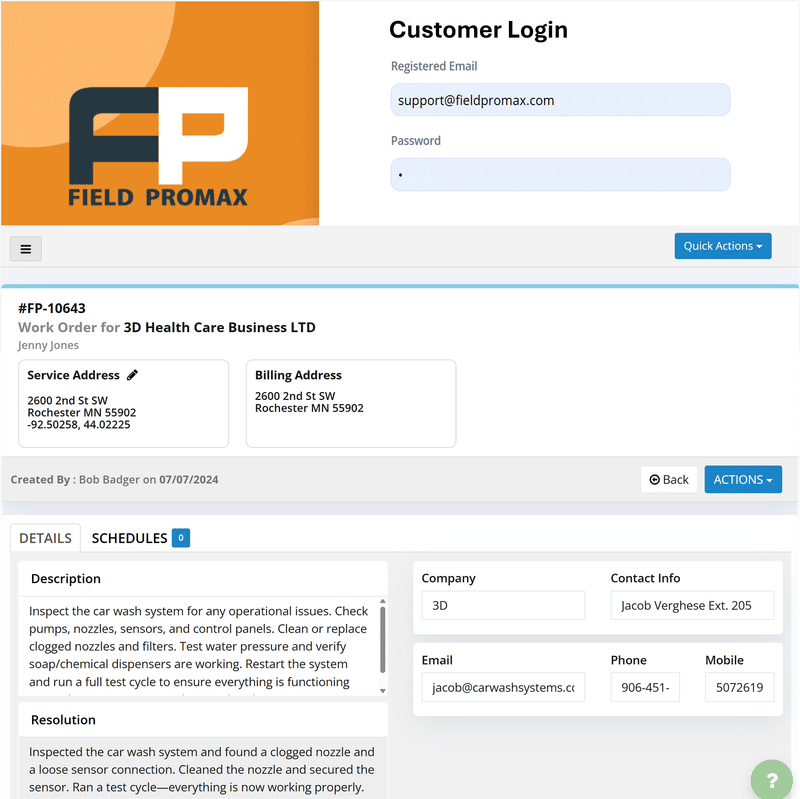
For field service operators, a customer CRM for service businesses is the single source of truth for everything known about a property and the people associated with it. It contains the address, the equipment that was installed, every visit and photo, every phone call, text message, and email that came through the office, as well as the complete invoice history. It also includes the estimate signed three years ago that a customer may suddenly call about and expect you to find immediately. When that record lives in one screen, your tech walks up to the door knowing the customer. When it doesn't, your tech knocks as a stranger and starts the relationship over every time.
This playbook explains how a service-business CRM should be organized. It covers profile design, communication history, customer portals, property photos, retention follow-up cadence, and customer segmentation. It also includes five to six industry-specific examples showing how the same CRM fields can be used differently by plumbing companies, landscaping businesses, and garage door installers.
If you're interested in going deeper on the detailed operational sections on this page, I've included the articles inline. Start here, then drill into the areas that matter to you.
The Anatomy of a Service-Business Customer Profile
A customer profile in a customer CRM for service businesses isn’t the same as an account in a sales CRM system. It doesn’t track lead stages or deal value. Instead, you’re tracking properties - often multiple per customer - and the equipment or assets installed at each location. These are the core fields that really matter.
- Contact block. Name, phone number, email, preferred communication channel (text, call, or email), and who is legally authorized to approve work. For commercial accounts, this matters greatly, since the person who answers the phone is not always the same person who signs the PO.
- Property block. Address and gate codes, parking notes, pet alerts, and instructions for which side door the technician should use. A single customer may have several properties. For example, a landscaping business in our customer base manages seven HOA properties under one account. The CRM needs to represent this structure naturally.
- Equipment or asset block. Furnace make, model, serial, installation date. Water heater details. Mainline cleaning history and location. Model of the irrigation controller. In garage door shops, each opener and door gets its own sub-record. This is what allows a technician to look professional when they walk through the door instead of asking the homeowner which system they are using.
- Service history. Every job, complete with the date, time, technician, any parts used, photos, notes, and invoices. Filterable by equipment, technician, and job type.
- Communication log. Every phone call, SMS, email, or portal message attached to the customer's record is automatically logged. More details on this below.
- Financial block. Status of invoices and payment history, including unpaid balances, signed estimates, and the status of membership or maintenance plans.
If owners of r/HVAC or r/Plumbing discuss their frustrations with CRM tools, a recurring pattern emerges - seen across multiple threads over the past year. Their CRM contains customer contacts, but no equipment list. As a result, the office can see the customer’s name, but the technician is effectively working blind in the field. The fix isn't more software. The fix is a profile shaped like the work.
Communication History: Calls, Emails, SMS in One Thread
Across four Reddit threads on r/smallbusiness and Quora where owners describe their CRM frustrations, the most consistent complaint isn't about features. It's about channel fragmentation. The text thread lives on the dispatcher's phone. The email lives in someone's inbox. The phone call lives in nobody's notes. The next person who picks up the account has no idea what was already discussed, and the customer has to repeat themselves.
A functional service business CRM solves this by collapsing every channel into a single thread attached to the customer record. Incoming SMS messages are routed into the CRM and logged in the communication history. Estimates and invoices are recorded with send time and open status. Phone calls are tagged to the customer’s number and include a short note summarizing the conversation. Emails can be BCC’d or forwarded into the customer’s thread to maintain a complete record.
The value is real-time rather than abstract. If a customer calls back and says, “I had a conversation with someone two weeks ago about the second-floor unit,” your dispatcher can immediately pull up the call record and see who they spoke with, what was discussed, and what the next step was supposed to be. The call is resolved in two minutes instead of fifteen. In small plumbing and HVAC businesses within our customer base, teams that route every channel through the CRM report a significant drop in inbound “where do we stand here?” calls after customers feel properly heard on the first interaction.
For the deeper read on building this discipline into daily ops, see strategies to improve customer relationships.
The Customer Portal: Why It Pays for Itself
For a typical 5 to 20 tech shop without a customer-facing portal, dispatch fields a steady stream of "where's my tech?" and "can I reschedule?" calls all day. Owners we've talked to in that size range consistently report those inbound status calls drop by roughly 40% once customers can self-serve scheduling and job status online. That's the load on dispatch alone - before you count the calls that never had to come in because the customer could check the portal at 9pm on a Sunday.
A service-business customer portal should give the customer four things.
- Status on their open job. When will the technician arrive? Where are they right now? What is the ETA?
- Their service history. Past invoices, previous jobs, and photos from earlier visits - this is the information commercial accounts rely on most, because facility managers need it for their own records.
- The ability to act. Approving an estimate, rescheduling an appointment, making a payment on an invoice, or booking a scheduled maintenance visit all happen in one place.
- A way to reach you that doesn't require the phone. A single message thread is then stored in the same communication log the office can see.
The problem that leads to portal adoption is clearly visible across Reddit threads, where owners describe being overwhelmed by repeated customer inquiries. Without a portal, staff spend hours each week answering the same basic questions, and customers often feel uninformed when they show up. Portals aren’t just a gimmick feature - they’re a deflection layer that allows the office to focus on calls that actually require a human.
Our STANCE: A service business portal isn't about looking modern. It's about recovering the 40% of your dispatcher's time that goes to status calls that the customer could have answered themselves at 9pm. You're not building an app. You're getting your office back.

Photo History Per Property: The Field's Memory
This is what service operators do not realize until they have to deal with it. Every visit becomes a documented record. Technology captures photographs before and after the work, including the equipment nameplate, the valve that was isolated, the section of wall not worked on, and any corrosion observed - even if the customer refused the repair.
These photos are linked to the property record, not just the job. Three years later, when the next technician arrives, they can pull up the property’s photo timeline and see how the equipment has deteriorated. They can also view the previous technician’s note on the corroded fitting that the homeowner declined to replace, and show the customer: “This is what we reported in 2022. Here is the current situation.”
A plumbing operator in our customer base told us that the photograph trail is the key to winning commercial accounts. Property managers need documentation. A CRM that holds a timeline of photos for each property gives property managers that documentation as a consequence of technicians simply doing their job.
Photos also do a quieter job - they protect you. When a customer cannot prove that a task was completed, or claims damage that was not present before the visit, a timestamped photo from the previous visit often closes the discussion immediately. In multi-trade companies we’ve worked with, those that integrated photo discipline into their closing checklist saw significantly fewer dispute-related invoices and reduced aged AR issues. A standard approach is five images per visit, tied to the property and indexed within the timeline.
Follow-Up Cadence: The Retention Engine
From 14 years of customer conversations, the small plumbing and HVAC outfits that actually run CRM follow-up workflows - including post-job check-ins, seasonal reminders, and maintenance triggers - see repeat-customer share climb roughly 25% over shops still relying on memory and spreadsheets to remember who to call back. That's the largest single retention lever I know of in this industry. And almost nobody runs it cleanly.
A follow-up cadence has four moments.
- The day after the job. Send a thank-you message along with a brief satisfaction survey. If the customer is satisfied, direct them to leave an online review. If they are not satisfied, route the response to the owner before it turns into a public review.
- The seasonal reminder. HVAC shops send cooling-season preparation reminders in March and heating-season preparation reminders in September. Plumbing shops send backflow testing reminders. Landscaping shops send annual winterization reminders. Garage door shops send spring lubrication reminders. These messages work because they are useful, not because they are clever.
- The maintenance-due trigger. Based on the equipment listed in the customer's profile, the CRM sends an alert when the next service is due. This is why the equipment section of the customer profile deserves its own dedicated record.
- The lapsed-customer touch. A customer who has not booked service in the last 14 months should not receive the same message as someone who booked service last week. The CRM should automatically separate these customers and communicate with them differently.
The benchmark on reminder workflows is striking. The average no-show rate in service appointments is 23%. Shops that implement automated email and SMS reminders typically see missed appointments decrease by around 30% almost immediately, bringing rates down from roughly 23% to 13%, according to systematic reviews. This reflects the appointment impact. The retention impact is even more significant over the course of a year.
According to Aberdeen Group, companies using CRM software see a 27% increase in customer retention. For a trade company where repeat customers account for 30% of revenue, this improvement translates directly into revenue - not just percentage points on a dashboard.
For the deeper playbook, see retention and upselling strategies. For the operational mechanics of reminders themselves, the same logic applies as in scheduling and dispatch automation.
Customer Segmentation That Actually Matches the Work
Segmentation in a service business CRM isn't a marketing activity. It's an operational one. The segments that really matter are:
- Residential vs. commercial. Different billing terms, decision-making structures, and different communication frequencies apply. Commercial customers often require purchase orders and net-30 payment terms. Residential customers typically require a credit card on file and appointment confirmation texts.
- Maintenance plan vs. transactional. Plan members receive priority dispatch, automated reminders, and ongoing engagement as recurring revenue. Transactional customers require a different follow-up and upsell strategy.
- High-value vs. standard. The top 15% of revenue customers often generate a disproportionate share of total revenue. They may receive enhanced service levels, direct access to the owner, and different SLA commitments.
- At-risk vs. healthy. A customer whose last three jobs included a callback, or who hasn't scheduled service in 18 months despite previously booking quarterly, is at risk. The CRM should identify these customers before they quietly churn.
- By equipment age. Equipment in years 8-12 of a 15-year lifespan is often the ideal target for replacement and upgrade conversations. Upsells are more successful when they are based on equipment age rather than customer demographics.
Shops that segment customers by equipment age and job-type history typically generate significantly higher response rates than shops that send the same seasonal emails to everyone. Segmentation doesn't have to be sophisticated. Often, it's just a simple filter on a specific equipment category.
Five Vertical Examples: How the Same CRM Fields Get Used Differently
The reason that horizontal CRM tools don't work in service companies is because one profile field can mean various things in different industries. This is how the same structure can be used across various trades that comprise our customers.
HVAC. The equipment block contains heating elements, AC condenser unit, the air handler and thermostat for each zone. Service history filters by equipment since the customer is aware of what unit is being discussed. The photo history monitors the condition of the coil over years. A follow-up sequence is activated twice a year to ensure that the coil is in good shape for seasonal tune-ups. Segmentation based on the equipment age determines the frequency of replacement conversations.
Plumbing. The property block contains the water main shutoff location, the mainline cleanout and the water heater specification. Photo history tracks the cleanout access and any previous work done on the root. The follow-up cadence is fired annually to test backflow and inspections of the water heater's anode at the appropriate date. Segmentation flags on slab homes, older galvanized supply lines, and septic vs.sewer.
Electrical. The equipment block contains the panel's make, amperage, breaker map, as well as any sub-panels. Service history records every circuit contacted. The photo history records the condition of the panel as well as any code problems that have been flagged, but not rectified. The follow-up timeframe is less, but the segmentation based on panel age triggers service-upgrade conversations
Landscaping. The property record has the greatest impact. The size of the lot, irrigation zones, plant inventory, and access notes guide every visit. The photo history tracks the lawn's condition seasonally. The follow-up cadence is based on the calendar, more than the equipment. One landscaping company within our client base described Field Promax as a fantastic tool for delivering information quickly to field employees, with phone support available within minutes whenever questions arise.
Garage door. Every door and opener is given its own sub-record within the property. The photo history records the condition of the springs, cable wear and rollers. A follow-up sequence is triggered based on the opener age and estimated spring cycle counts. Segmentation flags two-spring systems versus one-spring systems, as well as standard springs versus higher-cycle springs.
Pest control and cleaning. Recurring visits dominate. This profile is not so much about the equipment and more about service plans, frequency, and access. The communication log is the most frequently used component since customers ask the most questions between visits.
Estimates, Invoicing, and the QuickBooks Layer
Every interaction between a customer and money should be recorded in the customer's record. The estimate the technician created on the truck. The customer's approval timestamp. The invoice. The payment. The refund, if there was one. The membership plan auto-renewal. All of it should be connected to the same account.
The operational reason is simple. If a customer calls and says, "I already paid for that," the dispatcher should be able to see the payment in two seconds, not have to search through three different systems. If a technician is on the phone and a customer wants to review last month's estimate, the technician should be able to find it on their mobile device. After the bookkeeper closes the month, every invoice should flow into QuickBooks without anyone having to re-enter it.
A business in our customer base that had delayed going paperless for years said the transition was simple and the customer service was incredibly impressive. The reason the transition works when a CRM is designed correctly is that estimates, invoices, payments, and bookkeeping all live within the same customer record. No one has to manually cross-reference information between systems.
For the deeper reads on those mechanics, see the estimates workflow and the QuickBooks integration.

Why CRM Rollouts Fail (and How to Make Yours Stick)
Across roughly five Reddit threads where owners describe failed CRM rollouts, the pattern is identical. The shop bought software. The sales team and the techs quietly went back to spreadsheets, notebooks, and memory. The records stayed half-empty. The investment never paid back. The tool got blamed - but the real failure was adoption.
After 15 years of watching this unfold, the rollouts that stay have four characteristics in common.
- The owner uses it daily. If the owner remains within the spreadsheet, his team remains within the spreadsheet. There is no exception to this rule.
- Data entry happens at the job site, not at the office at the end of day. If the tech needs to recall and retype it later, it won't get entered into the system. Mobile apps must be the place where work is recorded.
- The profile fields are the minimum required, not the maximum possible. Twenty fields for each customer means no fields are filled. Five fields means five fields get filled.
- The follow-up workflows fire automatically. Sending a reminder depends on someone remembering, it won't go out. Automation is the key difference between a CRM and a digital filing cabinet.
Here's the most common version of this pattern that's seen across small multi-trade companies we've worked with: the owner of a sub-10-tech shop doing HVAC, plumbing, and light electrical was left with about a dozen unanswered one- and two-star reviews in the late cooling season, with some mentioning the callback process on a specific install crew.
The first solution was a Friday afternoon block for a personal response to reviews. Friday afternoons were constantly consumed by emergency messages. After the second month, they moved the block to 7:00 a.m. on Mondays, before the huddle, and it stayed that way. Two seasons later, the mood had shifted significantly in a positive direction. Some unhappy customers rebooked after receiving personal calls. One of them even signed up for a maintenance plan.
The lesson isn't about software. It's about cadence and ownership. The CRM made the discipline possible. The owner made it real.
Our STANCE: Most CRM rollout failures aren't software failures. They're accountability failures. The moment the owner stops using it daily, the whole team reads the signal. Your team won't maintain a system the owner skips.

What to Measure: The Five CRM Metrics That Actually Matter
There's no need for a 30 metric dashboard. You only need five numbers, viewed weekly.
- Repeat-customer share. What percentage of the jobs this month were from customers that you have served prior to. If the percentage is increasing, then your retention rate is on the rise.
- Customer lifetime value (CLV). Average ticket times number of visits per year multiplied by the years the customer has been on file. Follow this trend and not the exact number.
- Reactivation rate. Of the customers who hadn't booked in 12-plus months, what percentage came back after a reactivation touch.
- Estimate-to-job conversion. Of the estimates sent, how many turned into scheduled work. This is the point where your portal as well as follow-up workflows are reflected in the report.
- No-show and reschedule rate. Check this weekly. With the reminder mechanism is what drives it. Shops that enable automated SMS reminders usually notice no-shows decrease dramatically in just a few weeks.
In an 8-tech operation without a single customer profile, tech loses roughly 30 minutes on repeat jobs searching through prior invoices, notes, and text messages to reconstruct the site's history. Shops that pull this history together into a single CRM screen generally claw more than 30 minutes per call back. Combine 40 repeat jobs each week and the savings alone will fund the software.
For the deeper read on which metrics belong on the dashboard, see field service KPIs.

The Retention Math: What a CRM Is Actually Worth
Let's put hard numbers on it. The business case for a customer CRM for service businesses isn't about features. It's about the math of repeat revenue.
A new customer can cost 5 to 10 times more than maintaining an existing customer (BIA advisory). Repeat customers pay on average 67% more money than first-time buyers. An increase of 5% in retention rates can increase profits by 25% to 95% (Bain and Company). Aberdeen Group data shows CRM implementation boosts retention rates by around 27%. Check those numbers against your revenue base, and the ROI isn't just a theoretical number but it is measurable within the initial year.
Revenue gain estimates are illustrative, based on Aberdeen Group 27% retention lift benchmark applied to a representative repeat-customer revenue base.
| What Happens Without CRM | Actual Cost | What CRM Fixes |
| Acquiring new customers constantly | 5-10x more expensive than retention (BIA Advisory) | Automated follow-up and seasonal outreach keep existing customers active |
| Repeat buyer spend gap | Repeat buyers spend 67% more on average | Job history enables timed upsell conversations (equipment nearing end of life) |
| Tech arrives blind to the job | 30 min lost per repeat job reconstructing history | Full job and equipment history on mobile before the tech knocks |
| Communication gap on scheduling | 38% of customers cite poor communication as #1 frustration (FIELDBOSS Survey, 2025) | Automated notifications at every job stage, zero manual effort |
| Warranty and callback disputes | No documentation = no defense | Timestamped job notes and photos attached to every work order |
| No seasonal follow-up system | Customer calls a competitor next time | Maintenance reminders triggered by job date or equipment age |
| Business Size | Recommended Plan | Monthly Cost | Est. Annual Retention Revenue Gain (at 27% lift) | Approximate ROI |
| Solo operator | Light (1 user) | $99/mo | $5,000-$15,000 | 4x-12x first year |
| 3-5 person crew | Standard (5 users) | $159/mo | $20,000-$50,000 | 10x-26x first year |
| 8-12 person operation | Premium (12 users) | $239/mo | $40,000-$100,000+ | 14x-35x first year |
| KPI | What It Measures | Field Service Benchmark | Source |
| Customer Retention Rate | % of customers who return within 12 months | 60-75% residential; 75-85% commercial maintenance | Invesp, industry benchmarks |
| Repeat Purchase Probability | Likelihood of booking again | 27% after 1st job; 49% after 2nd; 62% after 3rd | Flowlu CRM Research, 2025 |
| Average Response Time | Request to dispatch | Under 2 hrs emergency; under 24 hrs standard | FIELDBOSS Survey, 2025 |
| First-Time Fix Rate | % jobs done without callback | 70-80% target; below 65% signals prep issue | Field service industry standard |
| Maintenance Contract Renewal | % of contracts renewed annually | 75-90% with reminders; drops below 60% without | Field service operator benchmarks |
| No-Show Rate | % of scheduled appointments missed | Drops from ~23% to ~13% with automated SMS reminders | Systematic review data |
Deep dives in this guide
- Customer Retention Strategies for Field Service Businesses - CLV math, the post-service cadence, maintenance plan structure, and the four retention metrics worth tracking weekly.
- Field Service Customer Experience: An Operator's Playbook for 2026 - The 10am dispatch cascade, written touchpoint rules, communication wiring, and the five CX metrics that prove your system works.
- How to Improve Field Service Customer Experience with the Right FSM Tools - The FSM-tool sequence (unified record to automated reminders to self-serve portal to feedback loop) and where most 5-20 tech shops should actually start.
Field Promax
Field Promax is specifically designed for trade companies operating in the USA and Canada. Its customer relationship management module is built around the type of customer profile that field service businesses actually need: equipment records, photo history, online portal access, automated follow-ups, and QuickBooks synchronization that doesn't require a third-party connector to keep everything together.
Deep dives in this guide
- Customer Retention Strategies for Field Service Businesses — the CLV math, follow-up cadence, loyalty tiers, and maintenance-plan attach that turn CRM data into repeat revenue.
- Field Service Customer Experience: An Operator's Playbook for 2026 — the touchpoint rules, communication threads, and CX metrics that make the customer record pay off at the door.
- How to Improve Field Service Customer Experience with the Right FSM Tools — where a 5–20 tech shop should start: unified record, reminders, self-serve portal, then the feedback loop.
Conclusion
A customer CRM for service businesses, done right, is the operational memory of your shop. It's where building information, equipment history, photos, messages, and financial records come together on a single screen. The shops with this type of system don't succeed simply because they purchased better software. They grow because every technician arrives with a complete picture of the customer, every dispatcher answers calls with the full service history in front of them, and every follow-up is triggered automatically, whether someone remembers to make the call or not.
That's the difference between a customer list and a customer relationship. Identify the area that hurt most in your shop today, fix it, and then move on to the next one.
Frequently Asked Questions

Founder and CEO
Joy Gomez is an engineer, process automation expert, and the Founder of Field Promax. Known for his technical expertise and commitment to field service innovation, Joy writes about transforming traditional business models into paperless, efficient operations. He is a Lean Six Sigma Black Belt based in Rochester, MN, dedicated to helping field professionals work smarter through better technology.
Reviewed by

Content Creator
Bhargavi Halthore is a content writer at Field Promax, a field service management platform serving trades businesses across the USA and Canada. With over a decade of experience writing for business owners, she brings detailed, ground-level insight to every topic she covers. Her research goes beyond search results - she digs into LinkedIn groups, Facebook communities, and Reddit forums to understand what field service business owners are actually dealing with on the ground. She speaks directly with industry professionals, understands their day-to-day challenges, and translates that into content that is practical and actionable. What you read in her articles reflects real industry patterns, not theory.