Subcontractor Management Software
Your subs are on the job. Are they on the system?
Field Promax subcontractor management hands a visit to an outside crew without buying them a licence. Assign the contractor, agree the fee, text or email them a private link, and they log their days, add charges, upload photos and collect the customer's signature from any phone, while the office watches the status, approves the charges and raises the vendor bill.
Hand Over the Visit, Not the Whole System
One visit, one contractor, one agreed fee.
Pick the scheduled visit, pick the vendor, set the agreed fee and write the instructions. Setting a fee raises a subcontract purchase order automatically, the contractor's name shows on the calendar in place of the technician, and the portal link goes out by email, by text, or both. A visit is locked to the contractor it was handed to. It can never be quietly reassigned to someone else mid-job.
Request Demo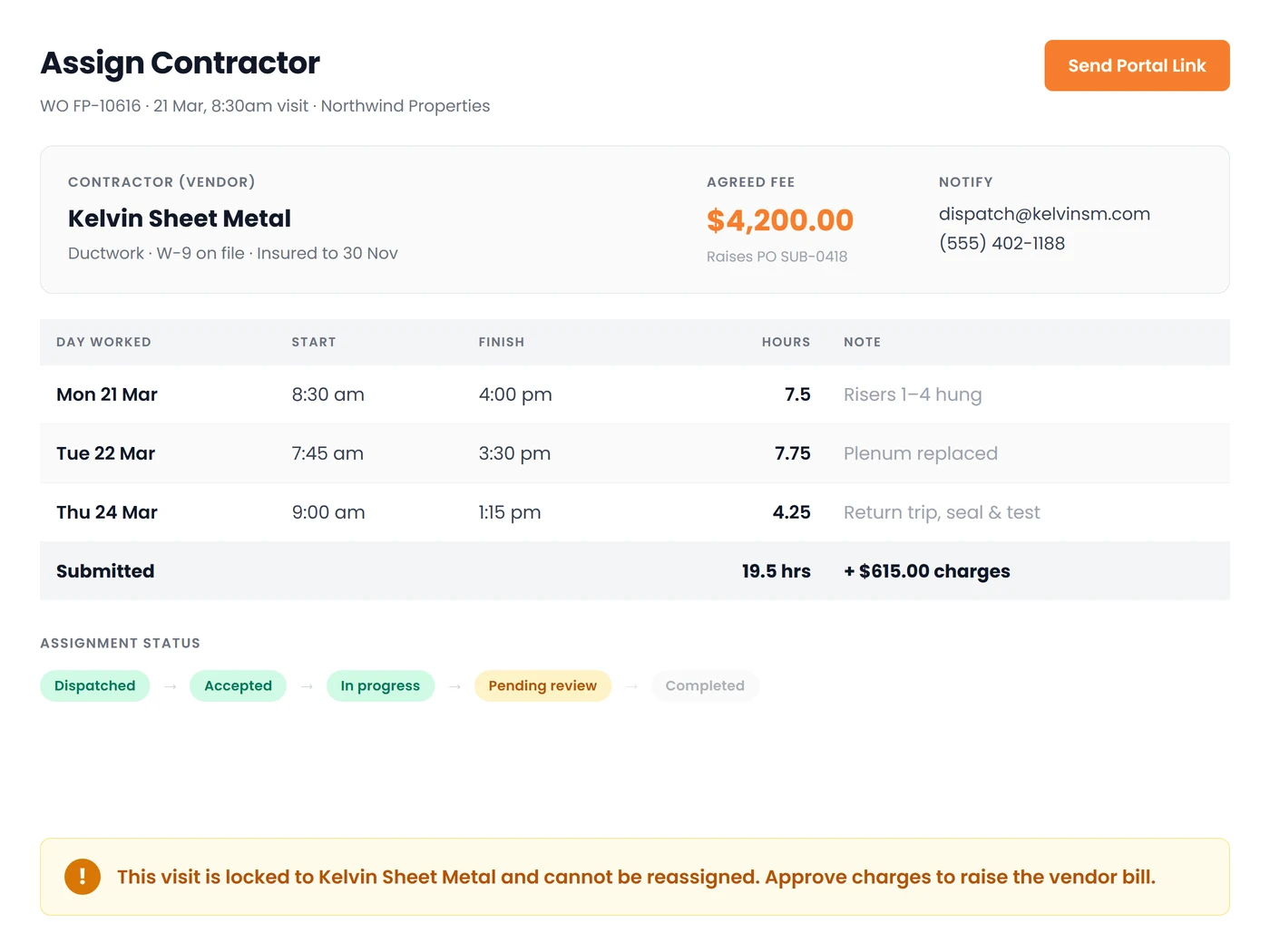
No App. No Licence. No Login.
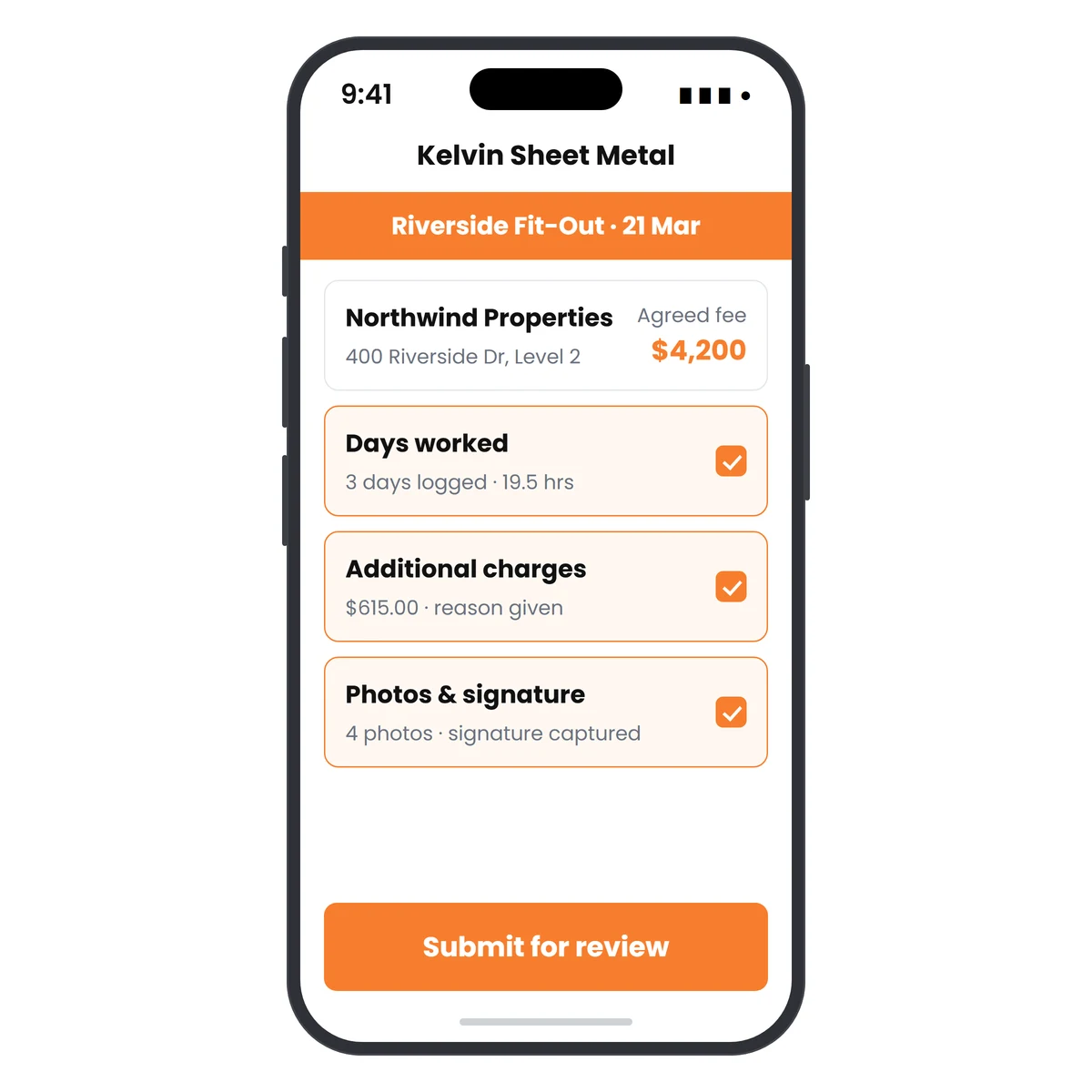
A private link, on your branding, that expires.
The contractor opens the link and sees exactly what they need: the customer, the address and phone, the scope, the trip note and the schedule. They log each day worked with start, finish and notes, enter additional charges with a required explanation, upload photos that land straight on the work order, capture the customer's signature and submit for review. Nothing else in your business is visible to them.
Request DemoFrom Dispatch to Paid, Without the Paper Chase
The office keeps control of the money at every step:
A Real Status Trail
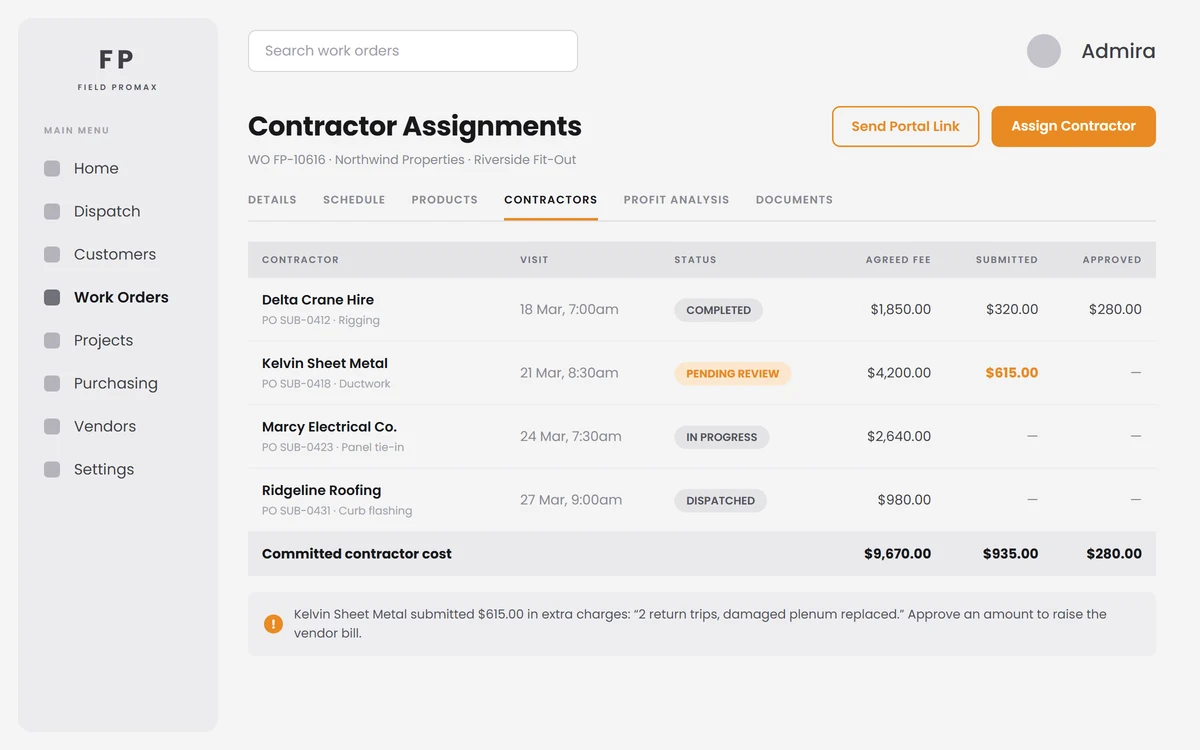
Dispatched, accepted, in progress, pending review, completed or cancelled: the assignment's status is visible on the work order and rolled up to the project, so nobody has to ring round to find out who actually showed up.
Days Worked, Not Guessed Hours
Contractors log each stretch of work as its own day with start and finish times; the hours add themselves up on the assignment. The office can add or correct a day too, and the visit's own actual start and finish stay the office's field.
Approve What You Will Pay
Submitted charges arrive with the contractor's explanation attached. The office records the amount it will actually pay, and only then does the vendor bill get created: agreed fee plus approved charges, never the number the contractor typed.
Straight Into Job Cost
The subcontract purchase order and the resulting vendor bill land on the work order and the project as contractor cost, so a job run half in-house and half by subs still shows one honest margin.
Compliance Before Dispatch
Each vendor record carries W-9 received, license expiry, insurance expiry, trade, capabilities and tax ID, with expired dates flagged, so an uninsured sub is caught before the visit, not after the claim.
Bills You Cannot Break
Approve, post to accounting, pay. Once a bill has been approved or paid, deleting the schedule or assignment behind it is refused outright, and a draft bill is voided rather than orphaned, so your books and your job costs never drift apart.
Frequently Asked Questions
You assign an existing scheduled visit to a vendor instead of a technician. Set the agreed fee and the instructions, and Field Promax raises a subcontract purchase order, shows the contractor's name on the calendar, and sends them a private portal link by email, by text, or both.
No. The contractor portal is a private expiring web link that opens in any phone browser. There is no app to install, no login to create, and no licence to buy. They see only their own visit (the customer, address, phone, scope, trip note and schedule) and nothing else in your business.
Update their status, log each day worked with start and finish times and notes, enter additional charges with a required explanation of what they are for, upload photos that land straight on the work order, capture the customer's signature, and submit the visit for review.
Submitted charges are a request, not an invoice. The office reviews them with the contractor's explanation attached and records the amount it will actually pay. Only then is the vendor bill created, from the agreed fee plus the approved charges, never from the number the contractor typed.
Yes. The subcontract purchase order and the approved vendor bill show as contractor cost on the work order's Profit Analysis tab and in the project's Costs and Profit tab, so a job run half in-house and half by subs still reports one honest margin.
No, by design. Once a visit has been handed to a contractor it is locked to them, and the lock survives even if the assignment is removed, so a visit can never change hands quietly and leave two vendors both believing they own it.
Field Promax refuses. If the vendor bill behind the assignment is approved, posted or paid, deleting the schedule or work order is blocked outright and it tells you which bill is in the way. A bill still in draft, pending review or rejected is voided instead of orphaned, so your books and your job costs never drift apart.