Project Management Software for Contractors
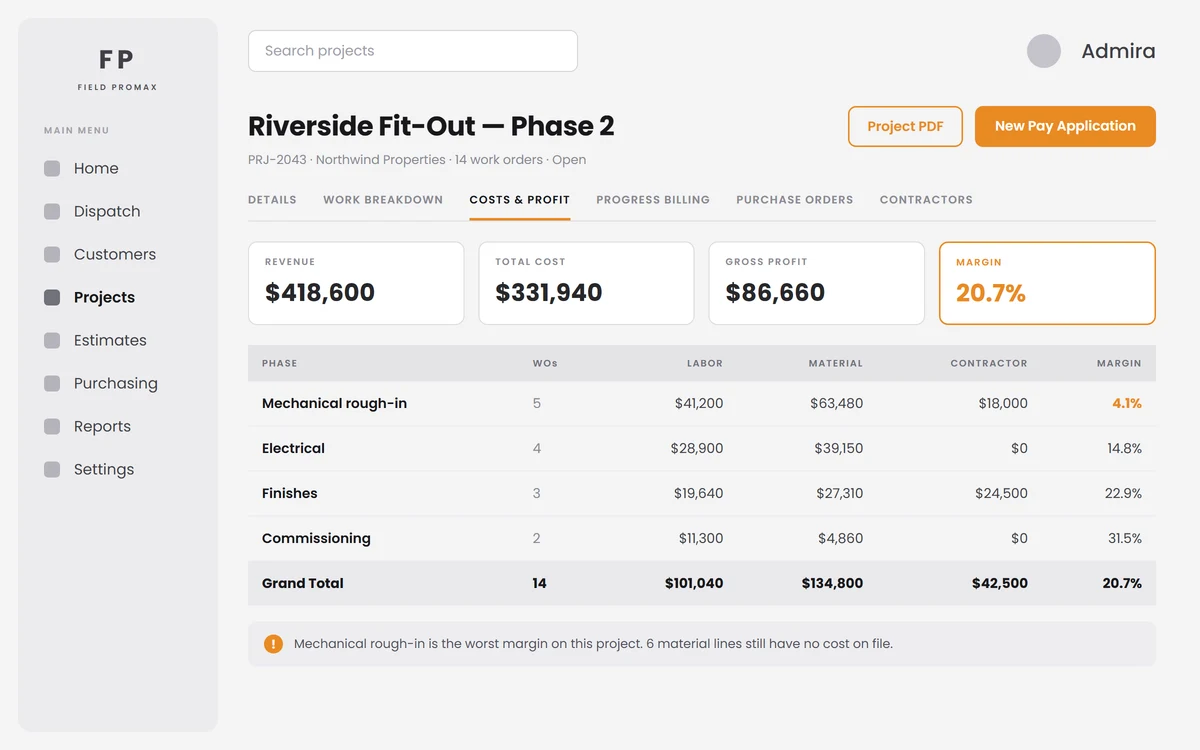
A twelve-month build should not be judged by one invoice.
Field Promax project management software runs a multi-phase job as one project, with every work order, phase, purchase order, subcontractor and expense under one record. A live Costs & Profit view shows cost and margin phase by phase, worst margin first, so the phase eating the job is the first row you read.
Trusted by 100,000+ contractors. Rated 4.7 on Google and 4.2 on Capterra.
Phases, Work Orders and a Live Cost Picture
One project, ten tabs, nothing kept in a spreadsheet.
Create a project against a customer, pick the phases it will use, and link work orders to it. New ones land under the project automatically. The Work Breakdown tab groups every estimate, change order and work order by phase. Costs & Profit rolls labor, material, subcontractor and expense cost into one margin and sorts phases worst first, so the phase quietly eating the job is the first row you read.
Request Demo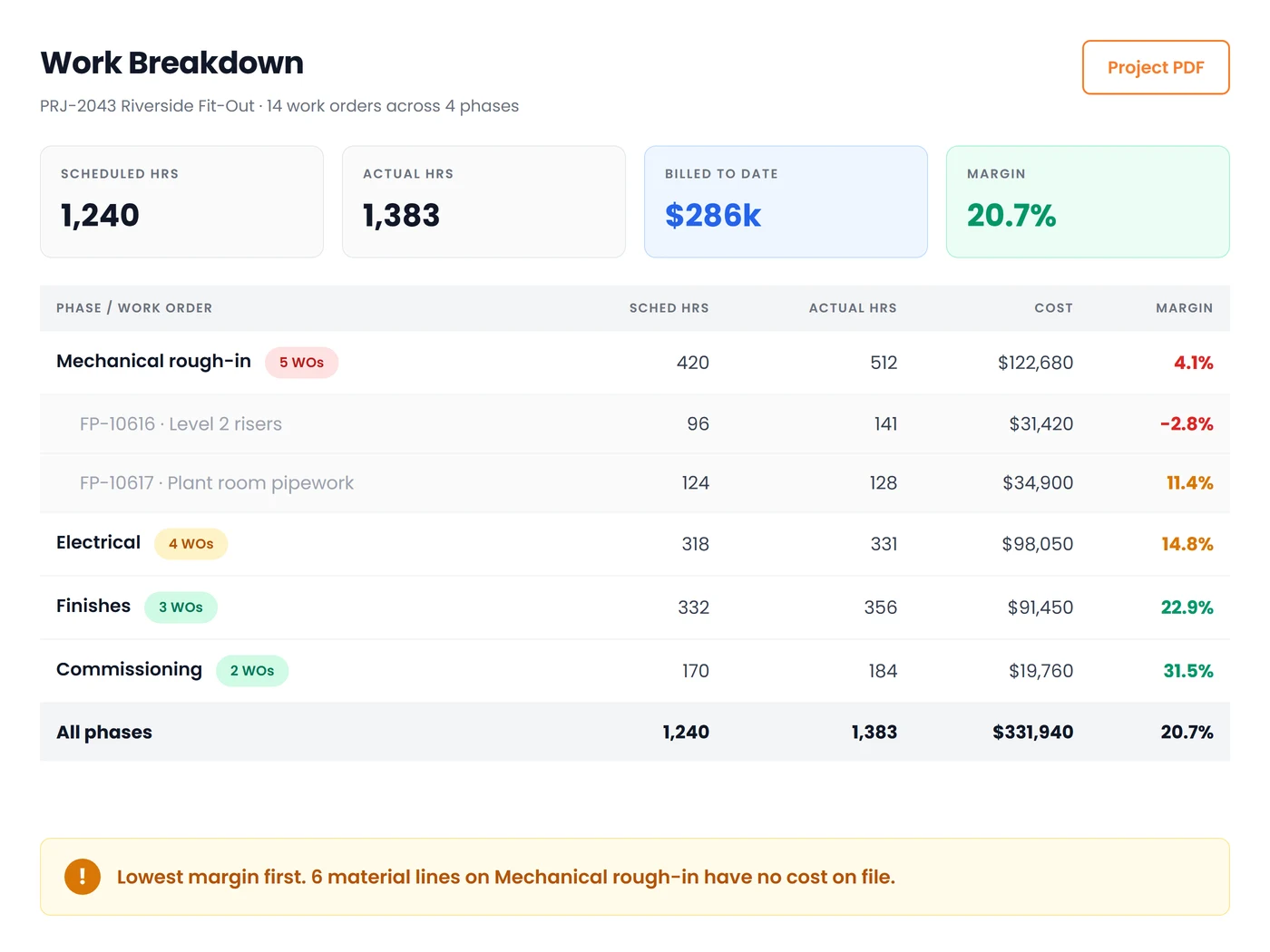
Purchase Orders, Subcontractors and Expenses in One View
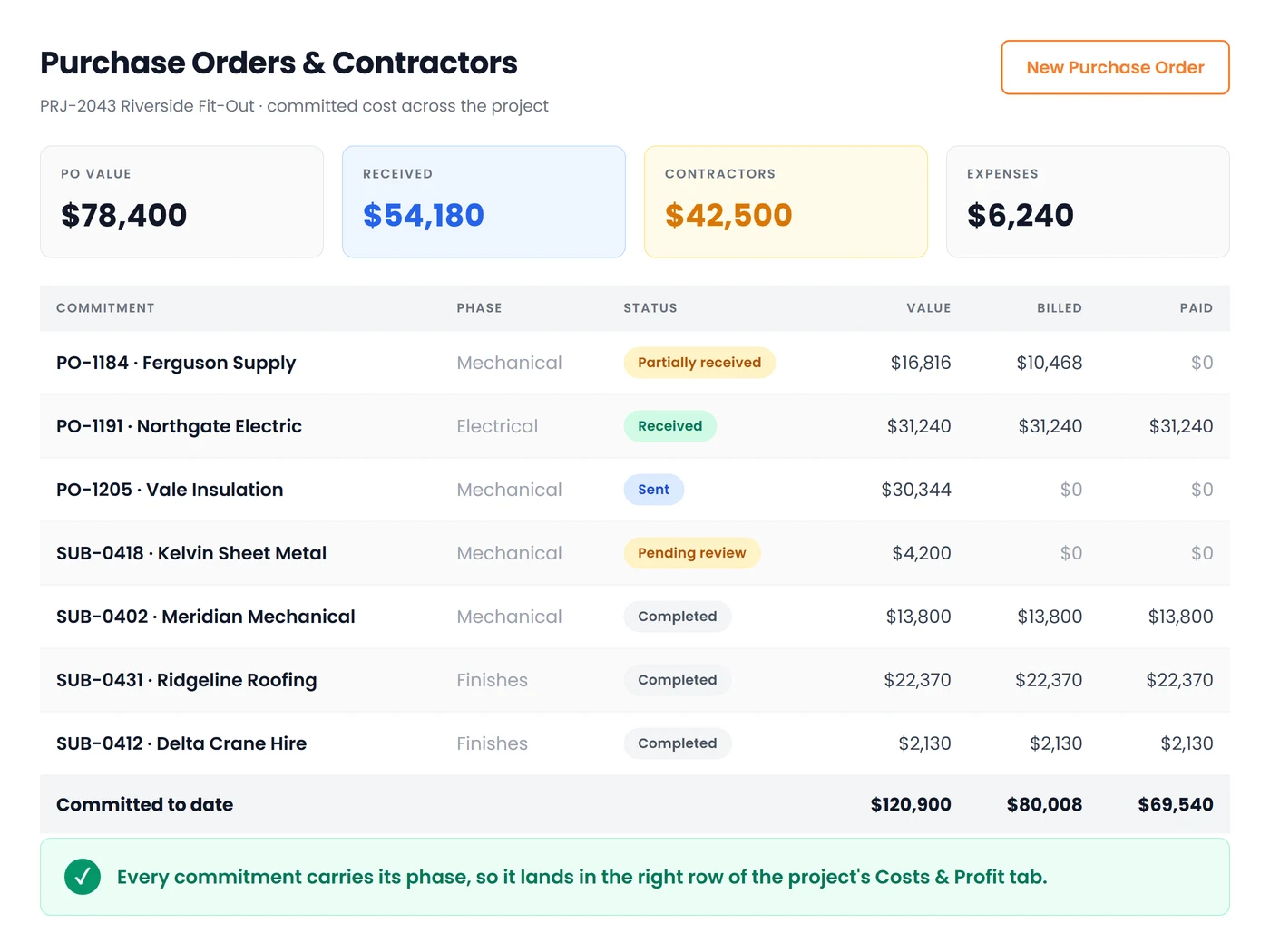
Committed cost, long before the invoice arrives.
Material purchase orders raised against the project show ordered, expected, received, billed and paid to vendor on their own tab. Subcontractor assignments roll up from every work order with vendor, agreed fee, status, submitted charges and whether their bill has been raised. Job expenses sit alongside them, so the project's real exposure is visible while you can still act on it.
Request DemoEverything a Multi-Phase Job Needs in One Place
Ten tabs on the project record, all fed by the work your crews are already doing:
Phases You Define
Choose the phases a project will run through when you create it, and change them later as the job changes. Every work order carries its phase, so cost and margin can always be read one phase at a time.
Open, On Hold, Closed, Cancelled
Park a project for weather, permits or a client decision and pick it up where it stopped. Each status has its own list, so a stalled job never quietly disappears from the pipeline.
Ten Tabs, One Record
Details, Work Breakdown, Costs & Profit, Progress Billing, Images, Documents, Expenses, Purchase Orders, Contractors and Notes, all on the project, so nothing about the job lives in a spreadsheet.
Honest Margins, or None
If too few schedules carry a labor rate or too many product lines have no cost, Field Promax shows the cost but hides the margin and tells you exactly which items are missing a price, rather than printing a confident number built on gaps.
Materials by Item
Every material line on the project combined by catalog item, highest cost first, with the unpriced items called out, so fixing your cost coverage is a worklist rather than a hunt.
One-Click Project PDF
Export the project as one client-ready PDF: the contract and billing summary, costs and profit by phase with the worst margin first, and the contractors on the job.
Frequently Asked Questions
Field service project management software groups the many work orders, phases, purchase orders, subcontractors and expenses of a long job under one project, so the job is tracked and costed as a whole instead of as separate visits. In Field Promax, each project has a live Costs & Profit view broken down by phase.
A project is one record for a long job for one customer, with a project number, owner, start and end dates, and the phases the job will run through. Work orders are created from the project or linked to it, so a twelve-month build stays one record instead of forty loose work orders.
You pick the phases a project will use when you create it, and you can change them later with Manage Phases as the job changes. Every work order sits in a phase, so cost and margin can be read one phase at a time. The Costs & Profit tab sorts phases worst margin first, so the phase eating the job is the first row you see.
Yes. The Field Promax Costs & Profit tab rolls labor at its loaded rate, material at purchase cost, subcontractors and expenses into one margin, and breaks it down by phase. It uses the same job cost engine as the work order Profit Analysis tab, so the project total is built from work orders you can drill into.
Ten: Details, Work Breakdown, Costs & Profit, Progress Billing, Images, Documents, Expenses, Purchase Orders, Contractors and Notes. Everything about the job, from its phases to its supplier orders and subcontractors, stays on the one record.
Yes. Material purchase orders raised against the project show on their own tab, from order through delivery to payment to the vendor. Subcontractor assignments from every work order roll up on the Contractors tab, and job expenses sit alongside them.
Yes. Projects are Open, On Hold, Closed or Cancelled, each with its own list, so a job parked for weather, permits or a client decision keeps its history and picks up where it stopped.
Yes. Generate PDF on the project exports one document with the contract and billing summary, costs and profit by phase with the worst margin first, and the contractors on the job.
From the project's Progress Billing tab. Field Promax supports AIA G702 / G703 pay applications for fixed-price work, and installment or per-work-order billing for time-and-material work. See how progress billing works.
There is no free plan, but you can try Field Promax free for 14 days after a short demo. Plans start at $99/month in the US and A$149/month in Australia. See plans and pricing.