Progress Billing & AIA Pay Applications
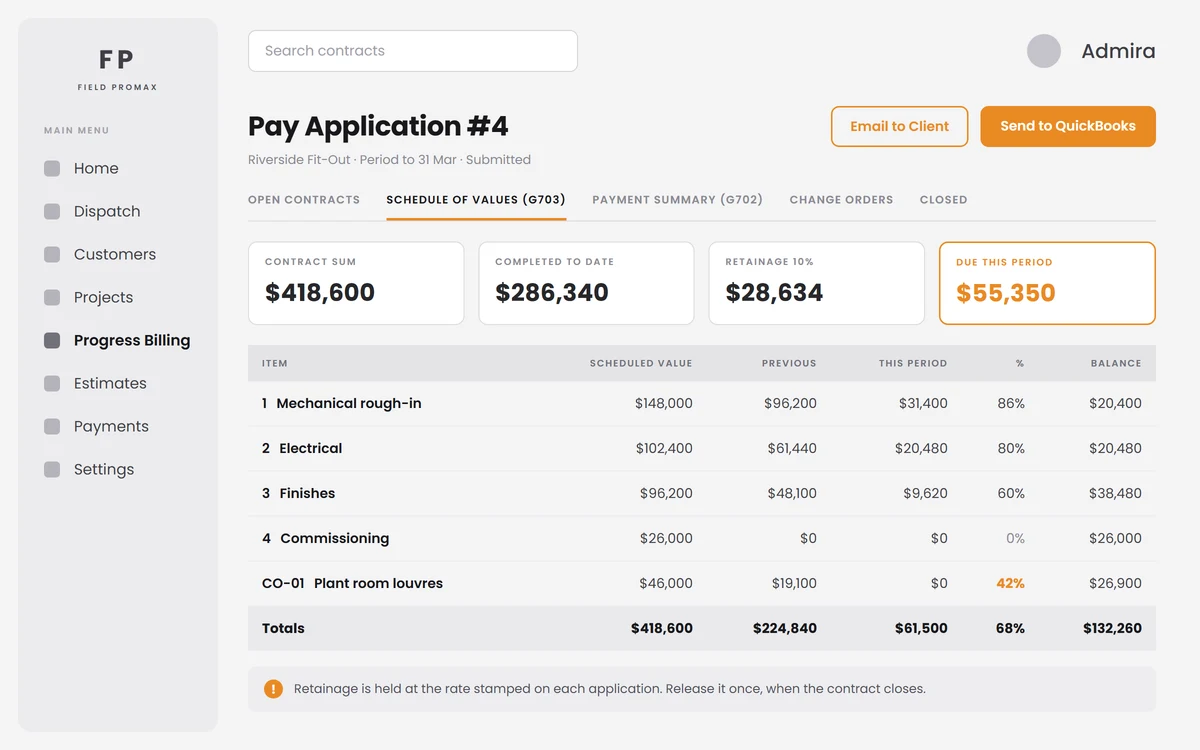
Stop billing a nine-month job on a spreadsheet.
Field Promax progress billing bills a long job the way it was actually sold: AIA G702 / G703 pay applications from a locked schedule of values, an installment plan against the agreed total, or per work order as each one closes, with retainage, change orders, client email and QuickBooks posting handled in the same place.
G702 and G703, Built From the Contract
The form your general contractor is already expecting.
Build the contract from one estimate or several and every line becomes a schedule-of-values item. Each period, enter work completed and materials stored, and Field Promax produces the G703 continuation sheet and the G702 summary (previous work, this period, total completed, percent complete, retainage and balance to finish), then walks it through draft, submitted, approved and paid.
Request Demo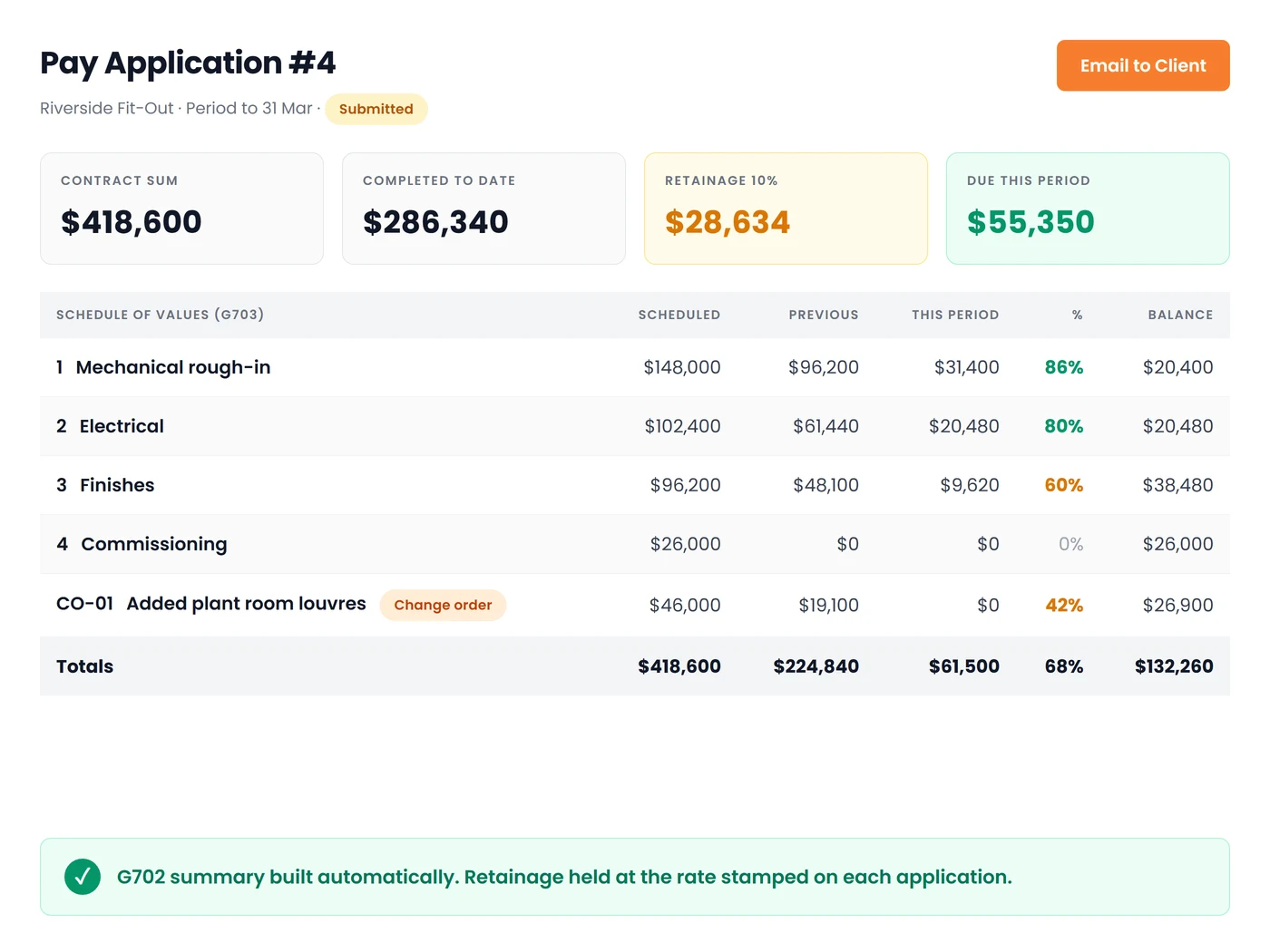
Or Bill Live, Straight From the Work Orders
Not every long job is a fixed-price contract.
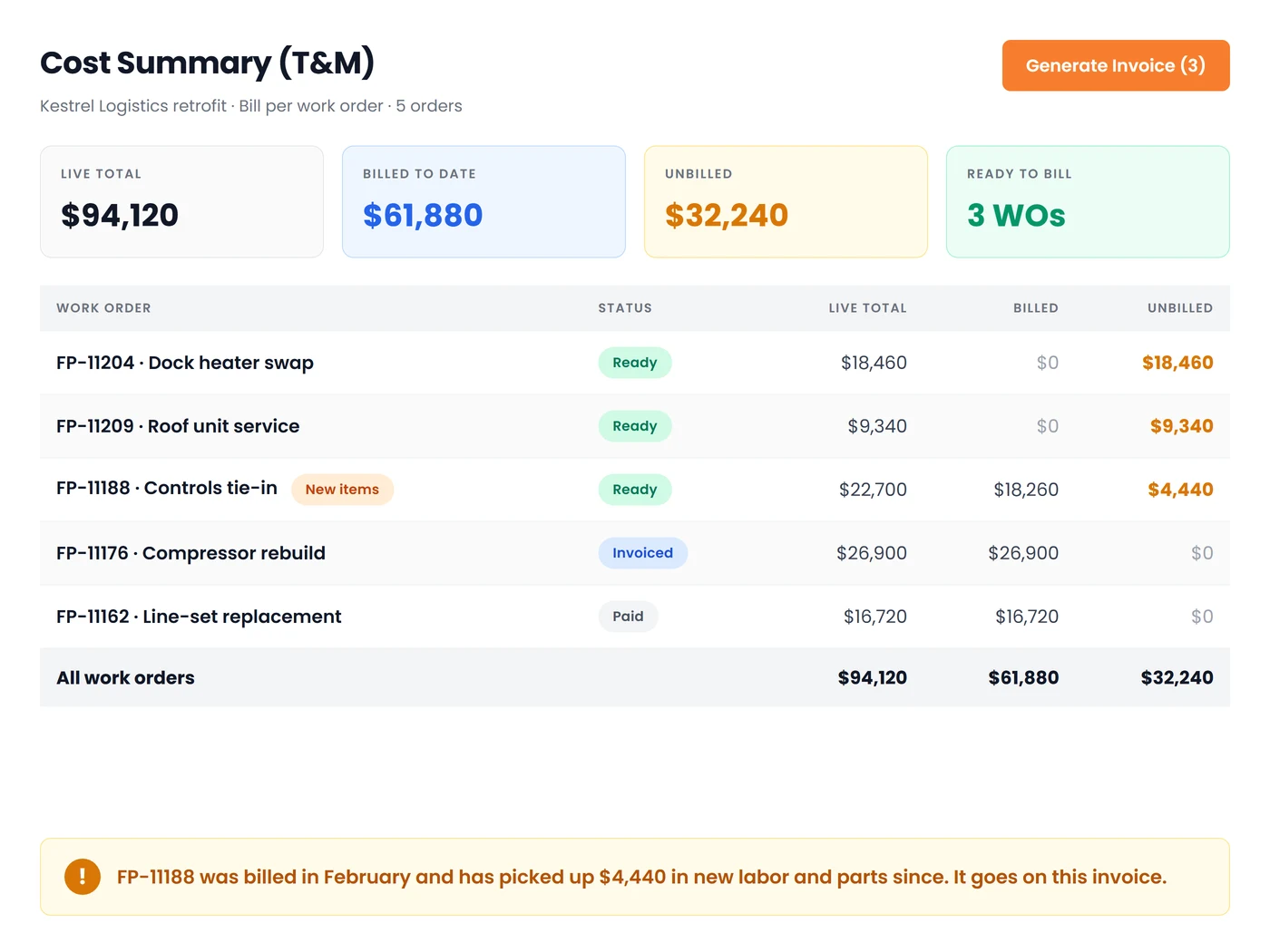
Time-and-material work bills from the orders themselves. Split the agreed total into an installment schedule, or invoice per work order as each one closes: a dashboard shows every order's live total, billed to date and unbilled balance, and flags orders that were billed before but have picked up new items since. Tick the ones that are ready and raise one invoice across them.
Request DemoBilling That Keeps Up With a Long Job
Because the contract changes, the retainage has to hold, and the books have to agree:
Schedule of Values
A locked line-by-line contract built from your estimates, with its own item numbers and scheduled values, so every application is measured against the same agreed scope instead of a moving target.
Change Orders as Their Own Lines
An approved change order is added from an estimate and becomes its own line with its own change order number. The G702 always subtotals the original contract and the change orders separately, so the contract sum to date is defensible.
Retainage That Releases Once
Set a percentage on the contract and every application holds it automatically. Each application keeps the rate it was stamped with, and the release is a single deliberate action. Retainage can never quietly fall off on its own.
New Items Never Get Missed
When a work order that has already been billed picks up extra labor or parts, the billing dashboard flags it rather than closing it off, so the extra lands on the next invoice instead of being written off by accident.
Email It, Then Post It
Send the pay application to the client as a professional document from your own business mailbox, and post it to QuickBooks Online or QuickBooks Desktop as a real invoice, with the invoice number kept on the application.
Latest-First, Reversible
Only the newest application on a contract can be deleted, and Field Promax tells you first whether it was billed, whether QuickBooks already has it, and exactly what will be reversed, so nothing is unwound behind your back.
Frequently Asked Questions
Progress billing invoices a long job in stages as the work is completed, instead of one lump at the end. Field Promax supports three ways to do it: AIA pay applications against a schedule of values, an installment schedule against an agreed total, and per-work-order invoicing as each order closes.
Yes. The G703 continuation sheet carries every schedule-of-values line with scheduled value, work completed previously, work this period, materials stored, total completed and stored, percent complete, balance to finish and retainage. The G702 summary is built from it: original contract sum, change orders, contract sum to date, total completed, retainage, less previous payments and the amount due this period.
From your estimates. Build the contract from one estimate or several and each line becomes a schedule-of-values item with its own number and scheduled value, locked for the life of the contract so every application measures against the same agreed scope.
An approved change order is added to the contract from an estimate and becomes its own schedule-of-values line with its own change order number. The G702 always subtotals the original contract and the change orders separately, so the contract sum to date is defensible.
Set a retainage percentage on the contract and every pay application holds it automatically. Each application keeps the rate it was stamped with, so changing the rate later never rewrites history. Releasing retainage is a single deliberate action that can happen only once. It can never quietly fall off on its own.
Then bill from the work orders themselves. Split the agreed total into an installment schedule, or invoice per work order as each one closes. The per-work-order dashboard shows live total, billed to date and unbilled for every order, and flags any that were billed before but have picked up new items since, so extras land on the next invoice instead of being written off.
Both. Email it to the client as a professional document from your own business mailbox, and post it to QuickBooks Online or QuickBooks Desktop as a real invoice. The invoice number and the date it was sent stay on the application.
Only the newest active application on a contract can be deleted, in any status. Before it goes, Field Promax tells you whether it was billed, whether it is still queued for the QuickBooks Web Connector, and exactly what will be reversed: an installment send deletes the billing work order it created, a per-work-order invoice reopens the orders it billed.
A billing contract can be raised against a project, an estimate or a work order. Multi-phase projects get the most out of it, because a contract can also be scoped to a single phase, but a one-off fixed-price job can be billed in stages too.