Garage Door Software

Garage Door Business Software for Repairs, Installs and Tune-Ups
Field Promax runs the whole garage door job, from a same-day broken spring call to a new door install. Save each door's size, spring type and opener model on the customer's record so your tech arrives knowing the door. Quote with optional upgrades the customer can add themselves, then invoice and take payment on site.
Trusted by 100,000+ contractors. Rated 4.7 on Google and 4.2 on Capterra.
Open the Door to Better Business Management
Garage Door App
The Door's Details Before You Arrive
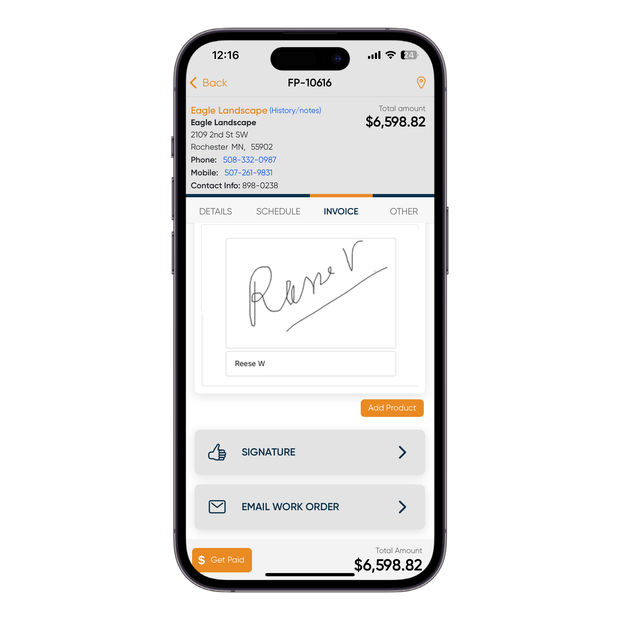
Your techs see the job details, address, directions and notes on their phone. Doors and openers saved as equipment show their size, spring type and service history on the job, so techs bring the right parts. They add photos, get a signature and take payment without calling the office.
- Job Details Access
- Real-Time Updates
- Timekeeping & Tracking
- Signature Capture

Garage Door Job Tracking
Know Where Every Job Stands
Field Promax records each tech's GPS location when they check in, clock in and complete a job, and job status updates as the work moves. See where work happened, improve scheduling accuracy, and deliver on promised service windows without constant back-and-forth communication.
- GPS Check-Ins
- Job Duration
- Efficiency Insights
- Job Status Colors
Features built for your trade
Garage Door Estimating Software
Quotes Customers Can Approve From Their Phone
Build quotes from your product list with markup and tax, add photos, and offer upgrades like a new opener as optional items. Send the quote by email or text. The customer adds the extras they want, signs and approves online, and the approved quote becomes a work order in one click.
Garage Door Scheduling Software
Spring Calls, Installs and Tune-Ups on One Calendar
Put emergency spring calls, installs and maintenance visits on one drag-and-drop calendar, colored by tech or by job status. Show days off so you don't book someone who is out, drag a job to another tech when plans change, and turn on appointment reminders before each visit.
Garage Door Invoicing Software
Get Paid Before You Leave the Driveway
The work order is the invoice. Techs add parts and labor on site, the customer signs on the phone, and they can take a card through Stripe, email a payment link or record cash or a check. Finished invoices sync to QuickBooks or Xero.
Garage Door Software FAQs
Garage door software is a business app that runs the service side of a garage door company: booking repair calls and installs, dispatching techs, quoting, invoicing and getting paid. Field Promax does all of that in one place. The office plans the day on a drag-and-drop calendar, and techs see their jobs, quote, collect signatures and take payments in the mobile app.
Yes, if you record them. Turn on Equipment Tracking and add your own fields, such as door size, spring type, cycle rating or opener model. Each door or opener is saved under the customer, and techs see its details and past service in the mobile app when it is attached to the job. Every visit adds to that door's history.
Yes. Put upgrades such as a new opener, a battery backup or a better spring on the estimate's Optional Products tab. The customer sees them on the approval page with their own Add to order button, signs with a finger and approves the estimate online. You are emailed right away, and the approved estimate becomes a work order in one click.
Create the work order, set a high priority and drag it onto the calendar for whichever tech can get there first. The dispatch map shows every scheduled and unassigned job, so you can see what is nearby. The job shows up in the tech's app, and the customer can get an On My Way text when the tech heads out. Drag jobs between techs if the day changes.
Yes. Set up a recurring work order with the pattern (for example every 12 months), the tech and the time window. Field Promax creates each work order 7 days before the visit, so it shows on the calendar without anyone re-entering it. You can also sell yearly tune-ups as a service agreement.
Yes. Send a Stripe payment link for the deposit, or record a deposit paid by check or cash on the estimate. The deposit carries over to the work order when you convert it, and the rest is collected when the job is done. Every payment shows on the job with the balance due, so you always know what is still owed.
Yes. Set agreed prices per commercial customer with Custom Pricing, and they fill in automatically on that customer's estimates and work orders. Keep several service addresses under one customer, each with its own work orders and history, add extra contacts, and schedule repeat visits with recurring work orders. Larger installs can be quoted and billed in stages with progress billing.
Yes. Field Promax connects to QuickBooks Online, QuickBooks Desktop or Xero. With QuickBooks, customers, products, invoices, payments and expenses sync, so nobody types them twice. With Xero, customers and invoices sync. Card payments can be taken through Stripe or QuickBooks Payments, and cash or checks are recorded by hand.
The mobile app follows the job in order: accept it, tap In Route, check in, add photos and parts, get a signature and take payment. Setup takes within an hour, and you can see the whole flow in a demo before you start. If a tech loses signal, they can still clock in and out and work through their tasks, and the app syncs later.
Plans start at $99 per month, billed annually. See plans and pricing.

Save More Time and Boost Productivity
Your team is the driving force behind your success. Support them with the right tools and watch your business thrive.