QuickBooks-Integrated Alarm Billing Software: A Buyer's Framework (2026)
The standard advice when shopping for alarm billing software is to grab a “top 5” listicle, compare the feature checkboxes, and pick whichever platform ranks number 1. That approach is flawed, and we’ll explain why - then provide a framework that actually works.
A ranked list usually tells you which vendor paid for placement or promotion on that website. It does not tell you which platform is best for a 14-tech residential alarm shop using QuickBooks Desktop, versus a fire and life safety contractor tracking NFPA 72 inspection records, versus a multi-trade company billing both monitoring contracts and one-off installations. Those are three different shops with three different operational needs. They cannot share the same “best” platform.
What follows is the six-criteria framework we use when shops ask which QuickBooks-integrated alarm billing platform to buy. Five vendors get evaluated against it. By the end, you should be able to evaluate any platform on the market - not just the five we cover.
Ready to get started with Field Promax?
Sign Up Free1. Why Ranked Listicles Fail Alarm Shops
Here is why you frequently see the same complaints on Quora and field-service forums: cryptic QuickBooks errors such as 3371, 6176, 15276, 30159, or C=387 - which block the company's accounting workflows during billing runs. The most common accounting issue in field service is not a missing feature - it’s operational opacity. The errors are identified by numbers, but the solutions are not. A feature-comparison table tells you nothing about how a platform behaves when QuickBooks throws a 6176 error on a Friday afternoon.
A listicle also gives every vendor the same write-up shape regardless of fit. A 5-tech alarm dealer on QuickBooks Desktop and a 50-tech fire and life safety integrator with 2,000 monitoring accounts should not be looking at the same #1 pick. Full stop.
There is no single best security company billing software. There is a best fit for your shop's size, trade mix, RMR exposure, and QB edition. The rest is marketing.
2. Six Criteria We Used to Evaluate
Each one is falsifiable in a demo. If the vendor can't show you the answer live, that's data too.
- QuickBooks sync depth. One-way vs. two-way sync; live API vs. nightly batch processing; and whether the sync includes customers, invoices, payments, and job costs - or just invoices. Bonus points if the platform supports both QuickBooks Online and QuickBooks Desktop.
- RMR handling. Native proration on mid-month starts, bulk rate-increase tooling, safeguards for suspended accounts, and dunning workflows for failed payments.
- Mobile billing UX. Does the technician create the invoice, collect the signature, and trigger the QB post directly from the van? Or does the back office still have to clean up the mess by 8 p.m.?
- Pricing transparency and ICP fit: Transparent pricing, no-meeting-required quotes, and plans designed for a typical 5–20 technician shop-not a 200-technician operation.
- Implementation and support. Time-to-live, named contacts, ticket SLAs, and whether founders or product teams are reachable when things go off the rails.
- Trade-specific workflows. Alarm/security RMR, fire and life safety inspections, and other industry-specific workflows vs. general multi-trade functionality.
A platform that nails three out of six criteria is not the same as one that nails five. That distinction often disappears in ranked listicles, which is part of the problem.
3. What QuickBooks Integration Depth Actually Means
“Integrates with QuickBooks” can mean a weekly CSV push, a one-way invoice export, or a true two-way live sync where customers, invoices, payments, and job costs flow in both directions in real time. These are not the same thing, and the difference shows up immediately at month-end.
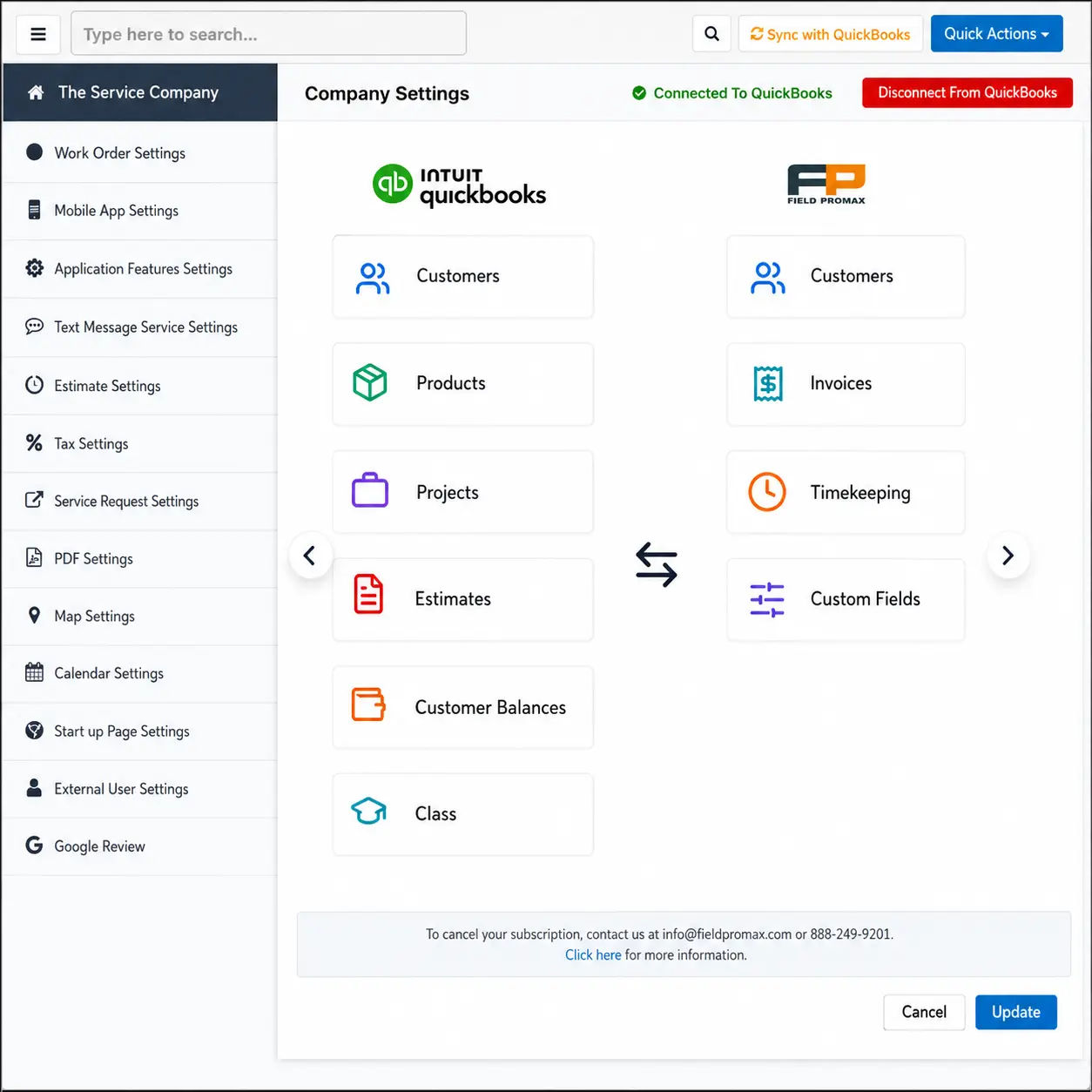
According to Intuit’s documentation, the QuickBooks Web Connector is the standard bridge between Windows applications and QuickBooks Desktop. However, it does not provide two-way sync functionality by itself - the connected application has to build that capability. In other words, “works with Web Connector” is a baseline requirement, not a feature.
The math behind missing sync depth is straightforward. For a typical 5-20 tech shop without proper QuickBooks integration, back-office teams report spending up to 8 hours each week re-entering invoices, payments, and job costs into QuickBooks. Shops that move to live sync recover most of that time because invoices are posted the moment the tech hits the send button - not the next morning, and not after someone in the office decodes their handwritten notes.
Per Intuit's 2024 stop-sell announcement, new U.S. QuickBooks Desktop Pro Plus and Premier Plus subscriptions ended September 30, 2024. A new alarm shop spinning up books in 2026 is on QBO or Enterprise. Web Connector compatibility matters less if you're cloud-native; live API integration with QBO matters more. The QuickBooks integration page documents the specific two-way sync coverage we ship.
4. Why RMR Breaks Generic Billing Tools
According to Security Sales & Integration’s 2024 RMR deep dive, recurring monthly revenue is now table stakes for security integrators. Our customer base includes alarm operators that have grown past roughly 200 active monitoring accounts. That’s where the generic FSM-plus-QuickBooks setup starts to leak.
The leaks tend to follow a familiar pattern. Suspended accounts continue to be billed because no rule triggers once monitoring stops. Rate increases are missed on 5-10% of accounts because someone handled them manually and got distracted. Reconciliation searches consume an entire day each month because the QuickBooks ledger and the FSM invoice logs disagree on which accounts are active. Industry research suggests that manual accounting data entry carries a 1-4% error rate, compared with 98-99% accuracy through automated sync. That difference becomes significant when you run the numbers across 500 monitoring contracts every month.
Field service shops without accounting integration typically wait 5-7 days after job completion before sending invoices. With QuickBooks sync, invoices are posted the same day the work is completed, and the days-to-invoice gap reduces to less than 24 hours. If you operate a monitoring book, that reduction also improves the cash-flow timing that RMR math depends on.
Platforms purpose-built for billing software for alarm companies - such as dedicated alarm stacks with native RMR tools - handle these workflows natively. General FSM platforms with QuickBooks integrations bolted on usually do not. The gap becomes visible once the business starts to scale.
5. The Five Platforms, Evaluated Against the Criteria
Every platform is evaluated against six factors, and honest weaknesses are identified. The list is alphabetical, not ranked.
BigChange. According to their documentation, BigChange integrates with QuickBooks Online Advanced and provides job management, live tracking, and document management. Its original focus was large-scale fleet operations in the UK. The weaknesses: QuickBooks integration is one-way for certain transaction types; pricing is aimed at mid-to-large operators rather than small alarm dealers; and alarm RMR is not a first-class workflow.
Field Promax. Two-way QuickBooks sync supports both QuickBooks Online and QuickBooks Desktop (via Web Connector), with invoices, customers, payments, and job costs syncing in both directions. Pricing starts at $99/month for the Light plan (1 user), with Standard at $159/month (5 users) and Premium at $239/month (12 users) - all publicly listed, no sales call required. A QuickBooks Desktop user with more than 20 years of experience, writing in a QuickBooks App Store review described choosing Field Promax specifically so mobile technicians could charge clients using existing QuickBooks customer information. Weaknesses: alarm-specific RMR depth - including proration across multiple contracts, bulk rate-increase tooling that is less powerful than dedicated alarm billing systems, and enterprise reporting dashboards that are not as advanced as those offered by larger platforms.
Jobber. According to Jobber’s documentation, the platform syncs only with QuickBooks Online and does not support QuickBooks Desktop. Pricing starts at $19 per month, making it the most transparent entry point in this review. Mobile UX is frequently highlighted as a strength in Capterra reviews. Weaknesses: QuickBooks Desktop incompatibility remains a problem for shops still using Desktop, there is no alarm-specific RMR handling, and the trade workflow is built for general residential services, rather than fire, alarm, or life safety operations.
mHelpdesk. According to mHelpDesk's documentation, the platform supports two-way sync with both QuickBooks Online and QuickBooks Desktop, one version at a time. Pricing is not published publicly; plans are quote-based after a demo. Mobile UX is frequently highlighted as a strength in Capterra reviews. Weaknesses: No alarm-specific RMR handling, a general field-service workflow rather than fire, alarm, or life safety, opaque pricing, and reviewer-reported QuickBooks sync issues.
MobiWork. According to published documentation, MobiWork supports QuickBooks Desktop Enterprise integration along with scheduling and invoicing that includes custom line items. Its trade fit is as a general FSM platform with deeper asset-tracking functionality. Weaknesses: Capterra reviews flag a dated UX; the limited alarm-specific feature set leaves RMR proration and bulk rate increases as manual processes; onboarding is also reported to be slow.
6. A Pattern Across Multi-Trade Operators We've Worked With
Across roughly 40 multi-trade operators since 2018, the most frequent issue has not been the software - it’s the dispatcher running the HVAC board in one tool and the plumbing board in another, then trying to monitor the overlap. On a Tuesday morning, a technician gets assigned to a tune-up while the plumbing rough-in for the same address is already being handled through a second board.
Consider an owner-operator managing HVAC and plumbing teams, along with a dispatcher and two dozen technicians, in a mid-sized Midwest metro. As spring became busier, the business ran into scheduling conflicts because many technicians held licenses in both trades. Estimate disclaimers made things worse: HVAC estimates included weather and equipment availability language, while plumbing estimates carried material-assumption language, and when a scope touched both trades, customers pointed to whichever disclaimer favored them. By midweek, no one trusted either version.
The owner merged both boards into a single calendar used exclusively by the dispatcher, then rewrote the estimated disclaimer into one unified template covering the exclusions of both trades. The first version was released before legal review. The second was issued after an unresolved customer dispute - a kind of correction most owners would rather avoid.
Double bookings nearly disappeared after the first month because the unified calendar exposed conflicts that had been hidden. The disclaimer, however, required two revisions. The customer challenged a water-damage exclusion that the plumbing lead considered standard, but it appeared overly broad in the unified template. Plumbing foremen were the last group to adopt the calendar fully - which is fairly typical in multi-trade operations.
This composite case is based on the most common variation of this pattern among the multi-trade operators we’ve worked with.
7. A note
The conventional wisdom on QuickBooks integration goes like this: pick the FSM platform with the most feature checkboxes, then bolt QB on at the end. That gets the order backwards. From 14 years of customer conversations, the alarm and security shops that succeed with FSM software almost always start from QuickBooks as the source of truth, not as an afterthought. The books already live there. The accountant already knows it. The owner can already read the P&L out of it.
Then they go looking for a field service tool that talks to QB cleanly, both directions, no weekend re-entry. The mistake I see shops make is they fall for an enterprise-tier alarm platform that promises a full accounting replacement, spend six months migrating, then realize the CPA wants the data back in QuickBooks anyway. The decision isn't which platform has the most modules. It's which platform respects that QB is already running the financial side of the business. That's the criterion most listicles skip, and it's the one that decides whether the rollout survives the first quarter.
- Joy Gomez, Founder of Field Promax
8. How to Choose for Your Shop
If you're a sub-10-tech alarm dealer that uses QuickBooks, the primary criteria include sync depth, mobile billing UX, and pricing below about $100/month. Most of the platforms in this review set a high bar. The most important differences are trade-specific RMR handling (which, at this size, is not yet a major issue) and access to founders or teams when something goes wrong.
If you're a 40-tech security integrator with more than 2,000 monitored accounts, your requirements reverse. RMR automation now becomes the primary concern, and an FSM-plus-QuickBooks mix will leak revenue at this scale. Alarm billing stacks specifically designed for the alarm industry earn their price tag here.
If you do NFPA-regulated fire and life safety work, NFPA 72 Chapter 14 ITM documentation requirements mean that the billing platform must also include inspection records, deficiency reports, and battery test results attached to invoices. The 2024 battery-listing requirement (UL-listed rechargeable secondaries, with a 25% correction factor) and the upcoming 60% shelf-life inspection rule reshape what an inspection invoice has to capture. A fire and security software workflow that ties ITM records to the field service invoice is more relevant than generic feature lists.
Roughly 62% of small businesses in the US use QuickBooks, according to 2024 market share data. That means that for a typical shop with 5-20 technicians, the books are already in QuickBooks. Most owners say the field service platform must integrate with QuickBooks, or it will not be purchased.
An HVAC operator on the QuickBooks App Store described Field Promax as simple to integrate with QuickBooks and credited the platform’s direct access to team members for faster processing. That founder-and-team accessibility gives smaller shops an edge that enterprise alarm billing platforms typically do not offer.
Industry Benchmarks and Growth Data
The numbers are worth having in your pocket in case you're arguing internally for a software upgrade.
| Billing KPI | Industry Benchmark | What It Measures | Source |
| RMR growth rate (healthy) | 7-16% annually | Subscriber base + rate health | SDM Magazine 2026 Top 100 Report |
| Days Sales Outstanding | Less than 30 days | Speed of payment collection post-invoice | FSM operations standard |
| Billing error rate target | Less than 1% | Invoices needing correction after issue | Field service operations standard |
| Failed payment rate | 2-5% | Autopay decline rate per billing cycle | Payment processor industry averages |
| Manual data entry error rate | 1-4% | Errors from re-keying vs automated sync | Industry research |
| RMR collection rate (target) | Greater than 98% | Billed RMR actually collected | SDM industry reporting |
| Customer attrition rate | Less than 8% annually | Subscriber retention health | Security industry standard |
| Year | SDM Top 100 RMR Trend | Industry Context | Source |
| 2021 | Growth recovery post-COVID | Residential installation boom | SDM Magazine |
| 2022 | Double-digit RMR growth | Smart home demand surges; inflation pressures begin | SDM Magazine |
| 2023 | 91% of Top 100 reported RMR growth | Strong year; annual rate increases widely adopted | SDM Magazine 2024 |
| 2024 | Declined 3% vs prior year; still 4th highest in decade | DIY market pressure; commercial pivot | SDM Magazine 2025 |
| 2025 | Up 7%; 90% reported growth; $740M total - highest ever | Video analytics and AI drive record RMR | SDM Magazine 2026 |
Sources Consulted
- Intuit, QuickBooks Desktop stop-sell announcement (2024): quickbooks.intuit.com
- NFPA 72, National Fire Alarm and Signaling Code: nfpa.org
- Inspect Point, Key Changes to NFPA 72 in 2022 and 2025: inspectpoint.com
- Security Sales & Integration, Recurring Monthly Revenue Deep Dive (2024): securitysales.com
- Lexul, Comparing 10 QuickBooks integrations in field service software: lexul.com
Conclusion
A ranking listicle is not the right format for this particular decision. The right approach is to test against six different criteria based on the shop's size, trade mix, and QuickBooks edition. Select the platform that passes the test, not the one with the flashiest demo.
Frequently Asked Questions

Content Creator
Bhargavi Halthore is a content writer at Field Promax, a field service management platform serving trades businesses across the USA and Canada. With over a decade of experience writing for business owners, she brings detailed, ground-level insight to every topic she covers. Her research goes beyond search results - she digs into LinkedIn groups, Facebook communities, and Reddit forums to understand what field service business owners are actually dealing with on the ground. She speaks directly with industry professionals, understands their day-to-day challenges, and translates that into content that is practical and actionable. What you read in her articles reflects real industry patterns, not theory.