What Is Field Service Management Software? The Complete Guide for Service Businesses

It is 7am. You have three techs heading out, a fourth calling in sick, two customers from yesterday asking when their invoices are coming, and a sticky note on your monitor that says 'call Mrs. Santos re: Thursday job.'
That is not a rare bad morning. For most small service businesses, that is Tuesday. Field service management software - also called FSM software - is the system that replaces the sticky notes, the frantic calls, and the late invoices with one connected platform that runs your whole operation.
This guide explains exactly what it is, how it works, who it is built for, and what to look for when you are ready to make the move. No jargon. No enterprise fluff. Just practical answers for service businesses in the USA and Canada.
1. What Is Field Service Management Software?
Field service management software is a digital platform built for businesses that send workers to customer locations to complete jobs.
Think HVAC contractors, plumbers, electricians, property maintenance teams, cleaning services, fire protection companies. Any business where the actual work happens outside the office.
Before FSM software, most of these businesses ran on some combination of a whiteboard, a shared spreadsheet, paper work orders, and a lot of phone calls. It worked until it didn't. A job got double-booked. A technician drove to the wrong address. An invoice sat in someone's truck for two weeks.
FSM software closes every one of those gaps by connecting your entire operation in one system. Your dispatcher sees every job and every technician on one screen. Your field tech gets the job details on their phone before leaving the shop. Your customer gets a notification when the tech is on the way. And when the job is done, the invoice goes out in minutes - not days.
According to multiple industry research reports, the global FSM market was valued at around $5.1 billion in 2025 and is expected to reach $8.9 billion by 2029. That growth is driven almost entirely by small and mid-sized service businesses moving away from manual operations.
| Simple definition: |
|---|
| Field service management software = one platform that manages work orders, scheduling, dispatch, technician tracking, invoicing, and customer records for businesses that send people into the field. It replaces the whiteboard, the spreadsheet, the sticky notes, and half the phone calls. |
2. How Does Field Service Management Software Work?
The easiest way to understand it is to follow one job from start to finish.
1. A service request comes in
A customer calls or submits a form online. The request becomes a work order inside the system automatically. Customer name, address, job type, service history, and any notes are all pulled in without anyone retyping anything.
If that customer has called before, their full history is right there. The technician who gets the job knows exactly what they are walking into before they leave.
2. The office schedules and dispatches
Your dispatcher opens the scheduling board and sees every technician, every open job, and every available time slot on one color-coded calendar. They assign the job with a drag and a drop. The technician gets a notification on their phone instantly.
No calls to figure out who is free. No back-and-forth. No double-booking because someone forgot to check the calendar. The right person gets the right job in seconds.
Emergency call coming in? The dispatcher can see who is closest and finishing up soonest - without picking up the phone.
3. The technician works from the mobile app
The technician opens the job on their field service mobile app. They see the customer address, the job description, service history, and any notes added by the office. They clock in when they arrive and update job status as they work. When the job is done, they capture the customer's signature on their phone, add before and after photos to the work order, and send the invoice from the job site. The customer gets it before the tech is back in the truck.
One real user on a review platform put it plainly: 'I don't have to have it in my head anymore. I can schedule my guys right there.'
The technician opens the job on their field service mobile app. They see the customer address, the job description, service history, and any notes added by the office. They clock in when they arrive and update job status as they work.
When the job is done, they capture the customer's signature on their phone, add before and after photos to the work order, and send the invoice from the job site. The customer gets it before the tech is back in the truck.
One real user on a review platform put it plainly: 'I don't have to have it in my head anymore. I can schedule my guys right there.'
4. The office sees it all in real time
Back at the office, the manager can see job status updates as they happen. No waiting for techs to call in. No mystery about whether a big job is done or running over.
If a tech calls out sick or a job runs long, the dispatcher can reshuffle the rest of the day in minutes - not an hour of phone calls.
5. Invoicing and accounting close the loop
Once the job closes, the invoice is ready. If the business uses QuickBooks, the integration syncs automatically - invoices, payments, and customer records flow both ways without manual data entry. The full loop - from customer call to payment cleared - runs faster, with fewer errors, and without anyone manually pushing data from one system to another.
Read more: How Dispatching Software Works for Small Service Businesses
3. The 10 Core Features of Field Service Management Software
Most FSM platforms cover the same core areas. Here is what each feature actually does in a real service business - not the marketing version.
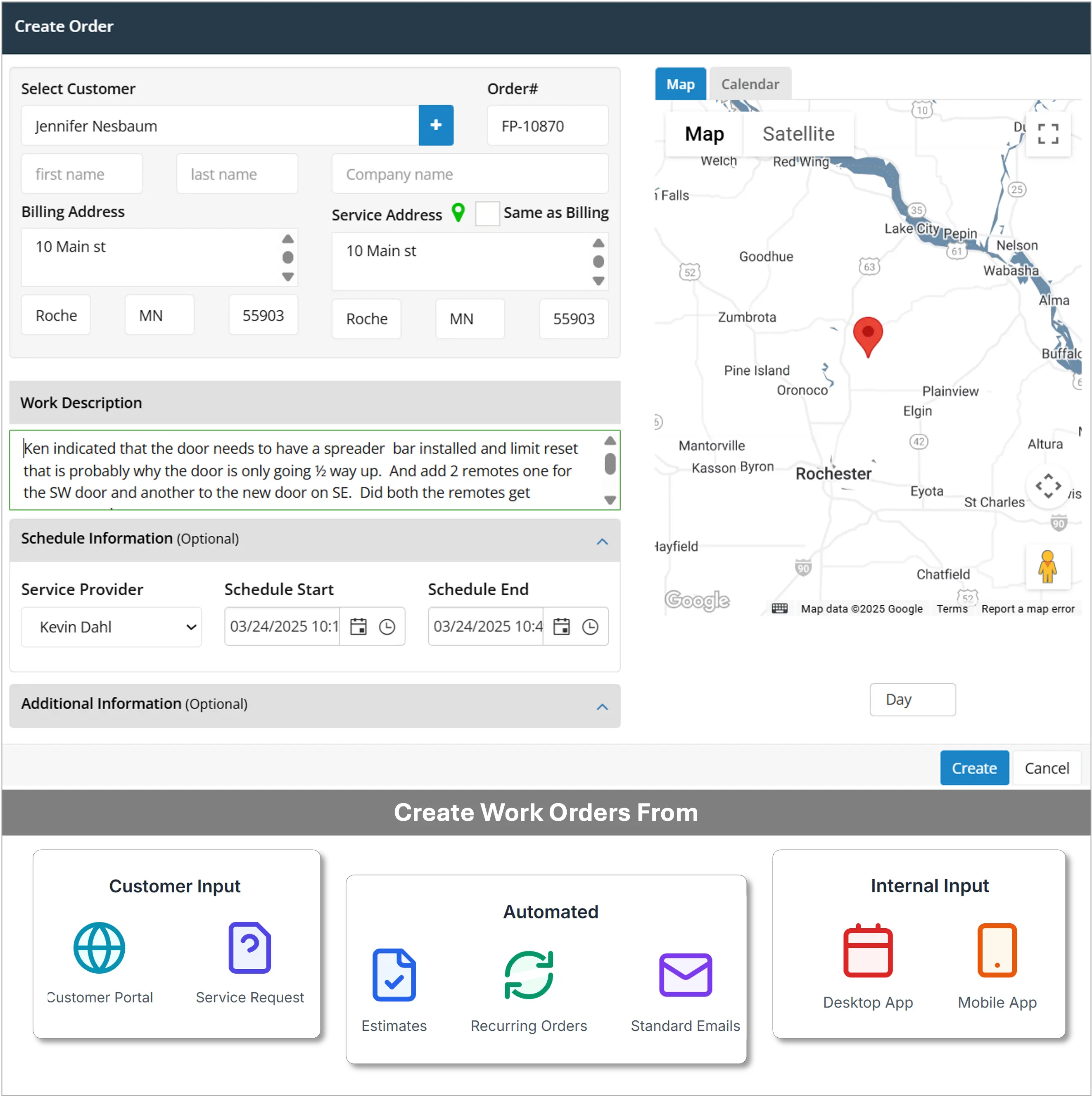
1. Work Order Management
Work orders are the backbone of any field service operation. A work order holds the customer details, the job description, the assigned tech, the parts needed, and the status.
Good FSM software creates work orders automatically from incoming requests, tracks them from open to closed, and lets you set up recurring work orders for maintenance contracts. Nothing falls through because nobody remembered to create the follow-up job.
You can see every open job on your dashboard at a glance. No jobs buried in email. No sticky notes that fall off monitors.
2. Scheduling and Dispatch
The scheduling board shows every technician, every job, and every open slot on a single screen. Color-coded by status. Filterable by skill set. Viewable by day, week, or month.
Good dispatch software catches conflicts before they become problems - double-bookings, missing certifications, unrealistic drive times. When you need a certified tech for a specific job type, the system shows you who qualifies instead of making you remember. This single feature eliminates the majority of the back-and-forth calls a typical service office makes every morning.

3. Mobile App for Technicians
Your technicians are not at a desk. The mobile app is their version of the software and it needs to be fast, simple, and reliable under field conditions.
What a good field technician app should do:
-
Show the full job schedule for the day with addresses and arrival windows
-
Display customer history and job notes before arriving on site
-
Let technicians clock in and out directly from the job
-
Allow photos and notes to be added to the work order in real time
-
Capture a digital customer signature on job completion
-
Send invoices from the field before leaving the job site
If your technicians find the app confusing, they will work around it. That is when the whole system stops working. Ease of use in the mobile app is not optional - it is the most important factor in whether adoption sticks.

4. Estimates
Customers expect quotes fast. FSM software lets you build an estimate on site, send it to the customer for approval, and convert it to a work order in one click when they say yes. The faster you can get an estimate out, the more jobs you win. Businesses that send same-day estimates close a significantly higher percentage of leads than those that send them a day or two later.
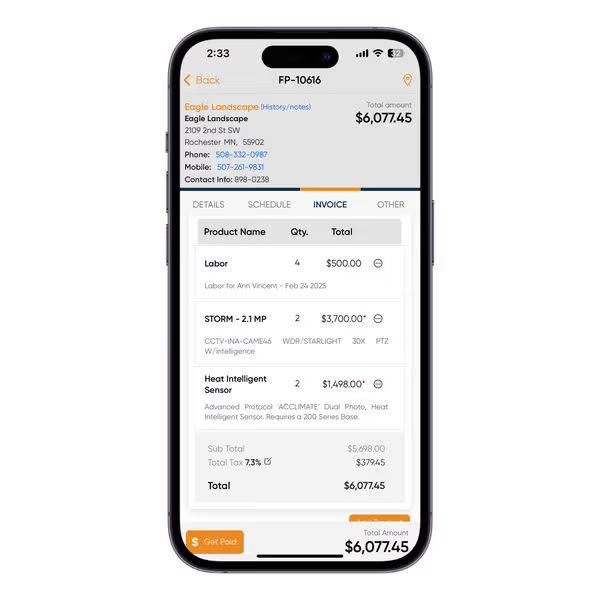
5. Invoicing
When the job closes, the invoice should go out the same day. FSM software converts the completed work order into a professional invoice automatically - no retyping, no manual calculations, no paperwork sitting in someone's bag.
Businesses that invoice same-day consistently get paid days faster than those that batch invoices at the end of the week. For a business doing $20,000 a month in revenue, cutting invoice-to-payment from 14 days to 5 days is a real cash flow difference.
6. QuickBooks Integration
Most small service businesses in the USA and Canada run QuickBooks for accounting. If your FSM software doesn't have a genuine two-way sync, you end up entering the same data twice - once in the field system and once in QuickBooks. That is wasted time and a guaranteed source of errors.
A proper integration pushes invoices, payments, and customer records between both systems automatically. When a tech closes a job in the field, the invoice appears in QuickBooks without anyone touching it.
7. GPS Tracking and Time Cards
Real-time GPS tracking lets dispatchers see where every technician is at any moment - which means you can send the nearest available tech to an emergency without calling five people first.
Time cards track when technicians clock in and out of jobs. Those hours flow directly into your payroll records. No paper timesheets. No disputes about hours worked. And when you are pricing a new job, you have actual labor cost data to work from instead of guesswork.
.webp?updatedAt=1753221558454 )
8. Customer Management
Every customer in your FSM system builds a complete history over time. Every job done, every part used, every invoice sent, every note a technician left after a service call.
When a customer calls back after six months, your office staff has the full picture in seconds. When a technician arrives on site, they already know what equipment is there and what was found last time. That preparation leads to faster jobs and better service without any extra effort.
.webp?updatedAt=1747733768755 )
9. Equipment Tracking
For businesses that service equipment - HVAC systems, fire suppression, electrical panels, commercial refrigeration - linking equipment records to the customer is essential.
Good FSM software stores the make, model, serial number, installation date, warranty status, and full service history for every unit you have ever touched. When the same unit keeps generating service calls, you have the data to recommend a replacement before it fails at the worst possible time.
10. Reports and Dashboard
A good FSM dashboard gives you a live read on your business every morning without building a spreadsheet. What you should be able to see at a glance:
-
Jobs completed this week versus last week
-
Which technicians are completing the most jobs and billing the most hours
-
Average invoice value per job type
-
Open jobs that are unassigned or overdue
-
Revenue trends by week or month
Most small service business owners make daily decisions based on gut feel because the data is buried somewhere they never have time to dig into. A dashboard that surfaces this automatically changes that.
.webp?updatedAt=1747733768790 )
4. Who Uses Field Service Management Software?
Any business that sends workers to customer locations to complete jobs can benefit. In the USA and Canada, these are the trades and industries using FSM software most often.
1. HVAC Contractors
HVAC businesses deal with emergency calls, seasonal demand spikes, and recurring maintenance agreements all at once. Without software, peak season becomes a daily scramble. FSM software manages emergency dispatch, tracks equipment per unit and per customer, and auto-creates recurring seasonal maintenance jobs so nothing gets missed.
Field Promax for HVAC businesses
2. Plumbing Companies
Plumbers need fast emergency dispatch, solid service history per customer, and invoices that go out the same day. When a customer calls about the same drain for the third time, having that history in front of you changes what you recommend and how you price the job.
Field Promax for plumbing companies
3. Electrical Contractors
Electrical businesses run multi-day jobs that span rough-in, inspections, and final sign-off. FSM software tracks job progress by phase, stores documentation, and keeps multiple technicians coordinated across multiple projects without constant check-in calls.
4. Property Management Teams
Property managers receive maintenance requests from tenants, assign work to in-house staff or contractors, and need a documented record of everything that gets done. FSM software routes requests, assigns jobs, and stores completion records per property automatically.
Field Promax for property management
5. Cleaning and Janitorial Services
Cleaning businesses run recurring schedules across multiple locations with different client instructions for each site. FSM software automates the recurring job creation and attaches the right checklist to each location so the correct crew shows up knowing what needs to be done.
6. Fire Protection and Security
Fire alarm inspection and security companies operate against compliance deadlines. Missing an inspection is a liability, not just a missed job. FSM software tracks upcoming inspection schedules, flags what is coming due, and stores completed inspection reports digitally so the record is always accessible.
7. Traffic Control and Flagging
Traffic management companies coordinate large crews across multiple active sites with strict scheduling requirements. FSM software handles multi-site dispatch, tracks hours per crew per site for accurate billing, and keeps documentation clean without a stack of paper daily reports.
For a full breakdown by industry, read: Industries That Use Field Service Management Software
5. What Are the Real Benefits?
Every software vendor lists the same generic benefits: save time, reduce errors, grow your business. Here is what those benefits look like in practice for a real small service business.
1. 20-30% of admin time gets back on the table
According to SoftwareAdvice research on SMB field service operations, the most common reason businesses switch from manual systems is that limited functionality forces them to spend a disproportionate amount of time on coordination, data entry, and chasing information across tools.
When scheduling is automated, invoices go out when jobs close, and time cards sync to payroll automatically, that reclaimed time goes straight into taking on more jobs - without hiring anyone.
2. Faster invoicing directly improves cash flow
Time-to-payment starts the moment the job closes. If invoicing waits until Friday batch time, you are voluntarily extending your payment cycle by days every week.
When technicians send invoices from the job site on completion, payment requests land while the work is still fresh. For a business doing $25,000 a month, cutting invoice-to-payment from 14 days to 5 days is a meaningful cash flow difference - without raising prices or getting more customers.
3. Nothing disappears between the cracks
In a manual system, jobs go missing when sticky notes fall off monitors, when someone forgets to follow up, or when an email gets buried under newer ones. A 2024 analysis of SMB manual versus FSM operations found that 13% of businesses using manual tools were missing growth opportunities because they had no visibility into their own job pipeline.
In an FSM system, every job has a status and an owner. Open job alerts fire automatically. Unassigned jobs sit in a queue until someone handles them. The system does not forget things.
4. Customers notice the difference
Customers care about three things: showing up when you said you would, doing the job right the first time, and keeping them in the loop. FSM software supports all three.
Better scheduling reduces late arrivals. Service history means technicians arrive prepared. Automated notifications mean customers are not calling your office to ask where their tech is.
Manual methods drove delays and communication failures that accounted for over half of negative HVAC and plumbing reviews in recent analysis of review site data. FSM software addresses the root cause of most of those complaints directly.
5. You can actually make decisions from data
Most small service business owners make daily calls based on gut feel because the data is scattered across spreadsheets and invoicing apps they never have time to reconcile.
A live FSM dashboard changes that. Job completion rates, revenue per technician, average job value, open orders - visible every morning without building anything. That visibility is what separates businesses that grow deliberately from businesses that hit a ceiling and cannot figure out why.
6. How to Choose the Right Field Service Management Software
There are hundreds of FSM platforms on the market. Most cover the same core features. The decision comes down to your team size, your trade, your accounting setup, and whether your technicians will actually use it.
1. Match it to your real team size
A solo operator has completely different needs from a 15-tech operation. Enterprise platforms are built for 50-plus technicians with dedicated office staff. A three-person shop that buys one of those platforms will spend more time fighting the software than using it. As one HVAC business owner on Reddit put it: 'It's like giving a Ferrari to someone who just needs a pickup truck.' Start with a platform built for your size. Upgrade later if you need to.
2. Check the QuickBooks integration properly
Do not take 'QuickBooks integration' at face value. Ask specifically: is it two-way? Does it sync automatically? What happens to voided invoices? What happens when a customer exists in both systems with slightly different names?
A third-party connector that breaks every time QuickBooks updates is not a real integration. Look for a platform with a native, documented sync that actually works under normal business conditions - not just in a demo.
3. Let your technicians test the mobile app
Before committing to any platform, have your two least tech-comfortable technicians try the app for 20 minutes on a real job scenario. Can they find the job, update the status, and send an invoice without asking for help?
If they figure it out, adoption will stick. If they struggle after 20 minutes, you will spend the first six months of the subscription chasing adoption and the system will never work right.
4. Require transparent pricing
Software that requires you to schedule a sales call just to find out what it costs is a warning sign for a small business. The best platforms publish their pricing openly so you know exactly what you are committing to before you start.
Field Promax publishes three plans: Light at $99 per month for 1 user, Standard at $159 per month for up to 5 users, and Premium at $239 per month for up to 12 users. Annual billing saves 20 percent. Full pricing at fieldpromax.com/pricing.
5. Run the trial on real work
Every major FSM platform offers a free trial or demo period. Use it on actual jobs. Import real customers. Dispatch real technicians. Send a real invoice. Check how the QuickBooks sync behaves.
An hour of real use tells you more than five hours of a sales presentation. Field Promax offers a 14-day free trial immediately after a 20-minute demo with their team - no credit card required.
6. Match the platform to your specific trade
A platform that works well for a cleaning business may miss what an electrical contractor needs daily. HVAC businesses need per-unit equipment tracking and maintenance agreement management. Plumbing businesses need fast emergency dispatch. Electrical contractors need multi-phase job tracking.
Check whether the platform has dedicated features and case studies for your industry. A platform built around your trade has workflows shaped by your actual problems - not a generic version you need to adapt yourself.
See how Field Promax is built for HVAC, plumbing, and electrical contractors
7. Is FSM Software Worth It for Small Businesses?
Here is the question most small business owners are really asking: 'Is this overkill for a team of three or four?'
It is not. In fact, FSM software tends to have a bigger proportional impact on small teams than on large ones. A five-person operation loses a higher percentage of its capacity to admin chaos than a fifty-person one does, because in a small team every missed invoice and every double-booked job is a larger share of total output.
The FSM market grew from almost nothing in the early 2010s to over five billion dollars driven largely by small service businesses making the switch. The pattern is consistent: businesses that switch from paper and spreadsheets consistently report handling more jobs per day without adding headcount.
That is not magic. It is just getting rid of the work that software handles better than people.
1. Buying for features you do not need yet
Enterprise platforms come with impressive feature lists. They also come with long implementation timelines, steep learning curves, and price tags that assume a dedicated office staff to manage them.
As one HVAC business owner put it on Reddit: 'It's like giving a Ferrari to someone who just needs a pickup truck.' A five-tech operation that buys a platform built for 200 technicians will spend more time fighting the software than using it. Buy for the size you are now, with room to grow.
2. Going live without importing real data
Testing the software with placeholder names and fake job types tells you almost nothing about whether it works for your business. The most common complaint in FSM onboarding reviews is that things broke or felt wrong once real customer data was in the system.
Import your actual customer list before you go live. Set up your real job types. Run the trial period on real jobs from last week. That is the only way to find out how the system actually behaves under your normal operating conditions.
3. Not involving technicians before launch day
The mobile app is the part of the system your technicians use every single day. If they were not involved in choosing it or trained on it before launch, you will spend the first two months chasing adoption instead of running jobs.
Show the app to your field team before you switch over. Walk them through the five actions they will do every day. Get their feedback. Technicians who had input in the selection process use the software. Technicians who had it handed to them by management often do not.
4. Judging the system in the first week
Every new system has a learning curve. The first week almost always feels slower than the old way of doing things. According to implementation research across FSM platforms, teams that quit in the first two weeks almost universally did so because the system felt unfamiliar, not because it was actually wrong for them.
Commit to a genuine 30-day run before making any verdict. By day 30, the time savings are visible and the friction of the new system is mostly gone.
5. Skipping the QuickBooks integration check
Not all QuickBooks integrations are equal. 'Compatible with QuickBooks' on a product page can mean anything from a full two-way native sync to a basic one-way export that breaks when either system updates.
Before you commit to any platform, test the QuickBooks sync with real invoices during the trial. Create a job, close it, send the invoice, and check that it appears correctly in QuickBooks. That 20-minute test saves months of reconciliation headaches later.
8. How Field Service Management Software Has Changed
FSM software ten years ago was expensive, complex, and built for enterprises. A small HVAC contractor or plumbing business had two realistic options: paper systems or a basic scheduling tool that did not talk to anything else.
That has changed significantly. Here is what is different now and what it means for a small service business in the USA or Canada.
1. Cloud made it affordable and accessible
The shift to cloud-based FSM software is what opened the market to small businesses. Instead of buying a server, paying for installation, and hiring someone to maintain it, you pay a monthly subscription and access everything from a browser or phone.
Pricing that used to start at tens of thousands of dollars per year now starts at $99 per month. That shift brought FSM software within reach for businesses with three technicians, not just three hundred.
2. Mobile apps changed how technicians work
Early FSM mobile apps were stripped-down portals that barely worked in the field. Today, a technician's phone is a full work station. They can view job history, capture photos, collect signatures, run invoices, and update job status - all without calling the office.
According to industry research, companies with mobile-first FSM report up to 75% productivity gains from reduced admin time per technician per day. That is not from AI or advanced analytics. It is just from giving technicians the information they need on a device they already have in their pocket.
3. AI is starting to appear in scheduling
Larger FSM platforms are adding AI-powered scheduling that auto-assigns jobs based on location, technician skills, and traffic conditions. For small businesses on platforms built for their size, this is still emerging rather than standard.
What matters practically: scheduling software is smarter about conflict detection, drive time estimates, and workload balancing than it was even three years ago. You do not need to understand the AI to benefit from it - it just makes the dispatch board more accurate.
4. QuickBooks integration became the baseline expectation
A few years ago, QuickBooks integration was a premium differentiator. Today it is the minimum expectation for any FSM platform targeting small service businesses in North America. The quality still varies - a native two-way sync is very different from a basic export file - but the bar has moved significantly.
5. The market is still growing fast
The global FSM software market was valued at around $5.6 billion in 2025 and is projected to reach nearly $9.7 billion by 2030, growing at roughly 12 percent annually. That growth is driven almost entirely by small and mid-sized service businesses making the digital switch - not by large enterprises, who were already using FSM tools a decade ago.
What that means for a small service business: the platforms competing for your business are investing heavily in features, mobile experience, and pricing. It is a better time to switch than it has ever been.
Ready to Stop Running Your Business on Sticky Notes?
The double-booked jobs, the late invoices, the technicians calling the office for information they should already have, the customers asking where their tech is - those are all symptoms of one problem. A disconnected operation.
Field service management software connects it. That is what lets a business do more jobs per week without hiring more people, get invoices out faster without more admin staff, and give customers a better experience without more manual effort.
If you run an HVAC, plumbing, electrical, property management, or other field service business in the USA or Canada, Field Promax was built for exactly that. Work order management, scheduling and dispatch, mobile app, invoicing, QuickBooks integration, GPS tracking, and customer management in one platform starting at $99 per month.
A 14-day free trial starts immediately after a 20-minute demo. No credit card required.
| Book your demo |
|---|
| Get a 20-minute walkthrough with the Field Promax team. Your 14-day trial starts right after - no credit card required. |