10 Best Field Service Management Software (+ 5 Free & Budget Picks)
%20(1).webp)
If your field service business is still running on sticky notes, group texts, and a whiteboard that gets wiped before anyone photographs it - you already know the feeling. Jobs slip. Techs show up to the wrong address. Invoices go out three days late. And somewhere in the middle of all that chaos, you are supposed to be growing.
Here is the thing: 73% of field service businesses still run their scheduling on spreadsheets and whiteboards. The ones that make the switch to proper software routinely go from 8 jobs a day to 12 - without hiring a single extra person. That is not a sales pitch. That is what happens when the admin work stops eating your time.
Field service management software - or FSM software - is the digital backbone your business runs on. It handles your work orders, scheduling and dispatch, invoicing, and customer records in one place. Your office staff stop playing phone tag. Your techs know exactly where to go and what to bring. And you stop losing jobs between the cracks.
In this guide, we compared the 10 best field service management software tools available today, with a special bonus section covering 5 free and budget-friendly picks for teams just getting started. Whether you run an HVAC company, a plumbing crew, an electrical contracting business, or a property management operation - there is something here for you.
| How We Evaluated These Tools |
|---|
| We assessed 25+ FSM platforms across 6 criteria: work order and scheduling functionality, mobile app quality (tech usability), QuickBooks/Xero integration, pricing transparency, free trial availability, and real user reviews from G2 and Capterra. All recommendations focus on USA and Canada-based small to mid-sized businesses with 1-50 technicians. |
Quick Comparison: 10 Best Field Service Management Software at a Glance
| Tool | Best For | Starting Price | Free Trial | QuickBooks Integration | Mobile App |
|---|---|---|---|---|---|
| Field Promax | SMBs, all trades | From $99/mo (1 user) | 14 days after demo | Yes - native | Yes |
| Arrivy | End-to-end operations with real-time customer experience | From $75/mo (3 users) | Demo only | Yes-Native | Yes |
| Service Fusion | Small teams, multi-trade | From $245/mo (unlimited users) | No - demo only | Yes | Yes |
| Connecteam | Large staff, scheduling | Free up to 10 users / $35+/mo | Yes - 14 days | Limited | Yes |
| Zoho FSM | Budget-conscious SMBs | Free / $25/user | Yes | Via Zoho Books | Yes |
| KickServ | Simple CRM + field ops | From $60/mo (5 users) | Yes - 30 days | Yes | Yes |
| Simpro | Subcontractor-heavy ops | Custom quote | Demo only | Yes | Yes |
| mHelpDesk | Mid-size teams | Contact for pricing | Yes - free trial | Yes | Yes |
| Vonigo | Franchise / multi-location | Custom quote | Demo only | Yes | Yes |
| RazorSync | Basic to mid operations | Contact for pricing | Yes | Yes | Yes |
| ServiceMax | Enterprise / asset-heavy | Custom quote | Demo only | Via Salesforce | Yes |
1. Field Promax
Best Overall Field Service Management Software for Small Businesses
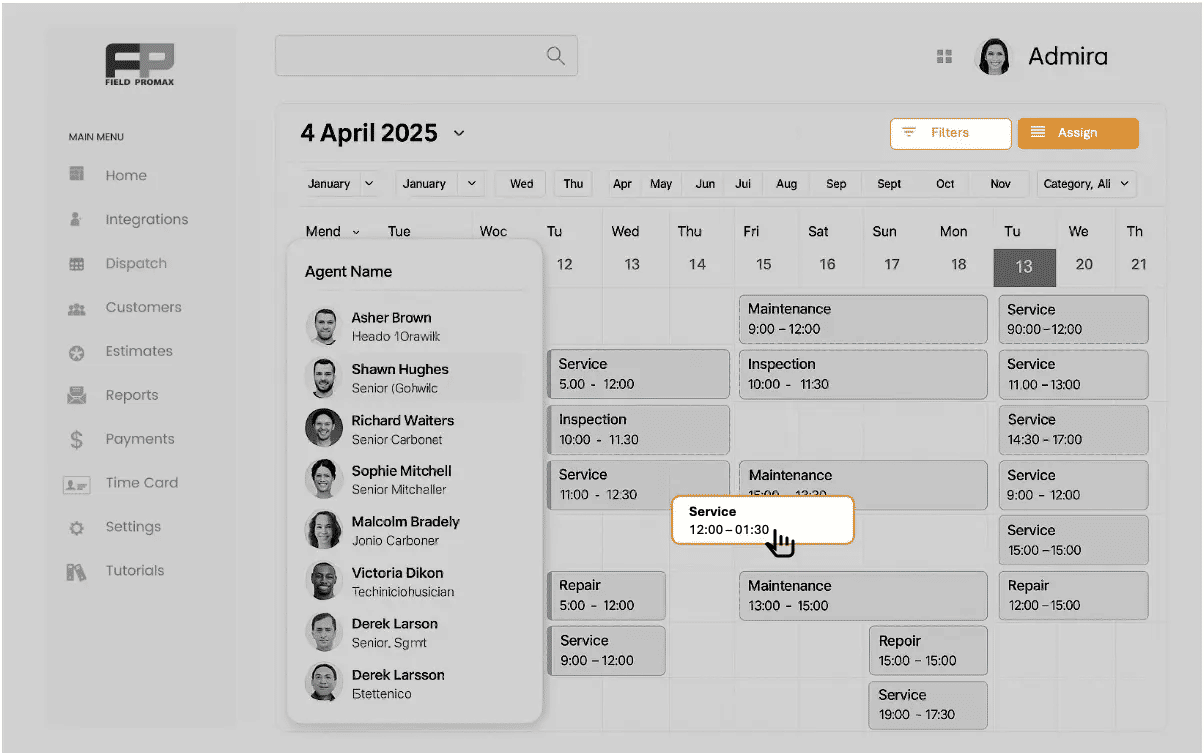
If you are running an HVAC, plumbing, electrical, cleaning, or property management business and you need software that does the job without costing a fortune or requiring a week of training - Field Promax is built for you.
Field Promax is work order management software designed specifically for field service businesses in the USA and Canada. It connects your office and your field team in real time, so no one is ever guessing about job status, technician location, or invoice amounts.
The platform is mobile-first, meaning your techs can pull up job details, add photos, capture customer signatures, and send invoices - all from their phone. Your office dispatcher sees a color-coded calendar view with drag-and-drop scheduling. Jobs that used to take 20 minutes of back-and-forth now take 30 seconds.
Key Features
-
Work order management - create, assign, and track from estimate to invoice
-
Drag-and-drop scheduling and dispatching with color-coded calendar
-
GPS-powered mobile app for technicians
-
[QuickBooks Online and Desktop integration](https://www.fieldpromax.com/quickbooks- integration-software/) - no double entry
-
Customer management with full service history
-
Estimates and invoicing from the field
-
GPS tracking and real-time technician locations
-
Equipment tracking per customer asset
QuickBooks Integration
This is where Field Promax pulls ahead for most small businesses. The QuickBooks integration is native and two-way - invoices, payments, and customer data sync automatically. No manual exports. No reconciling two systems at end of month. If QuickBooks is already your accounting backbone, Field Promax plugs right in.
.png?updatedAt=1747763704661)
Free Trial
Field Promax offers a 14-day free trial after a short product demo. The demo takes about 20 minutes and walks you through the platform with a real member of the Field Promax team. After the demo, your 14-day trial begins with your full account set up and ready to run real jobs. No credit card required. Book your demo at fieldpromax.com/schedule-a-demo. Most teams are running live jobs within 24 hours of their demo.
Pricing
Field Promax offers three plans: Light at $99/month (1 user), Standard at $159/month (5 users), and Premium at $239/month (12 users). Annual plans are available with a 20% discount. View all plans at fieldpromax.com/pricing.
| Best For |
|---|
| HVAC, plumbing, electrical, cleaning, property management, and traffic control businesses with 1-50 technicians. Especially strong for businesses already using QuickBooks. |
| Pros | Cons |
|---|---|
|
|
|
|
| |
| |
| |
|
| Free Trial |
|---|
| 14-day free trial after a 20-minute demo. No credit card required. Book at fieldpromax.com/schedule-a-demo |
2. Arrivy
-
Best for end-to-end field service operations with built-in real-time customer experience.
-
Arrivy is a strong option for field service businesses that prioritize both operational efficiency and the customer-facing side of operations. It includes robust scheduling and dispatch capabilities, while being built API-first, allowing seamless integration with CRMs, ERPs, QuickBooks, HubSpot, Salesforce, and custom systems without locking you into a closed ecosystem.
-
What sets Arrivy apart is its real-time customer experience layer. Customers receive live crew tracking, two-way SMS and email updates, and self-scheduling access through a web-based portal, with no app download required. For businesses where the customer experience during the job is just as important as job completion, this creates a clear advantage.
Key Features
-
Scheduling and dispatch with dynamic assignment based on technician proximity, skills, and availability
-
AI-powered route planning and optimization
-
Mobile app for field technicians with offline mode and GPS clock-in/out
-
Offline digital forms with auto-fill, PDF integration, and e-signatures
-
Native booking calendars - static and dynamic - for customer self-scheduling
-
Two-way messaging between crews, customers, and dispatchers
-
Real-time crew tracking with live ETA updates for customers
-
Timesheets with automated job-based tracking and reporting
-
Audit trail with timestamped activity logs for compliance and dispute resolution
-
API-first integrations with QuickBooks, Salesforce, HubSpot, and custom platforms
Pricing
Arrivy offers three plans: Standard at $75/month (3 users), Premium at $150/month (3 users), and Enterprise at custom pricing. Additional full-access users are $25/month on Standard and $50/month on Premium. A free demo is available on request.
Best For
Service businesses that need strong customer transparency tools alongside field operations, particularly moving and logistics, solar, cleaning, and HVAC companies, where customer experience during the job is important.
| Pros | Cons |
|---|---|
| Strong real-time customer experience features | Setup and configuration can take time |
| API-first design for flexible integrations | May be more than needed for basic scheduling-only use cases |
| Mobile app with offline support | |
| AI-powered route optimization | |
| Scalable for multi-location operations |
3. Workever
Best easy to use field service management software for small teams.
Workever is a solid choice for small to mid-sized service businesses looking to streamline their day-to-day operations with the help of a user-friendly field service management software.
The platform is particularly well-suited for trades and service-based businesses, including electricians, plumbers, HVAC technicians, and property maintenance teams. Its intuitive interface and quick setup make it accessible for smaller teams that need a straightforward solution without a steep learning curve.
Features
-
Job Scheduling & Dispatching
-
Mobile App for Field Teams
-
Quotes & Invoicing
-
Customer Management (CRM)
-
Real-Time Communication
-
Integrations & Reporting
Pricing
Workever offers a simple per-user pricing model starting from approximately £29 per user per month, making it an affordable and scalable option for small to mid-sized field service businesses.
Best for
Best for small to mid-sized field service businesses looking for an affordable, easy-to-use solution to manage jobs, scheduling, and invoicing in one place.
| Pros | Cons |
|---|---|
| Easy-to-use interface with minimal learning curve | Limited advanced features for larger enterprise teams |
| Affordable pricing with scalable per-user model | Fewer native integrations compared to larger competitors |
| Strong mobile app for field teams (photos, signatures, updates) | Reporting and analytics capabilities are relatively basic |
4. Service Fusion
Best Budget-Friendly FSM with Strong Dispatch for Small Teams
Service Fusion is a solid choice if you want a flat-rate pricing model and do not want to pay per user. For small to mid-sized field service companies juggling multiple trade types, its all-in-one pricing takes the uncertainty out of your monthly software bill.
The dispatch board is clean and easy to navigate. Estimating, work order management, and invoicing all work well. The integrated VoIP phone system is a bonus feature you will not find at this price point elsewhere.
Key Features
-
Flat-rate pricing - not per user - which is rare and useful for growing teams
-
Drag-and-drop dispatch with color-coded job status
-
Integrated VoIP calling
-
Customer management with job history
-
QuickBooks integration
-
Mobile app for technicians
Pricing
Field Promax offers three plans: $149/month flat rate covering unlimited users. Free trial available.
| Best For |
|---|
| Small field service companies that dispatch multiple trade types and want predictable, flat-rate software costs regardless of team size. |
| Pros | Cons |
|---|---|
|
|
|
|
|
|
5. Connecteam.
Best for Large Field Teams Who Need Communication + Scheduling Combined
Connecteam started as an employee communication tool and has grown into a solid FSM option - especially if you have a large frontline workforce and need scheduling, training, HR tools, and field communication in one app.
It is particularly popular in cleaning, landscaping, and multi-site property management - industries where team size is large but jobs are not always complex.
Key Features
-
Scheduling and dispatch with shift management
-
Employee communication hub - chat, announcements, surveys
-
Time tracking and GPS clock-in
-
Checklists and digital forms for field teams
-
Task and job management
-
Free plan for small teams
Pricing
Free for up to 10 users (Small Business Plan). Paid Operations Hub plans start at $35/month (monthly) for the first 30 users, with advanced tiers at $59/month and $99/month. 14-day free trial available.
| Best For |
|---|
| Cleaning companies, landscaping businesses, and property management teams with large staff counts who need scheduling + team communication in one place. |
| Pros | Cons |
|---|---|
|
|
|
|
|
|
6. Zoho FSM
Best for Budget-Conscious Businesses Already in the Zoho Ecosystem
Zoho FSM is part of the broader Zoho suite, which means if you are already using Zoho CRM, Zoho Books, or Zoho Inventory, this integrates cleanly with everything you have already set up. For businesses not already in the Zoho world, the learning curve is steeper. But the free plan and low-cost entry tier make it worth evaluating if you are just starting out.
Key Features
-
Work order management with status tracking
-
Scheduling and dispatch board
-
Technician mobile app
-
Service agreements and contracts
-
Integration with Zoho Books
-
Free starter plan available
Pricing
Free plan for up to 2 users and agents. Paid plans from $25/user/month.
| Best For |
|---|
| Small businesses already using Zoho tools, or first-time FSM buyers who want a free plan to test the concept before committing to paid software. |
| Pros | Cons |
|---|---|
|
|
|
|
|
|
7. KickServ
Best Simple CRM + Field Service Combo for Service Contractors
KickServ is one of the cleanest, easiest-to-learn platforms on this list. It handles the basics - scheduling, work orders, estimates, invoices, and customer records - without overwhelming you with features you will never use.
It integrates with QuickBooks and has a solid mobile app. If you are moving off a spreadsheet and want something that your least tech-savvy technician can figure out in an afternoon, KickServ is worth a look.
Key Features
-
Customer and job management in one view
-
Scheduling with team calendar
-
Estimates, work orders, and invoices
-
QuickBooks integration
-
Customer-facing portal for online booking
-
Mobile app for field technicians
Pricing
Field Promax offers three plans: $59/month with a 14-day free trial.
| Best For |
|---|
| Service contractors who want an easy CRM + scheduling combo without complexity. Great for handyman, appliance repair, and general maintenance businesses. |
| Pros | Cons |
|---|---|
|
|
|
|
|
8. Simpro
Best for Businesses Managing Subcontractors and Multi-Phase Projects
Simpro is a comprehensive platform built for trade businesses that deal with subcontractors, long-running projects, and complex job costing. It handles everything from quoting through to service delivery, with deep project management features most FSM tools do not offer.
Key Features
-
Full project management with multi-phase job tracking
-
Subcontractor management and scheduling
-
Inventory and parts management
-
QuickBooks and Xero integration
-
Custom digital forms for compliance and inspection records
-
Mobile app for field technicians
Pricing
Custom pricing based on business size. Demo available on request.
| Best For |
|---|
| Electrical, fire protection, and mechanical contractors who manage subcontractors, multi-phase projects, and complex job costing. |
| Pros | Cons |
|---|---|
|
|
|
|
|
|
9. mHelpDesk
Best for Mid-Sized Teams Needing Stronger Reporting
mHelpDesk is a mature FSM platform that has been around since 2009. It covers the full service lifecycle - from lead capture to invoice - and has more reporting depth than most tools at its price range.
Key Features
-
Lead and customer management with pipeline view
-
Scheduling and dispatching
-
Estimates and invoicing
-
QuickBooks integration
-
Custom reporting and dashboards
-
Mobile app
Pricing
Field Promax offers three plans: approximately $169/month. Free trial available.
| Best For |
|---|
| Mid-sized service businesses (10-30 technicians) that need stronger job reporting, customer pipeline visibility, and are outgrowing simpler tools. |
| Pros | Cons |
|---|---|
|
|
|
|
|
10. Vonigo
Best for Franchise and Multi-Location Service Businesses
Vonigo is built with multi-location and franchise operations in mind. If you run the same service business across multiple cities - or if you are a franchisor managing multiple owner-operators - Vonigo gives you the visibility and control to manage everything from a single dashboard.
Key Features
-
Multi-location and franchise management
-
Online booking engine for customer self-scheduling
-
CRM with customer history across locations
-
QuickBooks integration
-
Routing and dispatch optimization
-
White-label branding for franchisors
Pricing
Custom pricing based on number of locations and users. Demo available.
| Best For |
|---|
| Franchise networks and multi-location service businesses in cleaning, pest control, moving, and property maintenance. |
| Pros | Cons |
|---|---|
|
|
|
|
|
11. RazorSync
Best Simple-to-Solid Option for Basic to Mid-Level Operations.
RazorSync is a dependable, no-frills FSM platform that covers the basics cleanly. It handles scheduling, work orders, dispatch, and invoicing with a straightforward mobile app. For HVAC, plumbing, and general service contractors who want a reliable platform without paying for features they do not need, RazorSync is a reasonable mid-tier option.
Key Features
-
Scheduling and dispatching with map view
-
Work order management
-
Customer records and service history
-
Invoicing and payment collection
-
QuickBooks integration
Pricing
Field Promax offers three plans: $75/month with a free trial available.
| Best For |
|---|
| HVAC, plumbing, and general maintenance businesses that want solid core features at a mid-range price without enterprise complexity. |
| Pros | Cons |
|---|---|
|
|
|
|
|
12. ServiceMax
Best Enterprise Option for Asset-Heavy Operations
ServiceMax is enterprise-grade FSM software built for large organizations that manage complex assets - think medical equipment, industrial machinery, or large-scale energy systems. It integrates deeply with Salesforce CRM and offers advanced asset lifecycle management that smaller platforms simply do not provide.
For most small to mid-sized field service businesses, ServiceMax is more power than you need and more cost than you should pay. But for operations with 50+ technicians managing high-value equipment under strict SLAs, it is a serious contender.
Key Features
-
Advanced asset lifecycle and maintenance management
-
AI-powered scheduling and dispatch
-
Salesforce CRM integration
-
Service contract and warranty management
-
Field analytics and reporting
-
Mobile app with offline capability
Pricing
Custom enterprise pricing. Contact ServiceMax directly.
| Best For |
|---|
| Large enterprises and industrial service organizations managing high-value assets, strict SLAs, and 50+ technician teams. Not suited for small businesses. |
| Pros | Cons |
|---|---|
|
|
|
|
|
|
Bonus: 5 Free and Budget-Friendly Field Service Tools
If you are just starting out or watching every dollar, free and low-cost tools can get you moving. But here is the honest truth: most free FSM options are built for solo operators or very small teams, and they start showing their limitations the moment you add a second or third technician.
1. Zoho FSM Free Plan
Zoho offers a genuinely functional free plan for up to 2 users. You get work orders, scheduling, a mobile app, and basic reporting.
Where it stops working: The moment you add a third technician, you need to upgrade. The free plan also does not include native QuickBooks integration - a dealbreaker for most US-based service businesses already using QuickBooks.
2. Connecteam Free Plan
Connecteam's free plan covers up to 10 users and is one of the most generous free tiers in the industry. It focuses on team scheduling, communication, and time tracking.
Where it stops working: Work order management and invoicing are limited on the free tier. Connecteam is really a team management tool first. If your biggest pain point is job tracking and billing, you will hit its limits quickly.
3. Field Promax - Best Paid Value (14-Day Free Trial After Demo)
Free tools are great training wheels. But once you have 2-3 techs, customers expecting professional service, and QuickBooks to reconcile - the limitations of free software start costing you more time than you save.
Field Promax is where most small field service businesses land when they outgrow free tools. Starting at $99/month for 1 user, you get full work order management, QuickBooks integration, GPS tracking, mobile app access, and real-time dispatch - everything free tools cannot offer.
And before you commit, Field Promax offers a 14-day free trial after a 20-minute product demo. The demo walks you through the platform with a real team member. Your trial starts immediately after with full account access - no credit card required.
The most important thing to test during your trial: run 5 real jobs from last week through the system. Set up dispatch, let a tech update a work order from their phone, and send one invoice. Most teams decide within 3 days.
| Book Your Field Promax Demo |
|---|
| 20-minute walkthrough with the team. 14-day free trial starts immediately after. No credit card required. Book at fieldpromax.com/schedule-a-demo |
4. FieldServicely Free Starter Plan
FieldServicely offers a limited free starter plan with basic work order management and scheduling. It is worth mentioning for solo operations that want something beyond spreadsheets.
Where it stops working: Limited customization, basic reporting, and limited integrations. Once you are managing more than a handful of recurring customers, you will want more.
5. Google Workspace (Sheets + Calendar) - The Zero-Cost Starting Point
If budget is the hard constraint and you are not ready for any paid tool yet, a combination of Google Sheets for job tracking and Google Calendar for scheduling costs absolutely nothing. Plenty of solo operators and 1-tech shops run on this for their first 6-12 months.
Where it stops working: The moment a second technician joins, the cracks show fast. Double bookings. Formulas that break when someone edits the wrong cell. No mobile job updates. No invoicing. No QuickBooks sync. No customer service history. You end up spending 2-3 hours a day maintaining a spreadsheet that should take 20 minutes.
Google Workspace is a honest starting point - not a long-term system. When the admin work starts eating into your job time, that is the signal to switch. Field Promax's 14-day trial after demo is the natural next step. Most teams that make the switch say they wished they had done it 6 months earlier.
What Features Should You Look for in Field Service Management Software?
Not all FSM platforms are built the same. Here are the features that actually matter for field service businesses.
1. Work Order Management
This is the core of any FSM tool. Your software should create a work order in under a minute, assign it to a tech, track it from open to closed, and convert it to an invoice when the job is done. See Field Promax Work Order Management | Work Order Management Software Guide
2. Scheduling and Dispatch
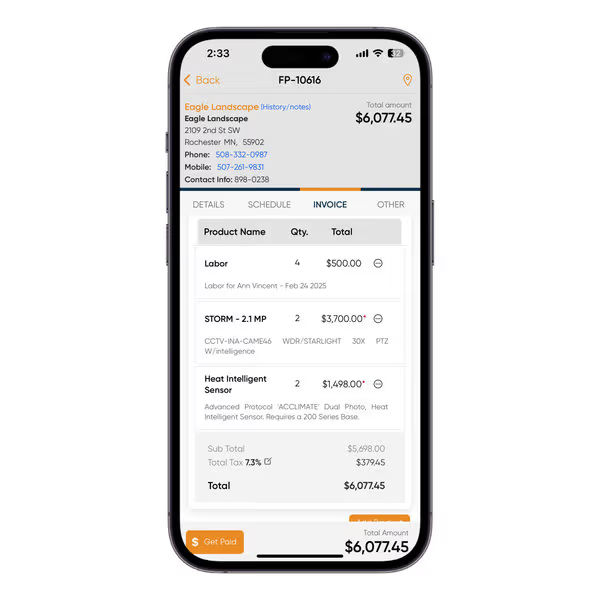
A drag-and-drop calendar where you can see every technician's schedule at a glance and assign jobs with a click is non-negotiable. Color-coded status views and conflict alerts save dispatchers hours every week. See Field Promax Scheduling and Dispatch | Dispatch Software for Small Business
3. Mobile App for Field Technicians
Your techs are not sitting at a desk. The mobile app needs to work fast, be easy to navigate, and work offline when they are in basements, rural locations, or buildings with bad signal. See Field Promax Mobile App | Best Field Service Management App
4. QuickBooks or Xero Integration
If you are already using QuickBooks or Xero for accounting, your FSM software needs to sync with it automatically - not export-to-CSV, but real two-way sync.
See Field Promax QuickBooks Integration | Best FSM Software Compatible with QuickBooks

5. GPS and Time Tracking
Knowing where your techs are in real time helps you dispatch the nearest tech to an emergency call, give customers accurate arrival windows, and verify technician hours.
See Field Promax GPS Tracking | GPS Time Tracking for Field Technicians
6. Reporting and Analytics
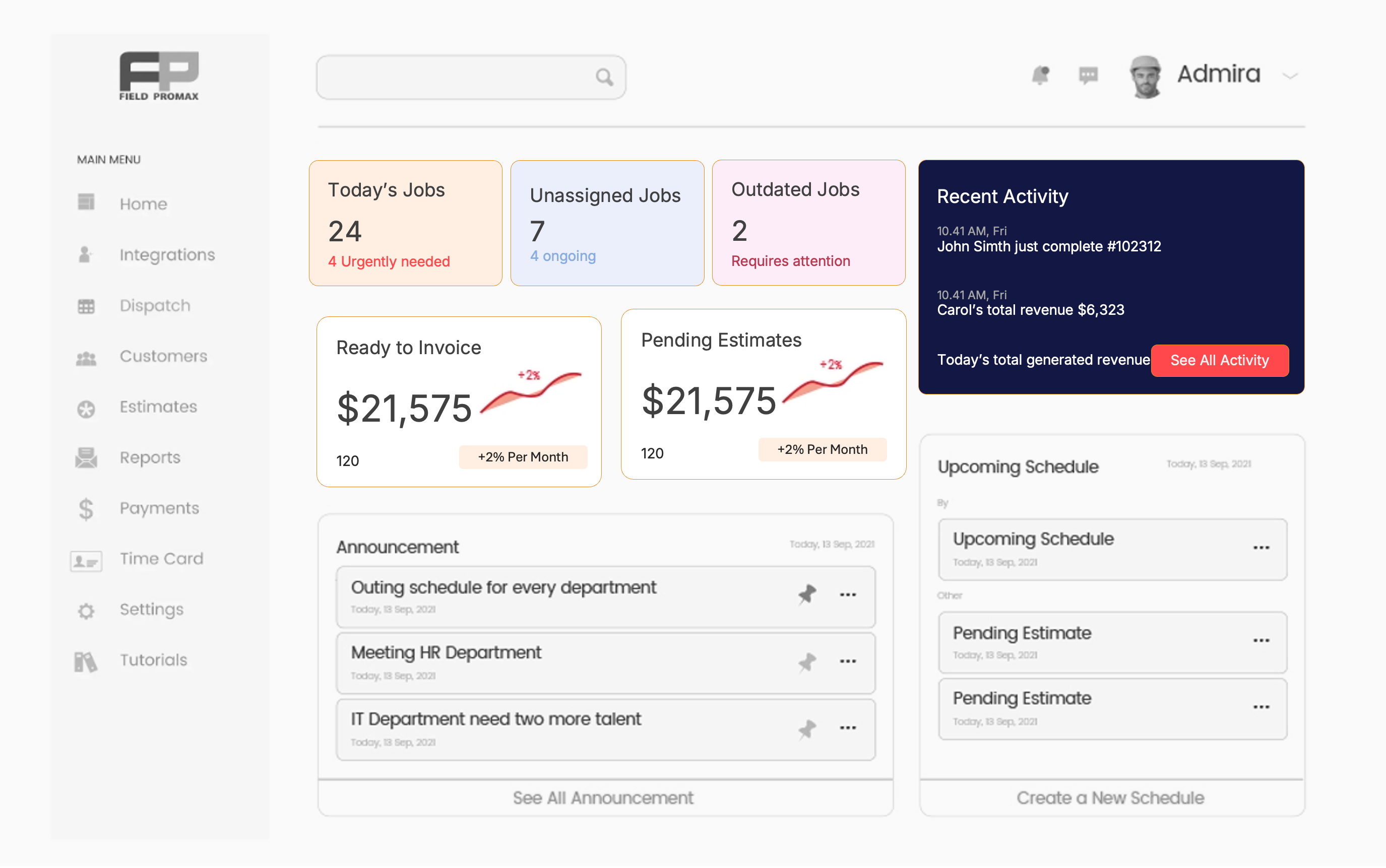
Revenue by technician. Jobs completed per week. Average response time. The businesses that grow fastest are the ones that know their numbers.
See Field Promax Reports and Dashboard
How to Choose the Best Field Service Management Software for Your Business
1. Know Your Team Size
A 1-3 person operation has completely different needs from a 20-tech crew. As one contractor put it: "It is like giving a Ferrari to someone who just needs a pickup truck." Do not buy enterprise software for a 3-person shop.
2. Decide on Must-Have Integrations
QuickBooks? Xero? Both? Write down your accounting software first. Then find FSM tools with a native, proven integration. A shaky integration creates more problems than it solves. See the full QuickBooks-compatible FSM guide.
3. Test the Mobile App Before Committing
Your techs will make or break adoption. Before you sign a contract, have your two least tech-savvy technicians test the mobile app for 20 minutes. If they figure it out quickly, you are golden.
4. Look for Transparent Pricing
If a software company's pricing page says 'contact us for a quote', that is a warning sign for small businesses. Platforms like Field Promax publish their prices openly at fieldpromax.com/pricing.
5. Always Use the Free Trial
Every major FSM platform offers a free trial or demo. Use it. Set up 5 real jobs from last week and test the full workflow. An hour of testing saves months of regret. Book a Field Promax demo here.
6. Know Your Industry
The industries that use FSM software span everything from HVAC and plumbing to fire protection and property management. Make sure the tool you choose has experience in your specific trade.
How Much Does Field Service Management Software Cost?
Most entry-level FSM platforms run around $100/month for basic features, while premium plans commonly cost $450 or more (source: Capterra). Here is the breakdown:
1. Entry-Level
Field Promax (from $99/mo for 1 user), KickServ (from $60/mo for 5 users) fall here. Full core FSM functionality - scheduling, work orders, dispatch, invoicing, mobile app, and QuickBooks integration. This tier covers the needs of 90% of small field service businesses.
2. Mid-Tier
Service Fusion (from $245/mo, unlimited users) sits here. More customization, built-in VoIP, flat-rate pricing regardless of team size. Worth the jump once you have 10+ technicians and want predictable costs. mHelpDesk also operates in this tier - contact them for current pricing.
3. Enterprise (Custom Pricing)
Simpro, Vonigo, and ServiceMax all operate on custom-quote pricing. For organizations with complex workflows, multiple locations, or asset-intensive operations that need dedicated implementation support.
4. Free Options
Zoho FSM (free up to 2 users) and Connecteam (free up to 10 users via Small Business Plan) both have functional free tiers. Genuine starting points, but with user limits and feature caps. Budget at least $99-$120/month once you have 2-3 technicians and are running more than 10 jobs per week.
Bonus: Best Field Service Software by Trade Vertical
Running a specific trade? Each of these verticals has a dedicated guide with tools and features specific to that industry.
-
Best HVAC Field Service Management Software - scheduling, maintenance agreements, QuickBooks sync
-
Best Software for Plumbing Businesses - invoicing, quoting, dispatch for plumbing crews
-
Best Electrical Contractor Software - estimating, scheduling, compliance tracking
-
Best Property Management Work Order Software - tenant requests, maintenance scheduling, vendor management
-
Best Fire Protection Field Service Software - inspection records, compliance, scheduling
-
Best Snow Removal Software - seasonal scheduling, QuickBooks integration, dispatch
| Pricing Disclaimer |
|---|
| All pricing information in this article was sourced directly from each vendor's official pricing page and is accurate as of the date of publication. Software pricing changes frequently. Field Promax and all third-party tools listed here may update their plans, pricing tiers, user limits, and included features at any time without notice. Always verify current pricing on the vendor's official website before making a purchasing decision. We are not responsible for any discrepancies between the prices shown here and current vendor pricing. |
The Bottom Line: Which Field Service Management Software Is Right for You?
After comparing 10 platforms and evaluating 5 free and budget options, here is the honest summary:
-
For most small field service businesses (1-20 technicians, any trade, USA/Canada) - Field Promax is the best overall choice. Starting at $99/month, built for trades, QuickBooks-native, and easy enough that your techs will actually use it. 14-day trial after demo.
-
Best Flat-Rate: For teams that want flat-rate pricing regardless of headcount - Service Fusion is worth a look.
-
Best Multi-Location: For franchise or multi-location operations - Vonigo was built for exactly that problem.
-
Best for Projects: For complex subcontractor and project-based work - Simpro handles it.
-
For businesses just starting out - Field Promax's free trial after demo or Zoho FSM free are your best first steps.
The field service management software market is projected to grow from $5.12 billion in 2025 to $8.87 billion by 2029. That growth is being driven by businesses exactly like yours, making the switch from paper and spreadsheets to connected digital operations.
The good news: you do not need to spend $450 a month to get there. You just need the right tool for your size, your trade, and your team.
Frequently Asked Questions

Content Creator
Bhargavi Halthore is a content writer at Field Promax, a field service management platform serving trades businesses across the USA and Canada. With over a decade of experience writing for business owners, she brings detailed, ground-level insight to every topic she covers. Her research goes beyond search results - she digs into LinkedIn groups, Facebook communities, and Reddit forums to understand what field service business owners are actually dealing with on the ground. She speaks directly with industry professionals, understands their day-to-day challenges, and translates that into content that is practical and actionable. What you read in her articles reflects real industry patterns, not theory.