How to Choose Dispatching Software for a Small Field Service Shop
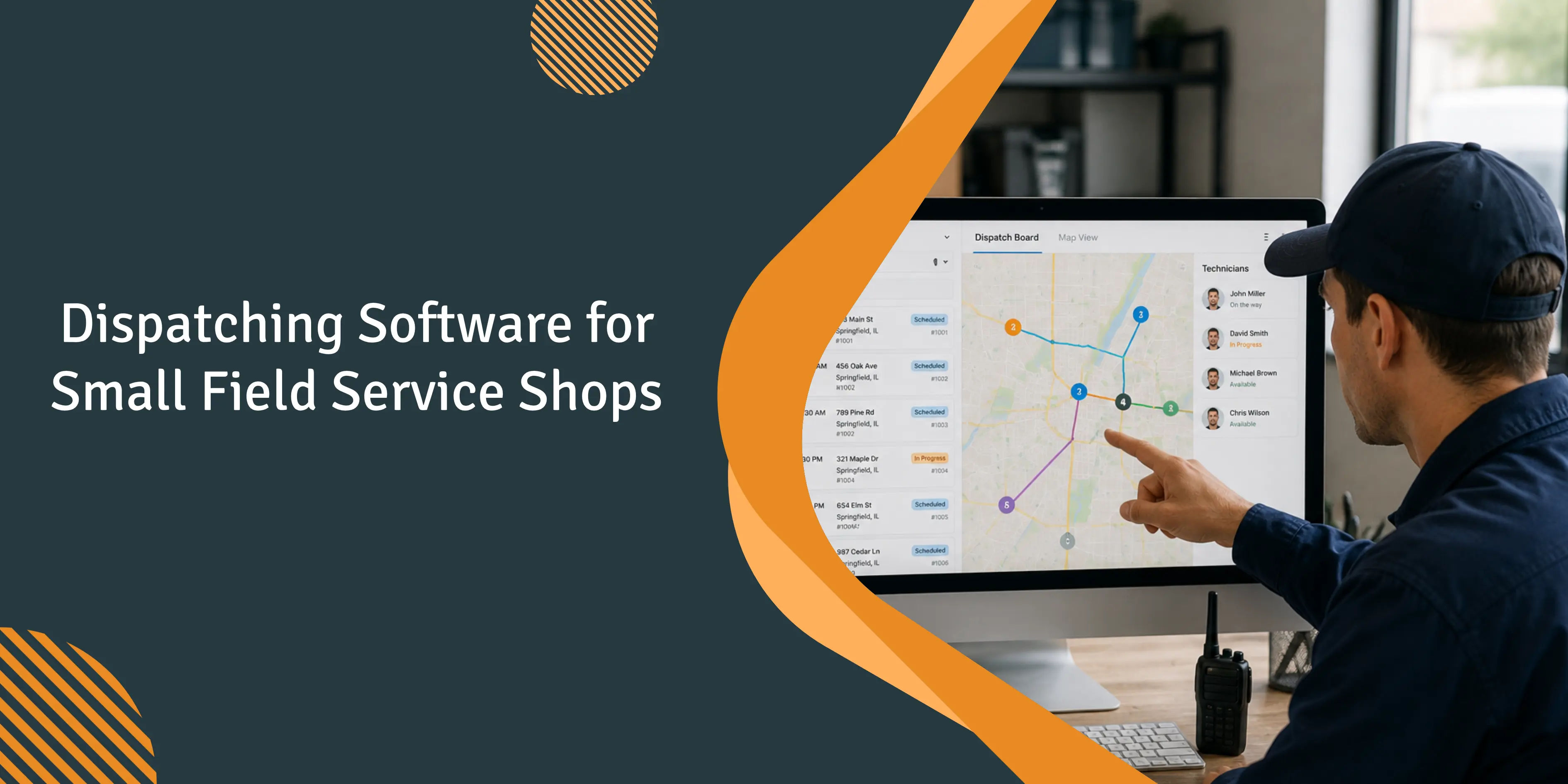
Tuesday afternoon, June 30. A commercial service shop with 8 techs sends a technician to a secured office park. He arrives at 2:45 p.m., but the gate is locked and the property manager is unavailable. The customer was never informed of the technician’s arrival time. Ninety minutes are lost before the tech is redirected to another job. Meanwhile, the dispatcher - who was promoted into the role just weeks earlier in May - is stuck apologizing on one phone call while another customer is calling to ask where their tech is.
That is the failure mode behind every conversation about dispatching software for a small field service shop. The real issue is not a missing feature. It is a schedule that looks clean at 7 a.m. and completely falls apart by lunchtime. This guide explains what to look for when evaluating dispatch software at this stage of growth - and how operations change once dispatch becomes tightly controlled.
Why does dispatch break before you notice?
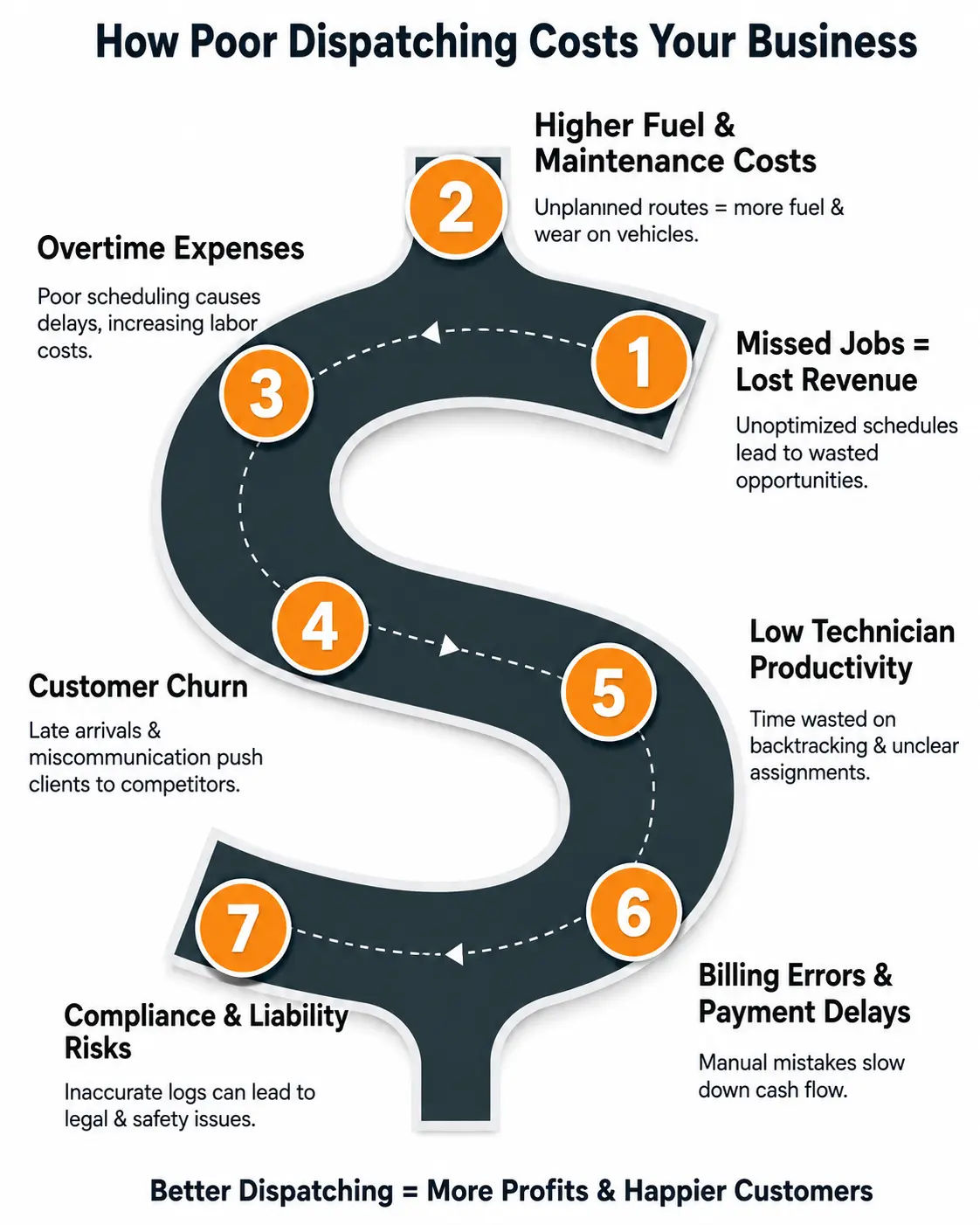
The breakdown on Tuesday marks the visible end of a chain that began days earlier. The intake system failed to record access notes. The dispatcher did not have the gate code. The customer never received a one-hour arrival reminder. Across owner discussions on Quora, contractors describe the same dispatcher-versus-route gap: the person assigning the work does not fully understand the reality of the route - site access hours, live-load wait times, or even who is responsible for opening the door.
The second issue is that arrival times shift after dispatch, and re-sequencing the day can cause delays to cascade. Fire alarm and security installers are particularly affected due to inspection scheduling, although the same pattern is common across HVAC, plumbing, and electrical work. Dispatching software is valuable when reality no longer matches the plan and the dispatcher has to rebuild the afternoon without a 20-minute phone tree.
What does dispatching software actually do under the hood?
Remove the marketing copy, and dispatch software performs three core tasks: it holds the calendar of who is booked and when, distributes that information to the people who need it (dispatcher, technician, and customer), and then records the events that actually occurred back into the same system.
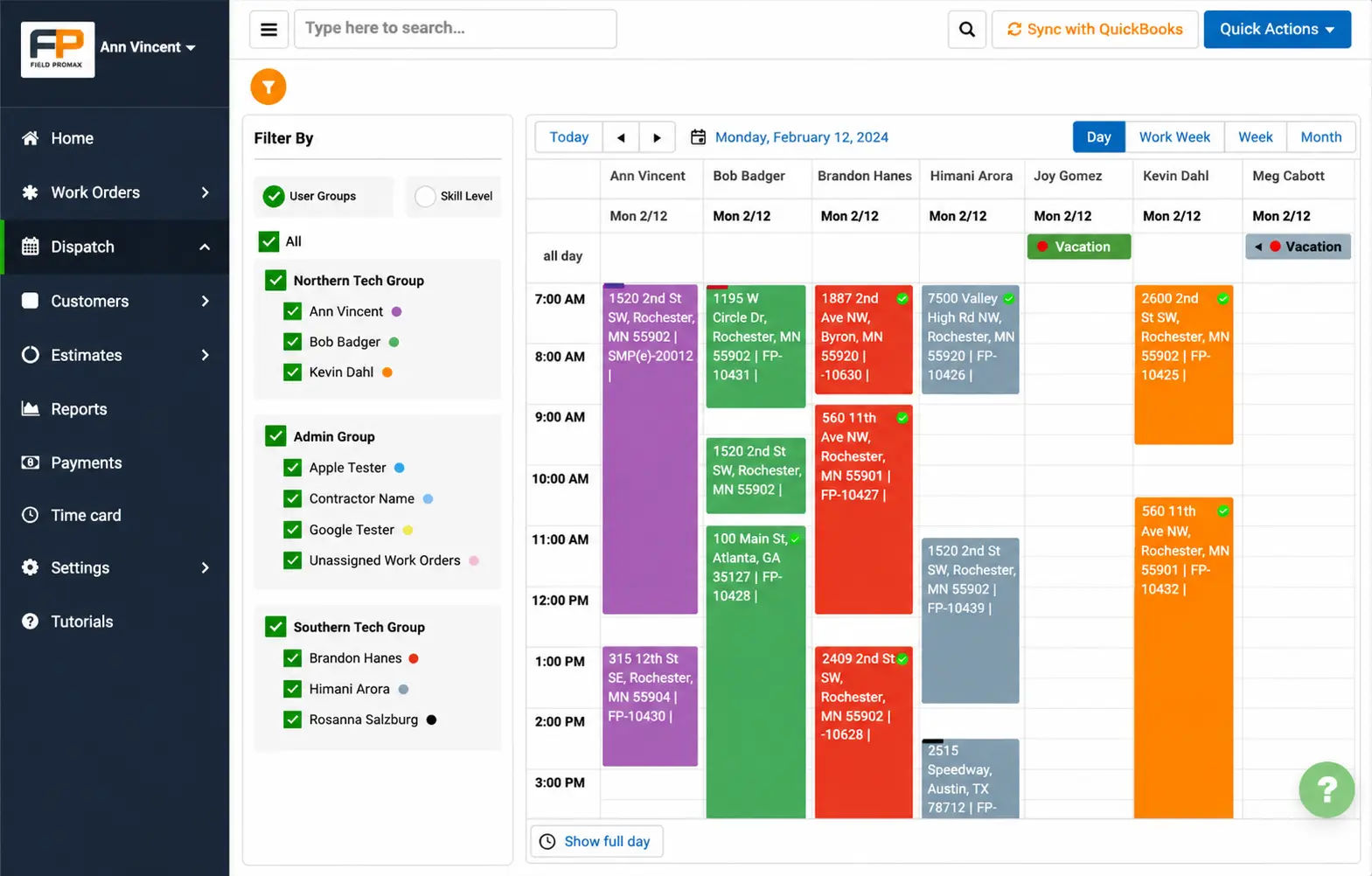
Drag-and-drop boards, GPS pins, route optimizers, arrival texts - every feature is a variation on those three jobs. When evaluating, the Field Promax scheduling and dispatch module and competing tools should answer the same question: how cleanly does this hold, push, and capture the work of a day in my shop?
What does dispatching software solve day-to-day?
For a shop with 8-techs, the day-one wins are clear. Fewer scheduling conflicts, because the board shows everyone’s schedule at a glance. Faster response to changes, since same-day cancellations update for all users immediately. Better billing handoff, because completed jobs carry over job details, times, and signatures directly into the invoice without re-entry. And a clearer view of the week ahead, allowing you to spot an unintended gap on Thursday before it turns into a payroll problem.
Analytics, predictive scheduling, and automated marketing typically come in year two. Buyers who chase these in the first year often choose tools with weak dispatch boards, then wonder why adoption slows. Start with the board. Get dispatch right first.
Our STANCE: We have seen this play out dozens of times. An owner demos an enterprise platform, falls in love with the revenue dashboards, signs the annual contract, and then realizes the dispatch board requires five clicks to move a job. By month two, the dispatcher is back on the whiteboard. Buy dispatch software to fix dispatch first - the analytics are a reward for getting the basics right.
How does smart scheduling cut Monday morning chaos?
From 15 years of client conversations, dispatchers in a typical 8-tech operation spend about 15 hours per week managing manual schedules. Shops that switch to a drag-and-drop board can reclaim most of that time, since the schedule updates automatically when jobs are cancelled. Assignments are made based on skills and location rather than the dispatcher’s memory. Monday preparation shifts from a three-hour phone routine to a fifteen-minute scan of the board.
The U.S. field service management software market surpassed $2.8 billion by 2025 (IBISWorld), a significant figure driven largely by SME adoption. Smaller companies are increasingly switching to these tools as they scale toward the operational complexity of larger competitors. As a result, there is less need for heavy IT involvement during setup.
What changes when you can see every tech in real time?
Live position tracking on the board answers ‘Where is my tech?’ without requiring a phone call. If a customer calls at 11 a.m. asking for the earliest available slot, the dispatcher can offer a realistic 90-minute window instead of guessing. And if a tech is delayed on a job, the next appointment can be rescheduled in seconds rather than after a 20-minute phone chain.
The Field Promax timecard and GPS tracking module ties this to clock-in hours, which matters for tech buy-in. GPS during work hours, not personal time - that is the conversation to have before rollout. Companies implementing real-time GPS routing have reduced fuel consumption by up to 30% (razorsync.com dispatch analysis, 2025). For a 8-tech shop running 5 vehicles, that line item starts offsetting software cost within months.
Why do customers stop shopping around when dispatch is tight?
As per Housecall Pro 2025 homeowner survey, 80% of homeowners factor online booking into hiring decisions and 96% expect a professional website. Shops that pair online booking with tight ETA texts see first-call-to-confirmed-job conversion climb visibly within a quarter.
Owners frequently tell us that around 40% of complaints about missed windows stem from overly wide arrival promises. A single missed window often leads to the loss of the next two potential referrals from that household. This is why shops that use strict two-hour arrival windows and live ETA texts maintain stronger retention - and why businesses relying on ‘we’ll be there sometime between 8 and 5’ continue to lose repeat customers they never had to risk losing.
How do offices and fields stay on the same page?
The link between the dispatcher and tech is the mobile application. One Field Promax customer in the QuickBooks App Store described moving from paper-based processes to a fully paperless system, enabling faster dispatch to multiple locations. When notes, photos, signatures, and parts are all stored in a single job file, the need for follow-up phone calls between office and field is greatly reduced.
The benchmark industry standard for first-time fix rates is around 77% (G2 FSM research, 2025). Each callback can represent another truck roll costing $200 or more. That cost increases further when tech arrives on-site with complete job information, site access notes, and all required parts already confirmed. Mobile apps let tech to receive full context before leaving the premises, rather than discovering missing information after they are already on the curb.
A pattern across commercial-services operators we have worked with
Across the 30-40 commercial services operators we have watched since 2019, a consistent pattern emerges during transitions in dispatch systems. ‘No-access’ situations are common across commercial routes, particularly in gated communities, property-managed sites, and retail locations after hours. Consider a mid-sized commercial service contractor with around 20 technicians operating across residential and light commercial routes in a single metro area. In many cases, dispatchers only discover access issues once the technician is already on-site, calling from the street. By that point, the 30-50 minute window - along with the return drive - has already been lost.
In Q2 of an especially difficult summer, the operator tracked a steady flow of jobs that were technically scheduled but not fully accessible. The booking system captured the address and time slot, but no information on site access. While the calendar itself was accurate, nearly a quarter of the day’s work was lost due to failed arrivals.
The fix was implemented before it became a software change. The intake process was updated to require access notes and a verified mobile number before a call could be closed. Dispatchers also began sending 24-hour confirmation texts. However, the initial version did not hold, as CSRs continued to skip the access field for repeat customers. After a month, the team introduced a mandatory field and added a brief Monday huddle to review recurring mistakes.
Events that were not accessible dropped by about half within one quarter. An unexpected side effect was that confirmation messages triggered a wave of cancellation requests, making the calendar more chaotic for about three weeks before stabilizing. Newer CSRs adopted the script quickly, while the two holdouts were senior dispatchers who had been making bookings from memory for many years.
This is a composite case based on patterns observed across the operators we’ve worked with.
What features actually matter when you are choosing software?
Most demo deck checklists are a mile long and an inch deep. For small to mid-sized shops, six factors determine whether a rollout will actually stick. Use this list in every demo, and ask the representative to demonstrate features using real operational data - not a sales sandbox.
Does the interface match how your dispatcher actually thinks?
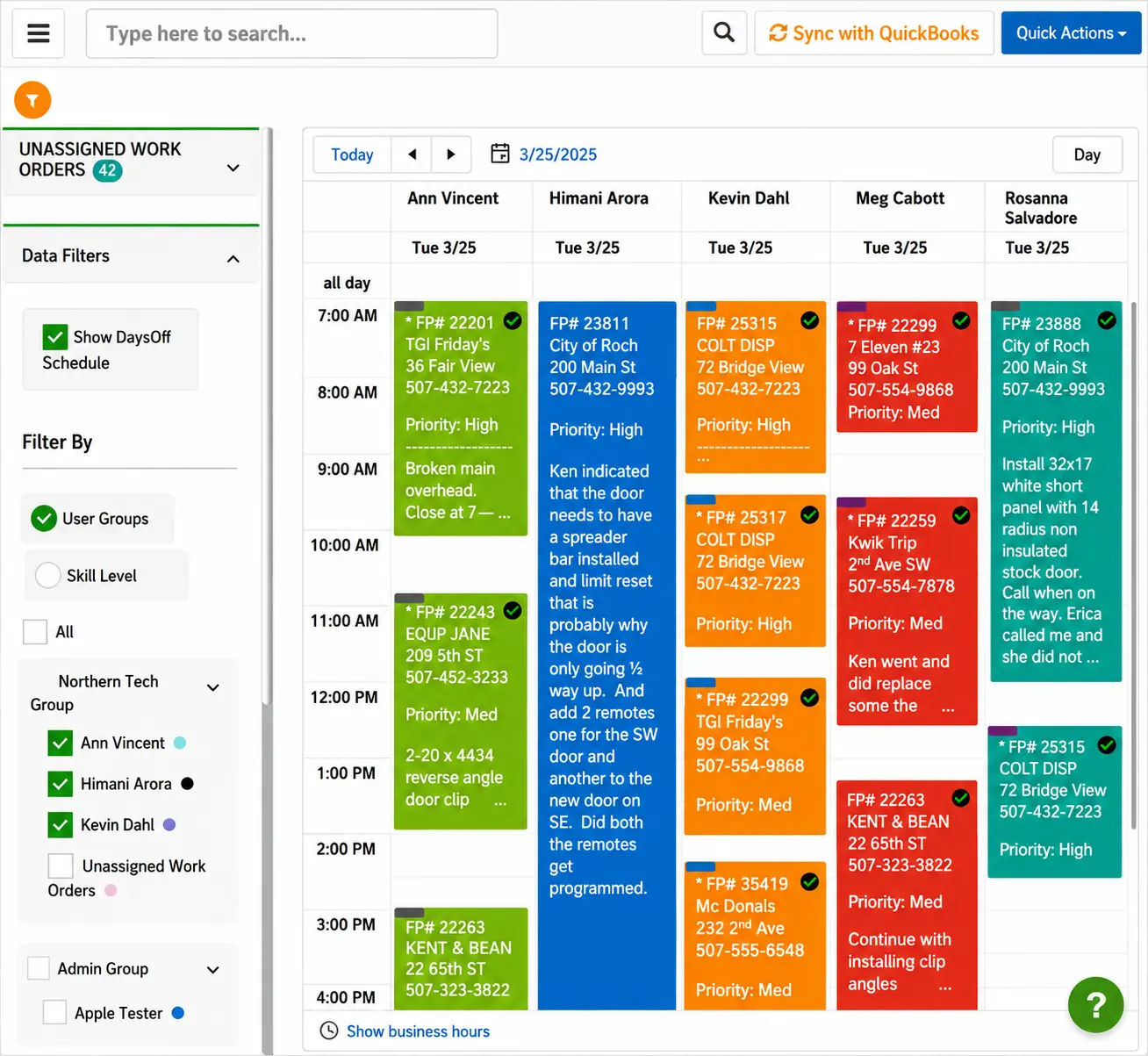
Dispatchers work within a grid that maps techs across the top and time down the side, with jobs displayed as colored blocks. If the system requires three separate modals just to transfer a job between technicians, it is unlikely to be successfully adopted by week three. One customer described Field Promax as streamlining everything from scheduling to QuickBooks invoicing, with the color-coded calendar being the feature that made it click. To evaluate a demo, ask the representative to move five jobs between three techs and observe the number of clicks required. Multiply that by 50 daily movements - that becomes the hidden workload your dispatcher inherits.
How important is integration with what you already use?
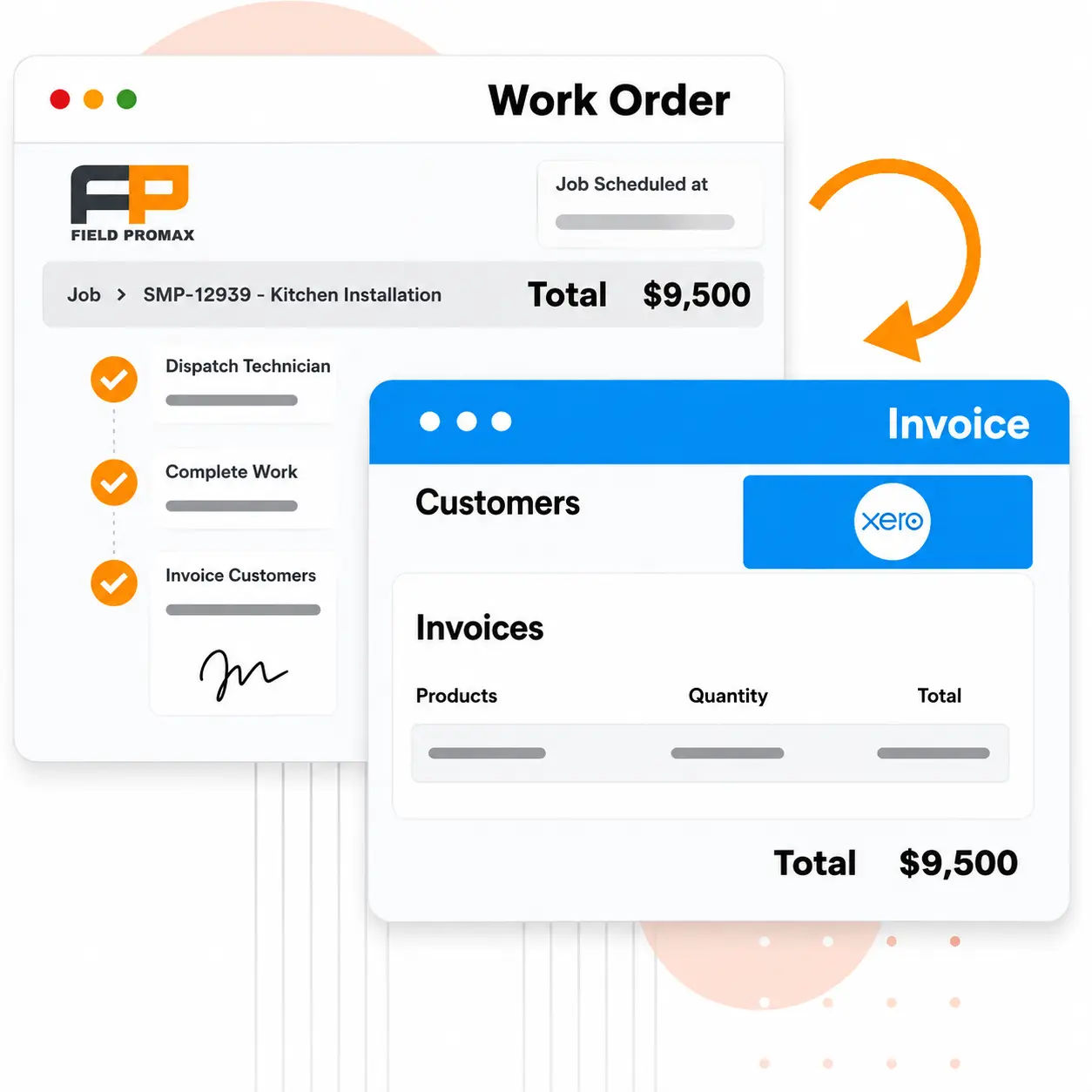
Most shops adopting dispatching software for a small field service shop for the first time are migrating from paper, a spreadsheet, or a QuickBooks-only setup. That makes the QuickBooks integration the highest-stakes one to evaluate. A dispatched job that does not flow into an invoice means double data entry - and that is when people give up.
During a demo, try booking a job, sending it, marking it as completed, and then processing the payment. Pay attention to the number of steps and keystrokes involved. If the workflow requires more than four steps, you are likely looking at a daily friction point that your billing team will begin to resent by the second month.
Why does technician mobile-app adoption decide the rollout?
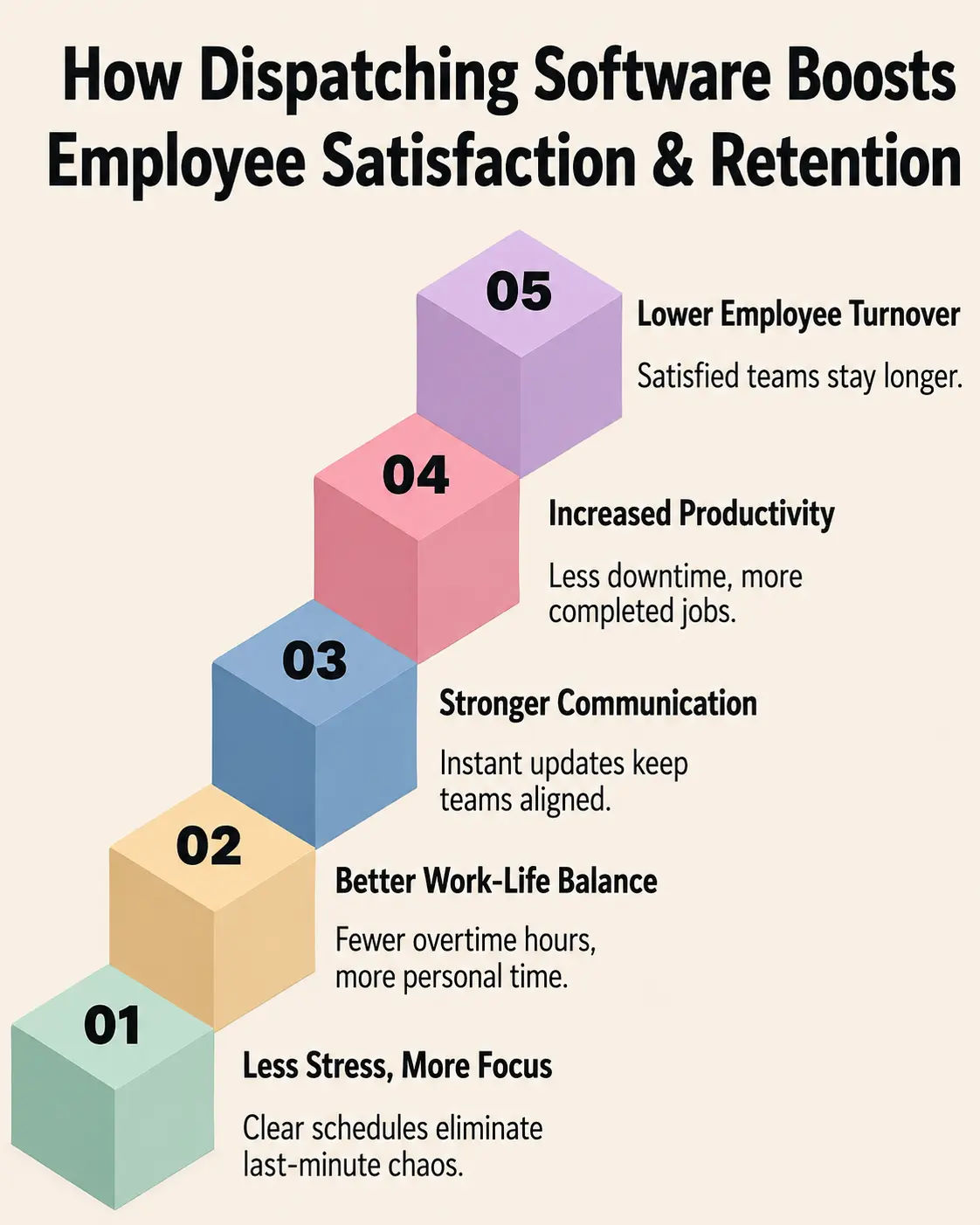
Technician adoption of mobile apps is the primary indicator of a successful rollout. If techs cannot reliably use the app, dispatchers are forced to call them for status updates, and the schedule in the system quickly becomes a fictional version of reality.
The single biggest predictor of whether a dispatching rollout sticks is not the dispatcher's comfort with the back-office screens. It is whether the techs open the mobile app on the truck. Owners often spend their evaluation grading the dispatch board, then watch the rollout stall because three of their eight techs are still calling the office for the next address.
I would rather see a shop demo the tech-facing app on a real phone, in a real driveway, before they sign anything. The other piece I push back on: the assumption that you need enterprise-grade tooling to fix dispatch. Most shops buying for the first time are coming off paper, a spreadsheet, or a QuickBooks-only setup. Onboarding speed and a clean handoff to invoicing matter more than the depth of the analytics module.
- Joy Gomez, Founder of Field Promax
Demo the Field Promax mobile app on a real Android and iPhone in a real driveway, not on a tablet in the conference room. Can the tech see today's jobs without scrolling? Mark complete in under thirty seconds? Attach a photo in two taps? Find prior service history without leaving the job screen? If any of those fail, the back-office features do not matter.
How do you turn on GPS without losing technician buy-in?
One of the first concerns raised by tech-savvy users when GPS tracking is introduced is whether it turns into monitoring every movement - even lunch breaks. The most effective approach is simple: GPS should be active during working hours and automatically off after clock-out. Dispatchers use it to assign jobs and respond to ETA questions, not to monitor personal breaks. Techs should understand how the system is used from day one. Without that clarity, resistance builds.
For security and alarm installers, GPS pairs well with inspection scheduling. As Per NFPA 72, fire alarm systems have inspection schedules that vary by component. Shops that load those schedules into dispatch and let GPS-aware routing string them together are the ones whose inspection-line revenue stops slipping.
What does route optimization look like in practice?
Urban HVAC and plumbing crews routinely lose 30%+ of the workday to windshield time. Well-routed operations keep it below 20%. Shops we work with that on optimized dispatch report drive-time settling near the 20% line - effectively a free tech and a half of recovered billable hours weekly. Vendor data from FieldAx lines up: 10 to 15% reductions in travel distance, 20 to 25% drive-time cuts. Shops at the higher end let the optimizer recalculate when a stop is added in the middle of the day.
One safeguard: consumer-grade routing can send drivers onto restricted routes, such as bridges with low height clearances or weight limits. Ensure the routing engine respects the vehicle profile and any site notes before dispatching.
Which numbers should reporting actually show you?
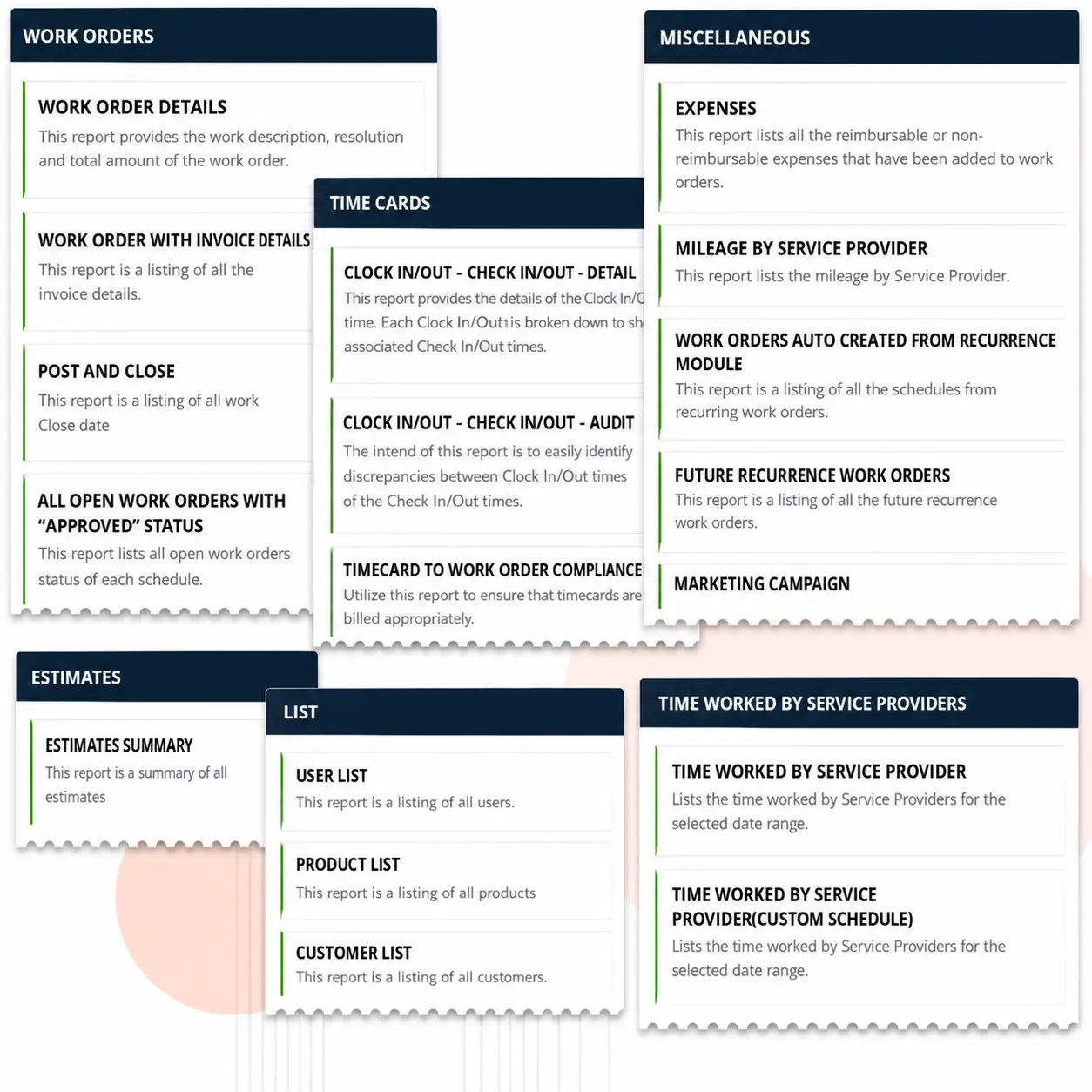
Four numbers matter for a shop this size. The Field Promax reports and dashboards module should show all four in under three clicks: revenue per tech per day, first-time fix rate, average response time from booking to on-site, and the gap between booked and billable hours. Everything else is decoration until those four are clear.
How do you size dispatching software to your shop?
Before you begin the demo, record four numbers: technicians on the job (split by trade if multi-trade), scheduled appointments per day for both an average week and your busiest week, the percentage of recurring contract work versus one-off services, and the percentage of appointment requests that come in after 5 p.m. or on weekends - typically around 35%, which strongly supports the case for online scheduling.
Enterprise platforms designed to handle 100+ techs can often be overkill in both capability and cost. On the other hand, buying a tool that caps out at five technicians when you already have eight is more common than many owners admit. Make sure you know your numbers before the first demo.
Where are the dispatch hiccups hiding, and what is the budget reality?
Examine your process thoroughly. The most common ‘hiding spots’ for breakdowns include intake calls (missing access notes or unverified mobile numbers), the handoff between CSR and dispatcher (verbal instructions, post-it notes, or inaccessible chat threads), same-day reschedules (does the update actually appear across all screens?), and job completion (are invoices processed immediately, or do they sit in an unfinished queue until the end of the week?).
The person bleeding the most hours is the one who should carry the most weight when grading demos. Total cost is not just the subscription price - it includes implementation time and the first 30 days of productivity loss. A tool that is 30% more expensive but can go live within a week will often outperform a cheaper system that takes a month to implement.
Will the software still fit in 18 months?
Choose the stage your shop will reach within the next 18 months. If you are currently at eight technicians and expect to grow to 15, your software must be able to scale without forcing a tier change that can triple your costs. When speaking to vendors, ask directly: ‘If I reach 12, 20, or 30 techs, what will my monthly cost be, and which features are locked behind paywalls?’
The U.S. FSM market is growing at approximately 15.6% per year (P&S Intelligence) and the tools are evolving alongside it. By 2027, AI-assisted scheduling is expected to assign jobs based on technician skill, location, and current workload. The shops that will benefit most from these capabilities are those already collecting clean dispatch data over the past two years. The software you choose today will determine whether that data exists at all.
How should you compare options without getting sold to?
The market is typically segmented into three tiers. First are user-friendly tools designed for 5-50 technician operations across HVAC, plumbing, electrical, and other trades. Field Promax sits in this category - fast to onboard, integrated with QuickBooks, and priced per user with no contract minimums. Second are enterprise FSM platforms built to handle 100+ technician operations with multi-region dispatching. These are powerful systems, but priced and structured for shops with dedicated operations managers. Third are generic scheduling tools suitable for micro-shops with one or two technicians, but they tend to break down beyond five techs.
Many owners tend to overshop the enterprise tier because the demo looks impressive, but implementation quickly runs into budget limits. The first step is to filter by tier. It can save you weeks of trials that were never going to work for your business anyway.
Which features matter for a small-to-mid shop specifically?
In the shop-friendly tier, create a one-page scoring sheet across these dimensions, Score 1-5:
- Dispatching board: Click count to move a job, color-coding and multi-day views
- Mobile app: speed on an actual phone, offline behavior, photo and signature capture
- QuickBooks handoff: invoice keystroke count, payment posting back
- Communication with the customer: ETA text, confirmation, online booking
- Reporting: four important numbers in less than three clicks
- Response time of the vendor: ticket response time during the trial period.
That last one matters more than most buyers realize. Vendor responsiveness during the free trial is the most predictive signal. The shops happiest at month six are the ones whose vendor answered tickets in hours. The vendor who answers your tickets within the hours of your trial will be who is still assisting in year three.
How do pricing models actually compare?
Three pricing forms you will see. Per-user monthly, with no minimums - the easiest way to increase the amount of seasonal hiring. Tiered bundles that feature gating - beware of gates that block the feature you actually require behind the top tier. And quote-based pricing with annual contracts - nearly always overkill for techs fewer than 25.
Ask each vendor to provide the monthly all-in cost based on the current headcount, and at 50% more. Then ask what implementation, training, and migration cost separately, in writing. The difference between what the pricing page claims and the actual price is where you will find surprises.
Field Promax runs $99/month for a solo operator (Light), $159/month for up to 5 users (Standard), and $239/month for up to 12 users (Premium). No per-user surcharges that double when you hire your third tech mid-season.
| Pricing Model | Best For | Watch Out For |
| Per-user monthly, no minimum | Shops hiring seasonally, growing crews | Cost climbs fast if tech count fluctuates |
| Tiered bundles with feature gating | Stable headcount, known needs | Key features (GPS, reporting) locked behind top tier |
| Annual contract, quote-based | 100+ tech enterprise operations | Almost always overkill under 25 techs |
| Flat monthly rate by user band | Small shops wanting predictable costs | Check what happens at the next band |
What do other owners say about the options?
Read reviews based on your own tier, not against the average platform. A 100-tech issue is not relevant to your decision; a 12-tech review is gold. Capterra reviews highlight the same problem we're hearing about: when the mobile app becomes clunky, techs stop updating and the office switches to phone calls. Make use of QuickBooks App Store reviews specifically to verify the handoff from dispatch-to-invoice - this is the primary everyday friction point that reviewers report when they're unhappy.
Field Promax holds 4.4-4.5 stars on both Capterra and G2 (research.com 2026). The consistent pattern across positive reviews: QuickBooks sync accuracy, the color-coded dispatch board, and the mobile app speed for clock-in and job updates.
What does success actually look like in the field?
Rollouts that stick share three signals by the end of month one. Same-day reschedules stop generating a phone tree. Friday stops being invoice-cleanup day. The owner stops being the escalation point for "where is my tech."
For security installers, the win shows up first in inspection scheduling: NFPA 72 intervals that would have been slipping get snared by repetitive-job logic. When it comes to HVAC shops, the win comes up in the summer capacities. The dispatcher will be able to see the overflow on Thursday morning, and then move the jobs ahead before the crunch comes in.
How do you actually roll this out without breaking the week?
- Set three goals that you can measure prior to signing: saving dispatch time, response time from booking to arrival on site and a percentage of same-day invoices.
- Make sure that the techs are in the room earlier. They determine which mobile app actually is utilized.
- Run two weeks parallel. It's painful, but it helps to fill in the gaps until the new system becomes the sole system.
- Cut over on a Monday during your slower season - not the Tuesday prior to an extreme heat wave.
- Make a standup every day for 15 minutes for the first two weeks. The majority of early issues are due to workflow miscommunications, rather than bugs.
What does effective training look like?
Training must be based on the role. The dispatcher should spend 90 minutes on the board and reassign mid-day. Techs require 30 minutes on the mobile app. The business owner should spend 30 minutes on reporting. Combining three of them into one all-hands session is the most frequent error - two-thirds of the room is sitting through content that is not their job. Put short reference videos somewhere the team can find them at 7:30 a.m., and shouldn't be hidden in an onboarding email that nobody ever opens.
How do you handle data migration without losing history?
If you're moving from QuickBooks-only, your customers list and service history are the assets. Clean them prior to migration: dedupe customers, fix errors in addresses, archive old accounts. If the data is not clean- that searching ‘Smith’ returns nine entries within the first day - that causes dispatchers to lose trust with the brand new systems
Before going live, run three simulated days: a typical Tuesday, a busy weekend Friday, and a scenario that cancels the same-day. The dispatcher should change the assignment five times without causing any friction. Techs must mark the complete position with a single bar of the signal. What breaks in simulation could have been broken by live customers.
Which KPIs prove the software is earning its keep?
On day 60, take a look against the goals you established prior to signing:
- The number of hours a week are spent by the dispatcher - goal: 30% reduction+
- Same-day reschedule resolution - less than five minutes
- Invoices on the same day on more than 80% of jobs
- Customer repeat-booking rate, or NPS
- Per day, revenue per tech over the course of a week
If the numbers aren't growing by day 90, the problem is usually not the software. The dispatcher is running half-time the old system, or the techs are still calling the office to find the next location. Make the workflow better, not the tool.
| KPI | Industry Benchmark | Why It Matters | Source |
| First-time fix rate | ~77% average | Right tech + right parts + job history = fewer callbacks | G2 FSM research, 2025 |
| Average response time | Under 4 hrs non-emergency; 1-2 hrs emergency | Faster dispatch drives retention | Mordor Intelligence FSM report |
| On-time arrival rate | 85-90% target | Route visibility and real-time rescheduling | fieldservicesoftware.io, 2025 |
| Technician utilization rate | 75-85% of available hours billable | Measures whether dispatch fills schedules efficiently | Shifton FSM KPI report, 2026 |
| Fuel cost reduction with GPS | Up to 30% reduction | Real-time routing cuts dead miles | razorsync.com, 2025 |
How do you keep getting better after go-live?
Schedule a 30-minute monthly review for a period of six months. Check the dashboards and ask the dispatcher and two techs about what's frustrating, and improve one workflow each month. Small, consistent changes add up quicker than large quarterly overhauls.
The vendor needs to be a part of the loop. With shop-friendly FSM suppliers, the founder personally reads the tickets and talks to owners every week - something that isn't the case for enterprise platforms. The features you'll need in the second year are typically those you don't anticipate when you sign in.
If your shop is multi-trade, the same engine should cover your verticals: HVAC, Plumbing, Electrical, Pest control, Landscaping, Fire and security.
.webp?updatedAt=1746782051290)
Field service dispatch benchmarks and market context
Before you can determine if the new dispatch software has improved your operation, you need to know where you began. These numbers don't change from every week, but they do show exactly dispatch improvements appear in the bottom line.
| Year | U.S. FSM Software Market | Key Driver | Source |
| 2021 | ~$1.5 billion | Post-pandemic mobile workforce expansion | Grand View Research |
| 2022 | ~$1.7 billion | Cloud adoption accelerating in SMB trades | Grand View Research |
| 2023 | ~$1.9 billion | QuickBooks integration demand; GPS growth | P&S Intelligence |
| 2024 | ~$2.1 billion | SME fastest-growing category; AI scheduling pilots | P&S Intelligence, IBISWorld |
| 2025 | $2.8 billion | AI routing, predictive maintenance, mobile-first | IBISWorld |
| 2026 (est.) | $3.2+ billion | Continued SMB adoption | Global Growth Insights |
| 2032 (proj.) | $6.6 billion | AI dispatching, IoT, servitization models | P&S Intelligence |
Conclusion
Dispatching software can pay for the day when a technician is running late, and a customer has to reschedule for 11 a.m., and the dispatcher rebuilds the afternoon without the phone tree. Test the mobile app on a real phone in a real driveway. Make sure the dispatch board updates when reality changes. Verify that the handoff from dispatch to invoice is in order. If it fails these three tests, walk away from it.
Frequently Asked Questions

Content Creator
Bhargavi Halthore is a content writer at Field Promax, a field service management platform serving trades businesses across the USA and Canada. With over a decade of experience writing for business owners, she brings detailed, ground-level insight to every topic she covers. Her research goes beyond search results - she digs into LinkedIn groups, Facebook communities, and Reddit forums to understand what field service business owners are actually dealing with on the ground. She speaks directly with industry professionals, understands their day-to-day challenges, and translates that into content that is practical and actionable. What you read in her articles reflects real industry patterns, not theory.