Undeposited Funds in QuickBooks Online: How Field-Service Shops Clear and Prevent Buildup
.webp?tr=f-auto,q-80,w-1200,pr-true)
Field service owners running QuickBooks Online know the symptom even when they don't know the name. The QuickBooks bank balance doesn't match what's actually in the bank - and the gap is sitting in an account most owners never deliberately set up. Across owner conversations on Quora and Reddit over the last 12 months, the most-described QuickBooks frustrations from small operators cluster around cryptic error codes, payroll-update failures, and a quieter question they keep asking: is QuickBooks even the right bookkeeping bet for a shop this size? Undeposited Funds sits inside that frustration zone - necessary, badly explained inside the product, and the single cleanest place a field-service shop's books can go off the rails.
This article explains what the account is, how balances accumulate, and how to clear them without creating tax exposure for prior years. It also covers what happens when payment workflows break down and transactions begin piling up in the back-office data entry queue.
What is the Undeposited Funds account in QuickBooks Online?
Undeposited Funds in QuickBooks Online is a temporary holding account that groups customer payments before they land in your operating bank account as a single combined deposit. Per Intuit's QuickBooks Online documentation, you record a customer payment to Undeposited Funds, then use the Bank Deposit screen to combine several payments into one deposit that matches the slip you actually walked into the bank. In our customer base, this is exactly how trade shops accumulate payments across a Tuesday route: three checks, a card-present payment, and a cash receipt that all need to net to one bank-side deposit - not five separate ledger entries.
Two product details are important here. First, payments processed through QuickBooks Payments often bypass Undeposited Funds entirely and route directly into the linked bank workflow. That is standard Intuit behavior - not a workaround. Second, the account’s behavior is determined by its account type and detail type within the Chart of Accounts, not by the account name itself. In some QuickBooks Online subscriptions, the same account may appear as “Payments to Deposit” instead of “Undeposited Funds,” even though the underlying function remains the same.
Think of it as a drawer in your back office. Cash and checks are placed there after technicians return to the shop. At the end of the day, everything is grouped onto a single deposit slip before being taken to the bank. Undeposited Funds is the digital version of that drawer. The problem begins when no one ever empties it.

What do Undeposited Funds actually buy you?
The account is designed to solve one problem: making QuickBooks deposits match your bank statement line for line. For a typical 5-20 tech shop collecting payments through cash, checks, and card terminals, that alignment is what makes monthly reconciliation possible without hours of forensic accounting work.
Four practical wins for a field service shop:
- One QuickBooks deposit for each bank deposit slip instead of individual payment lines floating independently
- Faster reconciliation because both sides match line for line
- Real-time visibility into collected payments that have not yet been deposited, helping owners monitor cash position throughout the week
- Cleaner audit trails and more reliable tax reporting because revenue is tied directly to deposits without requiring manual reconciliation work
One QuickBooks Desktop user with more than 20 years of experience on the platform explained that they needed mobile field software so technicians could access existing QuickBooks customer and item data, bill customers in the field, and push completed work back into QuickBooks Desktop immediately. That is exactly the type of workflow Undeposited Funds was designed to support on the accounting side. The field service platform handles payment capture and operational workflow in the field, while Undeposited Funds acts as the holding layer that groups those transactions into deposits matching the bank side of the books.
Our STANCE: The reason Undeposited Funds has a bad reputation is not the account itself - it is that QuickBooks does not explain the two-step process clearly during setup. Most field service owners discover it the hard way: a balance sheet that does not make sense, a reconciliation that will not close, or a CPA asking about a current asset account with $14,000 sitting in it. You should not have to learn this from a cleanup project.
How does the workflow run on a mixed-payment day?
On a typical Tuesday in an 8-tech operation, the back office reconciles cash, checks, and card-present transactions against work orders that were closed earlier in the day. When the process is set up correctly, it can be completed in five steps:
- Receive payment on the invoice and set the deposit-to account to Undeposited Funds.
- Repeat this process for each payment collected that day, regardless of payment method.
- At the end of the day, open the Bank Deposit screen and select the grouped payments that will be included in the deposit slip.
- Save the deposit. It posts to the operating bank account, and Undeposited Funds returns to zero for that batch.
- When the bank feed shows the matching deposit, accept and match the transaction.
Two operational rules consistently apply in day-to-day practice. First, each QuickBooks deposit should match the actual physical bank deposit from a single run. Do not combine payments from different days - such as Monday and Wednesday - into one QuickBooks deposit for convenience, as this can create mismatches with the bank statement. Second, the process remains accurate only if technicians record payments on the date they are collected, rather than reconstructing transactions at the end of the day from memory or from paper slips accumulated later in the week.
On Quora, the most common challenge for new QuickBooks users is setup confusion. Operators frequently search for guidance on charts of accounts configuration and day-to-day deposit workflows because the system does not clearly guide them toward a correct setup from the start. This is not a user problem - it is a product gap.

| Payment Type | Route Through Undeposited Funds? | Why |
| Cash payment from customer on-site | Yes - if batching with other payments | Multiple payments need to net to one bank slip |
| Check payment received in field | Yes - if batching | Multiple checks deposited together on one slip |
| QuickBooks Payments (card or ACH) | No - bypasses automatically | Intuit routes these directly; no manual step needed |
| Stripe or Square via third-party terminal | Depends on settlement timing | Settlement window of 1-3 days; balance during that period is correct behavior |
| Single check deposited alone, same day | Optional | Can go direct to bank account if no batching needed |
Why does the Undeposited Funds balance pile up?
If the holding account does not return to zero, it usually indicates one of five underlying issues. Each has a specific cause and solution, and mixing them up is what turns a one-hour fix into a week-long problem.
1. Payments collected but never grouped into a Bank Deposit. Office personnel often record “Receive Payment” correctly but skip the bank deposit process, which results in transactions remaining in Undeposited Funds indefinitely. This is by far the most common cause of reconciliation issues. The solution is straightforward: a closing-day checklist that ends with creating a bank deposit entry. When followed daily, the process typically takes just a few minutes.
2. Duplicate posting from the bank feed. A deposit appears in the bank feed and is incorrectly categorized as income instead of being matched to the existing Undeposited Funds deposit group. As a result, revenue can be double-counted, and held payments are not properly cleared. This can silently inflate income and, if not detected by year-end, may flow directly into tax reporting.
3. Grouping mismatches. This happens because QuickBooks deposits and physical deposits do not always share the same structure. For example, a $400 cash transaction may be removed from the QuickBooks deposit grouping, leaving that amount effectively unaccounted for on the system side. The bank statement shows the full deposit as cleared, but QuickBooks does not reflect the same total. This discrepancy remains until someone traces it back to the original deposit slip and corrects the grouping.
4. Manual category errors. A transfer posted to the wrong income account, or incorrectly marked as a direct deposit into the operating account, can bypass Undeposited Funds entirely. In such cases, the customer invoice may appear as paid in QuickBooks, but there is no corresponding entry in Undeposited Funds. As a result, the expected deposit flow is broken and reconciliation becomes inconsistent.

5. Card-processor settlement timing. Card payments processed through external providers such as Stripe, Square, and similar gateways typically take 1-3 days to settle. A balance that remains in transit during this window is normal and not indicative of an issue. If you are using QuickBooks Payments, the settlement balance behaves as designed within that same processing workflow.
The first four scenarios described are reconciliation issues. The fifth is simply a system function. Being able to distinguish between the two determines whether you’re looking at a quick fix or a full weekend cleanup.
A pattern across small contractors we have worked with
Across small residential service contractors we’ve worked with since 2019, a similar QuickBooks-only operating setup is still common in the sub-10-tech range. Typically, this involves an owner-operator managing around six technicians from a single location while also handling estimates and bookkeeping as a part-time office administrator. Two recurring patterns are often seen: estimates are edited line by line each time because no reusable templates have been created, and the customer referral source field is left blank in most new entries.
At the end of a very busy spring, the owner was spending two nights a week rebuilding estimates that were nearly identical to those he had already sent the previous month. When evaluating whether to renew Google Ads spend, he was unable to clearly distinguish between word-of-mouth work and ad-driven jobs.
Over a weekend, he created six estimate templates based on job types and saved them as reusable estimates in QuickBooks. He also introduced a strict referral-source tagging rule for the office administrator, requiring that no estimate be sent unless a source is selected on the customer record. The initial dropdown included fifteen options. Within two weeks, he reduced it by seven, as the long-tail options were rarely used.
Estimate turnaround tightened to roughly half its prior time by the end of the second month. The tagging rule slipped badly for the first eight weeks. The admin allowed rush-job estimates to proceed without proper tagging, until the owner began returning incomplete records. The process of backfilling existing customers in the system was never fully completed.
A composite case based on patterns commonly seen across the small contractor segment we’ve worked with.
How do you reconcile Undeposited Funds in QuickBooks Online?
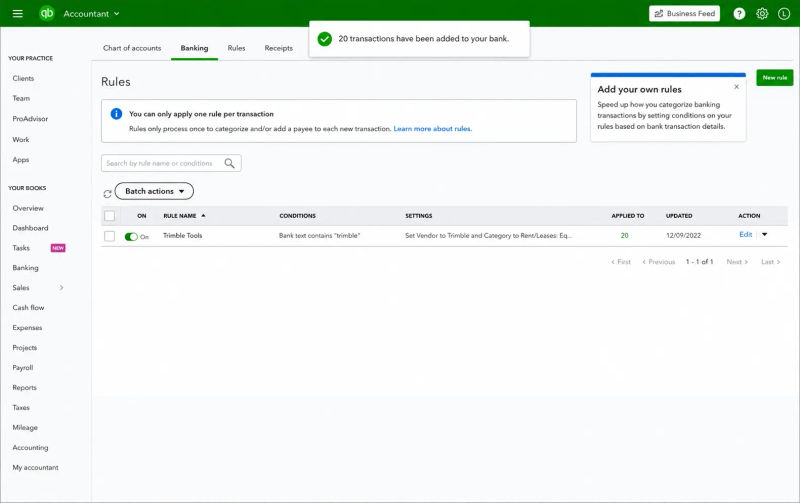
In QuickBooks Online, there are three common paths for handling held payments so they can be reconciled and matched correctly. Each results in the same outcome: the deposit is recorded in the operating account to match the bank statement, and the corresponding payments are cleared from Undeposited Funds.
From the Banking page. Open Banking, select Reconcile, choose the account, and review cleared transactions against the bank statement.
From the Accounts page. Open Accounts, Go to Reconcile and select the account. QuickBooks will display all undeposited transactions. Select the transactions that match actual bank deposits, and QuickBooks will automatically create the corresponding bank deposit entries.
Manual Bank Deposit from Banking. Banking, then Deposit, Select the bank account and review grouped or held transactions that are included in the deposit.
Maintaining a strict reconciliation schedule prevents cleanup from becoming overwhelming. Businesses processing more than 50 transactions per week should reconcile weekly, while lower-volume operations can typically reconcile monthly. Contractors on Quora often describe the difficulty of recovering records after reconciliation has been delayed for months, where small discrepancies compound into larger issues. These threads rarely begin with “QuickBooks broke”. They usually begin with “I stopped reconciling.”
| Reconciliation Scenario | What It Means | Action Required |
| Undeposited Funds balance = $0 at month-end | All received payments formally deposited in QBO | None - clean books |
| Balance = 1-3 days of payments | Recent payments in transit, not yet deposited | Create bank deposit transaction as soon as you deposit |
| Balance = weeks or months old | Deposit step was skipped repeatedly | Use Method 1 or Method 2 cleanup (see below) |
| Balance will not clear despite creating deposits | Duplicate or mismatched transactions | Review bank feed matches; look for double-recorded income |
| Negative balance | Credits without matching payments | Zero-value deposit with offsetting entries; consult accountant |
How do you turn off Undeposited Funds (and when should you not)?
QuickBooks Online lets you turn off the default of routing. Receive Payment to Undeposited Funds:
- Open the Settings menu.
- Go to Account and Settings, then Advanced.
- Under the Accounting block, uncheck "Use Undeposited Funds as a default deposit to account."
- Save and refresh.
After that, the customer's payments are credited to your accounts directly.
Do you need to turn it off? The only situations where disabling the option makes sense are single-tech operations that process only one payment at a time, where each transaction generates its own separate deposit (immediate ACH from QB Payments, or single-payment merchant terminals that settle individually). For any shops where multiple payments received on the same day are grouped into a single bank deposit, leaving Undeposited Funds enabled is the correct setting. Turning it off forces every payment to appear as its own bank feed entry. For example, eight customer payments collected on a Tuesday would appear as eight separate bank entries instead of a single grouped deposit that matches your bank statement.
An HVAC contractor reviewing Field Promax on the QuickBooks App Store mentioned that QuickBooks synchronization helped make invoices and work orders more efficient. Conversations about setup usually starts by leaving Undeposited Funds enabled, then addressing the workflow gap that is preventing the balance from returning to zero.
Our STANCE: Turning off Undeposited Funds is almost never the fix. The problem is not the holding account - it is the gap between when the technician collects payment and when the office records it. Fix the gap, and the account works exactly as designed. Disable the account, and you have traded one reconciliation problem for a different one.
How do you clear Undeposited Funds without breaking prior-year books?
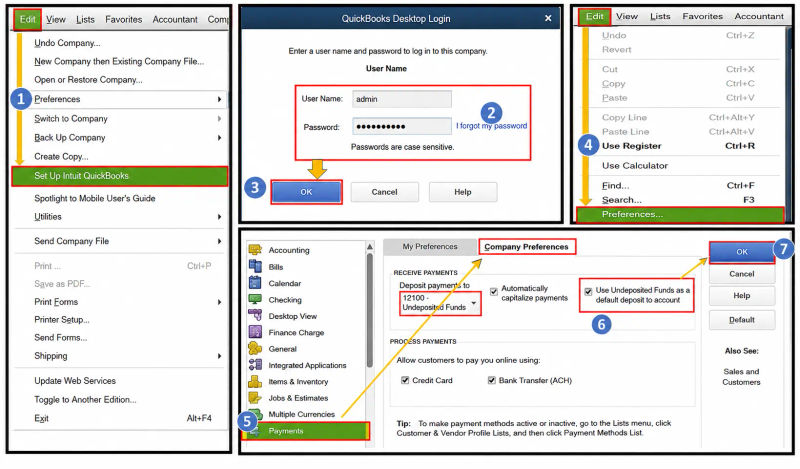
Two methods clear a backlog. Pick based on what source documents you have.
1. Method 1: Bank Reconciliation Cleanup (slower, defensible)
- Check bank statements for the time period during which Undeposited funds went off the tracks.
- Find each payment that is the held payment.
- Open Bank Deposit. Choose the matching held payments and then add the deposit amount to the actual amount of the bank slip and then send the deposit.
- Sort through the backlog deposit by deposits. When bank-feed transactions were posted directly to Income - resulting in duplicate revenue - remove or reclassify them.
- Do a Bank Reconciliation for every statement period to verify there is no discrepancy.
This assumes that each Undeposited Funds entry was genuine revenue that actually hit the bank. If the source documents are available (deposit slips and merchant statements), this is the most logical option for any time that overlaps the tax year that is filed.
2. Method 2: Dummy Clearing Account (faster, with a tax caveat)
- Create a brand-new account in your chart of Accounts named "UF Cleanup" (Other Current Asset type).
- Make use of bank deposits to move abandoned undeposited Funds entry to UF Cleanup.
- Reconcile UF Cleanup to zero through journal entries that point to where the duplicate revenue was actually recorded.
Before using Method 2, talk to your CPA. If any orphaned payments hit a prior tax year, the cleanup can require amended returns. Per IRS guidance summarized for small businesses, accuracy-related penalties under IRC §6662 run 20% of underpaid tax on returns that misstate revenue, plus interest. The shops that hit clean books fastest are the ones that fixed the source workflow first and chased the cleanup second.
Benchmark Reference: Undeposited Funds Health Metrics for Field Service Shops
| Metric | Healthy Benchmark | Warning Sign | Notes |
| Undeposited Funds balance at month-end | $0 or 1-3 days of receipts | More than 7 days of outstanding receipts | Anything older than 2 weeks needs investigation |
| Time between receiving payment and creating bank deposit in QBO | Same day or next business day | Deposits created weekly or less | Should match physical bank deposit routine |
| % of reconciliation discrepancies tied to UF entries | 0% | Any recurring discrepancy tied to old UF entries | Run UF detail report before each reconciliation |
| Manual data entry error rate | Under 1% with automation | 1-4% when keying invoices manually | Source: industry accounting research, per FPM customer base data |
| QuickBooks market share among US small businesses | 62% (2024) | N/A | Source: ElectroIQ, 2024 |
| Small business failures from cash flow mismanagement | N/A | 82% of failures | Source: DK/RK Services Bookkeeping Consultancy, 2025 |
Year-by-Year Growth: QuickBooks Online Adoption in Field Service
| Year | QBO Global Subscribers | Key Development |
| 2020 | ~4.5 million | COVID-19 accelerates cloud accounting adoption; paper-based bookkeeping workflows break down for remote teams |
| 2021 | ~5.2 million | Remote bookkeeping and digital payment adoption accelerates across field service trades |
| 2022 | ~5.9 million | QBO revenue grows 26% YoY; field service software integrations expand significantly |
| 2023 | ~6.5 million | QBO generates $2.8B in revenue; Intuit announces QuickBooks Desktop phaseout for new users |
| 2024 | ~7 million+ | QuickBooks Desktop Pro/Premier discontinued for new users (August 2024); QBO becomes the de facto SMB standard |
| 2025 | ~7+ million (est.) | FSM-accounting sync becomes table stakes for multi-tech operations; AI-assisted matching expands |
Sources: Intuit annual filings, FitSmallBusiness QuickBooks statistics (2024), DataCaptive QuickBooks user data (2025).
What changes when dispatch and invoicing feed QuickBooks automatically?
The issue in the upstream of almost every undeposited funds blunder is the difference between when the technician completes the work and when the office enters that payment into QuickBooks. Around 62% of US small businesses operate QuickBooks according to 2024 market share data - which means that for an average 5-20 tech shop, the books are already in QB. Based on 14 years of customer interactions, owners are reporting that their back office consumes around 8 hours a week re-keying invoices, payments and job cost into QuickBooks when no field-side tools are directly integrated with it.
Manual data entry in accounting runs at a 1-4% error rate, according to industry research. Automated QuickBooks sync improves accuracy to 98-99%. For a 5-20 tech shop manually entering invoices, that 1%-4% of the time can result in inaccurate totals, mismatched job costs and reconciliation searches every month. You cannot see these errors until the reconciliation day, by which point they have compounded.
When a field service invoicing tool pushes the invoice and payment to QuickBooks the moment the tech hits send from the truck, the Undeposited Funds entry posts in real time. The deposit batch the bookkeeper builds Friday morning matches what was physically deposited, line for line. The same logic applies to scheduling and dispatch: the work order, invoice, and payment are linked through the mobile app the tech is already using on the truck, so the office is not reconstructing the day from texts and paper slips on Monday.
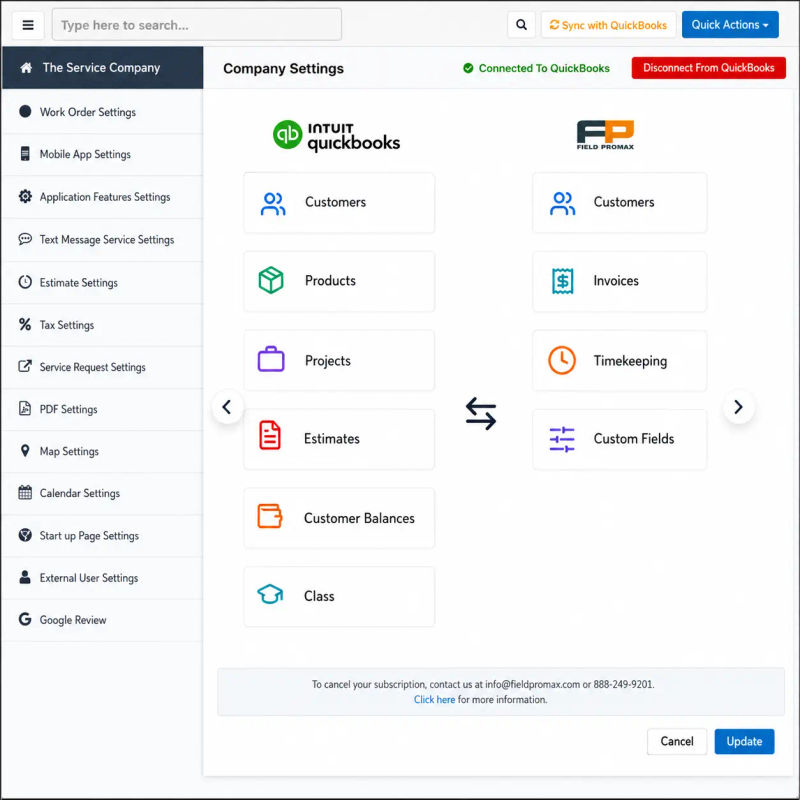
Most shops that visit us are already using QuickBooks and Undeposited funds is the reason the books slowly fall apart. This is not because QuickBooks is in error - it works as designed once the field-side data reaches it on time. Based on 14 years of conversations with customers, the most common feature request from trade shops is more efficient dispatch-to-invoice automation. The reason for this is exactly: the office should not be retyping invoices on Friday from a stack of paper slips a technician left in the truck Tuesday. Turning undeposited Funds on as the default setting is appropriate in almost all multi-tech shops. The biggest mistake that owners make is believing that the best solution to a slow back office process is to disable the account used for holding deposits. The solution is to upstream - make the payment available while the technician is still on-site, and allow QuickBooks to combine the deposit at the back end as it was designed to do.
Regional Considerations: Cash and Check Payment Norms Across the US and Canada
How often you need to address issues with Undeposited Funds depends on where you operate and what your customer base likes.
Rural and suburban markets. In smaller markets across the Midwest, rural Southeast regions, and rural Canada, cash and check payments remain common for residential field service work. Older homeowners are more likely to prefer checks, Some rural customers may not use payment apps. In these areas, the Undeposited Funds workflow is used more frequently - and is more likely to develop management issues, simply because the volume of physical transactions is higher. If your customer base consists primarily of rural or older customers, you should establish a daily routine for completing the bank deposit process. The transaction volume often justifies having a structured procedure in place.
Urban and commercial markets. In Toronto, Houston, Chicago, and Los Angeles, commercial clients increasingly pay through electronic methods. As a result, there is less need to use Undeposited Funds for commercial customers. However, residential customers in these markets still generate check payments from older homeowners and cash payments from customers who prefer to pay right away. Field service businesses operating in these areas often require both workflows: direct electronic payments and physical payments processed through Undeposited Funds.
Canadian operations - Interac e-Transfer. Canadian companies using Interac e-Transfer (commonly used for residential service invoices in the $500-$2,000 range) should treat these as electronic payments and deposit directly into the bank account - not through Undeposited Funds. Each Interac transfer appears as an individual bank transaction. For invoices that include GST/HST, ensure the deposit amount matches the tax-inclusive invoice amount if the payment is routed through Undeposited Funds.
Conclusion
Undeposited Funds is not an issue. It is a holding account that QuickBooks Online uses to keep your book-side transactions aligned with deposits actually made to the bank. For an average 5-20 tech field service shop, keeping it enabled as the default setting is typically the best option. The issues usually begin upstream, during the period between when a technician receives payment and when the office records it.
Close that gap with a QuickBooks integration that captures invoices and payments in the field, and the holding account does the job it was designed to do.
Frequently Asked Questions

Content Creator
Bhargavi Halthore is a content writer at Field Promax, a field service management platform serving trades businesses across the USA and Canada. With over a decade of experience writing for business owners, she brings detailed, ground-level insight to every topic she covers. Her research goes beyond search results - she digs into LinkedIn groups, Facebook communities, and Reddit forums to understand what field service business owners are actually dealing with on the ground. She speaks directly with industry professionals, understands their day-to-day challenges, and translates that into content that is practical and actionable. What you read in her articles reflects real industry patterns, not theory.
Reviewed by

Founder and CEO
Joy Gomez is an engineer, process automation expert, and the Founder of Field Promax. Known for his technical expertise and commitment to field service innovation, Joy writes about transforming traditional business models into paperless, efficient operations. He is a Lean Six Sigma Black Belt based in Rochester, MN, dedicated to helping field professionals work smarter through better technology.