Field Service Scheduling Mistakes: What Breaks the Day and How to Fix It

In an average 8-tech operation, a dispatcher spends around 15 hours per week managing manual schedules, including phone coordination, paper calendars, and last-minute rerouting. We’ve seen this pattern consistently over 14 years of customer conversations, and it is not always the result of poor dispatching.
It is a structural problem. Shops often start with three technicians using Google Calendar and a spreadsheet. The business grows to five technicians, and a second spreadsheet appears for the third crew. By the time the shop reaches ten techs, the owner is holding reconciliation meetings on Wednesday evenings just to keep scheduling aligned. Owners on Quora running 5-15 tech shops describe the same pattern in almost exact detail: manual systems work at a small scale, then begin to fail once the volume of work exceeds what one person can realistically keep in their head.
The field service management market is forecast to grow from $5.10 billion in 2025 to $9.17 billion by 2030 (MarketsandMarkets), and the growth driver isn't enterprise modernization. It's a fleet of 5-to-20-tech shops finally hitting the ceiling on Calendar and spreadsheets. This piece walks through the ten scheduling mistakes that show up most often, plus the operator-side fixes that actually pull the day back.
A pattern across multi-trade operators
Across roughly 40-50 multi-trade operators we’ve worked with since 2018, the most common failure mode has not been dispatcher performance. A typical setup looks like this: an owner-operator running HVAC and plumbing crews with one dispatcher and around two dozen technicians in a mid-sized Midwest metro. HVAC scheduling lives in one tool, plumbing in another, with overlaps manually reconciled by eye. The most common breakdown happens on a Tuesday morning, when a tech is routed to a tune-up while the same address is already assigned to a plumbing rough-in in the second system.
As the spring season became busier, the shop began double-booking techs licensed in both trades. Estimate disclaimers compounded the problem: HVAC estimates carried weather and equipment availability assumptions, while plumbing estimates carried material and scope assumptions. When a job touched both trades, customers pointed to whichever disclaimer worked in their favor. By Wednesday, no one fully trusted either calendar.
The owner consolidated the two boards into one shared calendar that the dispatcher used exclusively. During the first month, the dispatcher had to move every booking onto the same calendar, even though technicians pushed back. The owner also replaced the estimate disclaimers with a single template covering the standard exclusions for both trades, scope limits, key assumptions, and weather and access contingencies in plain language.
Double-bookings were largely eliminated after a difficult first month, when the unified calendar exposed conflicts that had previously been hidden between two separate systems. The disclaimer required two revisions after a customer questioned a water damage exclusion that the plumbing lead considered standard, but which was viewed as overreach under the unified template. The plumbing foreman was initially resistant to adopting the calendar system. He kept a separate spreadsheet on his desk during the first quarter but eventually abandoned it after realizing no one else was using it.
This is a composite case based on the most common version of the pattern. No individual customer is identified by name.
1. Overloading the day to 7+ calls
Seven service calls a day for an HVAC tech sounds productive on the schedule. In practice it's the fastest path to three angry voicemails by 4 PM. FieldProxy's 2025 trade-industry benchmarks put the realistic ceiling for service-call work at 4-6 jobs per technician per day, with simple repairs topping out around 6-8 and complex installations at 1-2. Shops that hold the 4-6 line show lower callback rates than those pushing seven.
Every field service job contains unpredictable variables. Customers add additional work. Parts are not always where they are supposed to be. A diagnostic may take an extra 30 minutes. Without buffer time, small delays quickly turn into a cascade.
The pattern repeats - and it is painfully familiar to anyone who has experienced it:
- The calendar becomes overloaded during booking
- Technicians scramble to keep up
- Mistakes begin happening on jobs
- Callbacks increase over the following week
- More jobs are added to recover lost revenue
- And the cycle continues.
What actually works:
- Set the daily ceiling with the techs, not the office. Their estimates usually prove more accurate than office optimism.
- Track tech-level burnout. A tech consistently handling 7+ calls per day is more prone to errors and turnover. Replacing a trained tech can cost between $15,000 and $25,000.
- Capacity, not calendar-filling. The most important metric is maintaining acceptable service quality, not simply filling booked slots.
| Job Type | Realistic Daily Ceiling per Tech |
| Simple repeatable service (filter change, tune-up) | 6-8 jobs/day |
| Standard repair calls | 4-6 jobs/day |
| Complex installations or diagnostics | 1-2 jobs/day |
2. Ignoring travel time and route sequencing
A tech starts on the North Side, drives 35 minutes south, and then heads back north for a 1 PM appointment. That is nearly an hour of windshield time the customer is not paying for.
Urban HVAC and plumbing crews routinely lose 30%+ of the workday to windshield time; well-routed operations keep it under 20%. Shops that turn on optimized dispatch consistently report drive-time settling closer to that 20% line, recovering roughly a tech and a half worth of billable hours weekly. FSM rollouts that include route optimization deliver 25-35% travel time reductions and around 30% fuel-cost reductions (Fieldservicely, 2024). Every hour a tech spends in the truck at $35/hour labor cost instead of on a $150/hour billable job is roughly $185 of opportunity walking out the windshield.
What actually works:
- Cluster jobs by ZIP code or neighborhood before the schedule locks.
- Pull up a map view before finalizing the day. Five minutes of visual inspection helps identify routing problems that are not obvious from the schedule alone.
- Account for peak-traffic hours. A 5 PM downtown job can take twice as long to reach.
- Use a routing tool that respects vehicle profile. Consumer GPS picks shortest paths; field service routing should account for low bridges, weight restrictions, and site access.
Owners on Quora frequently mention delays caused by routes their box trucks could not actually use.
3. Underestimating job duration
Poor time estimates can wreck schedules faster than almost anything else. A “routine maintenance” visit reveals a failed capacitor. A “quick repair” turns into a more complicated issue. Without accurate estimates, those surprises can consume the rest of the day’s schedule.
The compound effect is unforgiving:
What actually works:
- Pull your own 90-day job history. Track how long similar jobs actually took by job type and tech.
- Ask the techs, not the software defaults. Experienced techs know which jobs run long and which customers add work on. That knowledge belongs in the scheduling system, not in someone's head.
- Flag complexity at booking. New customers, commercial sites, and equipment more than 15 years old all tend to require more time on average. Label those jobs and build extra time into the schedule from the beginning.

| Estimate Error | Downstream Impact |
| Job estimated at 1 hour, runs 1.5 hours | 30-minute delay pushes into next appointment |
| Two jobs in a row each run 20 minutes long | Third appointment is already 40 minutes late at start |
| Four jobs each underestimated by 15 minutes | Last customer of the day waits an hour past their window |
4. Booking jobs with zero buffer
Even a clean job runs long by 10 minutes. If the next appointment is locked at the top of the hour, those 10 minutes follow the tech through every job the rest of the day.
Techs finish their job properly, answer customer questions, and leave at 11:12 instead of 11:00. Stack that across six jobs and the last customer is waiting for 2 hours after their time. Buffer doesn't mean idle time, it is the scheduling's shock absorber .
Buffer size increases with job complexity:
- Simple repeatable work: 10-15 minutes
- First-visit or diagnostic: 20-30 minutes
- Complex repairs or multi-tech tasks: 30+ minutes
Shops that maintain tight 2-hour arrival windows are not taking fewer jobs. They are building buffer time into the schedule to absorb normal slippage.
Our STANCE: Building buffer time into the schedule isn't admitting you can't run tight operations. It's the reason your tight operations actually stay tight. The shops that skip buffer aren't more productive - they're just hiding the delay cost inside callback rates and customer churn they never directly attribute to scheduling.
5. Treating every job at the same priority
When schedules are fully booked, urgent work gets pushed back.
A Monday in July is already overloaded: the board is filled with routine maintenance visits, two installations, and then a 7 AM call from a home where the AC failed overnight with an elderly parent inside. Even if the dispatcher reacts quickly, the emergency may not be reached until noon.
A three-tier framework that holds up:
Priority 1 (Urgent): No heat in winter, no AC in extreme heat, safety issues, commercial-site failures. Re-route immediately.
Priority 2 (Standard): Booked repair calls, follow-ups, active work orders. Run in sequence.
Priority 3 (Flexible): Routine maintenance, inspections, installs with a wide window. They fill gaps and shift when urgent work arrives.
Once the team understands the tiers, the dispatcher makes faster calls. No deliberation, no guilt about disrupting the calendar - the framework does the deciding.
6. Sending whoever's free instead of who's right
Dispatching with availability-only is one of the most expensive practices when it comes to field service scheduling. Tech available, job waiting, and then send the truck. But if the tech doesn't have the experience or certification for that job, the result will be an additional visit, callback or a visit again.
FieldProxy's 2025 benchmark data puts the industry median first-time fix rate around 72-75%, with top performers hitting 85%+, and technician utilization climbing from a 60-65% average to 75-85% at the high end. The gap is almost entirely about matching the right tech to the right job.
Three patterns drain margin:
- Availability-only dispatch. The tech with the closest availability gets the call regardless of skill fit. They arrive, but aren't able to complete the job, and then the customer has to wait for the next visit.
- The senior-tech trap. The highest-paid tech performs the basic tune-up while a tricky commercial diagnostic is shared with an apprentice who takes three times as long.
- No skills data in the system. Without documented certifications and job history per tech, dispatchers will default to availability since it's the only column that they have to sort through.
The fix is documentation. Build each tech's certifications, equipment specialties, and historical job-type performance into the dispatch board.
%20(1).webp?tr=f-auto,q-80,w-800,pr-true)
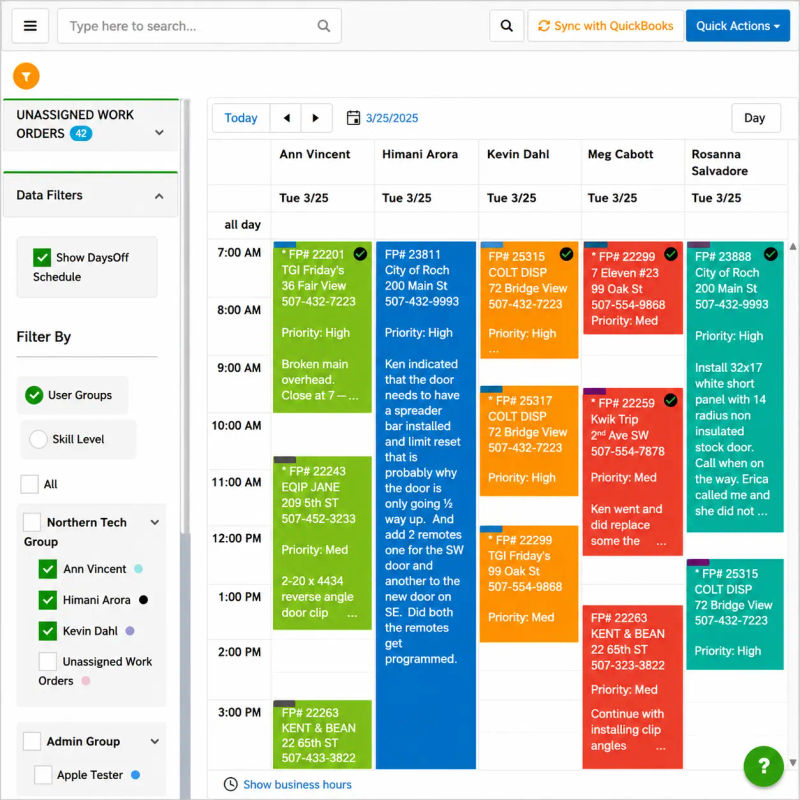
7. Running the schedule out of spreadsheets
Manual scheduling holds up at two techs and ten jobs per week. Combine five techs and twenty-plus jobs, and the cracks begin to open quickly.
Dispatchers working in an 8-tech operation consume about 15 hours a week wrangling manual schedules. Shops that switch to a drag-and-drop dispatch board consistently claw this back, because the schedule is updated automatically as jobs are cancelled or a tech is running long.
The breakdowns are predictable. Two people update the same cell; one update overwrites the other; nobody knows until a tech arrives on a job that's already started. No conflict detection. No automatic update when a job shifts. There is no visibility for techs who need to contact the office to inform them of every shift. No clean job history when a client calls back after six months. The billing process is delayed because paperwork is moved independently from the schedule.
Owner discussions on Quora and trade subreddits describe the same pattern: small-scale operators start with Google Forms, Calendar, and a spreadsheet, and the system collapses around five techs. The question frequently asked is whether there is a single tool that records the booking, schedules the job, and sends it to the right tech without re-keying. An HVAC contractor reviewing Field Promax on the QuickBooks App Store said that they were moving from paper to paperless in just a few minutes, with the team quickly catching on to dispatching crews across multiple locations.
Across small-team shops, manual scheduling overhead is around $4,800 per employee in a year. For a five-tech group, it is about $24,000 to maintain the system that's also making the day harder.
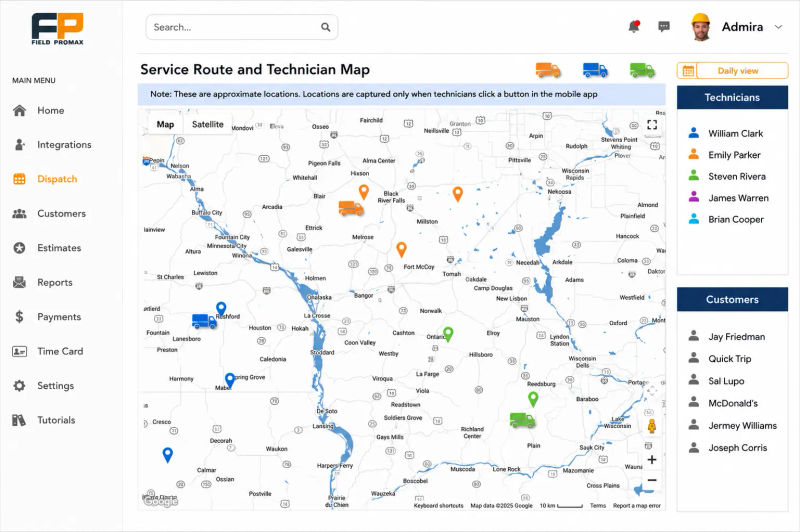
8. No real-time visibility into the field
A dispatcher who doesn't have job updates is making decisions based on the schedule as it was wet, and not what's happening at 1 PM.
Three common failure types follow:
- Customers don't get ETA updates. They have taken the day off, the tech is 45 minutes late, and nobody at the office knows. Research from IBOPE Zogby and TOA Technologies found that 70% of customers would recommend a service provider if the field rep arrived on time, and Field Nation's marketplace analysis shows that when timeliness drops below about 90%, complaint volume and rescheduling overhead climb noticeably.
- Capacity gaps don't get filled. If a job is completed early and nobody notices it, the tech is left to slack instead of picking the next flexible job.
- Delays ripple silently. The schedule doesn't even realize it is falling behind until a frustrated customer calls at 4 PM.
Live GPS visibility into where each tech actually is - not where the schedule says they should be - closes all three gaps.
9. Dispatching before checking parts and tools
The most avoidable scheduling mistake is sending a tech to a job they can't finish. The tech arrives, opens the truck, and the part is back at the shop. Or the specialized diagnostic tool is with another tech across the town. The customer is rescheduling and the shop is paying for a second trip.
Three appointments missed a week due to parts and preparation issues can result in between $23,000 and $78,000 in annual revenue loss when rescheduled trips, duplicate labor, and customers who quietly don't rebook are all in the math.
Three habits that prevent it:
- Attach parts requirements at booking. Make a note of items that are likely to be required. Before dispatch, confirm which tech has them
- Five-minute truck check at the start of the day. Prevents 90-minute detours at noon.
- Track shared specialty equipment. Sign-out process on the manifold gauge set, the recovery machine, the camera reel. Scheduling two jobs around the same gear on the same day is a self-inflicted wound.
10. Customer communication left to memory
Nearly 60% of negative HVAC and plumbing reviews are about communication, not about the workmanship. The customer is not aware of what's happening, doesn't know when the tech is coming, doesn't hear from anyone when the schedule is shifted.
Owners consistently tell us that around 40% of missed-window complaints trace back to overly broad arrival promises, and a single blown window within a 5-20 tech operation usually costs the shop a renewal plus the next two referrals. The shops with stronger retention are in place with tight 2-hour windows that are backed by real-time ETA text messages.
A minimum communication requirement, built into the workflow:
- Booking confirmation: Date, time window, and tech name will be sent out immediately following the scheduling.
- 24-hour reminder: A text the day before reduces no-shows and access issues.
- On-the-way notification: A 20-minute-out allows the customer to get ready and reduce inbound status calls.
- Proactive delay notice: When the schedule slips, the customer can hear it from the shop, not from watching the clock.
Automated customer notifications take all four off the dispatcher's plate, and shops that turn them on report that inbound "where's my tech" calls drop within the first week.

What poor scheduling actually costs a 5-20 tech shop
Many owners view missed work as a result of scheduling issues. But the real cost is difficult to assess and can be much greater.
An HVAC service ticket ranges from $150-$500. For every three missed appointments, the annual revenue loss is $23,000 to $78,000, before callbacks, additional fuel, and duplicate labor.
The full picture:
- Missed jobs from cascading delays. A customer who was waiting for a two-hour delay without updates isn't getting a call back.
- Callbacks from wrong-tech assignments. A second visit can double the labor and fuel cost, resulting in no new revenue.
- Fuel from poor routing. Enterprises that deploy AI-powered dispatch orchestration report 20-30% logistics cost reductions within the first two quarters (Locus, 2023). Mid-size shops typically see savings closer to the lower end, but recapture starts in the first month.
- Lost commercial accounts. Commercial customers who experience frequent delays don't complain; they just don't renew. A single account could carry $10,000 to $50,000 of annual work.
- Admin overhead. Manual rescheduling takes time which could be used for billing growth, sales, and billing.
Most of this is preventable when scheduling, dispatch, and customer notifications live in one system instead of three.
I read every support ticket that comes through Field Promax, and the same shape surfaces every week. A shop owner emails about what looks like a feature gap, and when we dig in, what actually broke was that the booking, the route, and the customer text were sitting in three different tools that never talked to each other. Most shops fighting scheduling delays aren't doing dispatch wrong. They don't have a scheduling system yet. They have a spreadsheet, a Calendar, and a dispatcher holding the connection in her head. The single biggest predictor of whether a new rollout actually fixes job delays isn't the software's feature list. It's whether the techs live in the mobile app. If they don't, schedule changes never reach the field in time and the day still falls apart.
- Joy Gomez, Founder of Field Promax
Industry Benchmarks: How Does Your Scheduling Stack Up?
The numbers below are derived from trade industry research and help frame where the typical field service shops are compared to the top performers.
| KPI | Low Performer | Industry Average | Top Performer | Source |
| First-time fix rate | Below 70% | ~72-75% | 85-98% | FieldProxy 2025 / IBM |
| Avoidable dispatch rate | 24% | ~12-15% | 3% | Aquant |
| On-time arrival rate | Below 70% | ~80% | 90%+ | Field service industry benchmarks |
| Appointments that go as planned | Below 50% | ~53% | 75%+ | Salesforce field service research |
| Average repair cycle time | 5.9 days | ~4.5 days | 3.7 days | HubSpot field service data |
| Unnecessary truck rolls | 20%+ of visits | ~14% | Under 5% | Aquant |
| Manual scheduling overhead per employee | $6,000+/yr | $4,800/yr | Near $0 (automated) | Field Promax customer conversations |
| FSM software adoption (under 100 employees) | Under 20% | ~29% | 51%+ (mid-market) | FSM industry statistics |
| Year | Global FSM Market Size | Key Driver | Source |
| 2023 | $4.06 billion | Post-COVID recovery in field operations | Research and Markets |
| 2024 | $4.65 billion | Mobile workforce expansion (93.5M US mobile workers) | Research and Markets |
| 2025 | $5.10-5.66 billion | AI scheduling tools, cloud-native platforms | MarketsandMarkets / Mordor Intelligence |
| 2026 | $6.21 billion (est.) | AI + IoT integration, real-time dispatch | Global Market Insights |
| 2028 | $7.3 billion (proj.) | Predictive maintenance, skill-based automation | FSM industry statistics |
| 2030 | $9.17 billion (proj.) | AI-driven scheduling, 5-20 tech shop adoption surge | MarketsandMarkets |
How to rebuild the schedule from the ground up
Most of the issues mentioned above have a root cause: the schedule isn't designed around the way field service operates. Make the base right and most downstream issues will be resolved.
Where to start:
- Build time estimates from your own 90-day job history. The real data is better than office optimism.
- Plan routes before the day starts. Group jobs in a geographical manner prior to the time when the schedule locks.
- Buffer as default. 10-15 minutes between simple jobs, more for initial visits and diagnostics.
- Match skills to jobs, not just availability. Record certifications and job-type strengths within the dispatching system.
- Confirm parts and equipment before dispatch. A five-minute inspection will prevent the most frequent callback that is preventable.
- Make customer communication automatic. Reminders, confirmations, and messages on the way are sent out without anyone noticing.
- Give the dispatcher a live view of the field. Real-time job status means that issues are discovered at 10 AM instead of 4 PM.
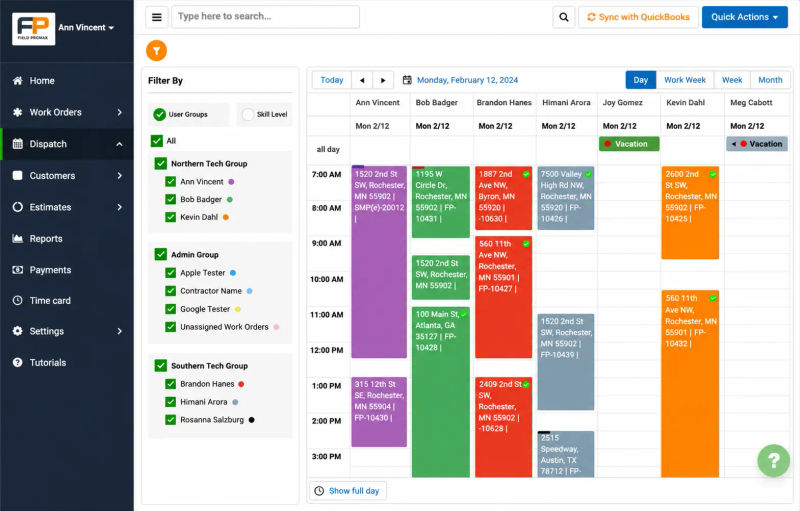
Field service shops that are available on the QuickBooks App Store often highlight two low-tech, high-leverage solutions: a color-coded calendar that shows double-bookings at a glance, and the ability for techs to generate their own service requests from the field rather than routing every new job through the dispatcher.
How shops that run on time structure their day
Shops that stay on time doesn't mean they are better-staffed. The way they organize their day differs:
- The day gets reviewed the night before. Parts, routes and disputes are resolved before the last person leaves the property. By 7 AM the board is clear.
- Geography drives the sequence. Jobs are organized according to location, but not in the booking order.
- The calendar has a ceiling, not just a limit. The best teams are aware of how to differentiate between a fully loaded calendar and a realistic one. Buffer is the default.
- Skill match before availability. That data is stored inside the dispatch system, not in the dispatcher's memory.
- Communication is a process, not a task. Confirmations, reminders, and on-the-way texts are sent out on a regular basis.
- One system, one source of truth. When schedule, job status, and customer communication are all in one place, everyone works from the same picture.
- The owner reads the dashboard, not the calendar. Top performers spend ten minutes a morning on a reports view and skip the line-by-line calendar review.
Our STANCE: The dispatcher who holds the whole schedule in her head isn't an asset. She's a single point of failure. When she calls in sick, the entire operation's knowledge base calls in sick with her. The shops that scale past 10 techs without chaos are the ones who moved that knowledge out of her head and into the system before they needed to.
The schedule doesn't have to fall apart
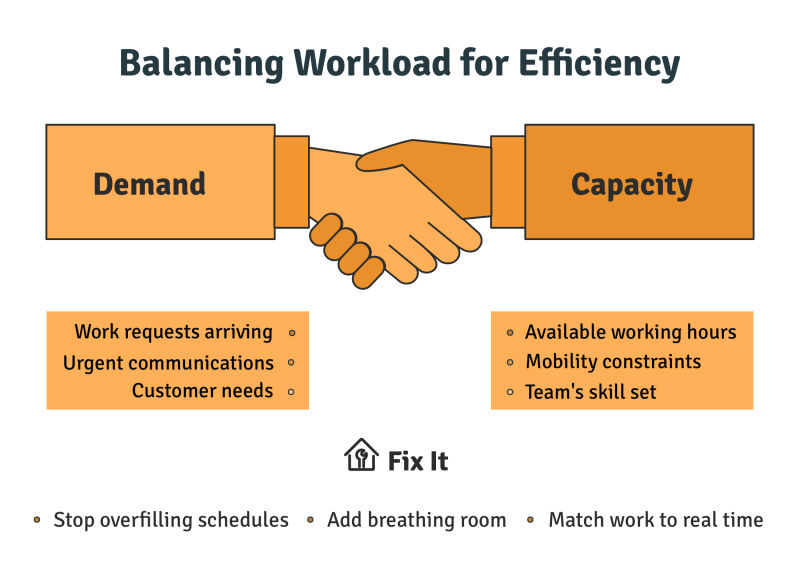
Field service work is naturally unpredictable. Jobs run long, parts go missing, customers no-show. What changes is how the schedule handles the friction or increases it.
Shops that keep their schedules have stopped using their calendars as a method to fill slots, and have started using them it as a system with actual capacity limits.
Pick the failure mode costing the most this month. Fix it. Move to the next. Field Promax was built around the workflow above, with the field-side mobile adoption that decides whether any of it actually sticks.
Conclusion
Field service work generates friction by default. The shops that stay on time aren't the ones with more techs; they're the ones whose schedule takes in friction instead of increasing it. Choose the mistake costing you the most in this month, fix the foundation, and move on to the next.
Frequently Asked Questions

Founder and CEO
Joy Gomez is an engineer, process automation expert, and the Founder of Field Promax. Known for his technical expertise and commitment to field service innovation, Joy writes about transforming traditional business models into paperless, efficient operations. He is a Lean Six Sigma Black Belt based in Rochester, MN, dedicated to helping field professionals work smarter through better technology.
Reviewed by

Content Creator
Bhargavi Halthore is a content writer at Field Promax, a field service management platform serving trades businesses across the USA and Canada. With over a decade of experience writing for business owners, she brings detailed, ground-level insight to every topic she covers. Her research goes beyond search results - she digs into LinkedIn groups, Facebook communities, and Reddit forums to understand what field service business owners are actually dealing with on the ground. She speaks directly with industry professionals, understands their day-to-day challenges, and translates that into content that is practical and actionable. What you read in her articles reflects real industry patterns, not theory.