Field Service Task Management
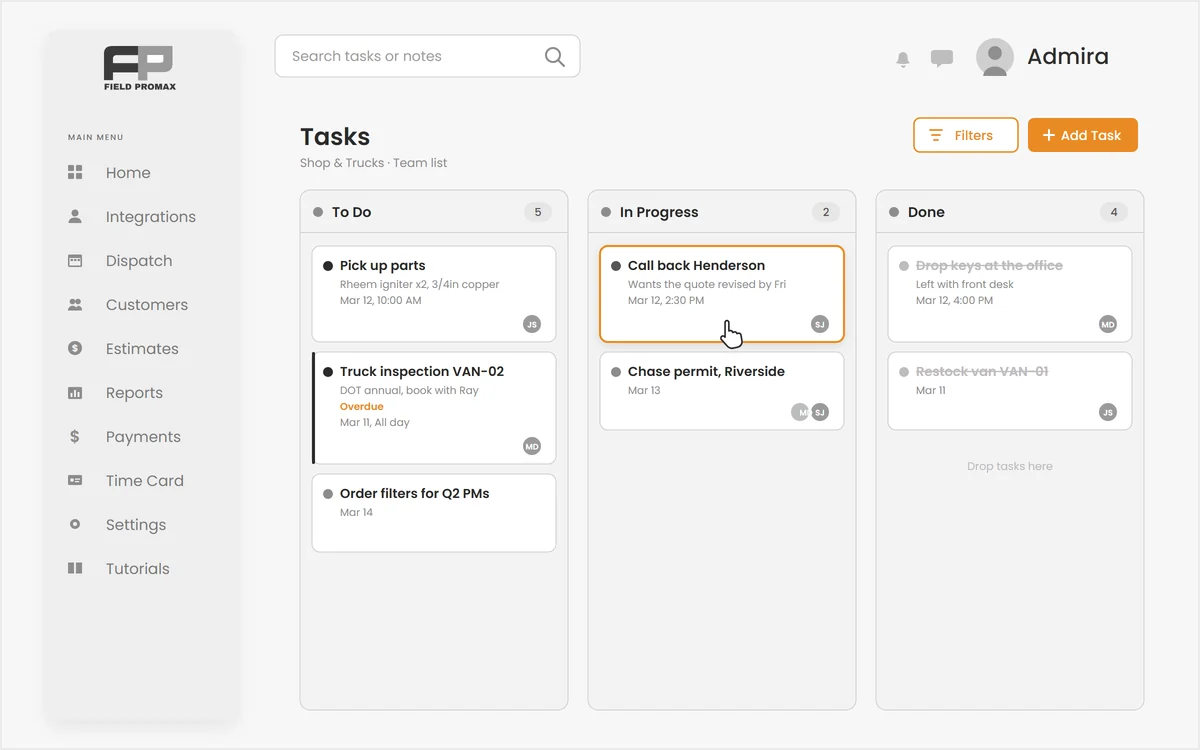
Not every job deserves a work order.
Pick up parts at the supply house. Call back the Henderson job. Run the truck inspection. Real work that never belonged on an invoice. Field Promax field task management puts dated, assignable tasks on the same calendar as your work orders, and your crew checks them off from the mobile app.
Tasks on the Same Calendar as Your Jobs
No more fake work orders just to book someone's time.
Right-click any slot on the dispatch calendar and create a task instead of a work order. Give it a date, a time window or an all-day flag, and one technician or a whole crew, and it lands as a chip in each assignee's lane. No customer required, no invoice and no job costing dragged along for what is really a reminder.
Request Demo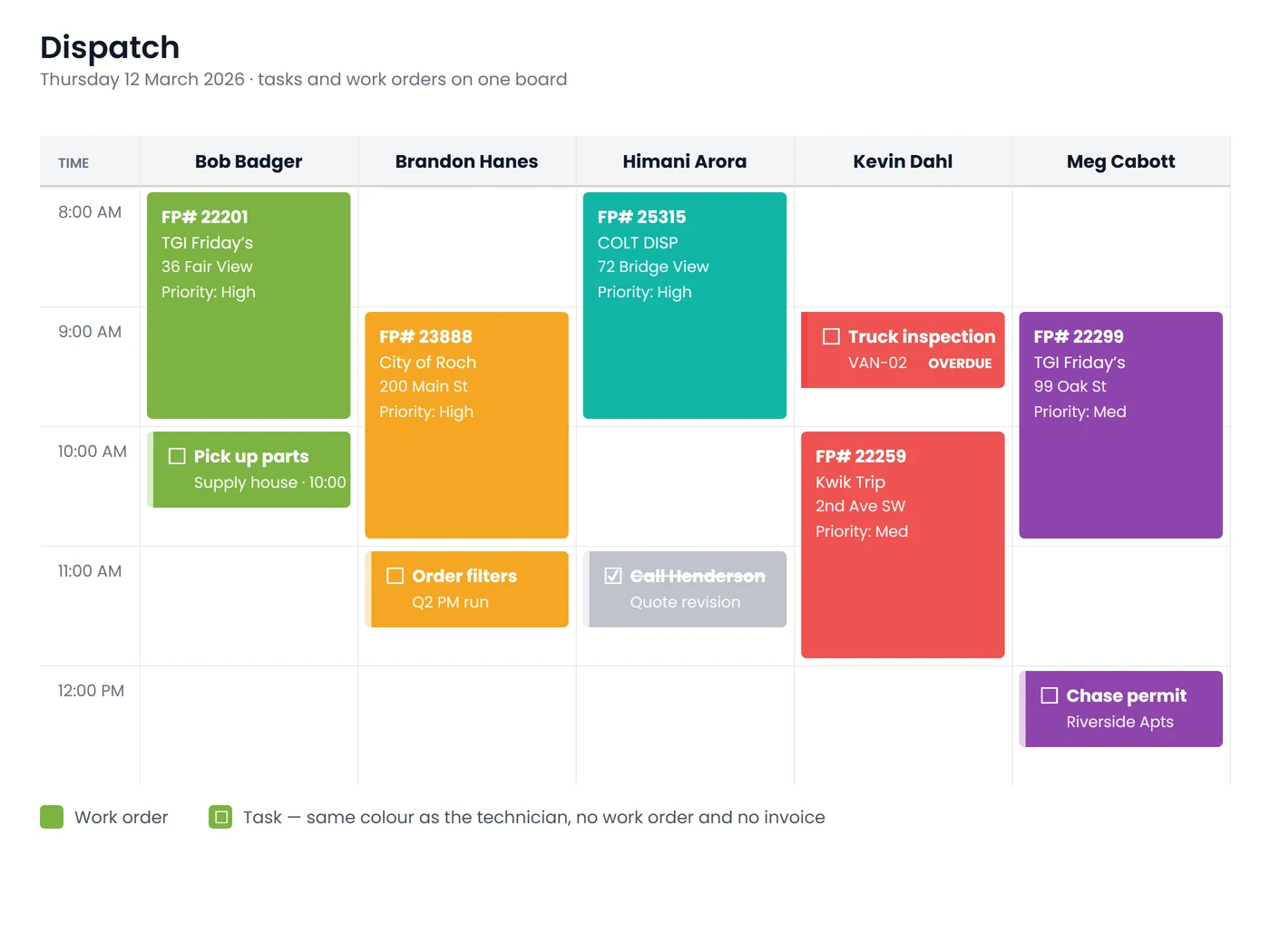
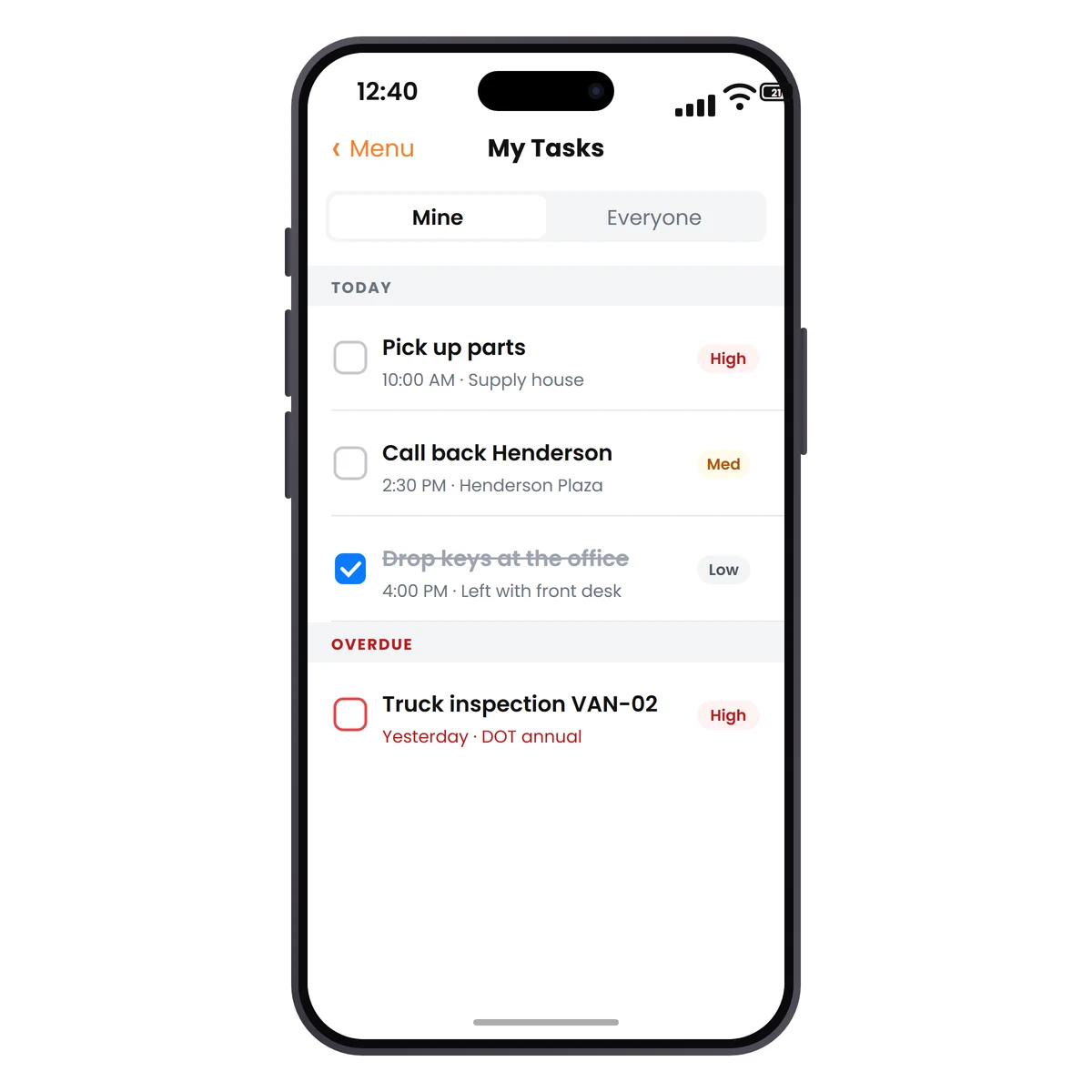
Your Crew Checks Them Off From the Field
The list that follows the technician.
Every assignee sees their open tasks in the mobile app's My Tasks screen, adds notes as they go and marks them done on the spot. Marking a task done works with no signal too. It queues offline and syncs the moment they reconnect.
Request DemoEverything a Field Task Manager Should Do
Small enough to use for a reminder, structured enough to run a team on:
Kanban Board & Backlog
Undated tasks live on a drag-and-drop board in the office. Drag one from the calendar's Backlog tab onto a time slot and it is scheduled, with the lane you drop it in becoming the assignee.
Priorities & Time Windows
Give a task a Low, Medium or High priority, a start and end time or an all-day flag, and an optional location so the technician knows where to be and when.
Overdue Flagged Correctly
Overdue is computed against your company's own time zone on the server, so a task never looks late just because a device clock sits in another region.
Multiple Assignees
Put one task on a whole crew. Every assignee sees it in their own calendar lane and their own mobile list, and any of them can close it out.
Bulk Reassign
Someone calls in sick and an administrator moves every open task from one technician to another in a single action, instead of reopening them one at a time.
Live Updates & Dashboard
Changes made in the field appear on the office board in real time without a refresh, and a My Open Tasks widget on the dashboard keeps the day's list in view.
Frequently Asked Questions
Field service task management is a way to schedule and track the work that is not a customer job: picking up parts, returning a call, running a truck inspection, completing training. Field Promax puts these tasks on the same dispatch calendar as work orders, assigns them to technicians, and lets the crew check them off from the mobile app.
A work order belongs to a customer and carries scheduling, line items, invoicing and job costing. A task is lighter: a title, a date or time window, one or more assignees, a priority, notes and an optional location. It never creates an invoice or a job cost record, which makes it the right tool for internal to-dos and reminders.
Yes. Pick any number of service providers when you create the task. Each assignee gets their own chip on the calendar and sees the task in their own My Tasks list in the mobile app, and any assignee can mark it complete.
Yes. Marking a task done in the mobile app works offline. The change is queued on the device and syncs to the office as soon as the phone reconnects, the same way offline work order edits do.
Yes. A task can reference a customer so the promised callback shows up against the right account. The reference is for context only, so it does not create a work order, a visit or an invoice.
Not at this time. Tasks are created by hand from the task board, the calendar or the mobile app. Work that repeats on a schedule for a customer is better handled with recurring work orders, which Field Promax generates automatically.
On the web, open Work Orders and choose Tasks to see the board, or right-click a slot on the dispatch calendar to create one. Undated tasks appear in the calendar's Backlog tab, ready to drag onto a time slot. In the mobile app, technicians use the My Tasks screen, and a My Open Tasks widget sits on the dashboard.