Profit Analysis Software for Field Service
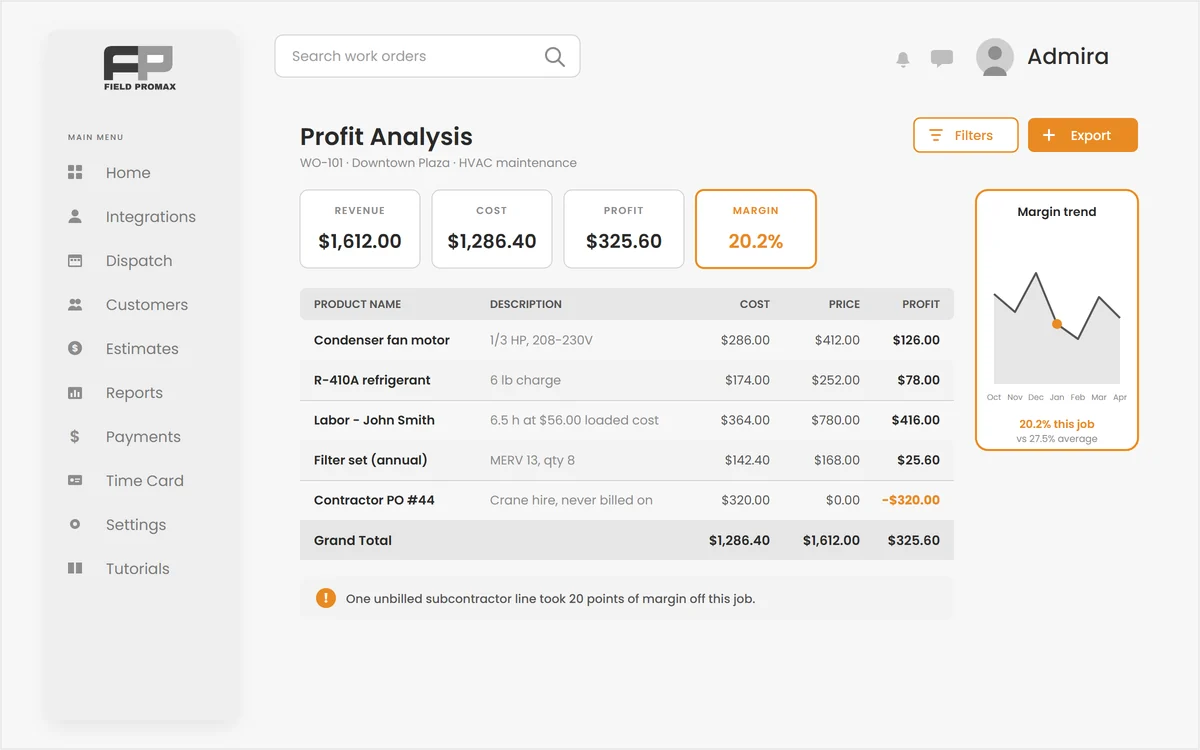
Busy is not the same thing as profitable.
A full schedule can still lose money. Field Promax profit analysis puts revenue, cost, profit and margin on every work order, estimate and project (real loaded labor, real material cost, subcontractor commitments and expenses), so you find the jobs that lose money while you can still do something about them.
Revenue, Cost, Profit and Margin on Every Work Order
Line by line, not just a total at the bottom.
Open the Profit Analysis tab on any work order and see each product, labor and contractor line with its price, purchase cost, profit and margin, plus totals across the whole job. Cost-only lines show the money going out in red instead of vanishing into an average, a line's cost can be corrected on that job alone, and the tab itself turns green or red with the job's margin.
Request Demo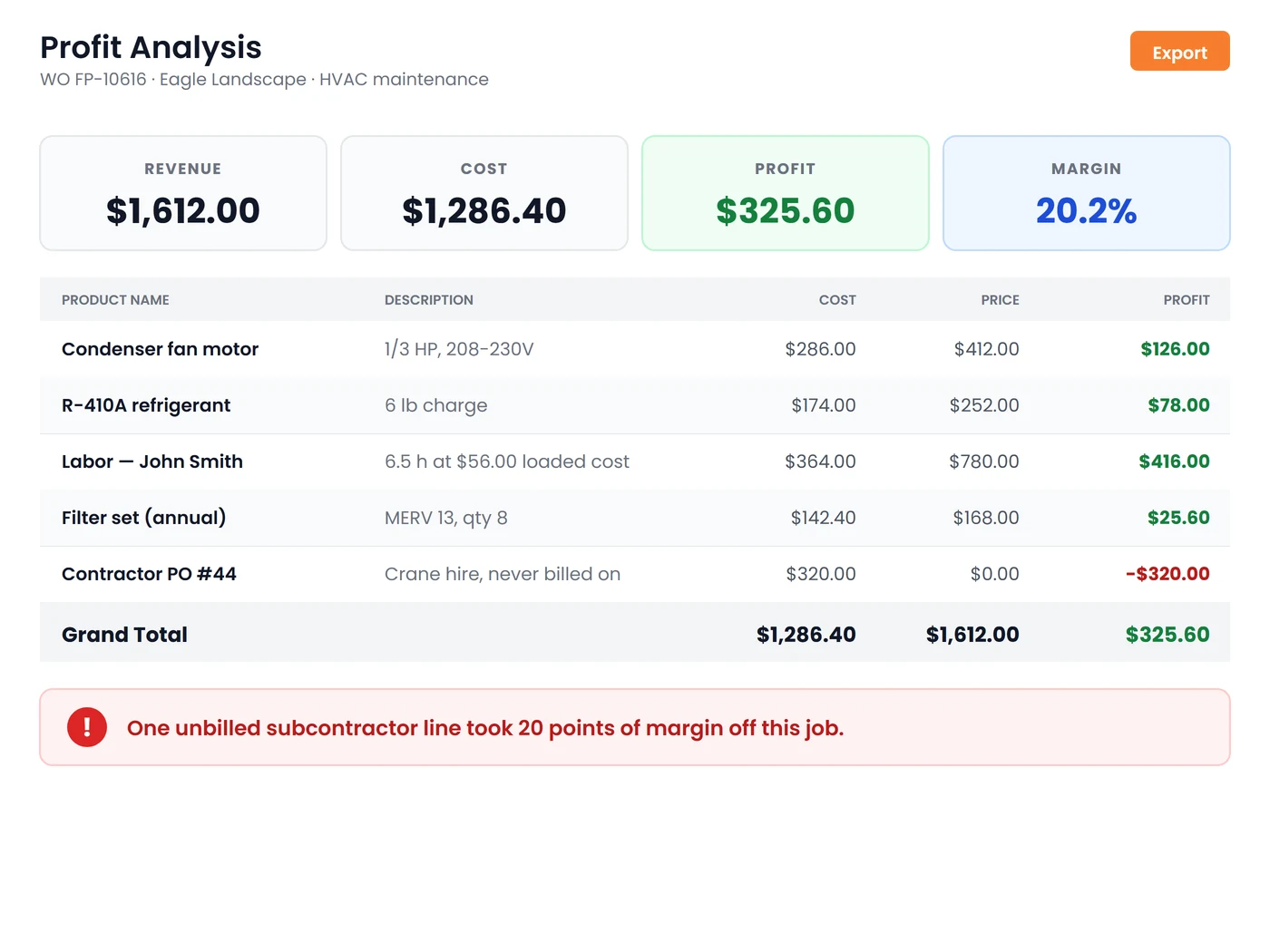
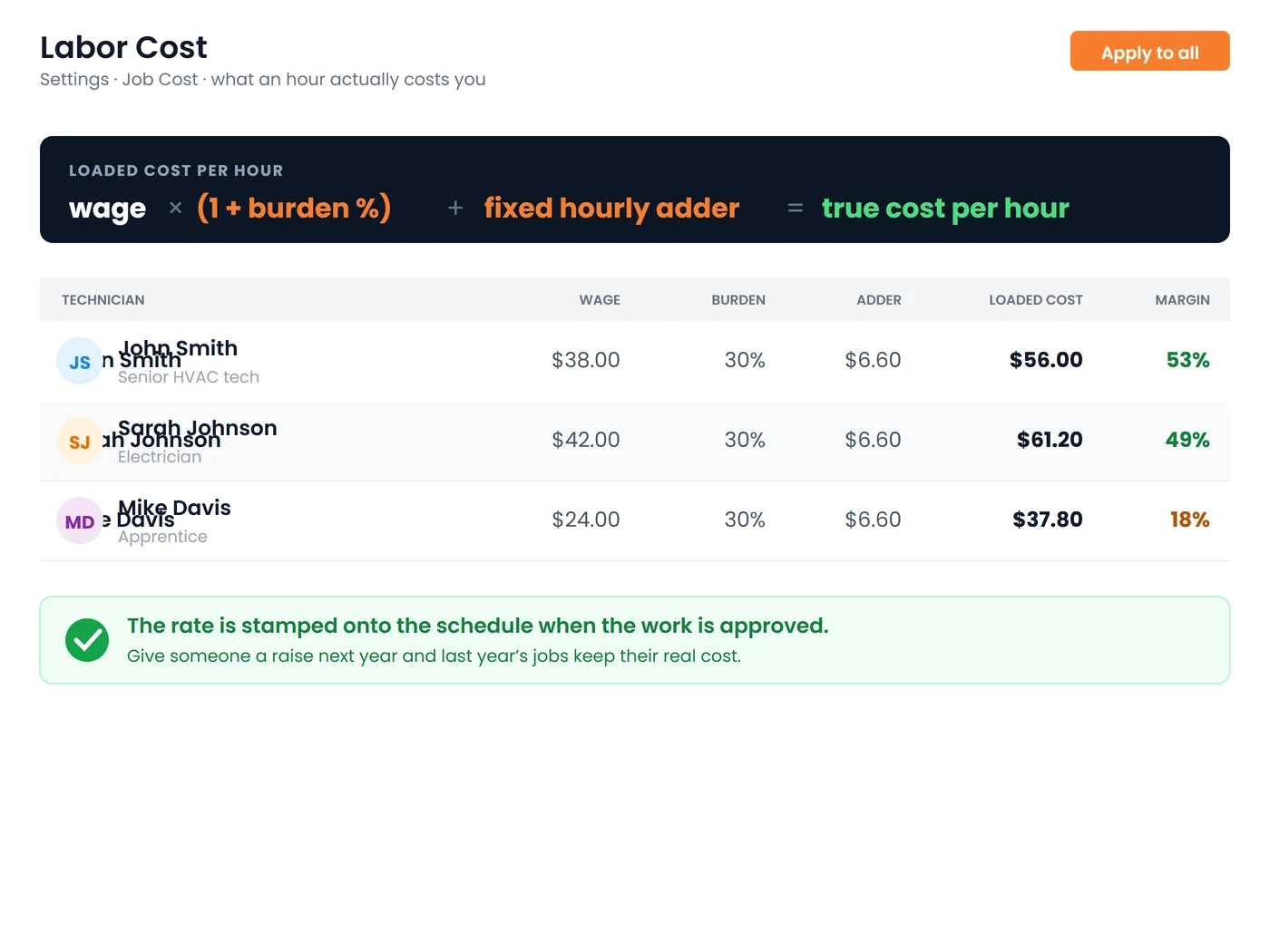
Cost Your Technicians Properly
An hour costs you far more than the hourly wage.
Set each technician's base wage, a burden percentage for taxes and insurance, and a fixed hourly adder for truck, fuel, phone and tools, or a flat override for salaried staff. Field Promax stamps the resulting loaded rate onto the visit when the schedule is approved, so last year's jobs stay accurate after this year's raise, and a margin column beside each technician turns red the moment someone is billed below what they cost you.
Request DemoKnow Which Work Is Worth Doing
One cost engine, from the estimate to the closed work order to the twelve-month project:
Material Cost, Your Way
Cost materials from what is on the work order, or from what vendors actually billed. It is one company-wide setting, so the same part is never counted twice. Missing catalog costs can be typed in, pasted in from a supplier price list, or overridden on a single line, and no accounting sync will overwrite what you entered.
Margin Before You Commit
Run the same profit analysis on an estimate, so you see the margin before the customer says yes rather than discovering it after the job is closed and invoiced.
Subcontractors and Expenses Counted
Subcontractor commitments and approved vendor bills, plus job expenses, land in job cost alongside labor and materials. Material purchase orders show committed and received value beside the job without being double-counted into it.
It Tells You When It Cannot Tell You
If too few worked schedules carry a labor rate, or too many product lines have no cost on file, Field Promax shows the cost, hides the margin, and lists the exact items to price instead of printing a confident number built on gaps.
Color-Coded Margins
Green above 20 percent, amber from 10 to 20 and red below 10, so the problem job stands out on the screen without anyone having to run a report.
Reports and Profit Charts
Profit Analysis Details, Profit Summary by Work Order, by Service Provider and by Products over any date range, plus charts for profit over time, profit by job type, by technician, by product and profit distribution.
Frequently Asked Questions
Profit analysis shows what each job actually earned after real costs: labor at its true loaded rate, materials at purchase cost, subcontractors and expenses. Field Promax puts revenue, cost, profit and margin on every work order, estimate and project, so you can see which work makes money and which quietly loses it.
Each technician gets a base wage, a burden percentage for taxes and insurance, and a fixed hourly adder for truck, fuel, phone and tools. Loaded cost is wage times one plus burden, plus the adder. When a schedule is approved that rate is stamped onto the visit and never changes, so a raise in March does not rewrite January's job costs. Salaried staff can use a flat override rate instead of the formula.
Yes. Estimates have their own Profit Analysis tab, so you see revenue, cost, profit and margin before the customer says yes. Once the estimate becomes a work order the same view follows the job through to close, and multi-phase projects roll every linked work order into one Costs and Profit tab.
That is a company-wide setting in Purchasing. “What is on the work order” prices product lines at their catalog cost, or the cost you typed on the line. This is right if every part goes on the work order. “What vendors billed” uses the approved vendor bills tied to the job instead. This is right if you buy through purchase orders, because it costs what you actually paid. Only one applies at a time, so a part is never counted twice. Contractor bills, labor and expenses are unaffected either way.
Yes. Synced catalog costs are used automatically. If a cost is missing or wrong you can type a purchase cost on the product, paste a column in from a supplier price list, or override it on a single work order line. A cost you entered is never overwritten by a later sync.
Because the data behind the margin is too thin to trust. If fewer than 80 percent of worked schedules carry a labor cost rate, or fewer than 80 percent of product lines resolve to a cost, Field Promax shows the cost, hides the margin, and lists the exact technicians and items that need a rate, rather than printing a confident number built on gaps.
Only users with the Allow to view Job Costing permission. Technicians without it see their work orders as normal but never see loaded labor rates, purchase costs or margins.
Four over any date range: Profit Analysis Details, Profit Summary by Service Provider, Profit Summary by Work Order and Profit Summary by Products, plus charts for profit over time, profit by job type, profit by service provider, profit by product and profit distribution.
Because it has no purchase cost on file. A blank cost reports as pure profit, which is misleading. Enter the cost on the product, or paste your supplier's price list into Product Costs, and the margin corrects itself on every job that uses it.