Xero Integration for Field Service
Your techs finish the job. Xero should already know.
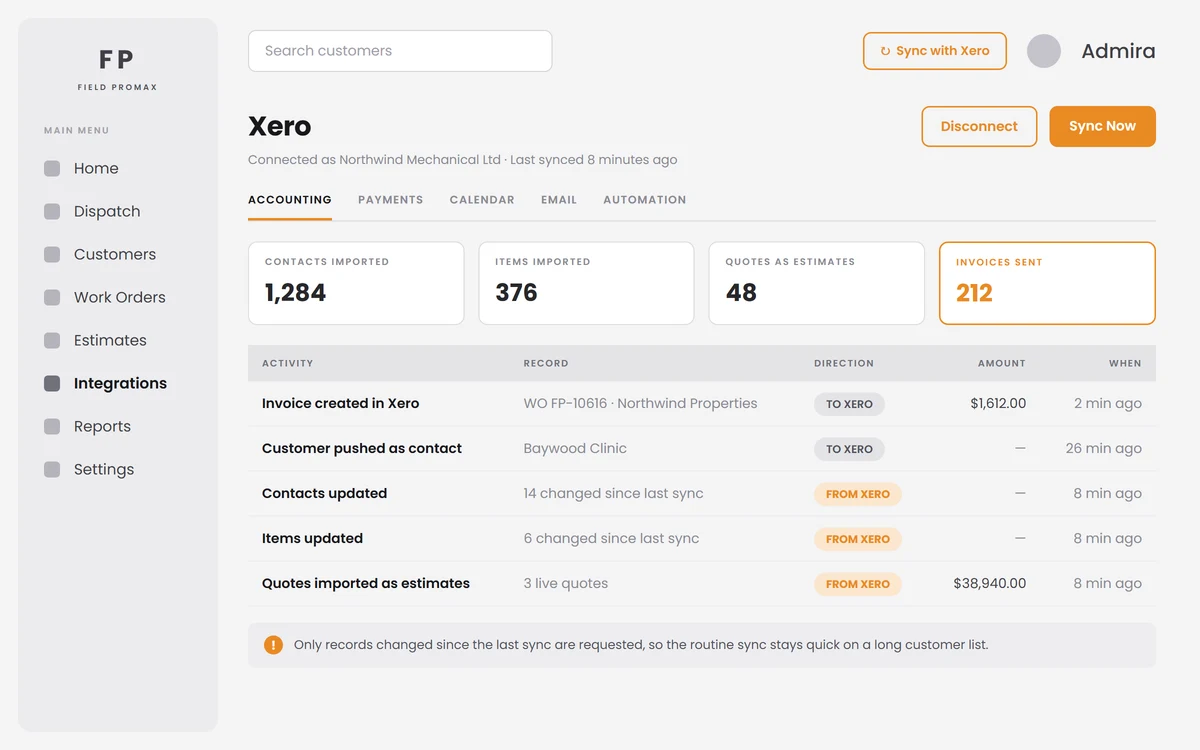
Field Promax connects to Xero over a secure Xero login, with no file exports and no copy-and-paste. Your customers and products sync with Xero contacts and items, payments recorded in Field Promax post to Xero, and a finished work order becomes a draft Xero invoice, ready for you to review and approve.
Trusted by 100,000+ contractors. Rated 4.7 on Google and 4.2 on Capterra.
One Button, and Only What Changed
Your ledger and your field software, holding the same numbers.
Sync with Xero pulls your active Xero contacts and inventory items into Field Promax, and your Xero quotes come in as estimates. It is incremental: Field Promax remembers when it last ran and asks Xero only for what has changed since, so the daily sync stays quick even on a long customer list. Start a sync while one is already running and it is politely ignored rather than run twice.
Request Demo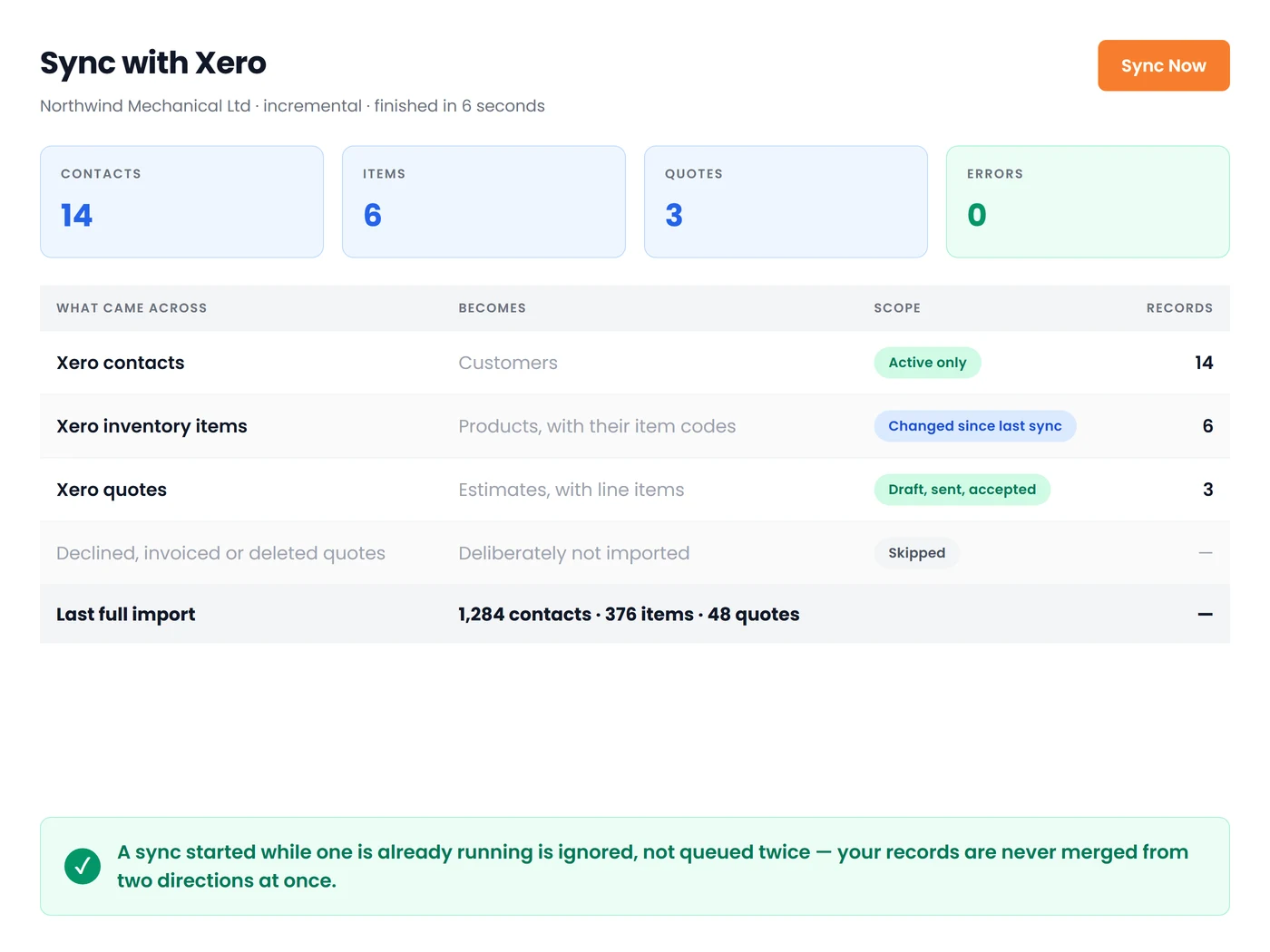
Close the Job, Draft the Invoice
The invoice your bookkeeper expected, before they asked for it.
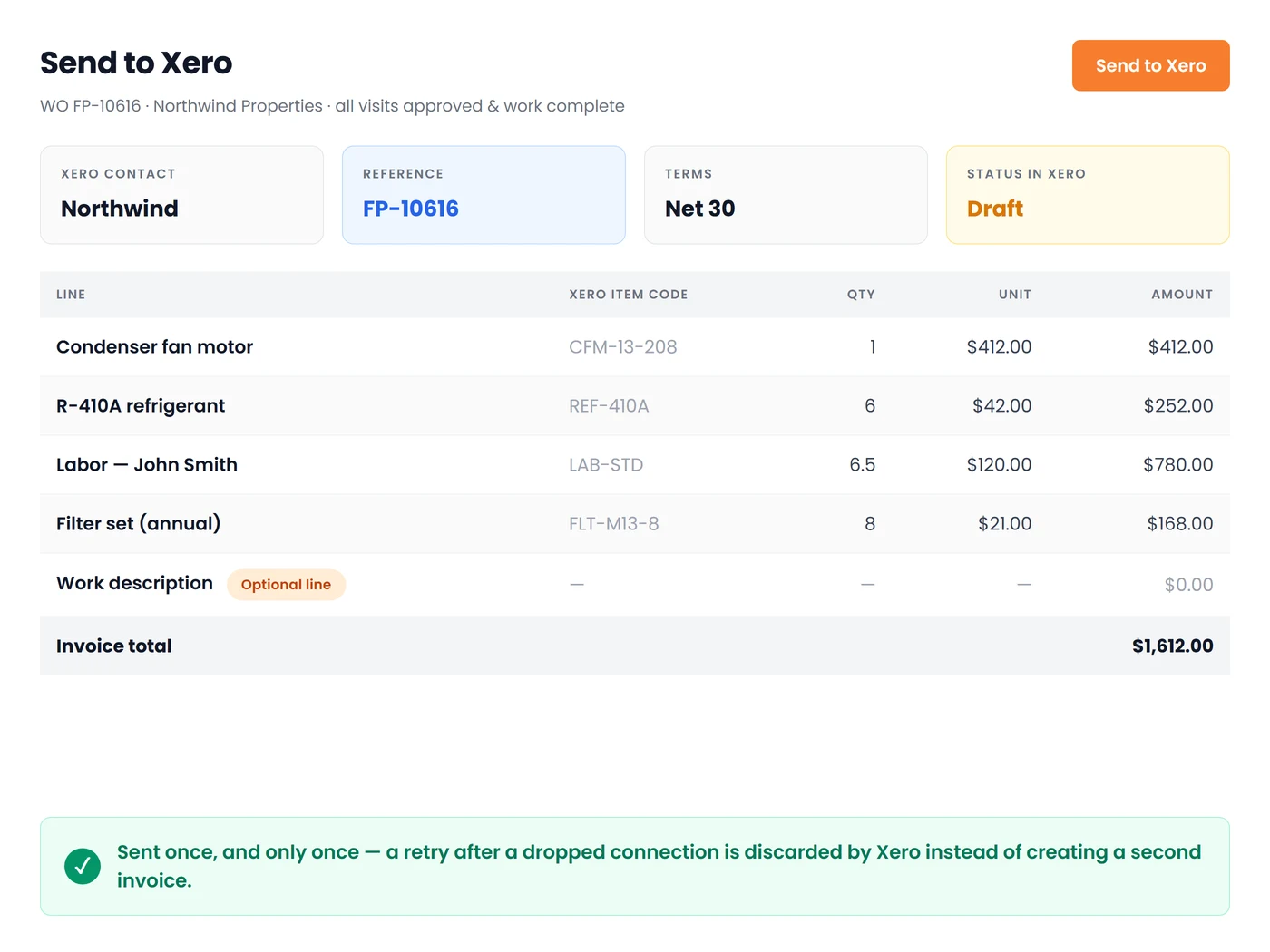
Send to Xero turns a completed work order into a draft accounts-receivable invoice in Xero: every product line carried over at its price and quantity, matched to the Xero item code it belongs to, with the work order number as the invoice reference and terms of 30 days. Optionally push the work description and the technician's resolution as their own lines. The work order is closed in the same step, and a retry can never create the invoice twice.
Request DemoBuilt on Xero's Own API, Not a Spreadsheet Export
What the Xero connection actually does, day to day:
Sign In With Xero
Connect with a Xero login and approve access once. Field Promax keeps the connection alive on its own, and you can disconnect from Settings whenever you want. You can even start your Field Promax account from Xero and have your organisation details come across with you.
Customers Pushed Back to Xero
Create a customer in Field Promax and it is created in Xero as a contact first, then saved locally with the Xero contact attached, so the two systems never disagree about who a customer is, and the office is never asked to type the same address twice.
Live Accounts-Receivable Balance
The customer's outstanding balance is read live from Xero on the customer screen, not cached from the last sync, so a payment taken this morning is reflected before the technician knocks on the door this afternoon.
Xero Quotes Become Estimates
Live quotes (draft, sent and accepted) import as Field Promax estimates with their line items matched to your imported Xero items. Declined, invoiced and deleted quotes are deliberately left behind, and a quote is never duplicated by a later sync.
Partial Billing, Your Way
Bill a multi-visit job in stages: pick the approved, work-complete visits and the line items you are invoicing for now, and Xero receives an invoice for exactly those. The rest of the job stays open for the next one.
Guardrails Before It Sends
Field Promax checks the job is actually ready (visits approved and marked work-complete) and refuses to send a work order that belongs to a progress-billing pay application, pointing you at the pay application instead, so the customer is never billed twice for the same work.
Frequently Asked Questions
Yes. Field Promax connects to Xero through Xero's secure sign-in. Customers sync with Xero contacts, products sync with Xero items, payments recorded in Field Promax post to Xero, and a finished work order can be sent to Xero as a draft invoice.
You connect once with your Xero login and approve access. Field Promax keeps the connection alive on its own, so there are no files to export, and you can disconnect from Settings whenever you want.
Your Xero contacts and items come into Field Promax as customers and products. New customers you create in Field Promax are added to Xero as contacts. Finished work orders go to Xero as draft invoices, and payments recorded in Field Promax post to Xero.
No. After the first import, Field Promax asks Xero only for contacts and items changed since the last sync, so routine syncs stay quick even with a long customer list.
A completed work order is sent to Xero as a draft accounts-receivable invoice, with the work order number as the invoice reference and 30-day terms, and the work order is closed in the same step. Because it arrives as a draft, you review and approve it in Xero before it goes to your customer.
Yes. Payments you record in Field Promax post to Xero, so your books show what has been paid without entering it twice.
No. Your Xero contacts and items are brought into Field Promax, so the office and your technicians work from the same customer and product lists as your books.
No. A Field Promax account connects to one accounting system at a time: Xero, QuickBooks Online or QuickBooks Desktop.
Most customers are set up within an hour. You connect Xero with your Xero login, and your contacts and items come across on the first sync.
There is no free plan, but you can try Field Promax free for 14 days after a short demo. Plans start at $99/month in the US and A$149/month in Australia. See plans and pricing.