Electrical Contractor Software That Estimates, Schedules, and Gets You Paid. Quote it, book it, bill it — one record.
Field Promax is electrical estimating software and dispatch in one: quote a service call or panel upgrade on-site, schedule the crew, and invoice into QuickBooks — built for service and repair work, not blueprint takeoff.
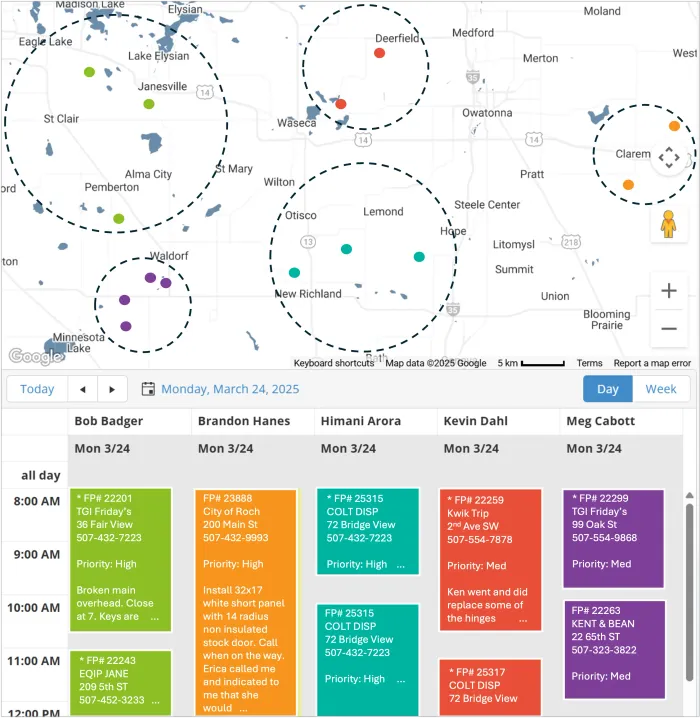
- Drag a job onto a tech's calendar and they are dispatched, phone notified instantly
- Electricians see the job, panel photos, history, and notes in the mobile app
- Job closes and the electrical invoice fires into QuickBooks, no retyping
Free 30-minute demo · Setup done for you in under an hour · 14-day trial after demo · No credit card
From whiteboard chaos to a calendar that runs itself
Missed jobs are scheduling failures, not technician failures. Here is how electrical service work runs when the schedule, the job, and the invoice are one record.
Drag, drop, dispatched
Drop the job onto a tech's calendar and they are dispatched: their phone buzzes with the address, scope, and customer history. Recurring maintenance contracts schedule themselves, so contract work never slips.
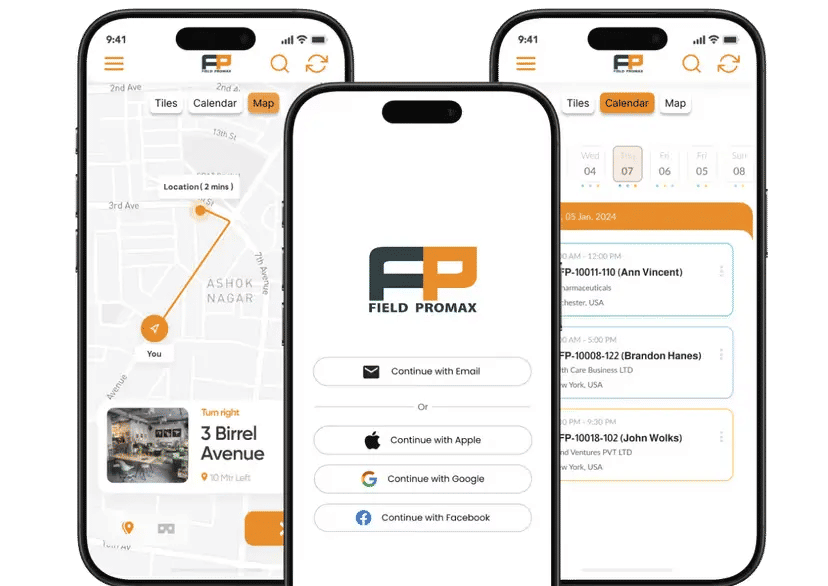
Electricians run the job from their phone
Panel photos, notes, parts, and GPS-stamped time attach to the work order from the field. The office sees status change as it happens, without a single "where are you on that job?" call.
Electrical invoice fires into QuickBooks
When the job closes, the invoice generates with parts and labor already attached. QuickBooks Online invoices auto-generate; QuickBooks Desktop syncs via Web Connector at preset intervals. Bill the same day, not at month-end.

Built for electrical service teams. Not panel designers.
This is not CAD, load calculation, or blueprint takeoff software. Field Promax is electrical estimating software and electrical contractor software for service and repair teams: quote the job, do the job, bill the job.
One platform. Every tool to run the job.
Every feature below is included on every plan — no add-ons, no per-feature upsells.
Honest pricing. No surprises.
No setup costs. No contracts to decode.
- Scheduling and Dispatch
- Work Order Management
- Estimates and Invoicing
- QuickBooks Integration
- Mobile App (iOS and Android)
- Everything in Light
- Time Tracking
- Online Service Booking
- GPS Tracking
- Customer Portal
- Everything in Standard
- Equipment Tracking
- Advanced Reports
- Custom Fields and Forms
- Priority Support
Every plan starts with a free 30-minute demo and a 14-day trial after your demo. No credit card required to start.
Why field service businesses stay with Field Promax
Answers before you ask
The questions electrical contractors ask us most when choosing scheduling software.
What makes Field Promax good electrical contractor scheduling software?
Because the schedule is connected to everything after it. The booked job carries its scope, photos, and history to the tech's phone, the completed job becomes the invoice, and QuickBooks stays in sync. One record from booked to paid, with no retyping at any step.
Does Field Promax work as electrical estimating software?
Yes — for service estimating. Build a quote on-site for a service call, panel upgrade, or repair from reusable line items, send it for approval, and convert it straight to a scheduled work order and invoice. It is not construction takeoff or bid estimating — no blueprint quantities, no NECA labor units, no Accubid/McCormick-style takeoff. If you bid new construction from plans, you need a takeoff tool instead.
Is this electrical design, CAD, or takeoff software?
No. Field Promax does not do panel design, load calculations, or material takeoff from plans. It is built for electrical service and repair businesses: estimating jobs, scheduling electricians, tracking work orders, and invoicing. If you design systems or bid new construction from blueprints, you need a different category of tool.
Does Field Promax sync with QuickBooks?
Yes. With QuickBooks Online, invoices auto-generate the moment a work order is closed. With QuickBooks Desktop, data syncs through the Web Connector at preset intervals. Either way, you never type the same job twice.
How long does setup take?
Most customers are set up within an hour. Our team does it for you: QuickBooks connects, and your customers and jobs are imported, so your team can start dispatching the same day.
Does Field Promax work as electrical invoice software too?
Yes. The same system that schedules the job invoices it. When an electrician closes the job in the app, the invoice generates with parts and labor attached and syncs to QuickBooks. Electrical invoice software and scheduling in one record.
Is there a free trial?
Yes. After your free 30-minute demo, you get a 14-day trial so your team can run real work orders in the system before you commit. No credit card required to start.
Ready to retire the whiteboard and keep every tech booked?
Book a free 30-minute demo. See Field Promax live for your trade, with your questions.
Prefer to talk now? Call (507) 405-5076
Setup done for you · 14-day trial after demo